

Keepass2.28
 تحميل مجاني
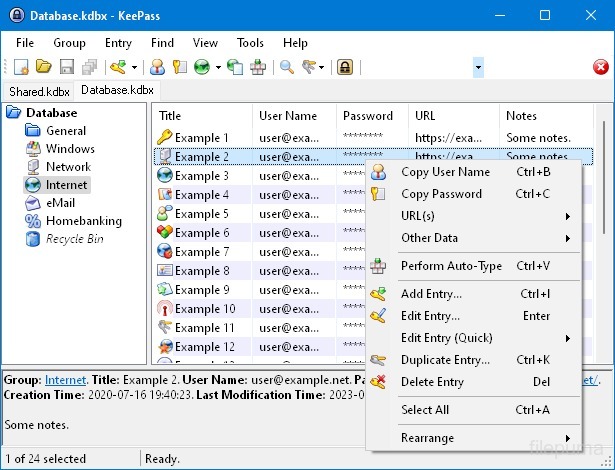
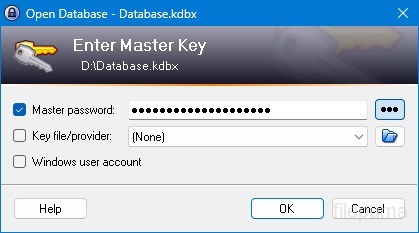
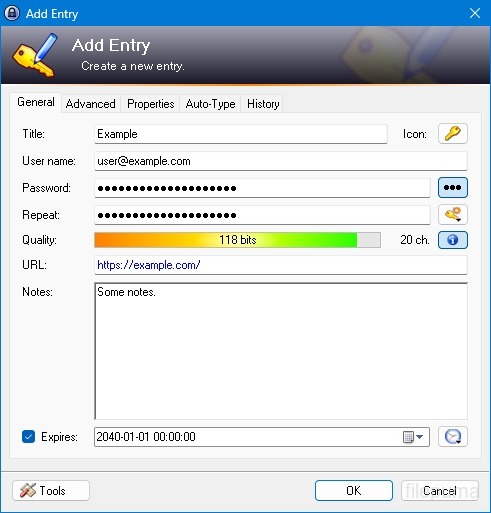
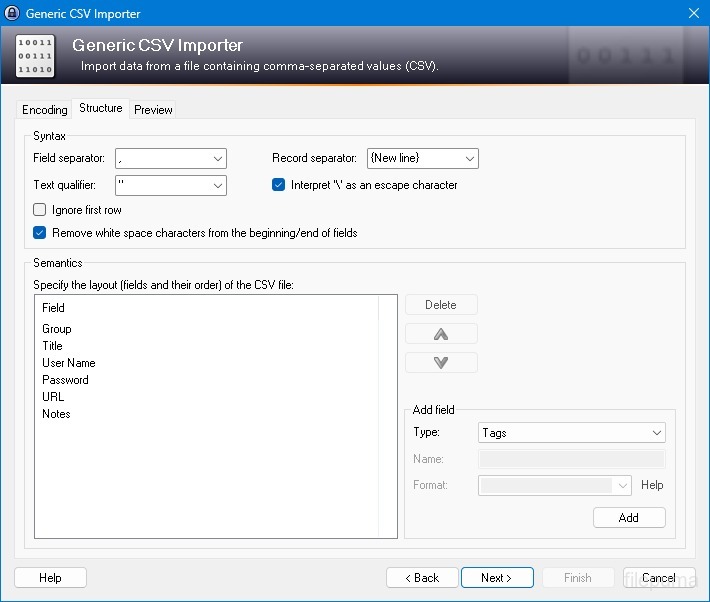


KeePassهو مدير كلمات مرور مفتوح المصدر وآمن للغاية وشائع يستخدم لتخزين وإدارة كلمات المرور، أسماء المستخدمين، وغيرها من المعلومات الحساسة بطريقة آمنة. تم تطويره بواسطة Dominik Reichl وهو متاح للعديد من المنصات، بما في ذلك Windows وmacOS وLinux والأجهزة المحمولة.
إحدى الميزات الرئيسية لـ KeePass هي أمانه القوي. يقوم باستخدام خوارزميات تشفير قوية (مثل AES و Twofish) لحماية البيانات المخزنة، مما يضمن أن المستخدمين المصرح لهم فقط الذين يمتلكون كلمة المرور الرئيسية يمكنهم الوصول إلى كلمات المرور الخاصة بهم. تعمل كلمة المرور الرئيسية كمفتاح أساسي لفتح قاعدة البيانات المشفرة.
يوفر KeePass واجهة مستخدم سهلة الاستخدام، مما يسمح للمستخدمين بتنظيم كلمات المرور الخاصة بهم بطريقة منظمة باستخدام المجلدات والفئات. بالإضافة إلى ذلك، يقدم أدوات لإنشاء كلمات المرور، مما يساعد المستخدمين على إنشاء كلمات مرور معقدة وفريدة لتعزيز الأمان.
يسمح البرنامج للمستخدمين بالبحث بسرعة عن كلمات مرور محددة ويقدم ميزات مثل الكتابة التلقائية، مما يسمح بملء نماذج تسجيل الدخول تلقائيًا للمواقع الإلكترونية والتطبيقات. كما يدعم KeePass الإضافات، مما يوسع من وظائفه ويجعله قابلًا للتخصيص لتلبية الاحتياجات الفردية.
علاوة على ذلك، يركز KeePass على قابلية النقل وإمكانية الوصول من خلال السماح للمستخدمين بتخزين قاعدة بيانات كلمات المرور المشفرة الخاصة بهم على وسائط تخزين متنوعة، مثل الأقراص المحلية، أو محركات USB، أو التخزين السحابي. وهذا يسمح للمستخدمين بالوصول إلى كلمات المرور الخاصة بهم من أجهزة مختلفة مع الحفاظ على الأمان والخصوصية.
بشكل عام، يعتبر KeePass حلاً موثوقًا وآمنًا لإدارة كلمات المرور يساعد المستخدمين على تنظيم وحماية معلوماتهم الحساسة.
الميزات الرئيسية:
- تخزين كلمات المرور بشكل آمن: قم بتخزين وإدارة كلمات المرور بأمان.
- تشفير قوي: يستخدم التشفير المتقدم لأمان البيانات.
- كلمة المرور الرئيسية وملف المفتاح: الوصول إلى قاعدة البيانات باستخدام كلمة مرور رئيسية قوية وملف مفتاح اختياري.
- المصادقة الثنائية (2FA): يوفر طبقة إضافية من الأمان.
- ميزة الكتابة التلقائية: يقوم بأتمتة إدخال أسماء المستخدمين وكلمات المرور.
- مولد كلمات المرور: ينشئ كلمات مرور قوية وعشوائية.
- تنظيم كلمات المرور: صنف كلمات المرور إلى مجموعات وفئات فرعية.
- بحث وتصفية: ابحث بسرعة عن الإدخالات المحددة.
- حقول مخصصة: أضف معلومات إضافية إلى المدخلات.
- المرفقات: قم بإرفاق الملفات بشكل آمن إلى الإدخالات المحمية بكلمة مرور.
- ميزات الأمان: يقدم خيارات أمان إضافية.
- متعدد المنصاتمتاح على أنظمة تشغيل متعددة.
- الإضافات والتوسعات: توسيع الوظائف بميزات إضافية.
- استيراد وتصدير: استيراد/تصدير كلمات المرور بسهولة.
- مزامنة قاعدة البيانات: مزامنة قاعدة البيانات عبر الأجهزة بشكل آمن.
ما الجديد؟
- Enhanced high DPI support.
- Added trigger action 'Show message box' (which can abort the current trigger execution or execute a command line / URL).
- The 'Database has unsaved changes' trigger condition now supports choosing between the active database and the database that triggered the event.
- Added parameter for the trigger action 'Activate database (select tab)' that allows activating the database that triggered the event.
- Auto-Type: added workaround for KiTTY's default Ctrl+Alt behavior (which differs from Windows' behavior).
- Auto-Type: added workaround for PuTTYjp's default Ctrl+Alt behavior (which differs from Windows' behavior).
- Added up/down arrow buttons for reordering auto-type associations in the entry editing dialog.
- While entering the master key on a secure desktop, dimmed screenshots are now also displayed on all non-primary screens.
- Added support for importing VisKeeper 3.3.0 TXT files.
- The group tree view is now saved and restored during most group tree updates.
- In the main entry list, multiple entries can now be moved by one step up/down at once.
- If Caps Lock is on, a balloon tip indicating this is now also displayed for password text boxes immediately after opening a dialog (where the password text box is the initially focused control).
- In the cases where Windows would display outdated thumbnail and peek preview images for the main window, KeePass now requests Windows to use a static bitmap instead (showing only the KeePass logo).
- Added fallback method for parsing dates/times (the default parser fails for some custom formats specified in the Control Panel).
- Added workaround for .NET ToolStrip height bug.
- Added own process memory protection for Unix-like systems (as Mono doesn't provide any effective memory protection method).
- On Unix-like systems, Shift+F10 (and Ctrl+Alt+5 and Ctrl+NumPad5 on Mac OS X) now shows the context menu in most list/tree view controls and rich text boxes (like on Windows).
- KPScript: for the 'Import' command, a different master key can now be specified using the standard master key command line parameters with the prefix 'imp_' (e.g. -imp_pw:Secret).
- KPScript: added option '-FailIfNotExists' for the 'GetEntryString' command.
- KPScript: added '-refx-Group' and '-refx-GroupPath' entry identification parameters.
- Improved compatibility with ClearType.
- Improved support for high contrast themes.
- When duplicating a group/entry, the creation time and the last access time of the copy are now set to the current time.
- Character picker dialog: initially the text box is now focused, improved tab order, and picked characters are now inserted at the current insertion point (instead of the end).
- Ctrl+Tab is now handled only once when the database tab bar has the focus.
- When exporting to a KeePass 1.x KDB file, a warning/error is now shown if the master key contains/is a Windows User Account.
- Unknown trigger events/conditions/actions are now ignored by the trigger dialog.
- Reduced group tree view flickering.
- Improved default value for the entry history size limit.
- Improved menu check mark and radio images.
- Improved list view column resizing.
- Improved list view scrolling.
- Secure edit control performance improvements.
- In some cases, double-clicking the tray icon now brings KeePass to the foreground.
- Improved concurrent UI behavior during auto-type.
- Auto-Type: improved compatibility with keyboard layouts with combining apostrophes, quotation marks and tildes.
- Auto-Type: improved virtual key translation on Unix-like systems.
- KPScript: the 'EditEntry' command now also updates the time fields of all affected entries.
- KPScript: the 'DeleteEntry' and 'DeleteAllEntries' commands now create deleted object information (improving synchronization behavior).
- Upgraded installer.
- Various code optimizations.
- Minor other improvements.
- When auto-typing a sequence containing a {NEWPASSWORD} placeholder, the raw new password is now stored (in the password field of the entry), not its corresponding auto-type sequence.
- Synchronizing two unrelated databases now always works as expected.
البرنامج متوفر بلغات أخرى
- Download Keepass
- Télécharger Keepass
- Herunterladen Keepass
- Scaricare Keepass
- ダウンロード Keepass
- Descargar Keepass
- Baixar Keepass
مراجعات المستخدمين
تقييم المستخدم
 26
26
رخصة:
مجاني
متطلبات:
Windows All
اللغات:
Multi-languages
حجم:
2.4MB
ناشر:
محدث:
Oct 8, 2014
نظيف
برنامج التقارير
أحدث إصدار
إصدارات قديمة
برنامج المطور
 Keepass 2.61.1
 RoboForm 10.0.0
 Dashlane 6.2632.0
 1Password 8.12.36
مستويات الأمان
لتجنب أي ضرر محتمل لجهازك وضمان أمان بياناتك وخصوصيتك، تقوم فريقنا بالتحقق في كل مرة يتم فيها رفع ملف تثبيت جديد على خوادمنا أو ربطه بخادم بعيد، كما يتم مراجعة الملف بشكل دوري لتأكيد حالته أو تحديثها. استنادًا إلى هذه العملية، نحدد مستويات الأمان التالية لأي ملفات قابلة للتنزيل.
 نظيف
نظيف
من المرجح جدًا أن يكون هذا البرنامج خاليًا من الفيروسات.
لقد قمنا بفحص الملفات وعناوين URL المرتبطة بهذا البرنامج في أكثر من 60 من خدمات مكافحة الفيروسات الرائدة في العالم؛ ولم يتم العثور على أي تهديدات محتملة. ولا يوجد أي برنامج طرف ثالث مُدمج.
 تحذير
تحذير
هذا البرنامج مدعوم بإعلانات وقد يقدم عرضًا لتثبيت برامج طرف ثالث غير مطلوبة. قد تشمل هذه برامج شريط الأدوات، أو تغيير الصفحة الرئيسية، أو محرك البحث الافتراضي، أو تثبيت برامج أخرى. قد تكون هذه نتائج إيجابية زائفة، وينصح مستخدمونا بأن يكونوا حذرين عند تثبيت واستخدام هذا البرنامج.
 معاق
معاق
هذا البرنامج لم يعد متاحًا للتنزيل. من المحتمل جدًا أن يكون هذا البرنامج ضارًا أو يحتوي على مشكلات أمان أو أسباب أخرى.
قدّم تقريراً
شكراً لك!
تم إرسال تقريرك.
سوف نراجع طلبك ونتخذ الإجراء المناسب.
يرجى ملاحظة أنك لن تتلقى إشعارًا بشأن أي إجراء يُتخذ نتيجةً لهذا التقرير. نعتذر عن أي إزعاج قد يسببه ذلك.
نُقدّر مساعدتك في الحفاظ على موقعنا الإلكتروني نظيفًا وآمنًا.