
Looking for a free Mac cleaner? Try diCleaner

Total Commander8.50
 تجربة مجانية
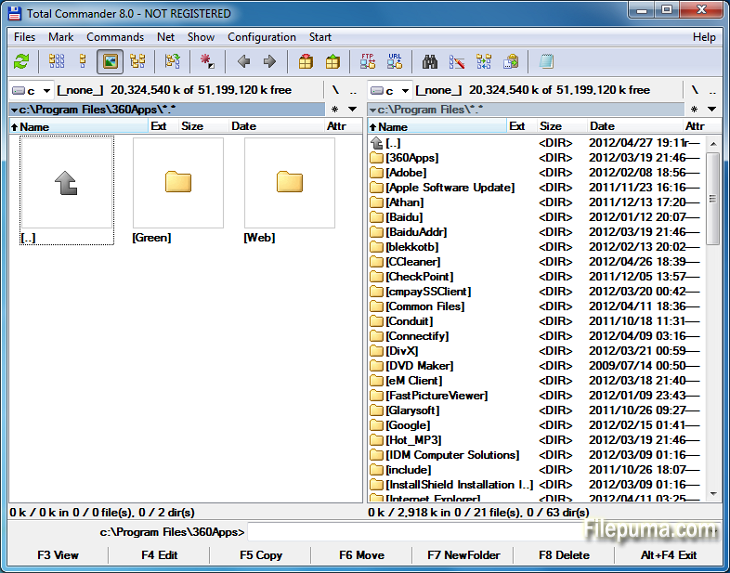


توتال كوماندرهو برنامج قوي لإدارة الملفات يبسط ويعزز عمليات الملفات على أنظمة التشغيل Windows. مع واجهة مستخدم سهلة الاستخدام ووفرة من الميزات، فقد اكتسب شهرة كبيرة بين المستخدمين في جميع أنحاء العالم.
يقدم هذا المدير الملفات تخطيطًا ثنائياً، مما يوفر عرضًا جنبًا إلى جنب للمجلدات والملفات، مما يجعل من السهل سحب وإفلات الملفات بين الدلائل. يدعم تنسيقات أرشيف متنوعة مثل ZIP وRAR و7-Zip، مما يسمح باستخراج وضغط الملفات بسهولة.
واحدة من أبرز الميزات في Total Commander هي الدعم الشامل للملحقات. يمكن للمستخدمين توسيع الوظائف بإضافة العديد من الملحقات للحصول على ميزات إضافية مثل تكامل التخزين السحابي، والتعامل مع الوسائط المتعددة، والمقارنة المتقدمة للملفات.
يتميز البرنامج أيضًا بخياراته القابلة للتخصيص، مما يمكن المستخدمين من تخصيص الواجهة ومفاتيح الاختصار وفقًا لتفضيلاتهم. تساعد أدوات البحث والتصفية الفعالة في العثور السريع على الملفات، مما يوفر الوقت والجهد.
Total Commander يؤكد على الأمان والموثوقية، مما يضمن تنفيذ العمليات الحرجة بأمان لتجنب الحذف أو الاستبدال غير المقصود للملفات.
في الختام، يعد Total Commander أداة موثوقة ومتعددة الاستخدامات لإدارة الملفات تسهّل التعامل مع الملفات، وتعزز الإنتاجية، وتوفر تجربة مستخدم سلسة. سواء كنت مبتدئًا أو مستخدمًا متقدمًا، فإن Total Commander هو أداة لا غنى عنها لأي شخص يبحث عن حل فعال وقوي لإدارة الملفات.
لديك جملة فارغة. يرجى إضافة الجملة التي ترغب في ترجمتها.
الميزات الرئيسية:
- واجهة ثنائية اللوحة لإدارة الملفات بسهولة.
- التصفح بعلامات التبويب للتنقل السريع.
- واجهة مستخدم قابلة للتخصيص.
- دعم مدمج للتعامل مع الأرشيفات.
- دعم FTP والشبكة لإدارة الملفات عن بُعد.
- أداة قوية لإعادة التسمية متعددة.
- مزامنة الدليل لمقارنة الملفات ومزامنتها.
- بحث سريع للبحث الفعال عن الملفات.
- دعم الإضافات لتوسيع الوظائف.
- اختصارات لوحة المفاتيح الوفيرة للعمليات السريعة.
ما الجديد؟
File operations:
- F5 copy: First copy all files where the user doesn't need to be asked and skip all with errors, ask at the end
- F5 copy: Option to verify files after copying them.
- F5 copy: Option to keep paths relative to current folder while in branch view (Ctrl+B)
- Select and copy related files, e.g. *.jpg > crw*.cr2 selects/copies raw files only if there is a related .jpg file
- F8 Delete: Only warn at the end if folders couldn't be deleted
- F8 Delete: Always use new delete method when VistaDelete isn't set in wincmd.ini, but show our own delete confirmation dialog if the system dialog is disabled
- Support unpacking of more archive formats: 7zip, new RAR5 format, as well as -lh6- and -lh7- (LHA)
- RAR with encrypted file names: Show archive content after entering password
- Pack/unpack files: Option to remember last entered password until TC is minimized, Windows goes to standby, or the screen saver starts
- Alt+F5 pack: New option to leave out the names of the selected folders when packing each folder to a separate archive
- New wincmd.ini options CopyLinks and IgnoreLinks to handle file system links
- FTP/file system plugins: When editing a file with F4, the file will automatically be re-uploaded when saved in the edfitor. No need to close the editor any more. Change via Edit/View options.
- Support for touch screen devices: Tap on icons to select files (configurable), long tap to open context menu
- Support for high resolution screens (high DPI)
- Drive drop-down list (Alt+F1/Alt+F2): Show links to "My Computer" and "My Documents" Configurable via. ShowExtraDrives in wincmd.ini
- Drive drop-down list (Alt+F1/Alt+F2): Open context menu directly in the list without choosing a drive first
- Show exclamation mark to the left of some options as a warning, e.g. that files may not go where the user expects them to go, like during copying from branch view, or when packing and unpacking
- Show file size and last modified time also in virtual folders like connected MTP devices like Android phones/tablets
- Button bar: Support multiple internal and/or user-defined commands on a single button e.g. cm_SelectAll,cm_Copy
- Progress dialog: Show number of files/bytes in more functions. Switch to files/bytes remaining by clicking on the numbers
- Show thumbnails in virtual folders like libraries
- Option to remember position of background transfer manager in system menu (click on top-left icon)
- Improved background copy dialog: Show number of copied and selected files and bytes, add button "Foreground"
- Search for text supports any combination of ANSI, ASCII, UTF-16, UTF-8 Unicode and office XML/EPUB at the same time
- Skip a folder by clicking on its name in the status line (with confirmation). Also allows to just pause the search
- Open in separate process via Alt+Shift+F7, so TC can still be used during the search
- "Feed to listbox" also when searching in archives, on FTP servers and file system plugins
- Search for duplicate files: Search by plugin fields, e.g. name parts, file extension etc.
- Search for duplicate files, Feed to listbox: New dialog box to select files inside the groups of duplicates, e.g. by newest, oldest etc.
- Compare by content: "Resync comparison from here" now also works after editing the files
- Create/Verify CRC checksums: Also support SHA256 and SHA512 formats
- Show hidden/system files now split into separate options for hidden and system
- Option to get more items in various history lists, set via wincmd.ini: HistoryLen for directory history, OldCmdLineCount for command line. MaxItemsInComboBox for comboboxes in F7 New Folder, Alt+F7 Search, Num+ select files etc.
- Lister, right click menu: Directly search for selected text via Google in default browser (configurable)
البرنامج متوفر بلغات أخرى
- Download Total Commander
- Télécharger Total Commander
- Herunterladen Total Commander
- Scaricare Total Commander
- ダウンロード Total Commander
- Descargar Total Commander
- Baixar Total Commander
مراجعات المستخدمين
تقييم المستخدم
 30
30
رخصة:
تجربة مجانية
متطلبات:
Windows All
اللغات:
Multi-languages
حجم:
3.5MB
ناشر:
محدث:
Feb 19, 2014
نظيف
برنامج التقارير
أحدث إصدار
إصدارات قديمة
برنامج المطور
 Total Commander 11.58
 CrystalDiskInfo 9.9.2
 Update Detector 6.64.0.64
 Defraggler 2.22.995
 Recuva 1.55.133
 EaseUS Data Recovery Wizard Free 20.8.0
مستويات الأمان
لتجنب أي ضرر محتمل لجهازك وضمان أمان بياناتك وخصوصيتك، تقوم فريقنا بالتحقق في كل مرة يتم فيها رفع ملف تثبيت جديد على خوادمنا أو ربطه بخادم بعيد، كما يتم مراجعة الملف بشكل دوري لتأكيد حالته أو تحديثها. استنادًا إلى هذه العملية، نحدد مستويات الأمان التالية لأي ملفات قابلة للتنزيل.
 نظيف
نظيف
من المرجح جدًا أن يكون هذا البرنامج خاليًا من الفيروسات.
لقد قمنا بفحص الملفات وعناوين URL المرتبطة بهذا البرنامج في أكثر من 60 من خدمات مكافحة الفيروسات الرائدة في العالم؛ ولم يتم العثور على أي تهديدات محتملة. ولا يوجد أي برنامج طرف ثالث مُدمج.
 تحذير
تحذير
هذا البرنامج مدعوم بإعلانات وقد يقدم عرضًا لتثبيت برامج طرف ثالث غير مطلوبة. قد تشمل هذه برامج شريط الأدوات، أو تغيير الصفحة الرئيسية، أو محرك البحث الافتراضي، أو تثبيت برامج أخرى. قد تكون هذه نتائج إيجابية زائفة، وينصح مستخدمونا بأن يكونوا حذرين عند تثبيت واستخدام هذا البرنامج.
 معاق
معاق
هذا البرنامج لم يعد متاحًا للتنزيل. من المحتمل جدًا أن يكون هذا البرنامج ضارًا أو يحتوي على مشكلات أمان أو أسباب أخرى.
قدّم تقريراً
شكراً لك!
تم إرسال تقريرك.
سوف نراجع طلبك ونتخذ الإجراء المناسب.
يرجى ملاحظة أنك لن تتلقى إشعارًا بشأن أي إجراء يُتخذ نتيجةً لهذا التقرير. نعتذر عن أي إزعاج قد يسببه ذلك.
نُقدّر مساعدتك في الحفاظ على موقعنا الإلكتروني نظيفًا وآمنًا.