

VirtualBox4.3.4
 تحميل مجاني
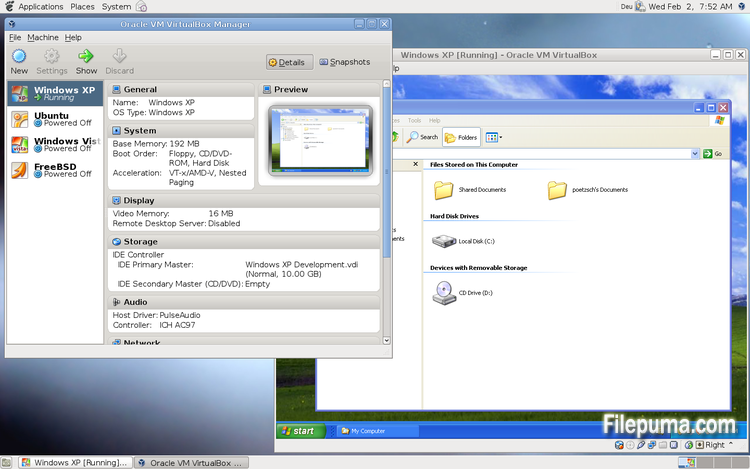
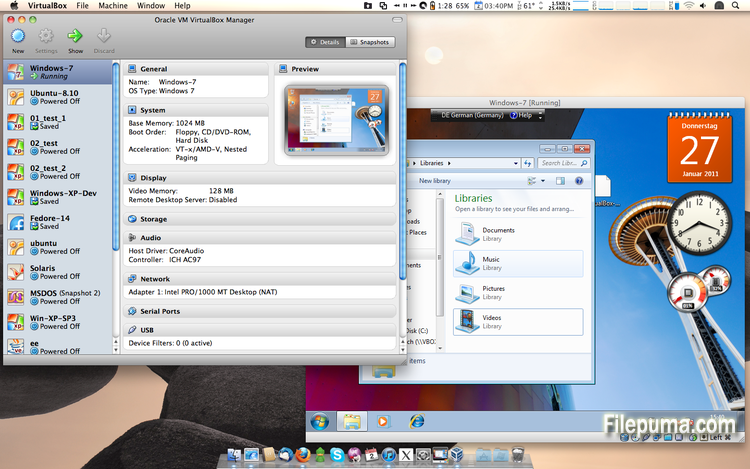
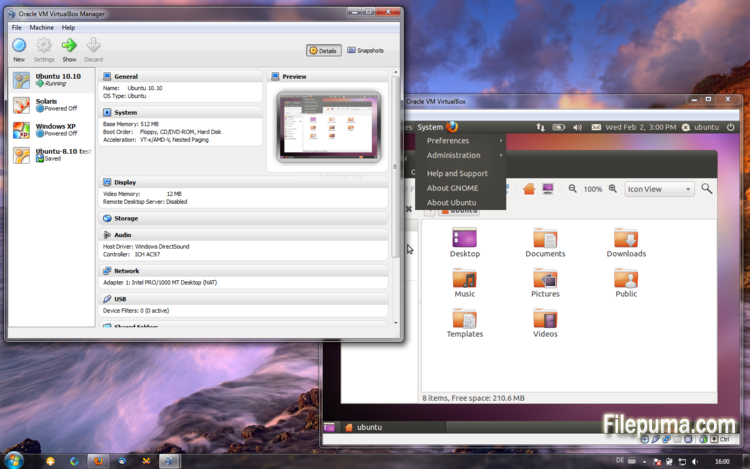


VirtualBoxهو برنامج مفتوح المصدر ومجاني يسمح للمستخدمين بإنشاء وتشغيل الأجهزة الافتراضية على أجهزة الكمبيوتر الخاصة بهم. باستخدام VirtualBox، يمكن للمستخدمين تثبيت وتشغيل أنظمة تشغيل متعددة في الوقت نفسه على جهاز الكمبيوتر الخاص بهم دون الحاجة إلى إنشاء أقسام منفصلة أو شراء أجهزة إضافية.
إحدى المزايا الرئيسية لبرنامج VirtualBox هي سهولة الاستخدام. إنه بسيط في التثبيت والإعداد، حتى لأولئك الذين لديهم خبرة قليلة أو معدومة في تقنية الافتراضية. يوفر VirtualBox أيضًا مجموعة واسعة من خيارات التخصيص، بما في ذلك القدرة على تعديل كمية ذاكرة RAM، وعدد نوى CPU، ومساحة القرص الصلب المخصصة لكل جهاز افتراضي.
ميزة أخرى رائعة في VirtualBox هي توافقه مع مجموعة واسعة من أنظمة التشغيل. يمكن للمستخدمين تثبيت وتشغيل Windows وLinux وmacOS والعديد من أنظمة التشغيل الأخرى على أجهزتهم الافتراضية. هذا يجعله أداة ممتازة للمطورين ومختبري البرمجيات وأي شخص يحتاج إلى تشغيل أنظمة تشغيل متعددة على جهاز كمبيوتر واحد.
أيضاً يوفر VirtualBox مجموعة من الميزات المتقدمة، مثل دعم الأجهزة USB، والمجلدات المشتركة، ومحولات الشبكة. تجعل هذه الميزات من الممكن تشغيل البرامج التي تتطلب موارد الأجهزة أو الشبكة، مثل الموجهات الافتراضية، وجدران الحماية، والخوادم.
VirtualBox هو خيار ممتاز لأي شخص يحتاج إلى تشغيل أنظمة تشغيل متعددة على جهاز كمبيوتر واحد. سهولة استخدامه، وتوفر مجموعة واسعة من خيارات التخصيص، وتوافقه مع العديد من أنظمة التشغيل المختلفة يجعله أداة متعددة الاستخدامات وقوية للمطورين ومحترفي تكنولوجيا المعلومات والمستخدمين المنزليين على حد سواء.
ميزة رئيسية:
- التوافق عبر الأنظمة المختلفة.
- واجهة مستخدم رسومية بديهية.
- دعم لأنظمة التشغيل المتعددة.
- تكامل سلس مع نظام التشغيل المضيف.
- لقطات واستنساخات.
- قدرات الشبكات.
- دعم الجهاز الافتراضي.
- حزم التمديد لوظائف إضافية.
ما الجديد؟
- VMM: fix for a bug in the Local APIC emulation causing a BSOD when booting certain guests (4.3.0 regression; bug #12240)
- VMM: fixed loading of saved states if VT-x/AMD-V was disabled (4.3.2 regression; bug #12291)
- VMM: fixed single-stepping inside the guest for certain instructions (VT-x only; bug #10947)
- VMM: fixed a performance issue involving APIC accesses after rebooting a VM (4.3.0 regression; VT-x only; bug #12296)
- VMM: fixed TPR patching to be enabled for 32-bit guests even when the chosen guest type is 64-bit (4.3.0 regression; AMD-V only)
- VMM: fixed occasional VINF_EM_TRIPLE_FAULT errors on hosts without the unrestricted guest execution feature (bug #12198)
- GUI: don't bother the user with the BPP warning if no Guest Additions are installed
- GUI: fixed machine-window paint artifacts on VM reboot / guest-screen resize
- GUI: make sure the assigned license and description are attached to the exported appliance
- GUI: fixed bugs in close VM action restrictions handling (bug #12333)
- GUI: fixed incorrect wizards text colors for some unusual look and feel styles (bug #11743)
- GUI: should restore seamless mode as soon as possible after VM reboot or shutdown
- GUI: fixes for medium enumeration
- GUI: the OS X hot corners were not accessible while a VirtualBox VM is running (Mac OS X hosts only; bug #4139)
- GUI: fixed an old bug which bared the host from cleanly shutdown / reboot if the VM selector window is open (Mac OS X hosts only; bug #8254)
- Host-only Networking: fixed creating of host-only network interfaces (4.3.0 regression; bug #12182)
- NAT: don't run into an infinite loop in case the host cannot access any DNS server (4.3.0 regression; bug #12300)
- NAT: don't re-connect the cable if the DNS information changes and the cable was disconnected before (4.3.0 regression; bug #12225)
- NAT: fixed several issues with automatically starting / terminating of NAT networks on VM start / stop and configuration changes
- VBoxNetDHCP: don't block prevent VBoxSVC from terminating (bug #12264)
- 2D Video acceleration: fix crashes on presentation mode switches (bug #9194)
- BusLogic: allow to run VMs with more than one BusLogic SCSI controller enabled
- Keyboard: fixed a VM crash if a VM was resumed from a saved state where at least one key was pressed (bug #11289)
- VBoxSVC: fixed a heap corruption under certain conditions (4.3.0 regression)
- VBoxSVC: fixed a race leading to a hang during initialization (bug #12349)
- OVF: fixed import logic for OVF appliances containing multiple VMs
- OVF: improved logic for finding an appropriate image format during OVF import
- API: block the removal of the current snapshot if it has child snapshots (only relevant for VMs without snapshottable hard disks, their presence always prevented removal), which resulted in VM configuration corruption
- API: mark VM configurations with snapshots but without current snapshot as inaccessible, as this combination is nonsense
- API: fixed information for some automatically generated events (only with XPCOM, Windows host was not affected), which caused errors when getting some of the attributes over the webservice (bug #12379)
- SDK: extended the functionality coverage for the C bindings
- Guest Control: various bug fixes and improved VBoxManage help (bugs #8072, #11044, #12336, #12338, #12346, #12371)
- Windows hosts: another attempt to fix the massive DPC latency (bug #6242)
- Windows host installer: make registering file extensions optional, contributed by Tal Aloni (bug #8009)
- Mac OS X hosts: properly sign the kernel extensions for Mavericks hosts (bug #12256)
- Mac OS X hosts: fixed a bug where the VirtualBox dock icon was not properly removed from the dock after a VM terminated preventing Mavericks hosts from shutting down (bug #12241)
- Mac OS X hosts: fixed minor installer issue (bug #12275)
- Linux hosts / guests: Linux 3.13 compile fixes (bug #12358)
- Linux guests: build the vboxvideo kernel module correctly on OL/RHEL 6.1 guests (bug #11996)
- Linux guests: make 3D work on Slackware 14.1 (bug #12320 comments 3 and 4)
- Guest Additions/3D: fixed an occasional dead-lock (bug #12319)
- Windows Additions/3D: fixed possible memory leaking (bug #12228)
- Windows Additions/XPDM: use separate tables containing valid video modes for each virtual monitor
- Windows Additions: fixed automatic logins for Vista and newer Windows guests (bug #12332)
البرنامج متوفر بلغات أخرى
- Download VirtualBox
- Télécharger VirtualBox
- Herunterladen VirtualBox
- Scaricare VirtualBox
- ダウンロード VirtualBox
- Descargar VirtualBox
- Baixar VirtualBox
مراجعات المستخدمين
تقييم المستخدم
 101
101
رخصة:
مجاني
متطلبات:
Windows All
اللغات:
Multi-languages
حجم:
101MB
ناشر:
محدث:
Dec 2, 2013
نظيف
برنامج التقارير
أحدث إصدار
إصدارات قديمة
برنامج المطور
 VirtualBox 7.2.18
 Adobe Air 51.3.3.1
 Java Runtime Environment (32bit) 8 Update 501
 Java Runtime Environment (64bit) 8 Update 501
 Java Development Kit (64bit) 8 Update 501
 Python (64bit) 3.14.7
مستويات الأمان
لتجنب أي ضرر محتمل لجهازك وضمان أمان بياناتك وخصوصيتك، تقوم فريقنا بالتحقق في كل مرة يتم فيها رفع ملف تثبيت جديد على خوادمنا أو ربطه بخادم بعيد، كما يتم مراجعة الملف بشكل دوري لتأكيد حالته أو تحديثها. استنادًا إلى هذه العملية، نحدد مستويات الأمان التالية لأي ملفات قابلة للتنزيل.
 نظيف
نظيف
من المرجح جدًا أن يكون هذا البرنامج خاليًا من الفيروسات.
لقد قمنا بفحص الملفات وعناوين URL المرتبطة بهذا البرنامج في أكثر من 60 من خدمات مكافحة الفيروسات الرائدة في العالم؛ ولم يتم العثور على أي تهديدات محتملة. ولا يوجد أي برنامج طرف ثالث مُدمج.
 تحذير
تحذير
هذا البرنامج مدعوم بإعلانات وقد يقدم عرضًا لتثبيت برامج طرف ثالث غير مطلوبة. قد تشمل هذه برامج شريط الأدوات، أو تغيير الصفحة الرئيسية، أو محرك البحث الافتراضي، أو تثبيت برامج أخرى. قد تكون هذه نتائج إيجابية زائفة، وينصح مستخدمونا بأن يكونوا حذرين عند تثبيت واستخدام هذا البرنامج.
 معاق
معاق
هذا البرنامج لم يعد متاحًا للتنزيل. من المحتمل جدًا أن يكون هذا البرنامج ضارًا أو يحتوي على مشكلات أمان أو أسباب أخرى.
قدّم تقريراً
شكراً لك!
تم إرسال تقريرك.
سوف نراجع طلبك ونتخذ الإجراء المناسب.
يرجى ملاحظة أنك لن تتلقى إشعارًا بشأن أي إجراء يُتخذ نتيجةً لهذا التقرير. نعتذر عن أي إزعاج قد يسببه ذلك.
نُقدّر مساعدتك في الحفاظ على موقعنا الإلكتروني نظيفًا وآمنًا.