

VirtualBox4.3.8
 تحميل مجاني
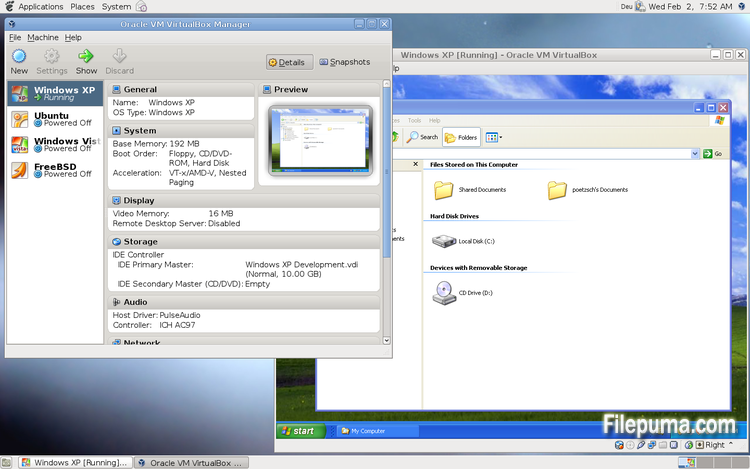
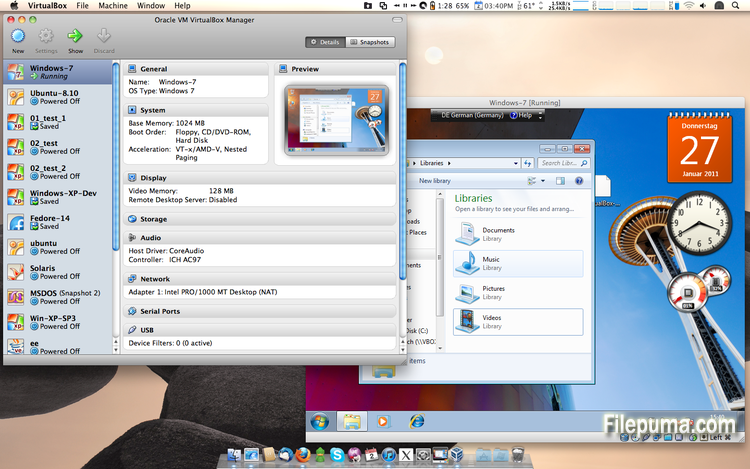
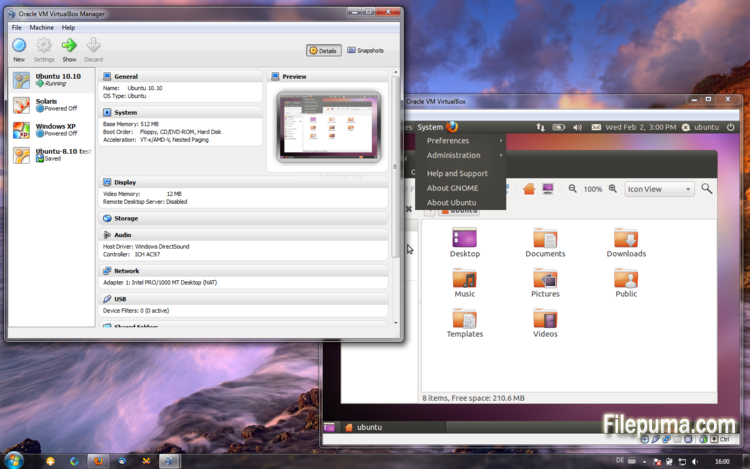


VirtualBoxهو برنامج مفتوح المصدر ومجاني يسمح للمستخدمين بإنشاء وتشغيل الأجهزة الافتراضية على أجهزة الكمبيوتر الخاصة بهم. باستخدام VirtualBox، يمكن للمستخدمين تثبيت وتشغيل أنظمة تشغيل متعددة في الوقت نفسه على جهاز الكمبيوتر الخاص بهم دون الحاجة إلى إنشاء أقسام منفصلة أو شراء أجهزة إضافية.
إحدى المزايا الرئيسية لبرنامج VirtualBox هي سهولة الاستخدام. إنه بسيط في التثبيت والإعداد، حتى لأولئك الذين لديهم خبرة قليلة أو معدومة في تقنية الافتراضية. يوفر VirtualBox أيضًا مجموعة واسعة من خيارات التخصيص، بما في ذلك القدرة على تعديل كمية ذاكرة RAM، وعدد نوى CPU، ومساحة القرص الصلب المخصصة لكل جهاز افتراضي.
ميزة أخرى رائعة في VirtualBox هي توافقه مع مجموعة واسعة من أنظمة التشغيل. يمكن للمستخدمين تثبيت وتشغيل Windows وLinux وmacOS والعديد من أنظمة التشغيل الأخرى على أجهزتهم الافتراضية. هذا يجعله أداة ممتازة للمطورين ومختبري البرمجيات وأي شخص يحتاج إلى تشغيل أنظمة تشغيل متعددة على جهاز كمبيوتر واحد.
أيضاً يوفر VirtualBox مجموعة من الميزات المتقدمة، مثل دعم الأجهزة USB، والمجلدات المشتركة، ومحولات الشبكة. تجعل هذه الميزات من الممكن تشغيل البرامج التي تتطلب موارد الأجهزة أو الشبكة، مثل الموجهات الافتراضية، وجدران الحماية، والخوادم.
VirtualBox هو خيار ممتاز لأي شخص يحتاج إلى تشغيل أنظمة تشغيل متعددة على جهاز كمبيوتر واحد. سهولة استخدامه، وتوفر مجموعة واسعة من خيارات التخصيص، وتوافقه مع العديد من أنظمة التشغيل المختلفة يجعله أداة متعددة الاستخدامات وقوية للمطورين ومحترفي تكنولوجيا المعلومات والمستخدمين المنزليين على حد سواء.
ميزة رئيسية:
- التوافق عبر الأنظمة المختلفة.
- واجهة مستخدم رسومية بديهية.
- دعم لأنظمة التشغيل المتعددة.
- تكامل سلس مع نظام التشغيل المضيف.
- لقطات واستنساخات.
- قدرات الشبكات.
- دعم الجهاز الافتراضي.
- حزم التمديد لوظائف إضافية.
ما الجديد؟
- VMM: more work on improving the emulation of certain MSR registers
- VMM: fixed a VERR_INVALID_RPL Guru Meditation when booting certain guests
- VMM: experimental support for SSE 4.1 / SSE 4.2 passthrough, see the manual for more information how to enable it
- VMM: fix for recent Linux kernels with software virtualization
- GUI: experimental HID LEDs synchronization for Windows hosts, see the manual for more information
- GUI: warn the user if the Oracle Extension Pack is not installed and the user tries to activate the remote display feature
- GUI: make sure that a minimized guest (using mini toolbar in fullscreen/seamless mode) keeps the minimized state
- GUI: popup banner's "do not show this message again" check-box replaced with corresponding button
- GUI: network adapter cables can now be connected/disconnected directly through the running virtual machine Devices / Network menu a Network status-bar indicator
- GUI: the new VM wizard now proposes 64-bit guests on 64-bit hosts by default; better distinction between 32-bit OS types 64-bit OS types
- GUI: better error message if appliance import fails
- GUI: allow to set host-combination to 'None' using the Global settings / Input page
- GUI: don't switch the guest to a black screen during online snapshot merge
- VBoxManage: when exporting an appliance, support the suppression of MAC addresses, which means they will be always recreated on import, avoiding duplicate MAC addresses for VMs which are imported several times
- AHCI: fixed a VM hang during suspend under certain circumstances
- AHCI: fixed a VM hang during online snapshot merge under certain circumstances
- AHCI: fixed a bug which resulted in Windows XP guest hangs if a SATA CDROM is attached
- AHCI: fixed a Guru Meditation under certain conditions
- AHCI: ejecting a CD/DVD medium failed under certain conditions
- AHCI: disk hotplugging fixes
- NAT: transparent handling of host sleep/resume and network configuration changes if the dnsproxy is enabled or if the hostresolver is used
- NAT: fixed crash and misbehaviour under some circumstances with ICMP packets having TTL=1
- NAT Network: fixed IPv6 reassembly
- NAT Network: ping proxy implemented
- OVF: fixed reading of the OVF 0.9 section element
- OVF: several fixes
- 3D: several fixes, multiscreen fixes
- 3D: include 3D content in captured videos
- 3D: include 3D content in captured screenshot
- VGA: proper handling of legacy graphics modes if the Guest Additions are active
- USB: fixed crash during isochronous transfer under rare circumstances
- BIOS: better disk geometry handling of SCSI drives
- API: fix crashes in Java API clients using the XPCOM binding, happened with output parameters only
- VBoxSVC: documented the handling of host power management events (see the manual for more information) and added an extradata item for configuring the handling of the battery-low event
- VBoxSVC: fixed a bug which could trigger a crash if a VM snapshot was restored the second time and the VM has associated bandwidth groups
- VBoxSVC: properly detect ifconfig if located in /bin
- Shared Folders: fixed a failure to restore transient shared folders when starting a VM from a saved state
- Mac OS X hosts: fixed issue when the application icon was frozen in the dock if the bridging interface was not connected to a network
- Linux hosts: also consider the physical package ID when determining the number of physical CPU cores
- Linux hosts / guests: don't warn in kernel log if memory allocation fails
- Solaris hosts: fixed the autostart SMF script
- Windows hosts: fixes for non-ANSI code page user names and similar environment contents
- Windows hosts / guests: fixed setting and using a guest user's process environment variables (relevant for Guest Control)
- Windows Additions: fixed handle leaks in VBoxTray
- Windows Additions: fixed a crash while detecting active guest users
- Windows Additions: fixed restoring backed up D3D files on XPDM -> WDDM upgrade
- Guest Control: fixed setting and using a guest user's process environment variables
- Linux Additions: support Enterprise Linux 6.5 kernels
- Linux Additions: fixed CPU hot-remove on newer Linux kernels
- Linux / Solaris Additions: don't automount a shared folder which is already mounted
- X11 Additions: support X.Org Server 1.15
البرنامج متوفر بلغات أخرى
- Download VirtualBox
- Télécharger VirtualBox
- Herunterladen VirtualBox
- Scaricare VirtualBox
- ダウンロード VirtualBox
- Descargar VirtualBox
- Baixar VirtualBox
مراجعات المستخدمين
تقييم المستخدم
 101
101
رخصة:
مجاني
متطلبات:
Windows All
اللغات:
Multi-languages
حجم:
102MB
ناشر:
محدث:
Feb 26, 2014
نظيف
برنامج التقارير
أحدث إصدار
إصدارات قديمة
برنامج المطور
 VirtualBox 7.2.18
 Adobe Air 51.3.3.1
 Java Runtime Environment (32bit) 8 Update 501
 Java Runtime Environment (64bit) 8 Update 501
 Java Development Kit (64bit) 8 Update 501
 Python (64bit) 3.14.7
مستويات الأمان
لتجنب أي ضرر محتمل لجهازك وضمان أمان بياناتك وخصوصيتك، تقوم فريقنا بالتحقق في كل مرة يتم فيها رفع ملف تثبيت جديد على خوادمنا أو ربطه بخادم بعيد، كما يتم مراجعة الملف بشكل دوري لتأكيد حالته أو تحديثها. استنادًا إلى هذه العملية، نحدد مستويات الأمان التالية لأي ملفات قابلة للتنزيل.
 نظيف
نظيف
من المرجح جدًا أن يكون هذا البرنامج خاليًا من الفيروسات.
لقد قمنا بفحص الملفات وعناوين URL المرتبطة بهذا البرنامج في أكثر من 60 من خدمات مكافحة الفيروسات الرائدة في العالم؛ ولم يتم العثور على أي تهديدات محتملة. ولا يوجد أي برنامج طرف ثالث مُدمج.
 تحذير
تحذير
هذا البرنامج مدعوم بإعلانات وقد يقدم عرضًا لتثبيت برامج طرف ثالث غير مطلوبة. قد تشمل هذه برامج شريط الأدوات، أو تغيير الصفحة الرئيسية، أو محرك البحث الافتراضي، أو تثبيت برامج أخرى. قد تكون هذه نتائج إيجابية زائفة، وينصح مستخدمونا بأن يكونوا حذرين عند تثبيت واستخدام هذا البرنامج.
 معاق
معاق
هذا البرنامج لم يعد متاحًا للتنزيل. من المحتمل جدًا أن يكون هذا البرنامج ضارًا أو يحتوي على مشكلات أمان أو أسباب أخرى.
قدّم تقريراً
شكراً لك!
تم إرسال تقريرك.
سوف نراجع طلبك ونتخذ الإجراء المناسب.
يرجى ملاحظة أنك لن تتلقى إشعارًا بشأن أي إجراء يُتخذ نتيجةً لهذا التقرير. نعتذر عن أي إزعاج قد يسببه ذلك.
نُقدّر مساعدتك في الحفاظ على موقعنا الإلكتروني نظيفًا وآمنًا.