
Looking for a free Mac cleaner? Try diCleaner

The Bat! (64bit)7.4
 免费下载
免费下载
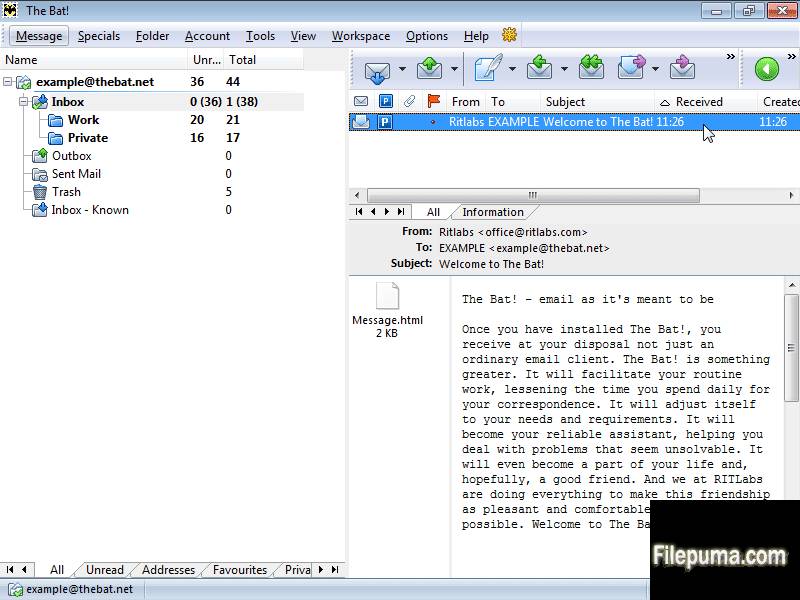
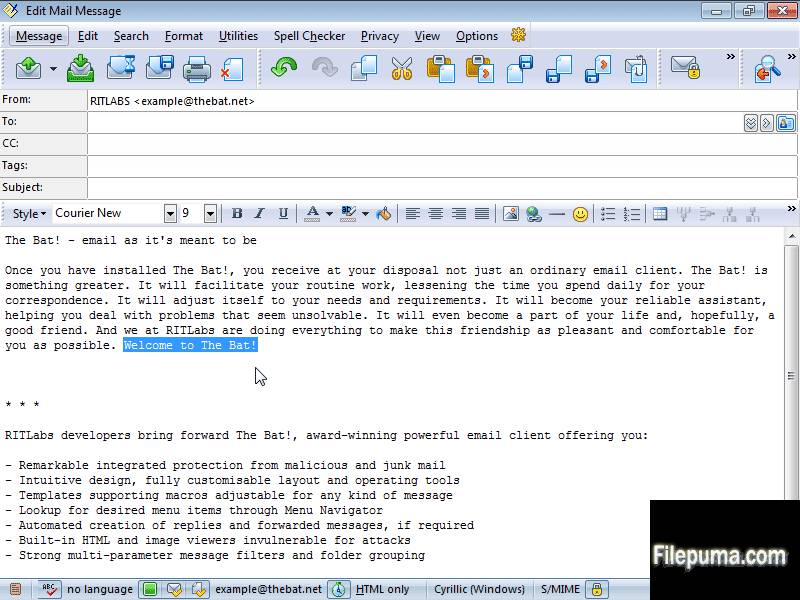
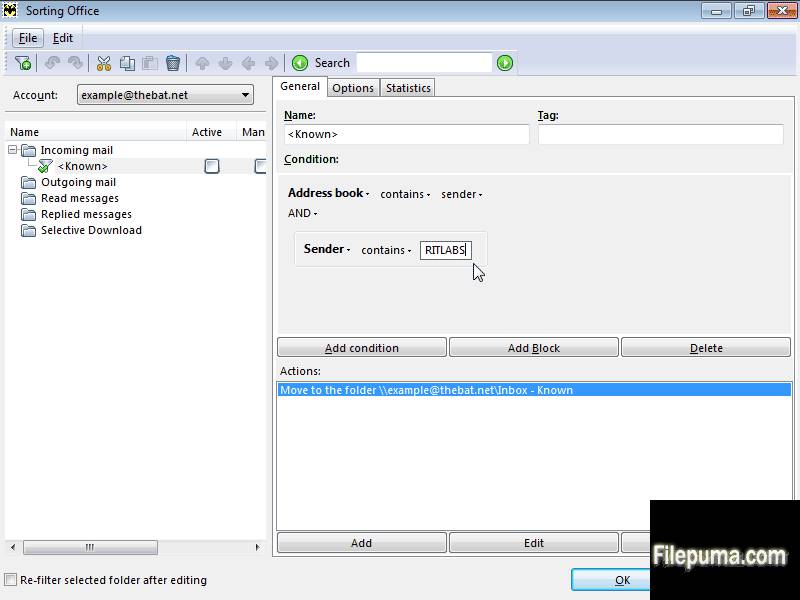
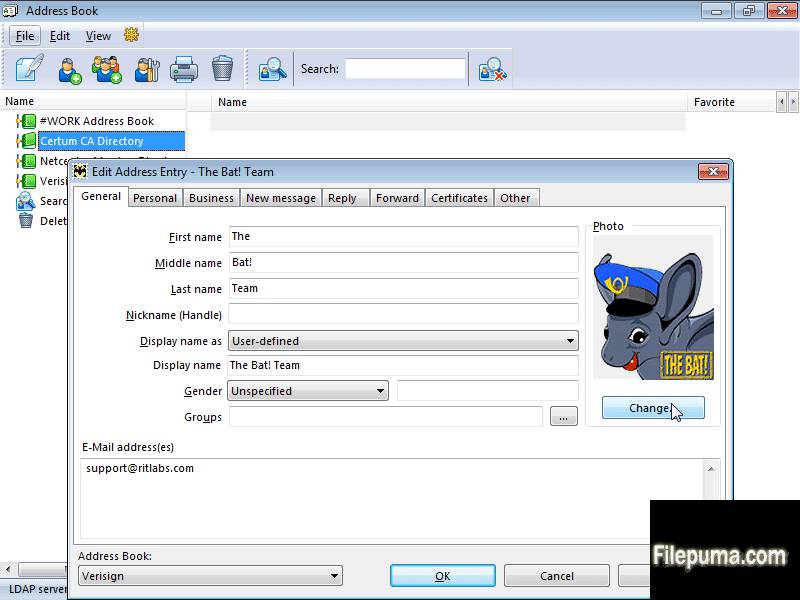


The Bat! 是一个安全的电子邮件客户端软件,旨在保护您的通信不受第三方的侵害。
The Bat! 通过多重加密流来保护您的信息,您可以选择将所有信息加密保存在磁盘上,并在通信过程中通过端到端加密 (E2EE) 来保护电子邮件。The Bat! 可以不依赖于将您的信息保存在云端的全球电子邮件提供商,并防止信息被窃取。The Bat! 将您的电子邮件保存在您的计算机上,以确保其私密性。同时,The Bat! 会阻止通过电子邮件传播的恶意代码和跟踪像素。这是保护免受电子邮件黑客攻击的一种方法。
The Bat! 电子邮件程序能够处理和存储无限数量的消息,并且在通过IMAP、POP、MAPI协议访问的电子邮件帐户数量上没有限制。The Bat! 是一个完美的多邮件帐户管理器——使您能够快速访问所有电子邮件帐户。The Bat! 是一个安全、强大且可靠的邮件应用程序。它可以快速处理非常大的消息库,并且占用的内存很小。
MailTicker™无疑是The Bat!中最强大的功能之一。MailTicker™为您的桌面添加了一个视觉指示器,类似于您在某些电视新闻频道中看到的股票交易横幅。它显示未读消息,这些消息是根据您可以选择的一组简单选项定义的。
关键特性:
- PGP、GnuPG 和 S/MIME 支持
- 内置HTML查看器
- 安全处理附件文件
- 选择性下载
- 强大的过滤系统
- The Bat! 的通讯录
- 实用模板
- RSS 订阅
有什么新鲜事
Version 7.4
New features
- Improved speed, reduced CPU use and decreased GUI latency on receiving messages via POP3 and sending via SMTP
- /BENCHMARK_STARTUP_TIME displays time passed to start The Bat!, in milliseconds
Improvements
- Improved speed of folder checking on MAPI
- Improved speed of checking for new message via MAPI in large folders
- Splash screen now uses default UI font
- Changed CSS length values for "ex" (was 1/1.3 of "em", now 1/2 of "em") and for cm&mm (was 1/2.52 of inch, now 1/2.54 of inch) - in accordance with https://www.w3.org/TR/CSS21/syndata.html#length-units
- If a tbuser.def file is larger than 500K, it is not loaded but renamed to .bak instead
- Plugins are now loaded at startup from a separate thread. In The Bat! version 5.0, has performed time-consuming startup routines (like loading of plug-ins, parsing of interface definition files) in parallel threads. The performance boost was noticeable even on old single-core CPUs, because disk and processor operations were running simultaneously; while on multi-core CPUs and multiprocessor systems the boost was even higher because computations could run in parallel, without one affecting another. In version 6.0, plugins weren’t loaded from a separate thread, but from the main thread. This is now fixed and plugin loading is now the same as it was in 5.0.
- Optimized IMAP work with multiple connections. When there are several idle connections, and there were need to work with another folder, The Bat! could use a connection that had INBOX selected; now connection with INBOX will only be used if no other connections are available
- dlNSpellLanguages is displayed when the user have selected too many languages for spell checking, in this case, the status bar didn't manage to display all the languages and there were a bug that other status bar items were hidden
Fixes
- (#0001080) "Message filtered counter" window element partially hidden in Filter Mail
- (#0000985) Wrong wrapping in the message boxes
- For HTML/plain text and HTML only editor modes after paste a link an unexpected space is added
- For Plain Text (Windows) editor mode after paste a link a selection remains
- MAPI tasks could give access violations on errors or if the user cancels them
- (#0000981) Photo area is too small in address book contact's properties
- Fixed "Thread Error: The handle is invalid" on HTML spell checkers
- Fixed a bug in spellchecker introduced in version 6.8.0.5 (05-May-2015)
- Selected color for even rows was incorrect
- Buttons' height in HTML didn't scale
- (#0000998) Incorrectly underlined text in the internal HTML viewer
- Improved speed of folder checking on MAPI
- (#0000963) Truncated line in "Options\Preferences\Message List"
- Fixed a vertical scroll bar in Preferences | Message List
- Items in User Preferences and Address Entry Editor dialog were misaligned
- CJKV (Chinese, Japanese, Korean, Vietnamese) characters were too big and didn't fit the interface sometimes, didn't look good
- Fixed the "Address Book photo width/height is mis-sized" error while adding new image for address book on high-resolution monitor
- Controls in the Account Properties form were misaligned
- Photos in the address book didn't scale properly
- The Bat! didn't delete TMP files older than 1 months (since version 5)
- (#0000776) If there were more than 2GB of total mail on the server during POP3 retrieval, total received size was displayed incorrect (negative) in the connection center; the word "bytes" was used twice there.
- Some dialog elements in the Account Properties, Folder Properties, Address Entry weren't properly aligned or sized with high-DPI settings in various dialogs (on high-definition displays)
- The pie chart didn't paint correctly in the connection center
- (#0001009) In URLs, the ampersand parameter delimiter gets percent-encoded as %26, rather than encoded as an HTML entity
- (#0001011) URLs with ampersands are incorrectly opened in the HTML editor after you reopen it
- (#0001014) Message list column width and attachments' icon too small (on high-definition displays)
- (#0000959) Small check boxes and overlapping buttons in text search (on high-definition displays)
- (#0000989) Splitters are not scaled (on high-definition displays)
- (#0000960) Not enough room for headers fields on the header pane (on high-definition displays)
- (#0001016) Message list nodes are too small (on high-definition displays)
- (#0001025) Address book icons truncated on 4K monitors (on high-definition displays)
- (#0000555) Toolbar buttons do not scale according to higher DPI setting (on high-definition displays)
- (#0001015) The status bar gripper is too small (on high-definition displays)
- (#0000967) Account/folder nodes and the respective lines are barely seen (on high-definition displays)
- (#0000965) Truncated font size drop-down menu in the HTML editor (on high-definition displays)
- (#0000952) Tiny icons in the message editor window (on high-definition displays)
- (#0000974) Scheduler Event via Sorting Office action doesn't look good (on high-definition displays)
- (#0000979) Narrow default column width in the Maintenance Center (on high-definition displays)
- (#0000989) Splitters are not scaled (on high-definition displays)
- (#0000951) Tiny font in the account information tab (on high-definition displays)
- (#0001028) Attachment panel is too narrow on high-resolution monitors, the icons don't fit, a scroll bar appears
- (#0001026) Editor/Viewer header layout uses an old font by default when you run fresh install of The Bat! under modern OS. For example, if you run The Bat! first time under Windows 10, it will set Tahoma 8, but should have set Segoe UI 9 or similar
- (#0000982) Issues with QR-Code Generator (on high-definition displays)
- Disappearing buttons in dialog Edit Event | Categories on high-definition display (on high-definition displays)
- (#00001032) The color of the even row of the quoted text is not purple as it used to be in The Bat! version 1 (purple)
- The font didn't get updated in the address headers in the message preview and the open message editor, after the user have changed the font in the Preferences dialog.
- (#0001015) The status bar gripper is too small (on high-definition displays)
- (#0001033) Changes in look and feel of the nodes and lines in the message list and folder tree
- The text in the splash screen was truncated under 300% DPI or more (on high-definition displays)
- High-contrast themes with large dpi (300% or more) didn't draw enlarged tree node glyph (plus/minus sign in a square), it was very small and not scaled (on high-definition displays)
- (#0000979) Narrow default column width in the Maintenance Center (on high-definition displays)
- Splitters didn't use system-defined colors, used a fixed color instead that ignored color schemes
- For certain widths of the header columns, in the message list, the ellipses became visible (mostly on high-definition monitors)
- (#0000958) Tiny and overlapping "next" and "last" buttons below the message body (on high-definition displays)
- (#0000955) Tiny "first/last" and "next/previous" buttons for the message list tabs (on high-definition displays)
- (#0000954) Account/folder tree tabs are tiny and overlap (on high-definition displays)
- (#0000892) Mouse cursor shows the "forbidden" sign if the user opens contact properties using double-click
- The Bat! could not complete the "Exit" command (the main window became inoperable after you close it) after you have created an account and tested connectivity to SMTP in the new account wizard
- (#0001005) Images are printed with the template
- (#0000997) SmartBat: Printed Text uses print templates for mails when printing via Print Preview
- (#0001046) If Quick Reply is enabled in the Message Finder, the Results tab becomes empty
- (#0000968) Tiny progress bar in Message Finder (F7) (on high-definition displays)
- (#0000974) Scheduler Event via Sorting Office action was displayed incorrectly (on high-definition displays)
- (#0000961) Tiny close buttons in the message list tabs incorrectly (on high-definition displays)
- (#00000962) Quick Reply pane is small (on high-definition displays)
- Grayed out items (like IMAP messages that weren't loaded) in the message list didn't scale
- Buttons didn't scale in the address grid of the message editor (on high-definition displays)
- (#0000948) Tiny contents of the OAUTH window (on high-definition displays)
- Internal HTML viewer didn’t scale logical pixels properly to physical pixels (on high-definition displays)
- (#0001055) The letter "g" does not fit on the search pane in the separate message viewer and in message finder (F7)
- (#0000919) Attachments' size turns 0 bytes after editing an email for the second time
- The mail ticker didn't scale (on high-definition displays)
- (#0000812) When resolution and display scaling is increased, the text gets unreadable in the address book (on high-definition displays)
- (#0001061) Selection color becomes invalid in the message list and in the Connection Center
- The widths of the status bar elements in the Message Finder and in the Connection Center didn't scale on high-definition monitors
- (#0001036) Sorting Office columns too narrow (on high-definition displays)
- (#0001037) Tiny conditions' drop-down arrows in Sorting Office (on high-definition displays)
- (#0001042) Filter text in Sorting Office always black
- (#0000884) AV errors on exit if an image was opened in an IMAP account
- (#0001063) Sorting office - filters that set colour groups always use blue text
- (#0000999) Spell-checker-specific underline (red) are not scaled for high resolution
- Check boxes were truncated at the bottom when UI font 9pt was used in the Message List Tabs editor dialog
- The radio buttons did overlap in the print preview window
- (#0000890) Access Violation error after compacting address books
- The Bat! could only allow compressing an address book when there were at least 1% of free space; the user could not compress the address book when there were less free space, e.g. only one entry deleted, which is not good from the security or privacy point of view
- (#0000659) Errors on compressing address books while On-The-Fly encryption was on
- Memory corruption on compacting address books with photos or certificates
- (#0001060) Message header names were top-aligned in the Message Editor
- (#0000988) Numbered list - Description is missing
- (#0000703) Removed import/export address entries from Google and Synchronize popup item from Google address books created earlier
- (#0000996) Print Preview: Two groups of option boxes did exclude each other
- (#0000639) URLs are not displayed as hyperlinks in Windows Editor
- Access Violation while starting The Bat (related to quick reply)
- (#0001049) "List index out of bounds" error message in the HTML-editor
- (#0000987) Clicking anywhere in the message body opens mail.ru sign-in page
- Access violation when working with 64-bit plugins, for example when clicking learn spam/learn ham plugin on the toolbar
- (#0000559) The main menu command Folder|Check for viruses was removed in 6.3.0.5 - now put back
- Cleanup for possible multiple "List index out of bounds" error messages while editing/moving/undo/redo and tracking mouse in editor
- Fixed an Access Violation when running The Bat! for the first time and creating an account with empty account password
- An IMAP connection went to Inbox between other commands, when it was not needed. A connection should only go to Inbox when there are no pending tasks at all, so all the connections are idle. There were a bug in determining whether a connection is idle, so it went to INBOX over and over again between executing other commands. You could observe it in the IMAP protocol log
- The Bat! didn't exit properly if the user had tags configured
- The Bat! didn't support "Priority: non-urgent" (see RFC-4021 section 2.1.54)
- Connection center labels were occasionally deleted in The Bat! 5.0.18.12 (23-Jul-2011) - now restored
该程序可提供其他语言版本。
- Download The Bat! (64bit)
- Télécharger The Bat! (64bit)
- Herunterladen The Bat! (64bit)
- Scaricare The Bat! (64bit)
- ダウンロード The Bat! (64bit)
- Descargar The Bat! (64bit)
- Baixar The Bat! (64bit)
用户评论

最新版本
旧版本
 The Bat! (32bit) 12.3.1
 The Bat! (64bit) 12.3.1
 Mozilla Thunderbird (32bit) 158.0.1
 Mozilla Thunderbird (64bit) 158.0.1
 eM Client 10.4.5674.0
安全级别
为了避免对您的设备造成潜在危害,并确保您的数据和隐私的安全,我们团队在每次新的安装文件上传到我们的服务器或链接到远程服务器时都会进行检查,并定期审查该文件以确认或更新其状态。基于这些检查,我们为所有可下载文件设置了以下安全级别。
 清洁
清洁
这个软件程序很可能是干净的。
我们在全球60多款领先的 antivirus 服务中扫描了与该软件程序相关的文件和 URL;没有发现任何潜在威胁。同时也没有捆绑任何第三方软件。
 警告
警告
该程序是由广告支持的,可能会提供安装不必要的第三方程序。这些程序可能包括工具栏、更改主页、默认搜索引擎或安装其他第三方程序。这些可能是误报,我们建议用户在安装和使用该软件时要小心。
 残疾人
残疾人
该软件不再提供下载。该软件程序很可能是恶意的,或者存在安全问题或其他原因。
提交报告
谢谢!
您的报告已发送。
我们将审核您的请求并采取适当的措施。
请注意,您将不会收到有关此报告所采取任何行动的通知。对于可能造成的任何不便,我们深表歉意。
我们感谢您帮助保持我们网站的整洁和安全。