
Looking for a free Mac cleaner? Try diCleaner

Total Commander8.50
 免费试用
免费试用
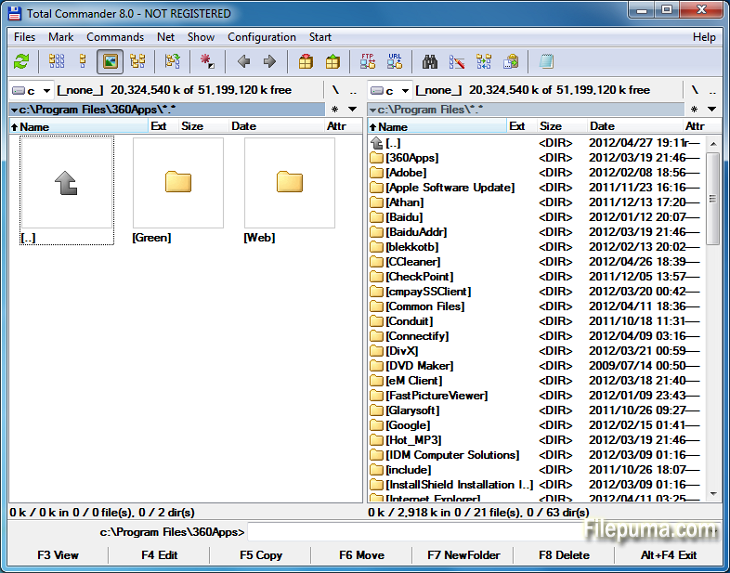


Total Commander是一款功能强大的文件管理软件,可以简化和增强Windows操作系统上的文件操作。凭借用户友好的界面和大量功能,它在全球用户中获得了极高的知名度。
这个文件管理器提供双面板布局,提供文件夹和文件的并排视图,使在目录之间拖放文件变得轻而易举。它支持各种压缩格式,如ZIP、RAR和7-Zip,允许无缝提取和压缩文件。
Total Commander的一个关键亮点是其广泛的插件支持。用户可以通过添加众多插件来扩展功能,增加云存储集成、多媒体处理和高级文件比较等附加功能。
该软件在可定制的选项方面也表现出色,使用户能够根据自己的偏好个性化界面和快捷键。其高效的搜索和筛选工具可快捷定位文件,节省时间和精力。
Total Commander强调安全性和可靠性,确保关键操作安全执行以避免意外删除或覆盖文件。
总之,Total Commander 是一个可靠且多功能的文件管理工具,简化了文件处理,提升了生产力,并提供了流畅的用户体验。无论您是新手还是高级用户,Total Commander 都是任何寻求高效和强大文件管理解决方案的用户必备的工具。
很抱歉,我没有看到具体的句子。请您重新输入需要翻译的句子。
关键特性:
- 双面板界面便于文件管理。
- 选项卡浏览以便快速导航。
- 可定制用户界面。
- 内置支持处理档案。
- FTP和网络支持远程文件管理。
- 强大的多重重命名工具。
- 目录同步用于文件比较和同步。
- 快速搜索以高效查找文件。
- 插件支持扩展功能。
- 丰富的键盘快捷键用于快速操作。
有什么新鲜事
File operations:
- F5 copy: First copy all files where the user doesn't need to be asked and skip all with errors, ask at the end
- F5 copy: Option to verify files after copying them.
- F5 copy: Option to keep paths relative to current folder while in branch view (Ctrl+B)
- Select and copy related files, e.g. *.jpg > crw*.cr2 selects/copies raw files only if there is a related .jpg file
- F8 Delete: Only warn at the end if folders couldn't be deleted
- F8 Delete: Always use new delete method when VistaDelete isn't set in wincmd.ini, but show our own delete confirmation dialog if the system dialog is disabled
- Support unpacking of more archive formats: 7zip, new RAR5 format, as well as -lh6- and -lh7- (LHA)
- RAR with encrypted file names: Show archive content after entering password
- Pack/unpack files: Option to remember last entered password until TC is minimized, Windows goes to standby, or the screen saver starts
- Alt+F5 pack: New option to leave out the names of the selected folders when packing each folder to a separate archive
- New wincmd.ini options CopyLinks and IgnoreLinks to handle file system links
- FTP/file system plugins: When editing a file with F4, the file will automatically be re-uploaded when saved in the edfitor. No need to close the editor any more. Change via Edit/View options.
- Support for touch screen devices: Tap on icons to select files (configurable), long tap to open context menu
- Support for high resolution screens (high DPI)
- Drive drop-down list (Alt+F1/Alt+F2): Show links to "My Computer" and "My Documents" Configurable via. ShowExtraDrives in wincmd.ini
- Drive drop-down list (Alt+F1/Alt+F2): Open context menu directly in the list without choosing a drive first
- Show exclamation mark to the left of some options as a warning, e.g. that files may not go where the user expects them to go, like during copying from branch view, or when packing and unpacking
- Show file size and last modified time also in virtual folders like connected MTP devices like Android phones/tablets
- Button bar: Support multiple internal and/or user-defined commands on a single button e.g. cm_SelectAll,cm_Copy
- Progress dialog: Show number of files/bytes in more functions. Switch to files/bytes remaining by clicking on the numbers
- Show thumbnails in virtual folders like libraries
- Option to remember position of background transfer manager in system menu (click on top-left icon)
- Improved background copy dialog: Show number of copied and selected files and bytes, add button "Foreground"
- Search for text supports any combination of ANSI, ASCII, UTF-16, UTF-8 Unicode and office XML/EPUB at the same time
- Skip a folder by clicking on its name in the status line (with confirmation). Also allows to just pause the search
- Open in separate process via Alt+Shift+F7, so TC can still be used during the search
- "Feed to listbox" also when searching in archives, on FTP servers and file system plugins
- Search for duplicate files: Search by plugin fields, e.g. name parts, file extension etc.
- Search for duplicate files, Feed to listbox: New dialog box to select files inside the groups of duplicates, e.g. by newest, oldest etc.
- Compare by content: "Resync comparison from here" now also works after editing the files
- Create/Verify CRC checksums: Also support SHA256 and SHA512 formats
- Show hidden/system files now split into separate options for hidden and system
- Option to get more items in various history lists, set via wincmd.ini: HistoryLen for directory history, OldCmdLineCount for command line. MaxItemsInComboBox for comboboxes in F7 New Folder, Alt+F7 Search, Num+ select files etc.
- Lister, right click menu: Directly search for selected text via Google in default browser (configurable)
该程序可提供其他语言版本。
- Download Total Commander
- Télécharger Total Commander
- Herunterladen Total Commander
- Scaricare Total Commander
- ダウンロード Total Commander
- Descargar Total Commander
- Baixar Total Commander
用户评论
用户评分
 30
30
许可证:
免费试用
要求:
Windows All
语言:
Multi-languages
尺寸:
3.5MB
出版商:
已更新:
Feb 19, 2014
清洁
报告软件
最新版本
旧版本
开发者软件
 Total Commander 11.58
 CrystalDiskInfo 9.9.2
 Update Detector 6.64.0.64
 Defraggler 2.22.995
 Recuva 1.55.133
 EaseUS Data Recovery Wizard Free 20.8.0
安全级别
为了避免对您的设备造成潜在危害,并确保您的数据和隐私的安全,我们团队在每次新的安装文件上传到我们的服务器或链接到远程服务器时都会进行检查,并定期审查该文件以确认或更新其状态。基于这些检查,我们为所有可下载文件设置了以下安全级别。
 清洁
清洁
这个软件程序很可能是干净的。
我们在全球60多款领先的 antivirus 服务中扫描了与该软件程序相关的文件和 URL;没有发现任何潜在威胁。同时也没有捆绑任何第三方软件。
 警告
警告
该程序是由广告支持的,可能会提供安装不必要的第三方程序。这些程序可能包括工具栏、更改主页、默认搜索引擎或安装其他第三方程序。这些可能是误报,我们建议用户在安装和使用该软件时要小心。
 残疾人
残疾人
该软件不再提供下载。该软件程序很可能是恶意的,或者存在安全问题或其他原因。
提交报告
谢谢!
您的报告已发送。
我们将审核您的请求并采取适当的措施。
请注意,您将不会收到有关此报告所采取任何行动的通知。对于可能造成的任何不便,我们深表歉意。
我们感谢您帮助保持我们网站的整洁和安全。