

VirtualBox4.2.12
 免费下载
免费下载
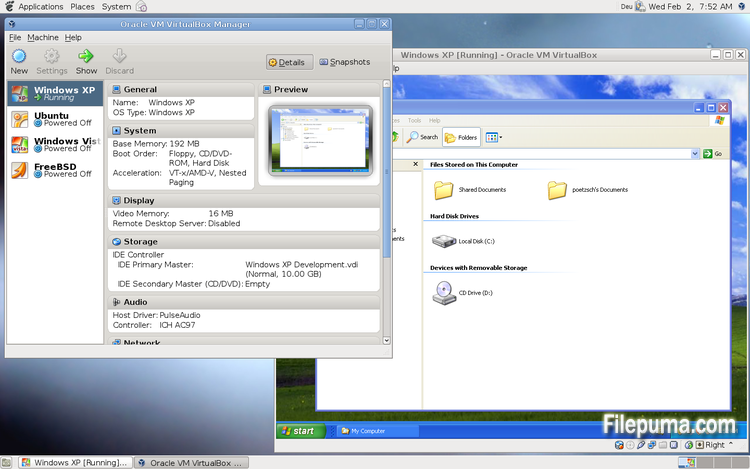
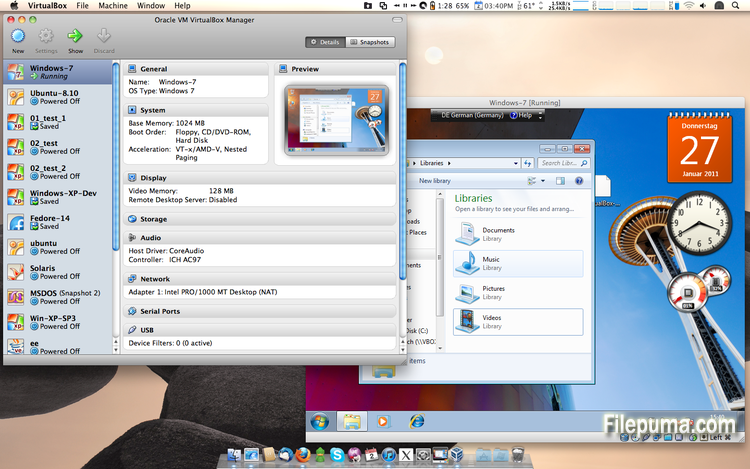
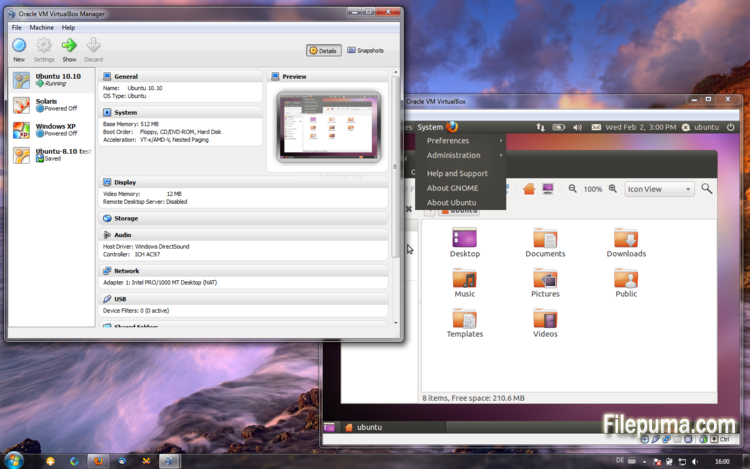


VirtualBox是一款免费且开源的虚拟化软件,允许用户在他们的计算机上创建和运行虚拟机。使用VirtualBox,用户可以在他们的计算机上同时安装和运行多个操作系统,而无需创建单独的分区或购买额外的硬件。
VirtualBox的主要优点之一是易于使用。即使是对虚拟化技术几乎没有经验的人,它也很容易安装和设置。VirtualBox还提供了广泛的自定义选项,包括调整分配给每个虚拟机的RAM、CPU核心和硬盘空间的能力。
VirtualBox的另一个重要特点是其与多种操作系统的兼容性。用户可以在他们的虚拟机上安装和运行Windows、Linux、macOS及许多其他操作系统。这使得它成为一个对开发人员、软件测试人员以及任何需要在单台计算机上运行多个操作系统的人来说非常优秀的工具。
VirtualBox 还提供了一系列高级功能,例如对 USB 设备、共享文件夹和网络适配器的支持。这些功能使得运行需要硬件或网络资源的软件成为可能,例如虚拟路由器、防火墙和服务器。
VirtualBox 是任何需要在一台计算机上运行多个操作系统的人的绝佳选择。其易用性、广泛的自定义选项以及与许多不同操作系统的兼容性,使其成为开发人员、IT 专业人员和家庭用户的多功能而强大的工具。
关键功能:
- 跨平台兼容性。
- 直观的图形用户界面。
- 支持各种操作系统。
- 与主机操作系统的无缝集成。
- 快照和克隆。
- 网络功能。
- 虚拟设备支持。
- 扩展包用于增加功能。
有什么新鲜事
VirtualBox 4.2.12 (release 2013-04-12)
This is a maintenance release. The following items were fixed and/or added:
- VMM: fixed a Guru Meditation on putting Linux guest CPU online if nested paging is disabled
- VMM: invalidate TLB entries even for non-present pages
- GUI: Multi-screen support: fixed a crash on visual-mode change
- GUI: Multi-screen support: disabled guest-screens should now remain disabled on visual-mode change
- GUI: Multi-screen support: handle host/guest screen plugging/unplugging in different visual-modes
- GUI: Multi-screen support: seamless mode: fixed a bug when empty seamless screens were represented by fullscreen windows
- GUI: Multi-screen support: each machine window in multi-screen configuration should have correct menu-bar now (Mac OS X hosts)
- GUI: Multi-screen support: machine window View menu should have correct content in seamless/fullscreen mode now (Mac OS X hosts)
- GUI: VM manager: vertical scroll-bars should be now updated on content/window resize
- GUI: VM settings: fixed crash on machine state-change event
- GUI: don't show warnings about enabled or disabled mouse integration if the VM was restored from a saved state
- Virtio-net: properly announce that the guest has to handle partial TCP checksums (bug #9380)
- Storage: Fixed incorrect alignment of VDI images causing disk size changes when using snapshots (bug #11597)
- Audio: fixed broken ALSA & PulseAudio on some Linux hosts due to invalid symbol resolution (bug #11615)
- PS/2 keyboard: re-apply keyboard repeat delay and rate after a VM was restored from a saved state (bug #10933)
- BIOS: updated DMI processor information table (type 4): corrected L1 & L2 cache table handles
- Timekeeping: fix several issues which can lead to incorrect time, Solaris guests sporadically showed time going briefly back to Jan 1 1970
- Main/Metrics: disk metrics are collected properly when software RAID, symbolic links or rootfs are used on Linux hosts
- VBoxManage: don't stay paused after a snapshot was created and the VM was running before
- VBoxManage: introduced controlvm nicpromisc (bug #11423)
- VBoxManage: don't crash on controlvm guestmemoryballoon if the VM isn't running (bug #11639)
- VBoxHeadless: don't filter guest property events as this would affect all clients (bug #11644)
- Guest control: prevent double CR in the output generated by guest commands and do NLS conversion
- Linux hosts / guests: fixed build errors on Linux 3.5 and newer kernels if the CONFIG_UIDGID_STRICT_TYPE_CHECKS config option is enabled (bug #11664)
- Linux Additions: handle fall-back to VESA driver on RedHat-based guests if vboxvideo cannot be loaded
- Linux Additions: RHEL/OEL/CentOS 6.4 compile fix (bug #11586)
- Linux Additions: Debian Linux kernel 3.2.0-4 (3.2.39) compile fix (bug #11634)
- Linux Additions: added auto-logon support for Linux guests using LightDM as the display manager
- Windows Additions: Support for multimonitor. Dynamic enable/disable of secondary virtual monitors. Support for XPDM/WDDM based guests
- X11 Additions: support X.Org Server 1.14 (bug #11609)
该程序可提供其他语言版本。
- Download VirtualBox
- Télécharger VirtualBox
- Herunterladen VirtualBox
- Scaricare VirtualBox
- ダウンロード VirtualBox
- Descargar VirtualBox
- Baixar VirtualBox
用户评论
用户评分
 101
101
许可证:
免费
要求:
Windows All
语言:
Multi-languages
尺寸:
94.5MB
出版商:
已更新:
Apr 14, 2013
清洁
报告软件
最新版本
旧版本
开发者软件
 VirtualBox 7.2.18
 Adobe Air 51.3.3.1
 Java Runtime Environment (32bit) 8 Update 501
 Java Runtime Environment (64bit) 8 Update 501
 Java Development Kit (64bit) 8 Update 501
 Python (64bit) 3.14.7
安全级别
为了避免对您的设备造成潜在危害,并确保您的数据和隐私的安全,我们团队在每次新的安装文件上传到我们的服务器或链接到远程服务器时都会进行检查,并定期审查该文件以确认或更新其状态。基于这些检查,我们为所有可下载文件设置了以下安全级别。
 清洁
清洁
这个软件程序很可能是干净的。
我们在全球60多款领先的 antivirus 服务中扫描了与该软件程序相关的文件和 URL;没有发现任何潜在威胁。同时也没有捆绑任何第三方软件。
 警告
警告
该程序是由广告支持的,可能会提供安装不必要的第三方程序。这些程序可能包括工具栏、更改主页、默认搜索引擎或安装其他第三方程序。这些可能是误报,我们建议用户在安装和使用该软件时要小心。
 残疾人
残疾人
该软件不再提供下载。该软件程序很可能是恶意的,或者存在安全问题或其他原因。
提交报告
谢谢!
您的报告已发送。
我们将审核您的请求并采取适当的措施。
请注意,您将不会收到有关此报告所采取任何行动的通知。对于可能造成的任何不便,我们深表歉意。
我们感谢您帮助保持我们网站的整洁和安全。