

Keepass2.35
 دانلود رایگان
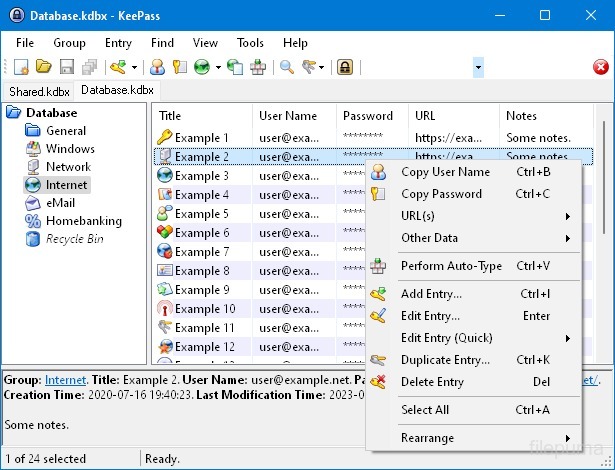
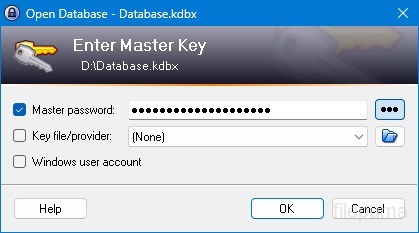
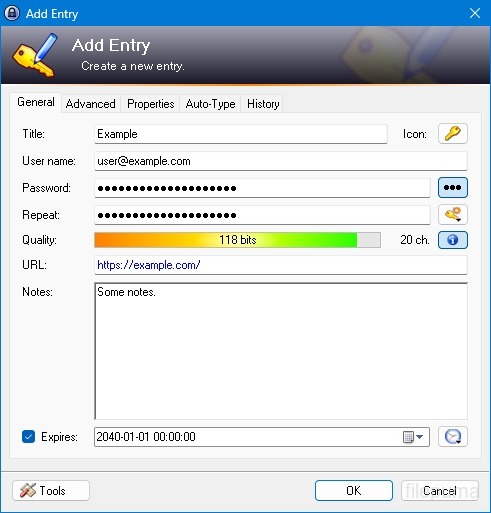
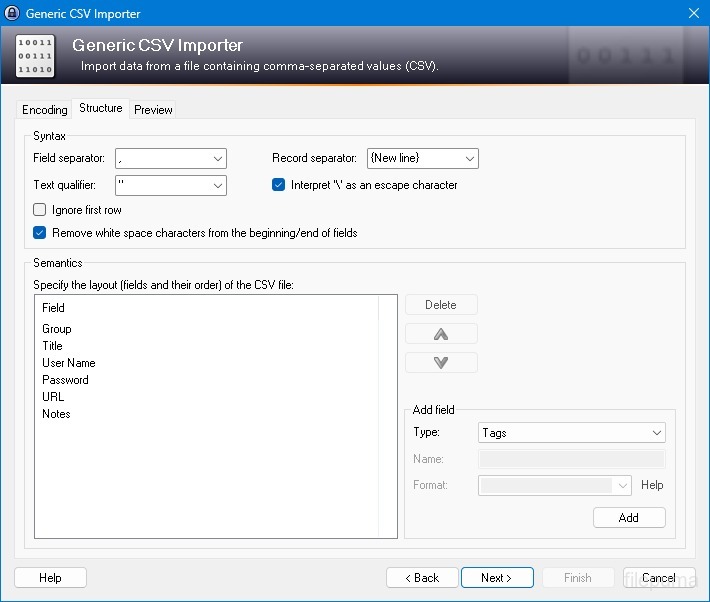
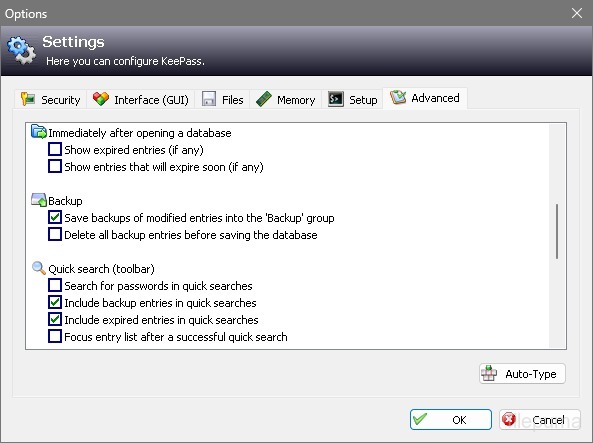


KeePassیک مدیر رمز عبور متنباز بسیار امن و محبوب است که برای ذخیره و مدیریت رمزهای عبور، نامهای کاربری و دیگر اطلاعات حساس به روشی امن استفاده میشود. این برنامه توسط Dominik Reichl توسعه داده شده و برای پلتفرمهای مختلف از جمله Windows، macOS، Linux و دستگاههای موبایل در دسترس است.
یکی از ویژگیهای کلیدی KeePass امنیت قوی آن است. این نرمافزار از الگوریتمهای رمزنگاری قوی (مانند AES، Twofish) برای محافظت از دادههای ذخیرهشده استفاده میکند و اطمینان میدهد که تنها کاربران مجاز با رمز عبور اصلی میتوانند به رمزهای عبور خود دسترسی پیدا کنند. رمز عبور اصلی به عنوان کلید اصلی برای باز کردن قفل پایگاه داده رمزنگاری شده عمل میکند.
KeePass یک رابط کاربرپسند ارائه میدهد که به کاربران امکان میدهد رمزهای عبور خود را به شیوهای ساختاریافته با استفاده از پوشهها و دستهبندیها سازماندهی کنند. به علاوه، ابزارهای تولید رمز عبور ارائه میدهد که به کاربران کمک میکند رمزهای عبور پیچیده و منحصربهفرد برای افزایش امنیت ایجاد کنند.
این نرمافزار به کاربران امکان میدهد به سرعت به جستجوی رمزهای عبور خاص بپردازند و ویژگیهایی مانند تکمیل خودکار فراهم میکند که امکان پر کردن خودکار فرمهای ورود به وبسایتها و برنامهها را میدهد. KeePass همچنین از پلاگینها پشتیبانی میکند که قابلیتهای آن را گسترش داده و قابل شخصیسازی برای نیازهای فردی میسازد.
علاوه بر این، KeePass بر قابلیت حمل و دسترسی تأکید دارد و به کاربران اجازه میدهد پایگاه داده رمزگذاری شده خود را بر روی رسانههای ذخیرهسازی مختلف مانند درایوهای محلی، درایوهای USB یا فضای ذخیرهسازی ابری ذخیره کنند. این امر به کاربران اجازه میدهد تا از دستگاههای مختلف به رمزهای عبور خود دسترسی داشته باشند و در عین حال امنیت و حریم خصوصی را حفظ کنند.
به طور کلی، KeePass یک راهحل مدیریت رمز عبور قابل اعتماد و امن است که به کاربران کمک میکند اطلاعات حساس خود را سازماندهی و محافظت کنند.
ویژگیهای اصلی:
- ذخیره مطمئن رمز عبور: رمزهای عبور را بهصورت ایمن ذخیره و مدیریت کنید.
- رمزنگاری قوی: از رمزنگاری پیشرفته برای امنیت دادهها استفاده میکند.
- رمز عبور اصلی و فایل کلیدپایگاه داده Access با یک رمز عبور قوی و فایل کلید اختیاری.
- احراز هویت دو مرحلهای (2FA): یک لایه اضافی امنیت فراهم میکند.
- عملکرد Auto-Type: ورود نامهای کاربری و رمزهای عبور را خودکار میکند.
- رمز عبور Generator: گذرواژههای قوی و تصادفی ایجاد میکند.
- مدیریت رمزهای عبوردستهبندی رمزهای عبور به گروهها و زیرگروهها.
- جستجو و فیلتربه سرعت ورودیهای خاص را پیدا کنید.
- فیلدهای سفارشی: افزودن اطلاعات اضافی به ورودیها.
- پیوستها: فایلها را به صورت ایمن به ورودیهای رمز عبور پیوست کنید.
- ویژگیهای امنیتی: گزینههای امنیتی اضافی را ارائه میدهد.
- چند سکویی: قابل دسترسی بر روی سیستمعاملهای مختلف.
- افزونهها و توسعهها: با افزودن ویژگیهای اضافی کارایی را گسترش دهید.
- واردات و صادرات: به راحتی رمزها را وارد/صادر کنید.
- همگامسازی پایگاه داده: همسانسازی پایگاه داده در دستگاههای مختلف بهصورت امن.
چه خبر؟
New Features:
- New KDBX 4 file format, which supports various new features (listed below; e.g. Argon2)
- Added Argon2 key derivation function (it can be activated in the database settings dialog)
- Improved header and data authentication in KDBX 4 files (using HMAC-SHA-256, Encrypt-then-MAC scheme)
- Added ChaCha20 (RFC 7539) encryption algorithm (it can be activated as KDBX file encryption algorithm in the database settings dialog; furthermore, it supersedes Salsa20 as default for generating the inner random stream of KDBX 4 files)
- Added support for opening entry URLs with Firefox or Opera in private mode via the context menu -> 'URL(s)' -> 'Open with ... (Private)'
- Added URL override suggestions for Firefox and Opera in private mode in the URL override suggestions drop-down list in the entry dialog
- Added optional built-in global URL overrides for opening HTTP/HTTPS URLs with Firefox or Opera in private mode
- Added {PICKFIELD} placeholder, which shows a dialog to pick a field whose value will be inserted
- Added option 'Hide "Close Database" toolbar button when at most one database is opened' (turned on by default)
- Added option 'Show additional auto-type menu commands', which can be turned on to show menu commands for performing entry auto-type with some specific sequences
- Added menu command 'Selected Entry's Group' (with keyboard shortcut Ctrl+G) in 'Edit' -> 'Show Entries' (and a context menu equivalent 'Show Parent Group' in 'Selected Entries'), which opens the parent group of the currently selected entry and selects the entry again
- Added menu commands in 'Edit' -> 'Show Entries' to show entries that expire in a specific number of days (1, 2, 3) or weeks (1, 2, 4, 8) or in the future
- Added configuration option that specifies the number of days within which entries are considered to expire 'soon' (the default is 7)
- Added option for changing the alternate item background color
- When the option 'Remember key sources' is enabled, KeePass now also remembers whether a master password has been used
- Added option 'Force changing the master key the next time (once)' (in 'File' -> 'Database Settings' -> tab 'Advanced')
- Added parameters 'Window style' and 'Verb' for the 'Execute command line / URL' trigger action
- Added support for importing mSecure 3.5.5 CSV files
- Added support for importing Password Saver 4.1.2 XML files
- Added support for importing Enpass 5.3.0.1 TXT files
- Enhanced SplashID CSV import (added support for the old version 3.4, added mappings for types of the latest version, groups are now created only for categories, and types are imported as tags)
- LastPass import: added support for CSV files exported by the LastPass Chrome extension, which encodes some special characters as XML entities
- Added 'KeePass KDBX (2.34, Old Format)' export module
- Export using XSL transformation: added support for the 'xsl:output' element in XSL files
- If the global auto-type hot key is Ctrl+Alt+A and the current input locale is Polish, KeePass now shows a warning dialog (telling the user that Ctrl+Alt+A is in conflict with a system key combination producing a character)
- Added Alt+X Unicode character conversion support in rich text boxes on Unix-like systems
- For development snapshots, the 'About' dialog now shows the snapshot version (in the form 'YYMMDD')
- Plugins can provide other key derivation functions now
- The header of KDBX 4 files is extensible by plugins
- Enhanced support for developing encryption algorithm plugins
- Plugins can now store custom data in groups and entries
- Plugin data stored in the database, a group or an entry can now be inspected (and deleted) in the database maintenance dialog, the group dialog and the entry dialog, respectively
- For plugins: file closing events now contain information about whether KeePass is exiting, locking or performing a trigger action
- Added workaround for .NET handle cast overflow bug in InputLanguage.Culture
- Added workaround for Mono ignoring the Ctrl+I shortcut
- Added workaround for Mono clipboard bug
- Added workaround for Mono not focusing the default control in the entry editing dialog
- Added workaround for a Mono timer bug that caused high CPU load while showing a file save confirmation dialog
- Added Mono workaround: when running on Mac OS X, KeePass now does not try to instantiate a tray icon anymore
- Added workaround for XDoTool sending diacritic characters in incorrect case
- TrlUtil now recommends to clear the 'Unused Text' tab
Improvements:
- Improved behavior when searching entries with exclusions (terms prefixed with '-')
- Improved support for auto-typing into target windows using different keyboard layouts
- Auto-Type: improved support for keyboard layouts with keys where Shift, Caps Lock and no modifier result in 3 different characters
- Auto-Type: improved support for spacing modifier letters (U+02B0 to U+02FF)
- Global auto-type now works with target windows having empty titles
- When copying entries to the clipboard, the data package now includes custom icons used by the entries
- Unified behavior when drag&dropping a field containing a placeholder
- Improved entry edit confirmation dialog
- If the screen height is insufficient to display a dialog, the dialog's banner (if the dialog has one) is now removed to save some space.
- Some tooltips are now displayed for a longer time
- A new entry created using a template now does not include the history of the template anymore
- For empty RTF attachments, the internal data editor now by default uses the font that is specified for TXT files
- Internal data editor: added support for changing the format of mixed-format selections
- Internal data viewer and editor: null characters ('', not '0') in texts are now automatically replaced by spaces (like Notepad on Windows 10)
- Improved encoding signature handling for conversions during text attachment imports (via the 'Text Encoding' dialog)
- File transactions are not used anymore for files that have a reparse point (e.g. symbolic links)
- Improved XSL stylesheets for KDBX XML files
- The internal window manager is now thread-safe
- Improved date/time handling
- Improved button image disposal
- When synchronizing two databases, custom data (by plugins) is now merged
- When opening a database file, corrupted icon indices are now automatically replaced by default values
- Added some more entropy sources for the seed of the cryptographically secure pseudo-random number generator (environment variables, command line, full operating system version, current culture)
- ChaCha20 is now used during password generation (instead of Salsa20)
- ChaCha20 is now used as fallback process memory encryption algorithm (instead of Salsa20)
- When the encryption algorithm for a database file is unknown, the error message now shows the UUID of the algorithm
- In KDBX 4, header field lengths are now 4 bytes wide
- In KDBX 4, entry attachments are now stored in an inner, binary header (encrypted, possibly compressed), before the XML part; this reduces the database file size and improves the loading/saving performance
- In KDBX 4, the inner random stream cipher ID and key (to support process memory protection) are now stored in the inner header instead of in the outer header
- KPScript: the 'ChangeMasterKey' command now also updates the master key change date
- TrlUtil: improved validation warning dialogs
- The MSI file now requires any .NET Framework version, not a specific one
- The MSI file is now built using Visual Studio 2015
- Various code optimizations
- Minor other improvements
Bugfixes:
- When executing a {HMACOTP} placeholder, the last modification time of the corresponding entry is now updated
- Key files containing exactly 64 alphanumeric characters are now loaded as intended
برنامه در زبانهای دیگر در دسترس است
- Download Keepass
- Télécharger Keepass
- Herunterladen Keepass
- Scaricare Keepass
- ダウンロード Keepass
- Descargar Keepass
- Baixar Keepass
بررسیهای کاربران
امتیاز کاربر
 26
26
مجوز:
رایگان
نیازمندیها:
Windows All
زبانها:
Multi-languages
اندازه:
2.96MB
ناشر:
بهروزرسانیشده:
Jan 9, 2017
تمیز
نرمافزار گزارشگیری
آخرین نسخه
نسخههای قدیمی
نرمافزار توسعهدهنده
 Keepass 2.61.1
 RoboForm 10.0.0
 Dashlane 6.2632.0
 1Password 8.12.36
سطحهای امنیتی
برای جلوگیری از هر گونه آسیب بالقوه به دستگاه شما و اطمینان از امنیت دادهها و حریم خصوصیتان، تیم ما هر بار که یک فایل نصب جدید به سرورهای ما بارگذاری میشود یا به یک سرور از راه دور متصل میشود، آن را بررسی کرده و بهطور دورهای وضعیت فایل را تایید یا بهروزرسانی میکند. بر اساس این بررسی، سطوح امنیتی زیر را برای هر فایل قابل دانلود تعیین میکنیم.
 تمیز
تمیز
بسیار احتمال دارد که این نرمافزار پاک باشد.
ما فایلها و URLهای مرتبط با این نرمافزار را در بیش از ۶۰ سرویس آنتیویروس برتر جهان اسکن کردیم؛ هیچ تهدید احتمالی پیدا نشد. و هیچ نرمافزار شخص ثالثی همراه نیست.
 هشدار
هشدار
این برنامه از تبلیغات حمایت میکند و ممکن است پیشنهاد نصب برنامههای شخص ثالثی را ارائه دهد که الزامی نیستند. اینها میتوانند شامل نوارابزار، تغییر صفحهاصلی شما، موتور جستجوی پیشفرض یا نصب برنامههای دیگر باشند. این موارد ممکن است مثبت کاذب باشند و به کاربران ما توصیه میشود در هنگام نصب و استفاده از این نرمافزار احتیاط کنند.
 معلول
معلول
این نرمافزار دیگر برای دانلود در دسترس نیست. احتمالاً این برنامه نرمافزاری مخرب است یا دارای مشکلات امنیتی یا دلایل دیگر میباشد.
گزارش را ارائه دهید
ممنون!
گزارش شما ارسال شده است.
ما درخواست شما را بررسی کرده و اقدام مناسب را انجام خواهیم داد.
لطفاً توجه داشته باشید که شما هیچگونه اطلاعیهای در مورد هر اقدام انجام شده به دلیل این گزارش دریافت نخواهید کرد. ما از هرگونه ناراحتی که ممکن است ایجاد شود، عذرخواهی میکنیم.
ما از کمکتان در حفظ تمیزی و امنیت وبسایتمان سپاسگزاریم.