
Looking for a free Mac cleaner? Try diCleaner

TeamViewer (32bit)9.0.24322
 دانلود رایگان
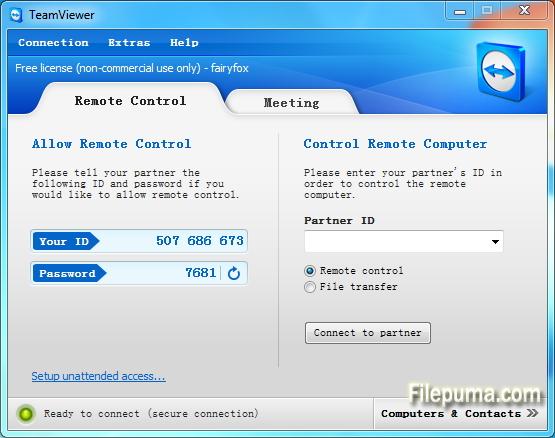
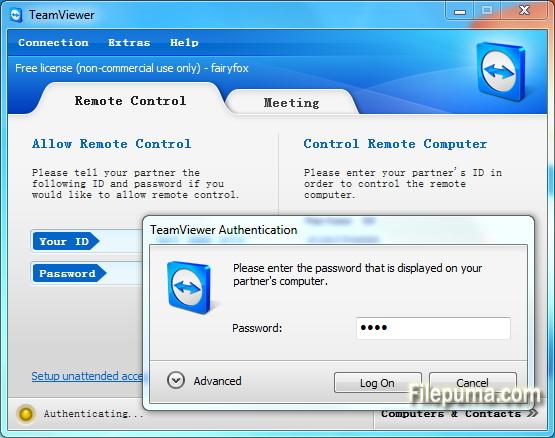
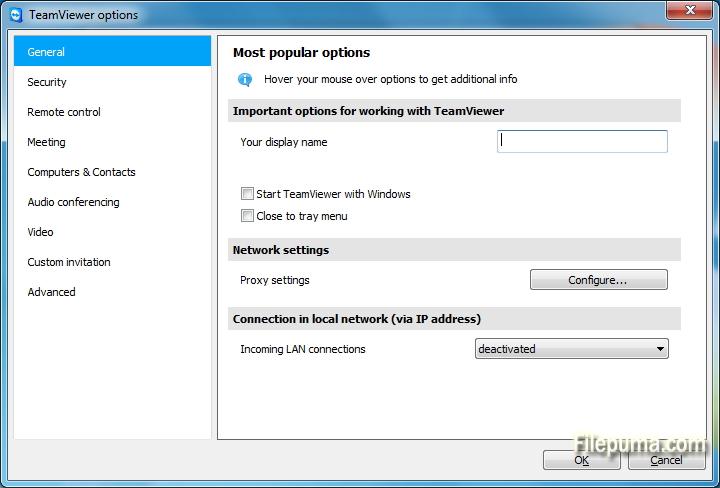
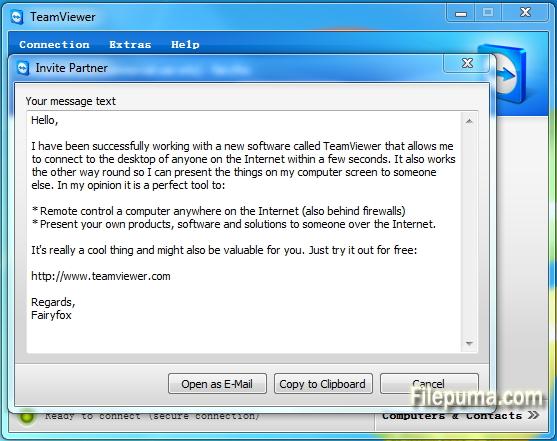


تیمویوریک ابزار پیشرفته دسترسی از راه دور و همکاری است که ارتباط بدون درز بین دستگاهها در سراسر جهان را تسهیل میکند. با رابط کاربری آسان و ویژگیهای قدرتمند، TeamViewer به یک راهحل مورد علاقه برای افراد و کسبوکارها تبدیل شده است.
در اصل، TeamViewer به کاربران امکان میدهد تا دستگاههای راه دور را به آسانی دسترسی و کنترل کنند. چه نیاز به ارائه پشتیبانی فنی به یک همکار داشته باشید، چه بخواهید به کامپیوتر کاری خود از خانه دسترسی پیدا کنید یا بر روی یک پروژه با اعضای تیم که در سراسر جهان پراکنده شدهاند همکاری کنید، TeamViewer یک ارتباط امن و کارآمد را تضمین میکند.
یکی از ویژگیهای برجسته TeamViewer سازگاری آن با پلتفرمهای مختلف است که از Windows، macOS، Linux و سیستمهای عامل موبایل مختلف پشتیبانی میکند. این ویژگی موجب میشود تا آن به یک راهحل انعطافپذیر برای کاربرانی با ترجیحات دستگاههای متفاوت تبدیل شود.
امنیت یکی از اولویتهای اصلی برای TeamViewer است، که با رمزنگاری انتها به انتها و گزینههای احراز هویت چندعاملی اثبات میشود. کاربران میتوانند اطمینان داشته باشند که دادهها و ارتباطاتشان محافظت میشوند، و این امر باعث میشود که TeamViewer گزینهای ایدهآل برای استفاده شخصی و حرفهای باشد.
ویژگیهای اضافی TeamViewer شامل انتقال فایل، چاپ از راه دور و یک عملکرد چت است که ارتباط و همکاری یکپارچه را تقویت میکند. با قابلیت اطمینان، سهولت استفاده و قابلیتهای قدرتمند خود، TeamViewer به ابزاری ضروری برای هر کسی که به دنبال دسترسی از راه دور و راهحلهای همکارانه کارآمد است، تبدیل شده است.
ویژگیهای کلیدی:
- دسترسی از راه دور: کنترل دستگاهها از راه دور.
- سازگاری بینپلتفرمی: به سامانههایعامل مختلف متصل شوید.
- انتقال فایل: به راحتی فایلها را در طول جلسات به اشتراک بگذارید.
- دسترسی متقابل مرورگر: دسترسی از طریق مرورگرهای وب مختلف.
- جلسات و ارائهها: برگزاری جلسات و ارائههای آنلاین.
- انتقال امن داده: اطلاعات را برای انتقال امن رمزگذاری میکند.
- چاپ از راه دور: به چاپگرهای محلی به صورت از راه دور چاپ کنید.
- کیفیت بالای صدا و تصویر: پشتیبانی از صدای با کیفیت و تصویر.
- همکاری چندکاربره: با چندین کاربر همکاری کنید.
- دسترسی بدون حضور: دسترسی از راه دور را بدون اجازه تنظیم کنید.
- بیداری از طریق شبکه: یک کامپیوتر از راه دور را بیدار کنید.
- برندینگ اختصاصی: رابط کاربری TeamViewer را برند کنید.
- یکپارچهسازی: با دیگر برنامهها یکپارچه شوید.
- دسترسی موبایلی: از برنامههای موبایل برای دسترسی از راه دور استفاده کنید.
- ضبط جلسه: ضبط جلسات از راه دور.
چه خبر؟
New features:
- Open multiple connections in different tabs: Open multiple remote sessions in tabs, just like in your browser. For an optimal overview, you can also open all the monitors belonging to a remote computer in separate tabs. You won't miss a thing because opened tabs will always flash when new activity occurs on the remote computer, e.g. a new chat message from a customer.
- Wake-on-LAN with TeamViewer:Do you want to ensure 24/7 access to your computer without having to leave it running all the time? With the new Wake-on-LAN feature, you can now wake up your computer remotely whenever you need access. The wake feature simply works via another computer using TeamViewer within the local network or via a router.
- Protect your TeamViewer account with two factor authentication :Protect your TeamViewer account against unauthorized access with two factor authentication, just in case your password happens to land in the wrong hands. With an established authentication app (e.g. Google Authenticator), you can simply generate a security code with your smartphone. Both the code and the password are requested during login. With this two factor authentication, TeamViewer helps you meet HIPAA and PCI DSS requirements, among others.
- Ready for Windows 8.1 :Do you or your customers use Windows 8.1? No problem. TeamViewer 9 is also optimized for this operating system.
- Save customized customer modules :You can now save customized modules with your company branding (TeamViewer QuickSupport, QuickJoin or Host) in your Management Console. You or your customers simply download the created module via an individual link.
- Copy and paste files, images, and text via the clipboard :Copy files, folders, images, screenshots, text, and tables along with formatting from one computer to another via the clipboard. E.g. attach a local file to an email being sent from a remote computer..
- Simplified file transfer without establishing a connection :Send files to computers and contacts from your list without first needing to establish a connection. Using an FTP server to share large amounts of data or files that exceed your email attachment size limit is now a thing of the past. Starting now, simply use TeamViewer to share files with colleagues or customers in the blink of an eye.
- Process customer cases in the service queue together with your team :Now organize instant customer support in your team more easily. All service cases are collected in your service queue and identified based on a session code. You can now manually create a new session code and pass it on to your customer in the form of a link. Instead of sharing the TeamViewer ID and password, like you used to, the customer can now join the session directly with just a click. Alternatively, a code is created automatically, as soon as the customer launches your customized TeamViewer QuickSupport. In this way, new customer cases are added to your service queue.
- TeamViewer API for integration into your applications :Integrate TeamViewer with your systems, such as helpdesk, ticket, or CRM. The new TeamViewer API offers the option of seamlessly integrating TeamViewer functionalities into your own work environment:
- Quick connection via desktop shortcut :Add a shortcut to any computer so you can connect to it in the blink of an eye, any time, with just a double-click. Simply use drag & drop to pull the specific computer from your Computers & Contacts list to your desktop.
- Notifications - Everything at a glance :TeamViewer now informs you directly in your Computers & Contacts list when new notifications are available. Stay informed, regardless of where you happen to be.
- Optimized video :Video transfer is now even faster. Show your participant a video during a presentation or view YouTube videos on remote computers in real-time.
- Redesign for even easier use :New TeamViewer user interface and Computers & Contacts design. Experience a new touch-friendly design. Important buttons convert automatically when you use TeamViewer on a touch device.
- TeamViewer 9 users can still establish remote control connections with TeamViewer 3, 4, 5, 6, 7 and 8.
- For technical and licensing reasons, a remote control connection in the other direction, i.e., from TeamViewer 3, 4, 5, 6, 7 and 8 to TeamViewer 9, is not possible. Meetings with version 9 are also accessible for participants with version 7, 8, however, vice versa it is not possible due to the mentioned reasons.
برنامه در زبانهای دیگر در دسترس است
- Download TeamViewer (32bit)
- Télécharger TeamViewer (32bit)
- Herunterladen TeamViewer (32bit)
- Scaricare TeamViewer (32bit)
- ダウンロード TeamViewer (32bit)
- Descargar TeamViewer (32bit)
- Baixar TeamViewer (32bit)
بررسیهای کاربران
امتیاز کاربر
 221
مجوز:
رایگان
نیازمندیها:
Windows All
زبانها:
Multi-languages
اندازه:
5.7MB
ناشر:
بهروزرسانیشده:
Dec 3, 2013
تمیز
نرمافزار گزارشگیری
آخرین نسخه
نسخههای قدیمی
نرمافزار توسعهدهنده
 TeamViewer (32bit) 15.82.6
 TeamViewer Portable 15.70.5
 TeamViewer (64bit) 15.82.6
 UltraVNC (64bit) 1.8.3.0
 UltraVNC (32bit) 1.8.2.9
سطحهای امنیتی
برای جلوگیری از هر گونه آسیب بالقوه به دستگاه شما و اطمینان از امنیت دادهها و حریم خصوصیتان، تیم ما هر بار که یک فایل نصب جدید به سرورهای ما بارگذاری میشود یا به یک سرور از راه دور متصل میشود، آن را بررسی کرده و بهطور دورهای وضعیت فایل را تایید یا بهروزرسانی میکند. بر اساس این بررسی، سطوح امنیتی زیر را برای هر فایل قابل دانلود تعیین میکنیم.
 تمیز
بسیار احتمال دارد که این نرمافزار پاک باشد.
ما فایلها و URLهای مرتبط با این نرمافزار را در بیش از ۶۰ سرویس آنتیویروس برتر جهان اسکن کردیم؛ هیچ تهدید احتمالی پیدا نشد. و هیچ نرمافزار شخص ثالثی همراه نیست.
 هشدار
این برنامه از تبلیغات حمایت میکند و ممکن است پیشنهاد نصب برنامههای شخص ثالثی را ارائه دهد که الزامی نیستند. اینها میتوانند شامل نوارابزار، تغییر صفحهاصلی شما، موتور جستجوی پیشفرض یا نصب برنامههای دیگر باشند. این موارد ممکن است مثبت کاذب باشند و به کاربران ما توصیه میشود در هنگام نصب و استفاده از این نرمافزار احتیاط کنند.
 معلول
این نرمافزار دیگر برای دانلود در دسترس نیست. احتمالاً این برنامه نرمافزاری مخرب است یا دارای مشکلات امنیتی یا دلایل دیگر میباشد.
گزارش را ارائه دهید
ممنون!
گزارش شما ارسال شده است.
ما درخواست شما را بررسی کرده و اقدام مناسب را انجام خواهیم داد.
لطفاً توجه داشته باشید که شما هیچگونه اطلاعیهای در مورد هر اقدام انجام شده به دلیل این گزارش دریافت نخواهید کرد. ما از هرگونه ناراحتی که ممکن است ایجاد شود، عذرخواهی میکنیم.
ما از کمکتان در حفظ تمیزی و امنیت وبسایتمان سپاسگزاریم.