

VirtualBox4.3.0
 دانلود رایگان
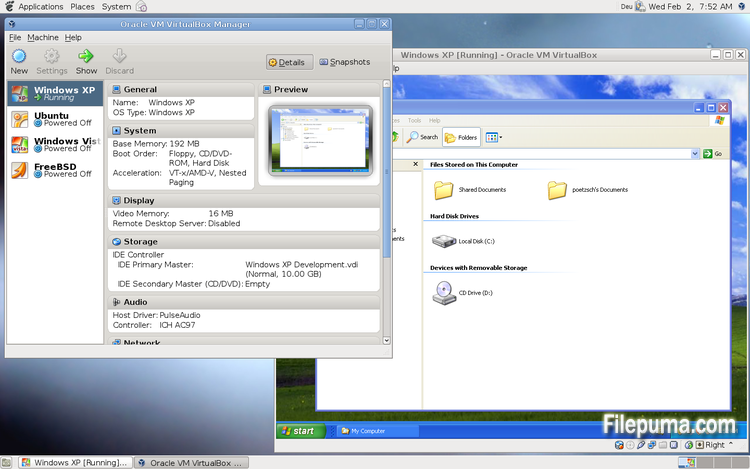
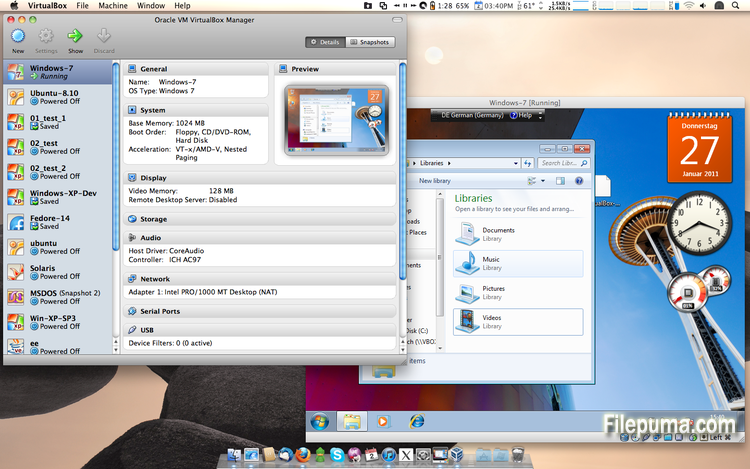
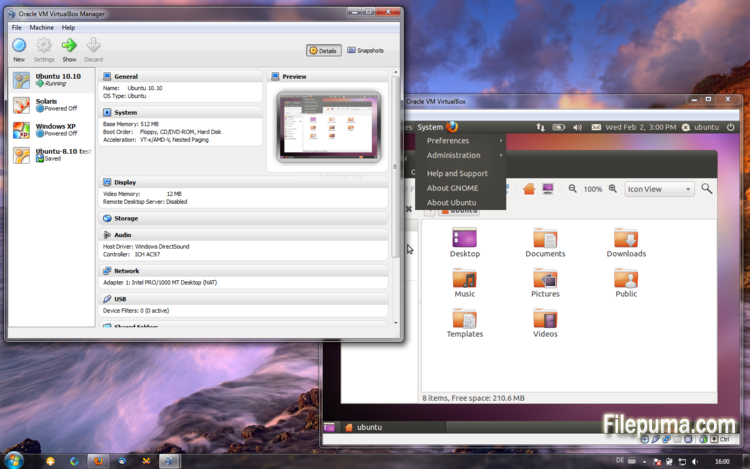


VirtualBoxیک نرمافزار مجازیسازی رایگان و متنباز است که به کاربران این امکان را میدهد تا ماشینهای مجازی را بر روی کامپیوترهای خود ایجاد و اجرا کنند. با استفاده از VirtualBox، کاربران میتوانند به صورت همزمان چندین سیستمعامل را روی کامپیوتر خود نصب و اجرا کنند، بدون اینکه نیازی به ایجاد پارتیشنهای جداگانه یا خرید سختافزار اضافی داشته باشند.
یکی از مزایای اصلی VirtualBox سهولت استفاده از آن است. نصب و راهاندازی آن حتی برای کسانی که تجربه کمی با فناوری مجازیسازی دارند یا اصلاً تجربه ندارند، ساده است. VirtualBox همچنین مجموعه گستردهای از گزینههای سفارشیسازی، از جمله قابلیت تنظیم میزان RAM، هستههای CPU، و فضای دیسک سخت اختصاص داده شده به هر ماشین مجازی را ارائه میدهد.
یکی دیگر از ویژگیهای عالی VirtualBox سازگاری آن با مجموعه وسیعی از سیستمعاملها است. کاربران میتوانند ویندوز، لینوکس، macOS و بسیاری دیگر از سیستمعاملها را بر روی ماشینهای مجازی خود نصب و اجرا کنند. این ویژگی باعث میشود که VirtualBox ابزاری بسیار مناسب برای توسعهدهندگان، تستکنندگان نرمافزار و هر کسی که نیاز به اجرای چندین سیستمعامل بر روی یک کامپیوتر دارد، باشد.
VirtualBox همچنین مجموعهای از ویژگیهای پیشرفته ارائه میدهد، مانند پشتیبانی از دستگاههای USB، پوشههای مشترک، و آداپتورهای شبکه. این ویژگیها امکان اجرای نرمافزارهایی که به منابع سختافزاری یا شبکه نیاز دارند، مانند روترهای مجازی، فایروالها و سرورها را فراهم میکند.
VirtualBox انتخابی عالی برای هر کسی است که نیاز به اجرای چندین سیستم عامل بر روی یک کامپیوتر دارد. راحتی در استفاده، طیف گستردهای از گزینههای سفارشیسازی و سازگاری با بسیاری از سیستمعاملهای مختلف، آن را به ابزاری همهکاره و قدرتمند برای توسعهدهندگان، متخصصان IT و کاربران خانگی تبدیل کرده است.
ویژگی کلیدی:
- سازگاری چندسکویی.
- رابط کاربری گرافیکی شهودی.
- پشتیبانی از سیستمعاملهای مختلف.
- ادغام بیدرز با سیستم عامل میزبان.
- تصاویر لحظهای و کلونها.
- قابلیتهای شبکه.
- پشتیبانی از دستگاه مجازی.
- پکهای افزونه برای قابلیتهای اضافی.
چه خبر؟
This version is a major update. The following major new features were added:
- VMM: major rewrite of the VT-x code and the AMD-V code including many bug fixes and performance improvements (for example bug #9659)
- VMM: introduced a lightweight instruction interpreter for situations not handled by hardware virtualization
- GUI: extended messaging mechanism (new non-modal popup overlays used to show non-critical warnings and provide user with additional information)
- GUI: keyboard shortcuts management (input page of global preferences extended with possibility to edit general keyboard shortcuts for VirtualBox Manager and Virtual Machine)
- GUI: video capturing support (bug #4766)
- Added USB touch device emulation
- Added experimental support for webcam passthrough complementing USB passthrough (see the manual for more information)
- Added SCSI CD-ROM emulation, including boot support
- VRDP: support for IPv6
- Guest Control: guest sessions now are running in dedicated, impersonated session processes (needs at least Guest Additions 4.3 installed)
- Guest Control: implemented IGuestFile support
- NAT: experimental virtual router mode: several VMs are attached to the same internal network and share one NAT service (see the manual for more information)
In addition, the following items were fixed and/or added:
- VMM: significantly improved performance of NetWare 5.x/6.x guests on host systems without nested paging support
- VMM: fixed losing host NMIs while in VT-x guest-context
- VMM: changed order of actions in emulated task switch (bug #10532)
- VMM: allow to activate VT-x while in SMX mode and provide more information if that is not possible
- GUI: update check uses https
- GUI: numerous minor internal cleanups and bug fixes
- GUI: HID LEDs synchronization when switching between guest window(s) and host (Mac OS X hosts only)
- GUI, VBoxManage: when unregistering a VM, also unregister the hard disk images which are used exclusively (bug #10311)
- GUI: use the number of physical presented processor cores instead of the number of logical processor cores to check if the users assigned too many virtual CPUs to the guest
- Snapshots: made live snapshots work again (bug #9255)
- Teleportation: made it work again (bug #9455)
- Storage: implemented AHA-154x compatibility mode in the emulated BusLogic SCSI HBA
- Storage: significantly improved performance of large ATAPI PIO transfers (BeOS, Minix 3 guests affected)
- Storage: added floppy formatting emulation (NB: cannot be used to change existing media geometry)
- Settings: global and per-VM default frontend configuration, useful to select the use of alternative VM frontends
- Settings: limit depth of snapshot tree to 250 levels, as more will lead to decreased performance and may trigger crashes
- Settings: the per-VM hwvirtextexcl setting has been replaced by a global hwvirtexclusive property
- Main: new event queue implementation which does not use the host's native event queue for processing VirtualBox events anymore
- Main: eliminate the use of SysV semaphores on all host OSes other than Windows, namely Linux, Solaris and Mac OS X, with the consequence that no system reconfiguration is needed to run more than approximately 100 VMs
- Main: use the XDG standard configuration folder instead of .VirtualBox on systems where it is appropriate (bug #5099)
- Main: extension pack framework can now support loading HGCM modules, contributed by Jeff Westphal
- VBoxManage: list more information about hard disk/DVD/floppy media, and support the --long option to show really all available details
- VBoxManage: added support for optional command line parameters for the automatic Guest Additions update
- VBoxManage: added support for listing active guest sessions, guest processes and/or guest files via guestcontrol list
- VBoxManage: added support for closing active guest sessions via guestcontrol session close --session-id
| --session-name | --all - VBoxManage: added support for terminating active guest processes via guestcontrol
process kill|close|terminate --session-id
| --session-name or guestcontrol [p[s]]kill --session-id... | --session-name ... - VBoxManage: added support for watching guest sessions via guestcontrol watch
- VBoxManage: added modifyvm --triplefaultreset to make the VM reset on triple fault instead of triggering a Guru Meditation (see the manual for more information)
- 3D support: several fixes
- 3D support: several fixes for Mac OS X hosts
- OVF: several fixes
- Extpack Installer: make it work if the file is located in a folder with special characters
- Keyboard: fix for reporting key sequences like Ctrl+Alt+Del for the USB keyboard emulation
- Shared Clipboard/X11: support for BMP-format images, contributed by François Revol
- Mac OS X hosts: limited support for Mac OS X 10.9 (Mavericks)
- Mac OS X hosts: use a launchd script instead of the deprecated StartupItem mechanism (bug #8940)
- Windows hosts: don't cause massive DPC latency (only on certain hosts; still needs improving; bug #6242)
- Windows hosts: consider symlinks when retrieving volume information (bug #11962)
- Windows hosts: fixed an issue with USB2 devices being inaccessible when plugged into USB 3.0 ports
- Windows Additions: fixed misbehavior with guest display power management (WDDM driver only; bug #11170)
- Windows Additions: fixed memory leak caused by WTSQuerySessionInformation() on Windows 2000 guests (bug #12072)
- Windows Additions: ability to track guest user idle times through the newly introduced event IGuestUserStateChangedEvent
- Linux Additions: fixed udev detection in the init script with Linux 3.x kernels
برنامه در زبانهای دیگر در دسترس است
- Download VirtualBox
- Télécharger VirtualBox
- Herunterladen VirtualBox
- Scaricare VirtualBox
- ダウンロード VirtualBox
- Descargar VirtualBox
- Baixar VirtualBox
بررسیهای کاربران
امتیاز کاربر
 101
101
مجوز:
رایگان
نیازمندیها:
Windows All
زبانها:
Multi-languages
اندازه:
102MB
ناشر:
بهروزرسانیشده:
Oct 15, 2013
تمیز
نرمافزار گزارشگیری
آخرین نسخه
نسخههای قدیمی
نرمافزار توسعهدهنده
 VirtualBox 7.2.18
 Adobe Air 51.3.3.1
 Java Runtime Environment (32bit) 8 Update 501
 Java Runtime Environment (64bit) 8 Update 501
 Java Development Kit (64bit) 8 Update 501
 Python (64bit) 3.14.7
سطحهای امنیتی
برای جلوگیری از هر گونه آسیب بالقوه به دستگاه شما و اطمینان از امنیت دادهها و حریم خصوصیتان، تیم ما هر بار که یک فایل نصب جدید به سرورهای ما بارگذاری میشود یا به یک سرور از راه دور متصل میشود، آن را بررسی کرده و بهطور دورهای وضعیت فایل را تایید یا بهروزرسانی میکند. بر اساس این بررسی، سطوح امنیتی زیر را برای هر فایل قابل دانلود تعیین میکنیم.
 تمیز
تمیز
بسیار احتمال دارد که این نرمافزار پاک باشد.
ما فایلها و URLهای مرتبط با این نرمافزار را در بیش از ۶۰ سرویس آنتیویروس برتر جهان اسکن کردیم؛ هیچ تهدید احتمالی پیدا نشد. و هیچ نرمافزار شخص ثالثی همراه نیست.
 هشدار
هشدار
این برنامه از تبلیغات حمایت میکند و ممکن است پیشنهاد نصب برنامههای شخص ثالثی را ارائه دهد که الزامی نیستند. اینها میتوانند شامل نوارابزار، تغییر صفحهاصلی شما، موتور جستجوی پیشفرض یا نصب برنامههای دیگر باشند. این موارد ممکن است مثبت کاذب باشند و به کاربران ما توصیه میشود در هنگام نصب و استفاده از این نرمافزار احتیاط کنند.
 معلول
معلول
این نرمافزار دیگر برای دانلود در دسترس نیست. احتمالاً این برنامه نرمافزاری مخرب است یا دارای مشکلات امنیتی یا دلایل دیگر میباشد.
گزارش را ارائه دهید
ممنون!
گزارش شما ارسال شده است.
ما درخواست شما را بررسی کرده و اقدام مناسب را انجام خواهیم داد.
لطفاً توجه داشته باشید که شما هیچگونه اطلاعیهای در مورد هر اقدام انجام شده به دلیل این گزارش دریافت نخواهید کرد. ما از هرگونه ناراحتی که ممکن است ایجاد شود، عذرخواهی میکنیم.
ما از کمکتان در حفظ تمیزی و امنیت وبسایتمان سپاسگزاریم.