

Keepass2.35
 Unduh Gratis
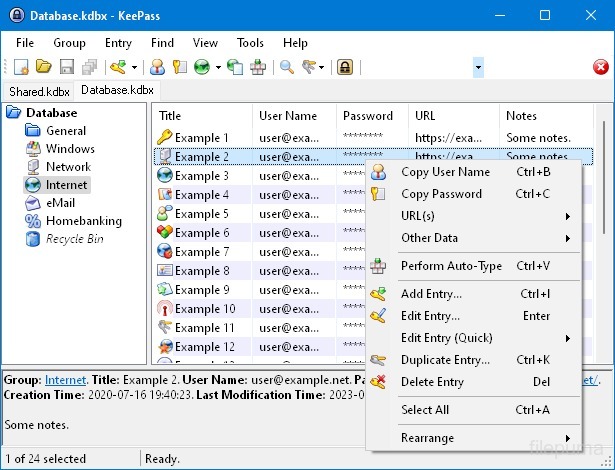


KeePassadalah pengelola kata sandi sumber terbuka yang sangat aman dan populer yang digunakan untuk menyimpan dan mengelola kata sandi, nama pengguna, dan informasi sensitif lainnya secara aman. Ini dikembangkan oleh Dominik Reichl dan tersedia untuk berbagai platform, termasuk Windows, macOS, Linux, dan perangkat seluler.
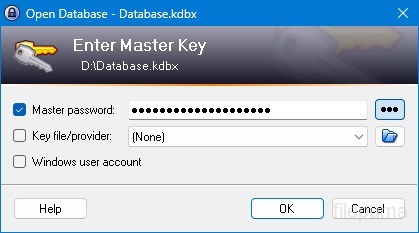
Salah satu fitur utama KeePass adalah keamanannya yang kuat. Ini menggunakan algoritma enkripsi yang kuat (misalnya, AES, Twofish) untuk melindungi data yang disimpan, memastikan bahwa hanya pengguna yang diizinkan dengan kata sandi master yang dapat mengakses kata sandi mereka. Kata sandi master berfungsi sebagai kunci utama untuk membuka database yang terenkripsi.
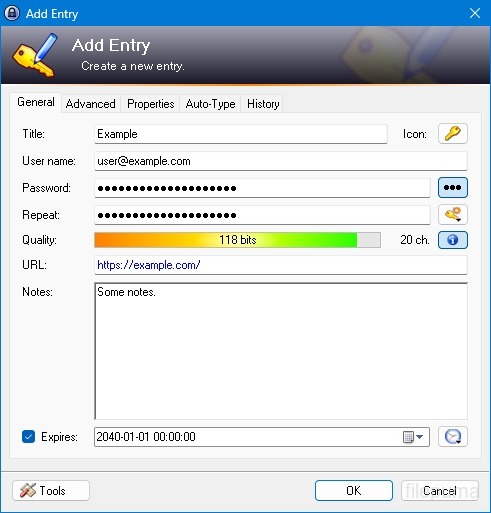
KeePass menyediakan antarmuka yang ramah pengguna, memungkinkan pengguna untuk mengatur kata sandi mereka dengan cara yang terstruktur menggunakan folder dan kategori. Selain itu, ia menawarkan alat pembuat kata sandi, membantu pengguna membuat kata sandi yang kompleks dan unik untuk meningkatkan keamanan.
Perangkat lunak ini memungkinkan pengguna untuk dengan cepat mencari kata sandi tertentu dan menawarkan fitur seperti auto-type, yang memungkinkan pengisian otomatis formulir login untuk situs web dan aplikasi. KeePass juga mendukung plugin, memperluas fungsinya dan membuatnya dapat disesuaikan untuk memenuhi kebutuhan individu.
Selain itu, KeePass menekankan portabilitas dan aksesibilitas dengan memungkinkan pengguna menyimpan database kata sandi terenkripsi mereka pada berbagai media penyimpanan, seperti drive lokal, drive USB, atau penyimpanan awan. Ini memungkinkan pengguna untuk mengakses kata sandi mereka dari perangkat yang berbeda sambil menjaga keamanan dan privasi.
Secara keseluruhan, KeePass adalah solusi manajemen kata sandi yang andal dan aman yang membantu pengguna menjaga informasi sensitif mereka tetap teratur dan terlindungi.
Fitur Utama:
- Penyimpanan Kata Sandi yang AmanSimpan dan kelola kata sandi dengan aman.
- Enkripsi Kuat: Menggunakan enkripsi canggih untuk keamanan data.
- Master Password & Keyfile: Akses database dengan kata sandi utama yang kuat dan file kunci opsional.
- Otentikasi Dua Faktor (2FA): Menyediakan lapisan keamanan tambahan.
- Fungsi Auto-Type: Mengotomatisasi memasukkan nama pengguna dan kata sandi.
- Password Generator: Membuat kata sandi yang kuat dan acak.
- Atur Kata Sandi: Kategorikan kata sandi ke dalam grup dan subgrup.
- Pencarian & Penyaringan: Cepat temukan entri tertentu.
- Kolom KustomTambahkan informasi tambahan ke entri.
- Lampiran: Lampirkan file dengan aman ke entri kata sandi.
- Fitur Keamanan: Menawarkan opsi keamanan tambahan.
- Lintas-Platform: Dapat diakses pada berbagai sistem operasi.
- Plugin & Ekstensi: Perluas fungsionalitas dengan fitur tambahan.
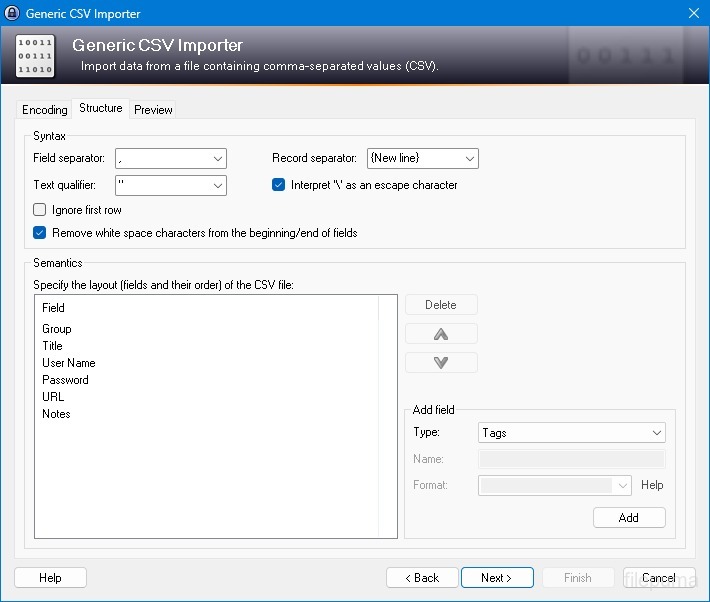
- Impor & Ekspor: Impor/ekspor kata sandi dengan mudah.
- Sinkronisasi Database: Sinkronkan database di seluruh perangkat dengan aman.
Apa yang Baru
New Features:
- New KDBX 4 file format, which supports various new features (listed below; e.g. Argon2)
- Added Argon2 key derivation function (it can be activated in the database settings dialog)
- Improved header and data authentication in KDBX 4 files (using HMAC-SHA-256, Encrypt-then-MAC scheme)
- Added ChaCha20 (RFC 7539) encryption algorithm (it can be activated as KDBX file encryption algorithm in the database settings dialog; furthermore, it supersedes Salsa20 as default for generating the inner random stream of KDBX 4 files)
- Added support for opening entry URLs with Firefox or Opera in private mode via the context menu -> 'URL(s)' -> 'Open with ... (Private)'
- Added URL override suggestions for Firefox and Opera in private mode in the URL override suggestions drop-down list in the entry dialog
- Added optional built-in global URL overrides for opening HTTP/HTTPS URLs with Firefox or Opera in private mode
- Added {PICKFIELD} placeholder, which shows a dialog to pick a field whose value will be inserted
- Added option 'Hide "Close Database" toolbar button when at most one database is opened' (turned on by default)
- Added option 'Show additional auto-type menu commands', which can be turned on to show menu commands for performing entry auto-type with some specific sequences
- Added menu command 'Selected Entry's Group' (with keyboard shortcut Ctrl+G) in 'Edit' -> 'Show Entries' (and a context menu equivalent 'Show Parent Group' in 'Selected Entries'), which opens the parent group of the currently selected entry and selects the entry again
- Added menu commands in 'Edit' -> 'Show Entries' to show entries that expire in a specific number of days (1, 2, 3) or weeks (1, 2, 4, 8) or in the future
- Added configuration option that specifies the number of days within which entries are considered to expire 'soon' (the default is 7)
- Added option for changing the alternate item background color
- When the option 'Remember key sources' is enabled, KeePass now also remembers whether a master password has been used
- Added option 'Force changing the master key the next time (once)' (in 'File' -> 'Database Settings' -> tab 'Advanced')
- Added parameters 'Window style' and 'Verb' for the 'Execute command line / URL' trigger action
- Added support for importing mSecure 3.5.5 CSV files
- Added support for importing Password Saver 4.1.2 XML files
- Added support for importing Enpass 5.3.0.1 TXT files
- Enhanced SplashID CSV import (added support for the old version 3.4, added mappings for types of the latest version, groups are now created only for categories, and types are imported as tags)
- LastPass import: added support for CSV files exported by the LastPass Chrome extension, which encodes some special characters as XML entities
- Added 'KeePass KDBX (2.34, Old Format)' export module
- Export using XSL transformation: added support for the 'xsl:output' element in XSL files
- If the global auto-type hot key is Ctrl+Alt+A and the current input locale is Polish, KeePass now shows a warning dialog (telling the user that Ctrl+Alt+A is in conflict with a system key combination producing a character)
- Added Alt+X Unicode character conversion support in rich text boxes on Unix-like systems
- For development snapshots, the 'About' dialog now shows the snapshot version (in the form 'YYMMDD')
- Plugins can provide other key derivation functions now
- The header of KDBX 4 files is extensible by plugins
- Enhanced support for developing encryption algorithm plugins
- Plugins can now store custom data in groups and entries
- Plugin data stored in the database, a group or an entry can now be inspected (and deleted) in the database maintenance dialog, the group dialog and the entry dialog, respectively
- For plugins: file closing events now contain information about whether KeePass is exiting, locking or performing a trigger action
- Added workaround for .NET handle cast overflow bug in InputLanguage.Culture
- Added workaround for Mono ignoring the Ctrl+I shortcut
- Added workaround for Mono clipboard bug
- Added workaround for Mono not focusing the default control in the entry editing dialog
- Added workaround for a Mono timer bug that caused high CPU load while showing a file save confirmation dialog
- Added Mono workaround: when running on Mac OS X, KeePass now does not try to instantiate a tray icon anymore
- Added workaround for XDoTool sending diacritic characters in incorrect case
- TrlUtil now recommends to clear the 'Unused Text' tab
Improvements:
- Improved behavior when searching entries with exclusions (terms prefixed with '-')
- Improved support for auto-typing into target windows using different keyboard layouts
- Auto-Type: improved support for keyboard layouts with keys where Shift, Caps Lock and no modifier result in 3 different characters
- Auto-Type: improved support for spacing modifier letters (U+02B0 to U+02FF)
- Global auto-type now works with target windows having empty titles
- When copying entries to the clipboard, the data package now includes custom icons used by the entries
- Unified behavior when drag&dropping a field containing a placeholder
- Improved entry edit confirmation dialog
- If the screen height is insufficient to display a dialog, the dialog's banner (if the dialog has one) is now removed to save some space.
- Some tooltips are now displayed for a longer time
- A new entry created using a template now does not include the history of the template anymore
- For empty RTF attachments, the internal data editor now by default uses the font that is specified for TXT files
- Internal data editor: added support for changing the format of mixed-format selections
- Internal data viewer and editor: null characters ('', not '0') in texts are now automatically replaced by spaces (like Notepad on Windows 10)
- Improved encoding signature handling for conversions during text attachment imports (via the 'Text Encoding' dialog)
- File transactions are not used anymore for files that have a reparse point (e.g. symbolic links)
- Improved XSL stylesheets for KDBX XML files
- The internal window manager is now thread-safe
- Improved date/time handling
- Improved button image disposal
- When synchronizing two databases, custom data (by plugins) is now merged
- When opening a database file, corrupted icon indices are now automatically replaced by default values
- Added some more entropy sources for the seed of the cryptographically secure pseudo-random number generator (environment variables, command line, full operating system version, current culture)
- ChaCha20 is now used during password generation (instead of Salsa20)
- ChaCha20 is now used as fallback process memory encryption algorithm (instead of Salsa20)
- When the encryption algorithm for a database file is unknown, the error message now shows the UUID of the algorithm
- In KDBX 4, header field lengths are now 4 bytes wide
- In KDBX 4, entry attachments are now stored in an inner, binary header (encrypted, possibly compressed), before the XML part; this reduces the database file size and improves the loading/saving performance
- In KDBX 4, the inner random stream cipher ID and key (to support process memory protection) are now stored in the inner header instead of in the outer header
- KPScript: the 'ChangeMasterKey' command now also updates the master key change date
- TrlUtil: improved validation warning dialogs
- The MSI file now requires any .NET Framework version, not a specific one
- The MSI file is now built using Visual Studio 2015
- Various code optimizations
- Minor other improvements
Bugfixes:
- When executing a {HMACOTP} placeholder, the last modification time of the corresponding entry is now updated
- Key files containing exactly 64 alphanumeric characters are now loaded as intended
Program tersedia dalam bahasa lain.
- Download Keepass
- Télécharger Keepass
- Herunterladen Keepass
- Scaricare Keepass
- ダウンロード Keepass
- Descargar Keepass
- Baixar Keepass
Ulasan Pengguna
Penilaian Pengguna
 26
26
Lisensi:
Gratis
Persyaratan:
Windows All
Bahasa:
Multi-languages
Ukuran:
2.96MB
Penerbit:
Diperbarui:
Jan 9, 2017
Bersih
Perangkat Lunak Pelaporan
Versi Terbaru
Versi Lama
Perangkat Lunak Pengembang
 Keepass 2.61.1
 RoboForm 10.0.0
 Dashlane 6.2632.0
 1Password 8.12.36
Tingkat Keamanan
Untuk menghindari potensi kerusakan pada perangkat Anda dan memastikan keamanan data dan privasi Anda, tim kami memeriksa setiap kali file instalasi baru diunggah ke server kami atau terhubung ke server jarak jauh, serta secara berkala meninjau file tersebut untuk mengkonfirmasi atau memperbarui statusnya. Berdasarkan pemeriksaan ini, kami menetapkan tingkat keamanan berikut untuk setiap file yang dapat diunduh.
 Bersih
Sangat mungkin bahwa program perangkat lunak ini bersih.
Kami memindai berkas dan URL yang terkait dengan program perangkat lunak ini di lebih dari 60 layanan antivirus terkemuka di dunia; tidak ada ancaman yang ditemukan. Dan tidak ada perangkat lunak pihak ketiga yang dibundel.
 Peringatan
Program ini disokong oleh iklan dan mungkin menawarkan untuk menginstal program pihak ketiga yang tidak diperlukan. Ini bisa termasuk toolbar, mengubah halaman beranda Anda, mesin pencari default, atau menginstal program pihak ketiga lainnya. Ini bisa jadi positif palsu, dan pengguna kami disarankan untuk berhati-hati saat menginstal dan menggunakan software ini.
 Tuna netra
Perangkat lunak ini tidak lagi tersedia untuk diunduh. Sangat mungkin bahwa program perangkat lunak ini bersifat berbahaya atau memiliki masalah keamanan atau alasan lainnya.
Kirim Laporan
Terima kasih!
Laporan Anda telah dikirim.
Kami akan meninjau permintaan Anda dan mengambil tindakan yang sesuai.
Harap dicatat bahwa Anda tidak akan menerima pemberitahuan tentang tindakan apa pun yang diambil akibat laporan ini. Kami mohon maaf atas ketidaknyamanan yang mungkin ditimbulkan.
Kami menghargai bantuan Anda dalam menjaga situs web kami tetap bersih dan aman.