
Looking for a free Mac cleaner? Try diCleaner

Beyond Compare4.2.0.22302
 무료 체험
무료 체험
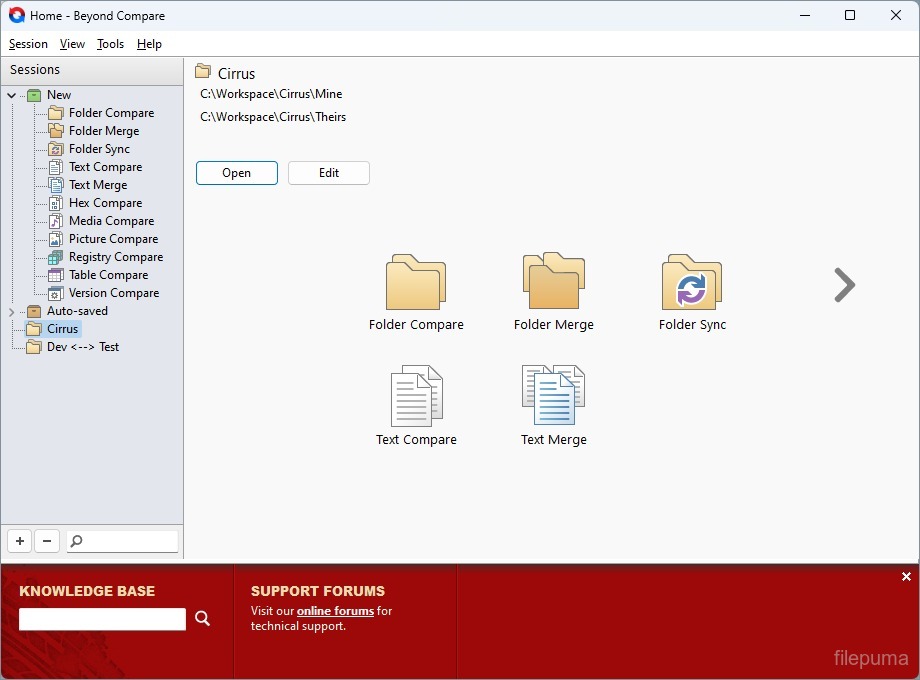
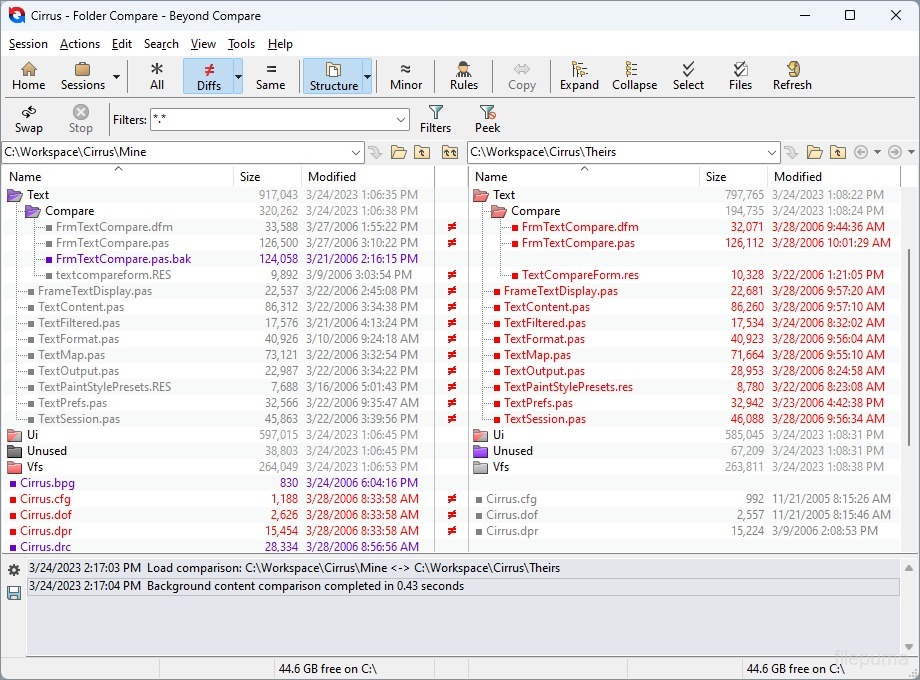
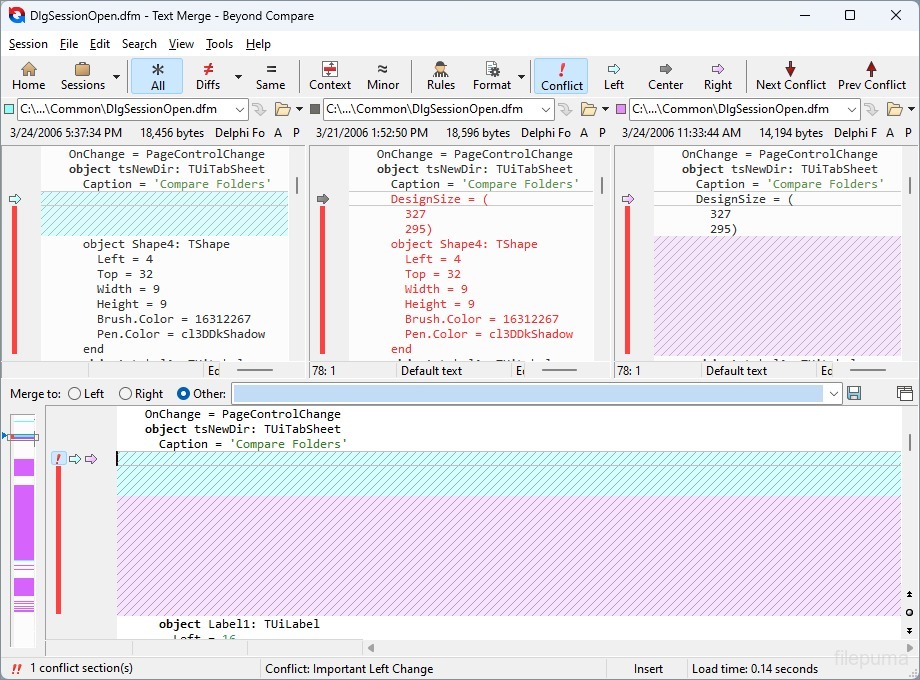
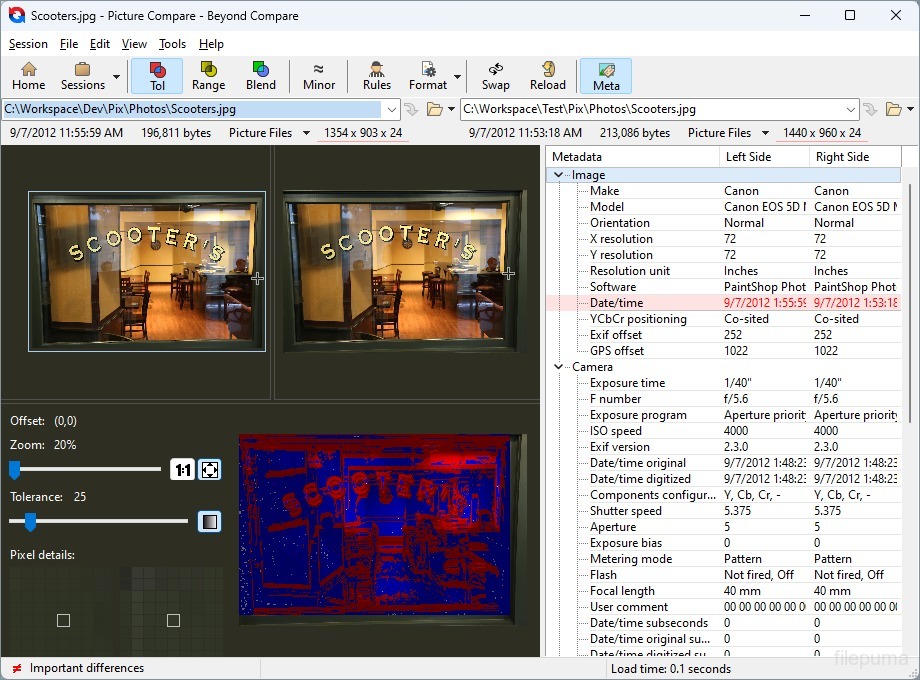
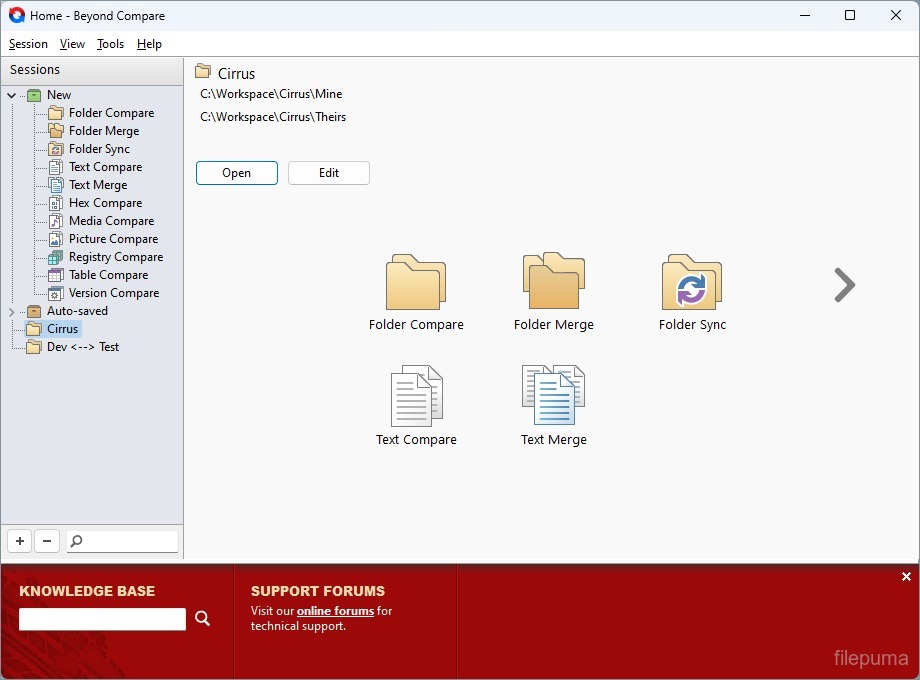


비욘드 컴페어는 Scooter Software에서 개발한 강력한 파일 및 폴더 비교 도구입니다. 사용자가 파일과 폴더를 빠르게 비교하고 변경 사항을 손쉽게 병합할 수 있도록 해줍니다. Beyond Compare는 텍스트, 바이너리, 이미지 비교를 포함한 다양한 비교 방법을 지원하여 다양한 유형의 파일에 유용합니다.
주요 기능 중 하나는 폴더를 동기화할 수 있는 기능으로, 사용자가 파일 및 폴더의 차이점을 명확하게 보고 효과적으로 관리할 수 있게 해줍니다. 또한 Git 및 SVN과 같은 버전 관리 시스템과 통합되어 있어 개발자 및 프로젝트를 공동으로 작업하는 팀에게 유용성을 높여줍니다.
Beyond Compare는 사용자 친화적인 인터페이스와 맞춤 설정을 제공하여 개인의 취향에 따라 비교 기준과 보기 옵션을 쉽게 조정할 수 있습니다. Windows, macOS, Linux 플랫폼에서 실행되어 다양한 운영 체제를 사용하는 광범위한 사용자에게 적합합니다.
Beyond Compare는 파일과 폴더를 정확하게 비교하고, 차이를 효율적으로 관리하며, 다양한 플랫폼과 환경에서 콘텐츠를 원활하게 동기화할 필요가 있는 사람들에게 가치 있는 도구입니다. 그 강력한 기능과 직관적인 디자인 덕분에 전문가와 애호가 모두에게 인기 있는 선택입니다.
주요 기능:
- 폴더 및 파일 비교: 전체 디렉토리와 개별 파일을 나란히 비교합니다.
- 3-Way Merge: 세 개의 파일 또는 폴더 간의 변경 사항을 효율적으로 병합합니다.
- 동기화: 파일 및 폴더를 서로 다른 위치에서 최신 상태로 유지하십시오. 일방향 및 양방향 동기화.
- 텍스트, 이미지, 그리고 16진수 비교: 문법 강조와 함께 텍스트 파일을 비교하고, 이미지를 픽셀 단위로 비교하며, 16진수로 이진 파일을 비교합니다.
- 폴더 병합: 폴더 간의 차이점을 지능적으로 병합합니다.
- 스크립팅 및 자동화: 내장된 스크립팅 기능을 사용하여 작업을 자동화하세요.
- 사용자 정의 가능한 보기: 차이점이 명확하게 표시되도록 사용자 지정합니다.
- 통합: Git, SVN, Mercurial과 같은 버전 제어 시스템과 통합합니다.
새로운 소식은 무엇인가요?
Notable Changes
- Windows: Added clipboard monitoring app to more easily launch comparisons from text editors. Must be enabled manually in Options dialog if upgrading from 4.1 or earlier. Requires Windows Vista or later.
- macOS: Added full Finder context menu extension on macOS 10.10 and above. Must be enabled manually from the Beyond Compare "Preferences" dialog or macOS System Preferences. May require a reboot.
- Added support for comparing JPEG/TIFF EXIF and IPTC metadata.
- Removed "Bypass disk cache during binary comparisons" option. Due to changes in hardware, operating systems, and drivers, it no longer works as originally intended.
- Upgraded Dropbox support to use v2 API. Dropbox support in v4.1.9 and earlier will stop working in June 2017.
- Added support for .lzma and .tar.lzma/.tlz archives and improved RAR support.
- macOS: Fixed scrolling behavior on macOS 10.12 Sierra and fixed Cmd+W/Esc inserting characters in a text editor rather than closing the view.
- Improved various graphics on high DPI displays and updated many icons.
Archives
- Added support for Microsoft Help 2.x archives and ext2fs/ext3fs/ext4fs disk images.
- Added support for .lzma and .tar.lzma/.tlz archives.
- Improved RAR support:
- Added support for RAR5 archives containing symlinks/junction points.
- Archives created on Unix now display Unix attributes correctly.
- Fixed CRC values for files that are split across multiple RAR volumes.
- macOS/Linux: Fixed support for RAR4 and RAR5 archives.
- Windows: Fixed support for empty folders in archives created on Unix.
- Windows: Updated UnRAR.dll to v5.40.
- Windows: Fixed issue with Total Commander packer plug-ins in 64-bit builds.
Cloud Services
- Upgraded Dropbox support to use v2 API.
- File last modified times can now be set.
- Folder last modified times are no longer reported.
- Folder listings with more than 2,000 items are now supported.
- Fixed support for Amazon S3 buckets in the us-east-2 (US East Ohio), ca-central-1 (Canada Central), eu-west-2 (EU London), and ap-south-1 (Asia Pacific Mumbai) regions and removed need to explicitly support new ones.
- Improved OneDrive authorization and error handling.
- Deleting folders on OneDrive now deletes everything in one call instead of removing everything recursively.
- Added support for connecting to Amazon S3 buckets when the requesting user doesn't have the "s3:GetBucketLocation" permission.
- Added optional "Bucket" to Amazon S3 profiles to limit the profile to that bucket and to make it more obvious how to connect when the user doesn't have the ListAllBuckets permission.
- Windows: Added support connecting to Amazon S3 over IPv6.
Command Line
- macOS: Fixed failure to load new comparisons from the command line after opening many previously without closing Beyond Compare.
- Linux: Fixed minimized window not restoring when launching a new comparison.
- Linux: Fixed main menu corruption when loading a second tab from the command line.
File Formats
- Added "JavaScript Source" text format.
- Updated "Python Scripts" text format keywords.
- Fixed "COBOL Source" text format's line number matching.
- Windows: Fixed MS Word extraction when running on a system with the Korean locale.
- Improved "SQL" text format to detect identifiers that start with "#".
File Views
- Added font resizing via Ctrl+Shift+MouseWheel and added "Increase Display Font Size", "Decrease Display Font Size", and "Reset Display Font Size" commands.
- Added support for adding/removing Unicode byte-order marks in the "Save As" dialog.
- macOS: Fixed newly opened views inserting characters when using keyboard shortcuts (Esc, Cmd+W, etc).
- Fixed performance issue when the merge output file is on a slow network drive.
- "Save As" now has a default filename when saving the initially empty side of an orphan comparison launched from a folder comparison if the parent folder exists.
- Fixed file open permissions to prevent unexpected behavior when files are open for writing by other applications.
- Fixed editors not repainting during slow saves after switching tabs.
- Fixed dimmed painting of items during horizontal scrolls in MP3, Registry, and Version Compare sessions.
Folder Compare
- Removed "Bypass disk cache during binary comparisons" option. Due to changes in hardware, operating systems, and drivers, it no longer works as originally intended.
- Fixed canceling a rules-based or binary comparison of a large pair of files caching incorrect CRC values and causing subsequent CRC or rules-based comparisons to report immediately matching contents.
- Fixed minimum column size to take margins into account.
Folder Merge
- "Compare to Output" now preserves session settings (e.g. Name Filters).
- "Merge/Sync Base Folders" now preserves more session settings.
- Fixed "Ignored" action, when merging to a separate output folder, to not copy the center file to the output.
Folder Sync
- Fixed toolbar appearing below the path edits.
FTP
- Fixed "Hide VMS versions" support for SFTP profiles.
- Fixed requesting CRC32 values over SFTP.
- Fixed Profiles dialog not updating controls when switching between FTP and SFTP profiles.
Hex Compare
- Added support for switching between the hex and ANSI parts of the editor using Tab and Shift+Tab.
Installer
- Windows: Start Menu icon is now just a single "Beyond Compare 4" item rather than a folder with the app, help file, and uninstaller (new installs only).
- Windows: Fixed automatic upgrades of a portable install writing values in the registry if there is also an existing "For All Users" install.
- Windows: Removed UACLaunch.exe from Windows installer.
Misc
- Windows: Added clipboard monitoring app to more easily launch comparisons from text editors.
- macOS: Added full Finder context menu extension on macOS 10.10 and above.
- "Duplicate Tab" now preserves clipboard contents, folder session parentage.
- Improved various graphics on high DPI displays and updated many icons.
- Fixed various high DPI issues and tweaked minimum constraints for various dialogs.
- macOS: Fixed scrolling behavior on macOS 10.12 Sierra.
- Fixed filename truncation when the whole filename doesn't fit the available space.
- Toolbar gradients are no longer used under high contrast themes.
- macOS/Linux: Fixed "Show Differences" popup button visibility and toolbar context menu checked states.
- Upgraded third party libraries.
MP3 Compare
- Improved handling for various ID3 tags.
- Changed ID3v2 tag names to match their ID3v1 counterparts.
- Disabled character based differencing for numeric values.
- Binary tags are now shown as hex digits.
- "Copy" puts binary data on the clipboard if only one item is selected and it is binary.
- Added separator lines below each row of the treeview.
Options
- Improved typing into "Extra line spacing" edit on "Tweaks" page.
Picture Compare
- Added support for comparing JPEG/TIFF EXIF and IPTC metadata.
- "Fit to Window" zooms to multiple of 100% for images smaller than 64x64.
- Improved menus for going into and out of "Full Screen" mode.
- Fixed NetPBM image handling of comments containing numbers.
- Changed order of items in "Picture Compare Info" dialog.
Registry Compare
- "Copy" puts text on the clipboard unless only one item is selected and it is binary.
- Added separator lines below each row of the treeview.
Reports
- File reports now include error messages.
- macOS/Linux: Added mouse wheel handling to "Print Preview" dialog.
- Picture Compare HTML reports now scale down large images to fit the window.
Table Compare
- Improved number handling accuracy by storing data as binary-coded decimals instead of floats.
- Added "Alignment" session settings.
- Improved typing scientific notation into "Numeric tolerance" edit.
- Windows: Updated MS Excel support.
- Fixed using regional number/date format settings, broken in 4.1.7.
Text Edit
- Added folder path of open file to dropdown for "Find in Files" folder edit.
Text Views
- macOS: Fixed Find with "Match Whole Word" always failing.
Text Compare
- macOS/Linux: Fixed thumbnail showing 1 pixel high if two comparisons are launched quickly.
- Linux: Removed non-functional "Webpages" command.
Text Merge
- Changed order of items in "Text Merge Info" dialog.
Version Compare
- Added support for comparing "Dynamic Base (ALSR)" and "NX compatible (DEP)" DLL characteristics.
- Disabled character based differencing for numeric values.
- Binary tags are now shown as hex digits.
- "Copy" puts binary data on the clipboard if only one item is selected and it is binary.
- Added separator lines below each row of the treeview.
View Patch
- Added check for external file changes.
Crashes
- Fixed MP3, Registry, Version Compare crash if Ctrl+A is pressed when line details have focus and Ctrl+A isn't used as a shortcut for a menu action.
- Windows: Fixed BCompareLite crash when opening/closing Options dialog.
- macOS: Fixed crash on startup with invalid network printer.
- macOS: Fixed hang when opening a zip file containing filenames with invalid UTF-8 sequences.
- Linux: Fixed crashes or hangs when launching multiple comparisons from the command line.
- macOS/Linux: Fixed crash when switching between Text Compare sessions in the Home view when the session overrides the default file format.
- Fixed crashes on shutdown.
다른 언어로 제공되는 프로그램
- Download Beyond Compare
- Télécharger Beyond Compare
- Herunterladen Beyond Compare
- Scaricare Beyond Compare
- ダウンロード Beyond Compare
- Descargar Beyond Compare
- Baixar Beyond Compare
사용자 리뷰
사용자 평가
 12
12
면허:
무료 체험
요구사항:
Windows All
언어들:
English
크기:
20.6MB
출판사:
업데이트됨:
May 1, 2017
깨끗한
리포트 소프트웨어
최신 버전
구버전
개발자 소프트웨어
 Beyond Compare 5.2.5
 SyncBackFree 12.1.6.0
 Wise Data Recovery 6.2.2
 IZArc 4.6
 FBackup 9.9.1044
보안 수준
장치에 잠재적인 손상이 발생하지 않도록 하고 데이터 및 개인 정보를 보호하기 위해, 저희 팀은 새로운 설치 파일이 저희 서버에 업로드되거나 원격 서버에 연결될 때마다 이를 확인하고 주기적으로 파일을 검토하여 상태를 확인하거나 업데이트합니다. 이러한 검토를 기반으로 다운로드 가능한 파일에 대해 다음과 같은 보안 수준을 설정합니다.
 깨끗한
깨끗한
이 소프트웨어 프로그램이 안전할 가능성이 높습니다.
우리는 이 소프트웨어 프로그램과 관련된 파일과 URL을 세계 60개 이상의 주요 안티바이러스 서비스에서 검사했으며, 가능한 위협은 발견되지 않았습니다. 또한 서드파티 소프트웨어가 포함되어 있지 않습니다.
 경고
경고
이 프로그램은 광고 지원을 받으며 필수는 아닌 제3자 프로그램 설치를 제안할 수 있습니다. 여기에는 툴바 설치, 홈페이지 변경, 기본 검색 엔진 변경 또는 다른 제3자 프로그램 설치가 포함될 수 있습니다. 이러한 프로그램은 오탐일 수 있으며, 사용자들은 이 소프트웨어를 설치하고 사용할 때 주의할 것을 권장합니다.
 장애인
장애인
이 소프트웨어는 더 이상 다운로드할 수 없습니다. 이 소프트웨어 프로그램은 악성일 가능성이 높거나 보안 문제 또는 기타 이유가 있을 수 있습니다.
보고서를 제출하다
감사합니다!
귀하의 보고서가 전송되었습니다.
귀하의 요청을 검토하고 적절한 조치를 취하겠습니다.
이 보고서와 관련하여 취해지는 조치에 대한 알림은 받지 않으실 것임을 알려드립니다. 이로 인해 불편을 끼쳐 드려 죄송합니다.
웹사이트를 깨끗하고 안전하게 유지하는 데 도움을 주셔서 감사합니다.