

Keepass2.35
 무료 다운로드
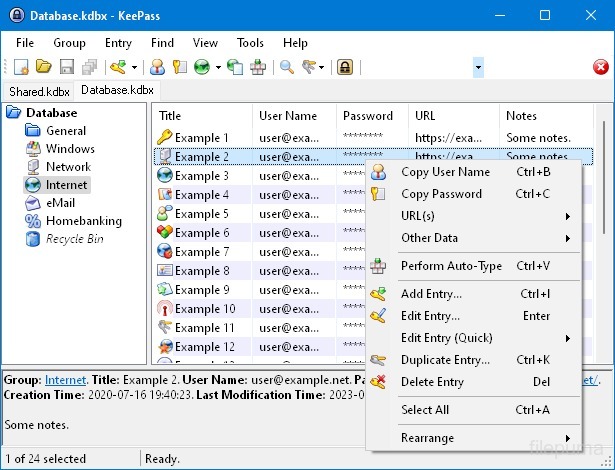


KeePassDominik Reichl이 개발한 이 오픈 소스 비밀번호 관리자는 비밀번호, 사용자 이름 및 기타 민감한 정보를 안전하게 저장하고 관리하는 데 사용되며, 다양한 플랫폼에서 사용할 수 있습니다, 포함 Windows, macOS, Linux, 및 모바일 장치.
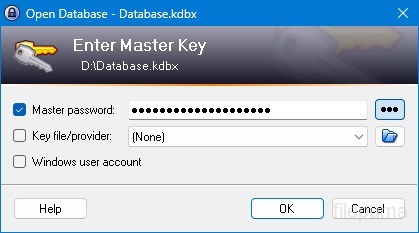
KeePass의 주요 기능 중 하나는 강력한 보안입니다. AES, Twofish와 같은 강력한 암호화 알고리즘을 사용하여 저장된 데이터를 보호하며, 마스터 비밀번호를 가진 승인된 사용자만 자신의 비밀번호에 액세스할 수 있도록 보장합니다. 마스터 비밀번호는 암호화된 데이터베이스를 여는 주요 키 역할을 합니다.
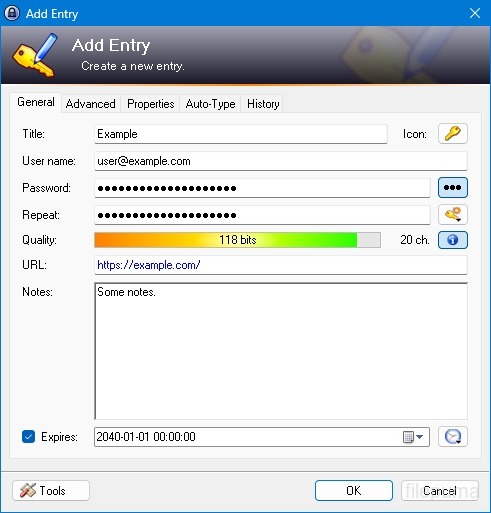
KeePass는 사용자 친화적인 인터페이스를 제공하여 사용자가 폴더와 카테고리를 사용하여 비밀번호를 구조화된 방식으로 정리할 수 있도록 합니다. 또한, 비밀번호 생성 도구를 제공하여 사용자가 보안을 강화하기 위해 복잡하고 고유한 비밀번호를 만들 수 있도록 돕습니다.
이 소프트웨어는 사용자가 특정 암호를 빠르게 검색할 수 있도록 하며, 웹사이트 및 애플리케이션의 로그인 양식을 자동으로 채워주는 자동 입력과 같은 기능을 제공합니다. KeePass는 또한 플러그인을 지원하여 기능을 확장하고 개인의 요구에 맞게 사용자 정의할 수 있습니다.
또한 KeePass는 암호화된 비밀번호 데이터를 로컬 드라이브, USB 드라이브 또는 클라우드 저장소와 같은 다양한 저장 매체에 저장할 수 있도록 하여 이동성과 접근성을 강조합니다. 이를 통해 사용자는 보안과 개인정보 보호를 유지하면서도 다양한 장치에서 비밀번호에 액세스할 수 있습니다.
전반적으로 KeePass는 사용자가 민감한 정보를 체계적으로 관리하고 보호할 수 있도록 도와주는 신뢰할 수 있고 안전한 암호 관리 솔루션입니다.
주요 기능:
- 보안 비밀번호 저장소안전하게 비밀번호를 저장하고 관리하세요.
- 강력한 암호화: 데이터 보안을 위한 고급 암호화를 사용합니다.
- 마스터 비밀번호 및 키파일강력한 마스터 암호와 선택적 키 파일로 Access 데이터베이스에 액세스하십시오.
- 이중 인증 (2FA): 추가적인 보안 계층을 제공합니다.
- 자동 입력 기능: 사용자 이름과 비밀번호 입력을 자동화합니다.
- 비밀번호 생성기: 강력하고 무작위적인 비밀번호를 생성합니다.
- 비밀번호 정리: 비밀번호를 그룹 및 하위 그룹으로 분류하십시오.
- 검색 및 필터: 특정 항목을 빠르게 찾으세요.
- 사용자 지정 필드항목에 추가 정보를 추가하세요.
- 첨부파일: 파일을 비밀번호 항목에 안전하게 첨부하세요.
- 보안 기능: 추가적인 보안 옵션을 제공합니다.
- 크로스 플랫폼: 다양한 운영 체제에서 이용 가능.
- 플러그인 및 확장 프로그램: 추가 기능으로 기능 확장.
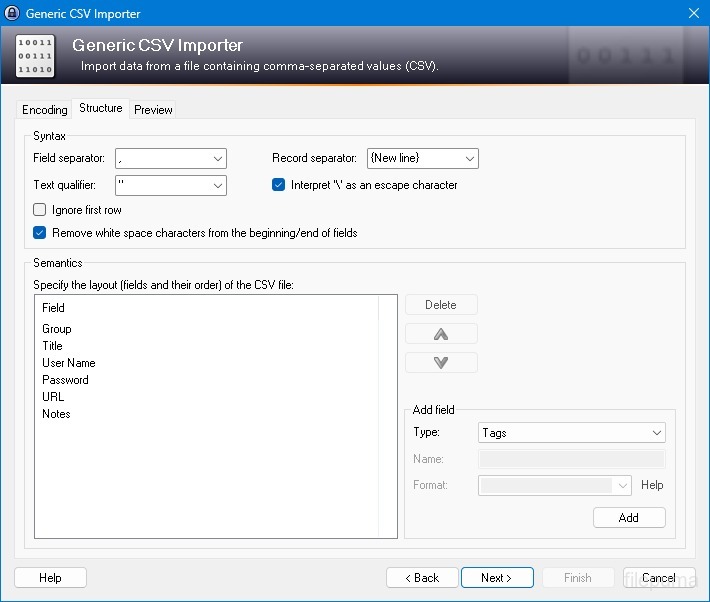
- 수입 및 수출: 비밀번호를 쉽게 가져오고 내보내기.
- 데이터베이스 동기화: 데이터베이스를 기기 간에 안전하게 동기화하십시오.
새로운 소식은 무엇인가요?
New Features:
- New KDBX 4 file format, which supports various new features (listed below; e.g. Argon2)
- Added Argon2 key derivation function (it can be activated in the database settings dialog)
- Improved header and data authentication in KDBX 4 files (using HMAC-SHA-256, Encrypt-then-MAC scheme)
- Added ChaCha20 (RFC 7539) encryption algorithm (it can be activated as KDBX file encryption algorithm in the database settings dialog; furthermore, it supersedes Salsa20 as default for generating the inner random stream of KDBX 4 files)
- Added support for opening entry URLs with Firefox or Opera in private mode via the context menu -> 'URL(s)' -> 'Open with ... (Private)'
- Added URL override suggestions for Firefox and Opera in private mode in the URL override suggestions drop-down list in the entry dialog
- Added optional built-in global URL overrides for opening HTTP/HTTPS URLs with Firefox or Opera in private mode
- Added {PICKFIELD} placeholder, which shows a dialog to pick a field whose value will be inserted
- Added option 'Hide "Close Database" toolbar button when at most one database is opened' (turned on by default)
- Added option 'Show additional auto-type menu commands', which can be turned on to show menu commands for performing entry auto-type with some specific sequences
- Added menu command 'Selected Entry's Group' (with keyboard shortcut Ctrl+G) in 'Edit' -> 'Show Entries' (and a context menu equivalent 'Show Parent Group' in 'Selected Entries'), which opens the parent group of the currently selected entry and selects the entry again
- Added menu commands in 'Edit' -> 'Show Entries' to show entries that expire in a specific number of days (1, 2, 3) or weeks (1, 2, 4, 8) or in the future
- Added configuration option that specifies the number of days within which entries are considered to expire 'soon' (the default is 7)
- Added option for changing the alternate item background color
- When the option 'Remember key sources' is enabled, KeePass now also remembers whether a master password has been used
- Added option 'Force changing the master key the next time (once)' (in 'File' -> 'Database Settings' -> tab 'Advanced')
- Added parameters 'Window style' and 'Verb' for the 'Execute command line / URL' trigger action
- Added support for importing mSecure 3.5.5 CSV files
- Added support for importing Password Saver 4.1.2 XML files
- Added support for importing Enpass 5.3.0.1 TXT files
- Enhanced SplashID CSV import (added support for the old version 3.4, added mappings for types of the latest version, groups are now created only for categories, and types are imported as tags)
- LastPass import: added support for CSV files exported by the LastPass Chrome extension, which encodes some special characters as XML entities
- Added 'KeePass KDBX (2.34, Old Format)' export module
- Export using XSL transformation: added support for the 'xsl:output' element in XSL files
- If the global auto-type hot key is Ctrl+Alt+A and the current input locale is Polish, KeePass now shows a warning dialog (telling the user that Ctrl+Alt+A is in conflict with a system key combination producing a character)
- Added Alt+X Unicode character conversion support in rich text boxes on Unix-like systems
- For development snapshots, the 'About' dialog now shows the snapshot version (in the form 'YYMMDD')
- Plugins can provide other key derivation functions now
- The header of KDBX 4 files is extensible by plugins
- Enhanced support for developing encryption algorithm plugins
- Plugins can now store custom data in groups and entries
- Plugin data stored in the database, a group or an entry can now be inspected (and deleted) in the database maintenance dialog, the group dialog and the entry dialog, respectively
- For plugins: file closing events now contain information about whether KeePass is exiting, locking or performing a trigger action
- Added workaround for .NET handle cast overflow bug in InputLanguage.Culture
- Added workaround for Mono ignoring the Ctrl+I shortcut
- Added workaround for Mono clipboard bug
- Added workaround for Mono not focusing the default control in the entry editing dialog
- Added workaround for a Mono timer bug that caused high CPU load while showing a file save confirmation dialog
- Added Mono workaround: when running on Mac OS X, KeePass now does not try to instantiate a tray icon anymore
- Added workaround for XDoTool sending diacritic characters in incorrect case
- TrlUtil now recommends to clear the 'Unused Text' tab
Improvements:
- Improved behavior when searching entries with exclusions (terms prefixed with '-')
- Improved support for auto-typing into target windows using different keyboard layouts
- Auto-Type: improved support for keyboard layouts with keys where Shift, Caps Lock and no modifier result in 3 different characters
- Auto-Type: improved support for spacing modifier letters (U+02B0 to U+02FF)
- Global auto-type now works with target windows having empty titles
- When copying entries to the clipboard, the data package now includes custom icons used by the entries
- Unified behavior when drag&dropping a field containing a placeholder
- Improved entry edit confirmation dialog
- If the screen height is insufficient to display a dialog, the dialog's banner (if the dialog has one) is now removed to save some space.
- Some tooltips are now displayed for a longer time
- A new entry created using a template now does not include the history of the template anymore
- For empty RTF attachments, the internal data editor now by default uses the font that is specified for TXT files
- Internal data editor: added support for changing the format of mixed-format selections
- Internal data viewer and editor: null characters ('', not '0') in texts are now automatically replaced by spaces (like Notepad on Windows 10)
- Improved encoding signature handling for conversions during text attachment imports (via the 'Text Encoding' dialog)
- File transactions are not used anymore for files that have a reparse point (e.g. symbolic links)
- Improved XSL stylesheets for KDBX XML files
- The internal window manager is now thread-safe
- Improved date/time handling
- Improved button image disposal
- When synchronizing two databases, custom data (by plugins) is now merged
- When opening a database file, corrupted icon indices are now automatically replaced by default values
- Added some more entropy sources for the seed of the cryptographically secure pseudo-random number generator (environment variables, command line, full operating system version, current culture)
- ChaCha20 is now used during password generation (instead of Salsa20)
- ChaCha20 is now used as fallback process memory encryption algorithm (instead of Salsa20)
- When the encryption algorithm for a database file is unknown, the error message now shows the UUID of the algorithm
- In KDBX 4, header field lengths are now 4 bytes wide
- In KDBX 4, entry attachments are now stored in an inner, binary header (encrypted, possibly compressed), before the XML part; this reduces the database file size and improves the loading/saving performance
- In KDBX 4, the inner random stream cipher ID and key (to support process memory protection) are now stored in the inner header instead of in the outer header
- KPScript: the 'ChangeMasterKey' command now also updates the master key change date
- TrlUtil: improved validation warning dialogs
- The MSI file now requires any .NET Framework version, not a specific one
- The MSI file is now built using Visual Studio 2015
- Various code optimizations
- Minor other improvements
Bugfixes:
- When executing a {HMACOTP} placeholder, the last modification time of the corresponding entry is now updated
- Key files containing exactly 64 alphanumeric characters are now loaded as intended
다른 언어로 제공되는 프로그램
- Download Keepass
- Télécharger Keepass
- Herunterladen Keepass
- Scaricare Keepass
- ダウンロード Keepass
- Descargar Keepass
- Baixar Keepass
사용자 리뷰
사용자 평가
 26
26
면허:
자유로운
요구사항:
Windows All
언어들:
Multi-languages
크기:
2.96MB
출판사:
업데이트됨:
Jan 9, 2017
깨끗한
리포트 소프트웨어
최신 버전
구버전
개발자 소프트웨어
 Keepass 2.61.1
 RoboForm 10.0.0
 Dashlane 6.2632.0
 1Password 8.12.36
보안 수준
장치에 잠재적인 손상이 발생하지 않도록 하고 데이터 및 개인 정보를 보호하기 위해, 저희 팀은 새로운 설치 파일이 저희 서버에 업로드되거나 원격 서버에 연결될 때마다 이를 확인하고 주기적으로 파일을 검토하여 상태를 확인하거나 업데이트합니다. 이러한 검토를 기반으로 다운로드 가능한 파일에 대해 다음과 같은 보안 수준을 설정합니다.
 깨끗한
깨끗한
이 소프트웨어 프로그램이 안전할 가능성이 높습니다.
우리는 이 소프트웨어 프로그램과 관련된 파일과 URL을 세계 60개 이상의 주요 안티바이러스 서비스에서 검사했으며, 가능한 위협은 발견되지 않았습니다. 또한 서드파티 소프트웨어가 포함되어 있지 않습니다.
 경고
경고
이 프로그램은 광고 지원을 받으며 필수는 아닌 제3자 프로그램 설치를 제안할 수 있습니다. 여기에는 툴바 설치, 홈페이지 변경, 기본 검색 엔진 변경 또는 다른 제3자 프로그램 설치가 포함될 수 있습니다. 이러한 프로그램은 오탐일 수 있으며, 사용자들은 이 소프트웨어를 설치하고 사용할 때 주의할 것을 권장합니다.
 장애인
장애인
이 소프트웨어는 더 이상 다운로드할 수 없습니다. 이 소프트웨어 프로그램은 악성일 가능성이 높거나 보안 문제 또는 기타 이유가 있을 수 있습니다.
보고서를 제출하다
감사합니다!
귀하의 보고서가 전송되었습니다.
귀하의 요청을 검토하고 적절한 조치를 취하겠습니다.
이 보고서와 관련하여 취해지는 조치에 대한 알림은 받지 않으실 것임을 알려드립니다. 이로 인해 불편을 끼쳐 드려 죄송합니다.
웹사이트를 깨끗하고 안전하게 유지하는 데 도움을 주셔서 감사합니다.