

VirtualBox5.0.4
 무료 다운로드
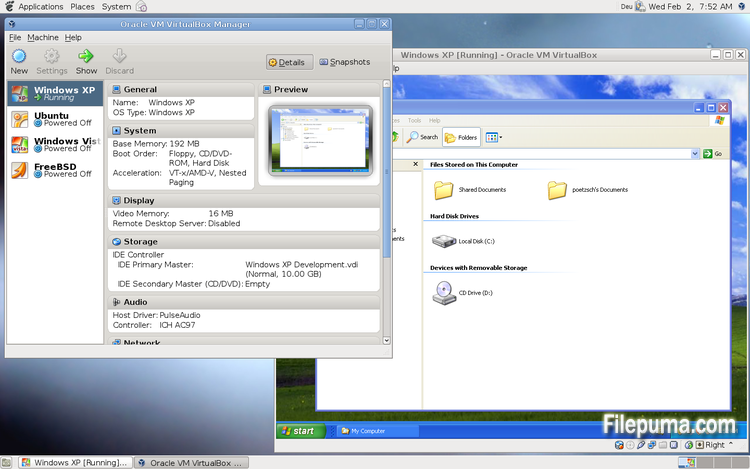
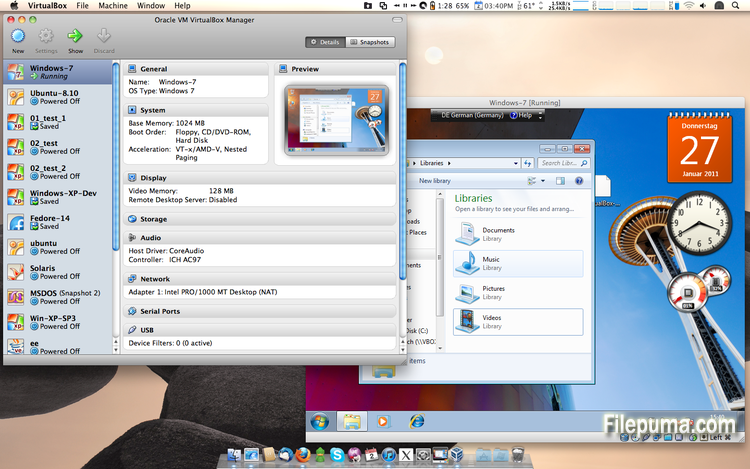
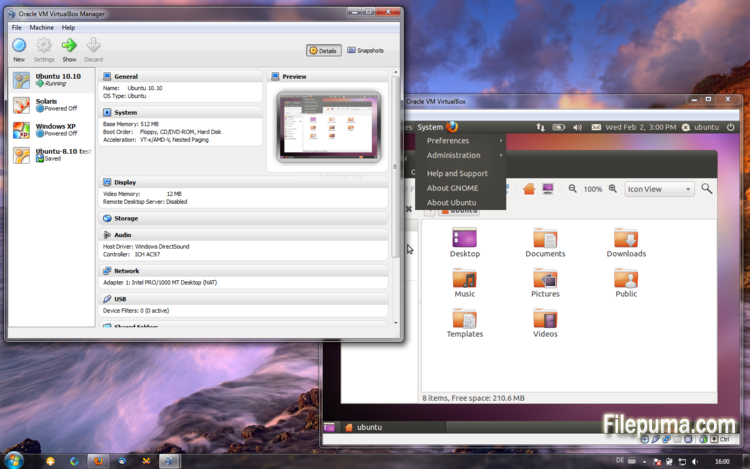


VirtualBox무료 오픈 소스 가상화 소프트웨어로, 사용자가 컴퓨터에서 가상 머신을 생성하고 실행할 수 있게 해줍니다. VirtualBox를 사용하면, 사용자는 별도의 파티션을 생성하거나 추가 하드웨어를 구매하지 않고도 컴퓨터에서 여러 운영 체제를 동시에 설치하고 실행할 수 있습니다.
VirtualBox의 주요 장점 중 하나는 사용이 간편하다는 점입니다. 가상화 기술에 대한 경험이 거의 없거나 전혀 없는 사람들도 설치 및 설정이 간단합니다. VirtualBox는 또한 각 가상 머신에 할당된 RAM, CPU 코어 및 하드 디스크 공간의 양을 조정할 수 있는 다양한 사용자 정의 옵션을 제공합니다.
VirtualBox의 또 다른 훌륭한 기능은 다양한 운영 체제와의 호환성입니다. 사용자는 가상 머신에 Windows, Linux, macOS 및 많은 다른 운영 체제를 설치하고 실행할 수 있습니다. 이것은 개발자, 소프트웨어 테스터, 그리고 단일 컴퓨터에서 여러 운영 체제를 실행해야 하는 모든 사람에게 훌륭한 도구가 됩니다.
VirtualBox는 USB 장치, 공유 폴더 및 네트워크 어댑터 지원과 같은 다양한 고급 기능을 제공합니다. 이러한 기능은 가상 라우터, 방화벽 및 서버와 같이 하드웨어 또는 네트워크 리소스를 요구하는 소프트웨어를 실행할 수 있게 해줍니다.
VirtualBox는 여러 운영 체제를 단일 컴퓨터에서 실행해야 하는 사람들에게 훌륭한 선택입니다. 사용의 용이성, 다양한 맞춤화 옵션, 다양한 운영 체제와의 호환성 덕분에 개발자, IT 전문가 및 가정 사용자 모두에게 다재다능하고 강력한 도구입니다.
주요 기능:
- 크로스 플랫폼 호환성.
- 직관적인 그래픽 사용자 인터페이스.
- 다양한 운영 체제 지원.
- 호스트 운영 체제와의 매끄러운 통합.
- 스냅샷과 클론.
- 네트워킹 기능.
- 가상 장치 지원.
- 추가 기능을 위한 익스텐션 팩.
새로운 소식은 무엇인가요?
- VMM: fixed an issue with Windows 10 guest kernel debugging over the network for Hyper-V paravirtualized VMs
- VMM: fixed a bug which prevented reading the saved state of the 'PATM' unit from VirtualBox 4.3.x (bug #14512)
- GUI: changed default OS type for Windows from Windows XP to Windows 7
- GUI: added another pre-defined guest screen resolution (bug #14384)
- GUI: fixed update check which was broken due to changing the location of the root certificates (bug #13096)
- GUI: fixed issues with synchronization of Caps lock / Num lock / Scroll lock on Windows hosts (bug #14302)
- GUI: don't crash during VM shutdown if 2D video acceleration and 3D support are enabled (Mac OS X hosts only)
- GUI: several seamless fixes for certain X11 window managers, also when used in multi-screen setups
- GUI: Log window size, position and cursor-position fixes
- Audio: fixed playing leftover/deprecated audio samples
- Audio: fixed playing audio after suspending the host (5.0 regression; Linux hosts using the ALSA backend)
- Audio: fixed playing short audio samples which were chopped off formerly
- Audio: fixed distortions on OS X when the sample rate of the guest stream and host device don't match
- Storage: fixed raw disk access and flat VMDK image access which would be always opened readonly (5.0.2 regression; bugs #14425, #14461)
- Storage: fixed initial encryption of VDI images after they were compacted (bug #14496)
- VGA: fix for certain graphics modes (bug #14516)
- NAT: don't freeze while the VM is paused if the network attachment mode is changed from/to NAT with activated port forwarding
- OVF: fixed duplicate USB controller entries in exported OVA/OVF (bug #14462)
- Shared Folders: fixed a path separator issue (bug #14434)
- Drag and drop: fixed crashes on OS X hosts when doing host-to-guest transfers
- VBoxManage: another attempt to not deny changing the network adapter type at VM runtime (5.0 regression; bug #14308)
- VBoxManage: fixed broken guestcontrol
list command (5.0 regression) - VBoxManage: fixed broken Guest Control stdout/stderr output (5.0 regression)
- Mac OS X hosts: fixed remaining problems with activated SMAP (Broadwell and later; bug #14412)
- Mac OS X hosts: fixed broken 3D support (5.0.2 regression; bug #14476)
- Linux hosts: Linux 4.2 fix
- Linux hosts: don't crash on older Linux distributions if the DBus service isn't running (bug #14543)
- Windows hosts: fixed the VERR_LDR_MISMATCH_NATIVE error message (bug #14420)
- Windows hosts: fix for Windows 10 build 10525 and later (bug #14502)
- Windows hosts: fixed network adapter enumeration on Windows 10 (bug #14437)
- Windows hosts: prevent intermittent host network disconnects during VM start/shutdown with bridged networking (bug #14500)
- Windows Additions: fixed the call to the memory allocation function (bug #14415)
- Linux Additions: be more forgiving if the compilation of the vboxvideo module fails (bug #14547)
- X11 Additions: fixed a number of small issues with dynamic resizing and full-screen and seamless modes.
다른 언어로 제공되는 프로그램
- Download VirtualBox
- Télécharger VirtualBox
- Herunterladen VirtualBox
- Scaricare VirtualBox
- ダウンロード VirtualBox
- Descargar VirtualBox
- Baixar VirtualBox
사용자 리뷰
사용자 평가
 101
101
면허:
자유로운
요구사항:
Windows All
언어들:
Multi-languages
크기:
111MB
출판사:
업데이트됨:
Sep 15, 2015
깨끗한
리포트 소프트웨어
최신 버전
구버전
개발자 소프트웨어
 VirtualBox 7.2.18
 Adobe Air 51.3.3.1
 Java Runtime Environment (32bit) 8 Update 501
 Java Runtime Environment (64bit) 8 Update 501
 Java Development Kit (64bit) 8 Update 501
 Python (64bit) 3.14.7
보안 수준
장치에 잠재적인 손상이 발생하지 않도록 하고 데이터 및 개인 정보를 보호하기 위해, 저희 팀은 새로운 설치 파일이 저희 서버에 업로드되거나 원격 서버에 연결될 때마다 이를 확인하고 주기적으로 파일을 검토하여 상태를 확인하거나 업데이트합니다. 이러한 검토를 기반으로 다운로드 가능한 파일에 대해 다음과 같은 보안 수준을 설정합니다.
 깨끗한
깨끗한
이 소프트웨어 프로그램이 안전할 가능성이 높습니다.
우리는 이 소프트웨어 프로그램과 관련된 파일과 URL을 세계 60개 이상의 주요 안티바이러스 서비스에서 검사했으며, 가능한 위협은 발견되지 않았습니다. 또한 서드파티 소프트웨어가 포함되어 있지 않습니다.
 경고
경고
이 프로그램은 광고 지원을 받으며 필수는 아닌 제3자 프로그램 설치를 제안할 수 있습니다. 여기에는 툴바 설치, 홈페이지 변경, 기본 검색 엔진 변경 또는 다른 제3자 프로그램 설치가 포함될 수 있습니다. 이러한 프로그램은 오탐일 수 있으며, 사용자들은 이 소프트웨어를 설치하고 사용할 때 주의할 것을 권장합니다.
 장애인
장애인
이 소프트웨어는 더 이상 다운로드할 수 없습니다. 이 소프트웨어 프로그램은 악성일 가능성이 높거나 보안 문제 또는 기타 이유가 있을 수 있습니다.
보고서를 제출하다
감사합니다!
귀하의 보고서가 전송되었습니다.
귀하의 요청을 검토하고 적절한 조치를 취하겠습니다.
이 보고서와 관련하여 취해지는 조치에 대한 알림은 받지 않으실 것임을 알려드립니다. 이로 인해 불편을 끼쳐 드려 죄송합니다.
웹사이트를 깨끗하고 안전하게 유지하는 데 도움을 주셔서 감사합니다.