

VirtualBox4.3.0
 Gratis Download
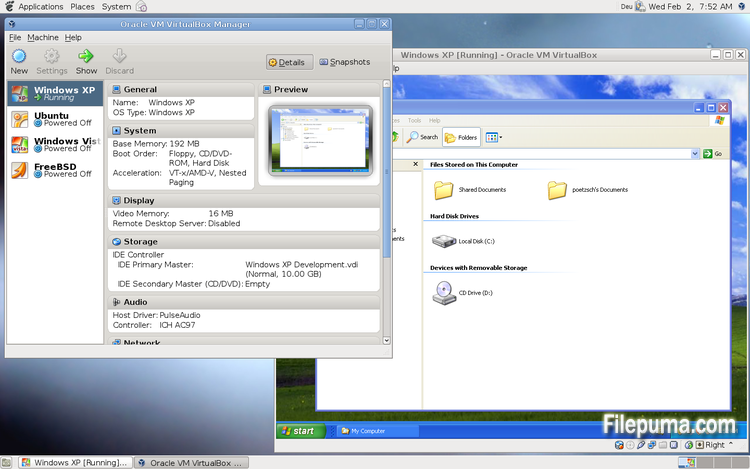
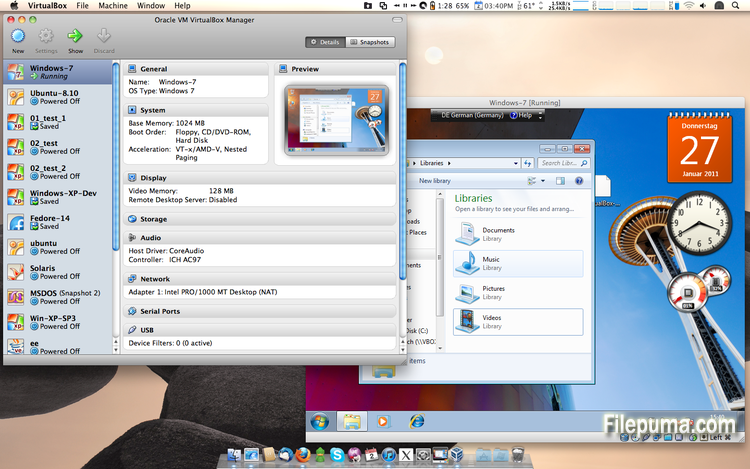
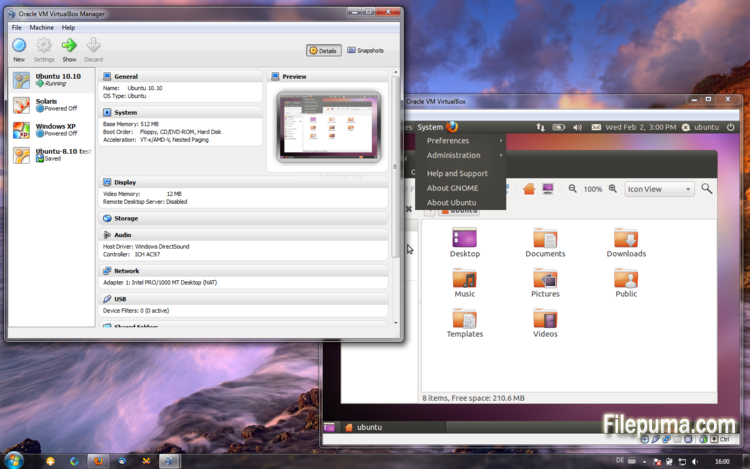


VirtualBoxis een gratis en open-source virtualisatiesoftware waarmee gebruikers virtuele machines kunnen maken en uitvoeren op hun computers. Met VirtualBox kunnen gebruikers meerdere besturingssystemen tegelijkertijd op hun computer installeren en uitvoeren zonder aparte partities te hoeven maken of extra hardware te kopen.
Een van de belangrijkste voordelen van VirtualBox is de gebruiksvriendelijkheid. Het is eenvoudig te installeren en in te stellen, zelfs voor degenen die weinig of geen ervaring hebben met virtualisatietechnologie. VirtualBox biedt ook een breed scala aan aanpassingsmogelijkheden, waaronder de mogelijkheid om de hoeveelheid RAM, CPU-kernen en harde schijfruimte die aan elke virtuele machine wordt toegewezen, aan te passen.
Een ander geweldig kenmerk van VirtualBox is de compatibiliteit met een breed scala aan besturingssystemen. Gebruikers kunnen Windows, Linux, macOS en vele andere besturingssystemen installeren en draaien op hun virtuele machines. Dit maakt het een uitstekend hulpmiddel voor ontwikkelaars, softwaretesters en iedereen die meerdere besturingssystemen op één computer moet draaien.
VirtualBox biedt ook een reeks geavanceerde functies, zoals ondersteuning voor USB-apparaten, gedeelde mappen en netwerkadapters. Deze functies maken het mogelijk om software uit te voeren die hardware- of netwerkbronnen vereist, zoals virtuele routers, firewalls en servers.
VirtualBox is een uitstekende keuze voor iedereen die meerdere besturingssystemen op één computer moet draaien. De gebruiksvriendelijkheid, het brede scala aan aanpassingsmogelijkheden en de compatibiliteit met veel verschillende besturingssystemen maken het een veelzijdig en krachtig hulpmiddel voor ontwikkelaars, IT-professionals en thuisgebruikers.
Belangrijk Kenmerk:
- Compatibiliteit tussen verschillende platforms.
- Intuïtieve grafische gebruikersinterface.
- Ondersteuning voor verschillende besturingssystemen.
- Naadloze integratie met het host besturingssysteem.
- Snapshots en clones.
- Netwerkmogelijkheden.
- Ondersteuning voor virtueel apparaat.
- Uitbreidingspakketten voor extra functionaliteit.
Wat is nieuw?
This version is a major update. The following major new features were added:
- VMM: major rewrite of the VT-x code and the AMD-V code including many bug fixes and performance improvements (for example bug #9659)
- VMM: introduced a lightweight instruction interpreter for situations not handled by hardware virtualization
- GUI: extended messaging mechanism (new non-modal popup overlays used to show non-critical warnings and provide user with additional information)
- GUI: keyboard shortcuts management (input page of global preferences extended with possibility to edit general keyboard shortcuts for VirtualBox Manager and Virtual Machine)
- GUI: video capturing support (bug #4766)
- Added USB touch device emulation
- Added experimental support for webcam passthrough complementing USB passthrough (see the manual for more information)
- Added SCSI CD-ROM emulation, including boot support
- VRDP: support for IPv6
- Guest Control: guest sessions now are running in dedicated, impersonated session processes (needs at least Guest Additions 4.3 installed)
- Guest Control: implemented IGuestFile support
- NAT: experimental virtual router mode: several VMs are attached to the same internal network and share one NAT service (see the manual for more information)
In addition, the following items were fixed and/or added:
- VMM: significantly improved performance of NetWare 5.x/6.x guests on host systems without nested paging support
- VMM: fixed losing host NMIs while in VT-x guest-context
- VMM: changed order of actions in emulated task switch (bug #10532)
- VMM: allow to activate VT-x while in SMX mode and provide more information if that is not possible
- GUI: update check uses https
- GUI: numerous minor internal cleanups and bug fixes
- GUI: HID LEDs synchronization when switching between guest window(s) and host (Mac OS X hosts only)
- GUI, VBoxManage: when unregistering a VM, also unregister the hard disk images which are used exclusively (bug #10311)
- GUI: use the number of physical presented processor cores instead of the number of logical processor cores to check if the users assigned too many virtual CPUs to the guest
- Snapshots: made live snapshots work again (bug #9255)
- Teleportation: made it work again (bug #9455)
- Storage: implemented AHA-154x compatibility mode in the emulated BusLogic SCSI HBA
- Storage: significantly improved performance of large ATAPI PIO transfers (BeOS, Minix 3 guests affected)
- Storage: added floppy formatting emulation (NB: cannot be used to change existing media geometry)
- Settings: global and per-VM default frontend configuration, useful to select the use of alternative VM frontends
- Settings: limit depth of snapshot tree to 250 levels, as more will lead to decreased performance and may trigger crashes
- Settings: the per-VM hwvirtextexcl setting has been replaced by a global hwvirtexclusive property
- Main: new event queue implementation which does not use the host's native event queue for processing VirtualBox events anymore
- Main: eliminate the use of SysV semaphores on all host OSes other than Windows, namely Linux, Solaris and Mac OS X, with the consequence that no system reconfiguration is needed to run more than approximately 100 VMs
- Main: use the XDG standard configuration folder instead of .VirtualBox on systems where it is appropriate (bug #5099)
- Main: extension pack framework can now support loading HGCM modules, contributed by Jeff Westphal
- VBoxManage: list more information about hard disk/DVD/floppy media, and support the --long option to show really all available details
- VBoxManage: added support for optional command line parameters for the automatic Guest Additions update
- VBoxManage: added support for listing active guest sessions, guest processes and/or guest files via guestcontrol list
- VBoxManage: added support for closing active guest sessions via guestcontrol session close --session-id
| --session-name | --all - VBoxManage: added support for terminating active guest processes via guestcontrol
process kill|close|terminate --session-id
| --session-name or guestcontrol [p[s]]kill --session-id... | --session-name ... - VBoxManage: added support for watching guest sessions via guestcontrol watch
- VBoxManage: added modifyvm --triplefaultreset to make the VM reset on triple fault instead of triggering a Guru Meditation (see the manual for more information)
- 3D support: several fixes
- 3D support: several fixes for Mac OS X hosts
- OVF: several fixes
- Extpack Installer: make it work if the file is located in a folder with special characters
- Keyboard: fix for reporting key sequences like Ctrl+Alt+Del for the USB keyboard emulation
- Shared Clipboard/X11: support for BMP-format images, contributed by François Revol
- Mac OS X hosts: limited support for Mac OS X 10.9 (Mavericks)
- Mac OS X hosts: use a launchd script instead of the deprecated StartupItem mechanism (bug #8940)
- Windows hosts: don't cause massive DPC latency (only on certain hosts; still needs improving; bug #6242)
- Windows hosts: consider symlinks when retrieving volume information (bug #11962)
- Windows hosts: fixed an issue with USB2 devices being inaccessible when plugged into USB 3.0 ports
- Windows Additions: fixed misbehavior with guest display power management (WDDM driver only; bug #11170)
- Windows Additions: fixed memory leak caused by WTSQuerySessionInformation() on Windows 2000 guests (bug #12072)
- Windows Additions: ability to track guest user idle times through the newly introduced event IGuestUserStateChangedEvent
- Linux Additions: fixed udev detection in the init script with Linux 3.x kernels
Programma beschikbaar in andere talen
- Download VirtualBox
- Télécharger VirtualBox
- Herunterladen VirtualBox
- Scaricare VirtualBox
- ダウンロード VirtualBox
- Descargar VirtualBox
- Baixar VirtualBox
Gebruikersbeoordelingen
Gebruikersbeoordeling
 101
101
Licentie:
Vrij
Vereisten:
Windows All
Talen:
Multi-languages
Grootte:
102MB
Uitgever:
Bijgewerkt:
Oct 15, 2013
Schoon
Rapportsoftware
Nieuwste versie
Oude versies
Ontwikkelaarsoftware
 VirtualBox 7.2.18
 Adobe Air 51.3.3.1
 Java Runtime Environment (32bit) 8 Update 501
 Java Runtime Environment (64bit) 8 Update 501
 Java Development Kit (64bit) 8 Update 501
 Python (64bit) 3.14.7
Beveiligingsniveaus
Om eventuele schade aan uw apparaat te voorkomen en de veiligheid van uw gegevens en privacy te waarborgen, controleert ons team elke keer wanneer een nieuw installatiebestand naar onze servers wordt geüpload of aan een externe server wordt gekoppeld, en beoordeelt het bestand periodiek om de status te bevestigen of bij te werken. Op basis van deze controles stellen we de volgende veiligheidsniveaus in voor alle downloadbare bestanden.
 Schoon
Het is zeer waarschijnlijk dat dit softwareprogramma schoon is.
We hebben bestanden en URL's die aan dit softwareprogramma zijn gekoppeld gescand in meer dan 60 van 's werelds toonaangevende antivirusdiensten; er zijn geen mogelijke bedreigingen gevonden. En er is geen software van derden gebundeld.
 Waarschuwing
Dit programma wordt ondersteund door advertenties en kan aanbieden om programma's van derden te installeren die niet vereist zijn. Dit kan een werkbalk, het wijzigen van je startpagina, de standaard zoekmachine of het installeren van andere programma's van derden omvatten. Dit kunnen valse positieven zijn, en onze gebruikers worden aangeraden voorzichtig te zijn bij het installeren en gebruiken van deze software.
 Gehandicapt
Deze software is niet langer beschikbaar voor download. Het is zeer waarschijnlijk dat dit softwareprogramma kwaadwillig is of veiligheidsproblemen of andere redenen heeft.
Dien een rapport in
Dank je wel!
Je rapport is verstuurd.
We zullen uw verzoek beoordelen en passende maatregelen nemen.
Houd er rekening mee dat u geen notificatie zult ontvangen over enige actie die is ondernomen vanwege dit rapport. Onze excuses voor het ongemak dat dit kan veroorzaken.
We waarderen je hulp bij het schoon en veilig houden van onze website.