

Keepass2.35
 Darmowe pobieranie
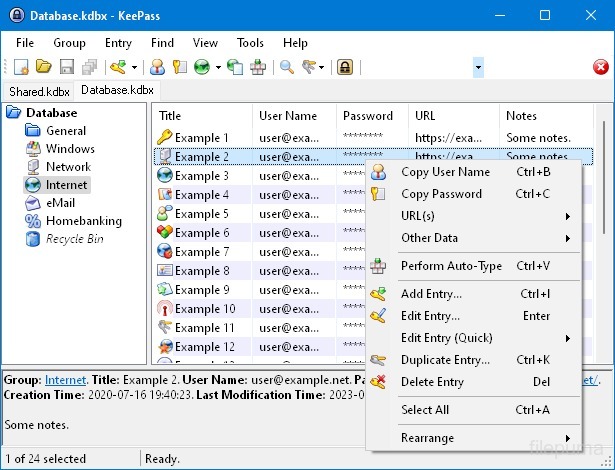


KeePassto wysoko bezpieczny i popularny menedżer haseł typu open-source, używany do przechowywania i zarządzania hasłami, nazwami użytkowników i innymi poufnymi informacjami w bezpieczny sposób. Został opracowany przez Dominika Reichla i jest dostępny na różne platformy, w tym Windows, macOS, Linux oraz urządzenia mobilne.
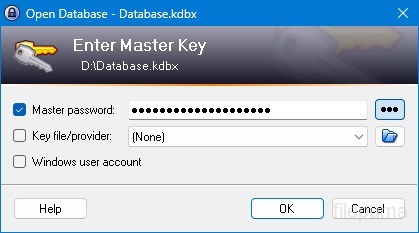
Jedną z kluczowych cech KeePass jest jego solidne zabezpieczenie. Wykorzystuje silne algorytmy szyfrowania (np. AES, Twofish) do ochrony przechowywanych danych, zapewniając, że tylko autoryzowani użytkownicy z hasłem głównym mogą uzyskać dostęp do swoich haseł. Hasło główne służy jako klucz główny do odblokowania zaszyfrowanej bazy danych.
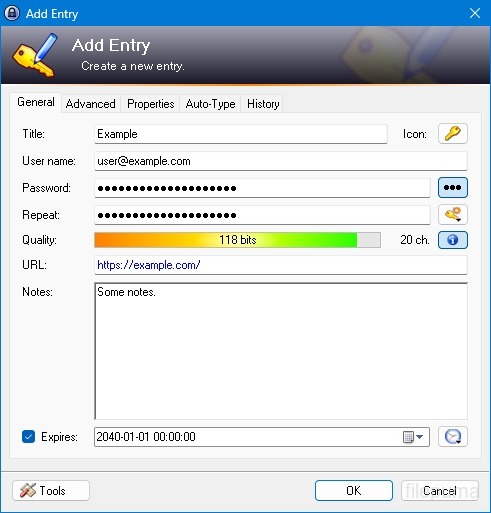
KeePass zapewnia przyjazny interfejs, umożliwiając użytkownikom organizowanie swoich haseł w uporządkowany sposób za pomocą folderów i kategorii. Dodatkowo oferuje narzędzia do generowania haseł, pomagając użytkownikom tworzyć skomplikowane i unikalne hasła w celu zwiększenia bezpieczeństwa.
Oprogramowanie umożliwia użytkownikom szybkie wyszukiwanie określonych haseł i oferuje funkcje takie jak auto-type, które pozwala na automatyczne wypełnianie formularzy logowania na stronach internetowych i w aplikacjach. KeePass wspiera również wtyczki, rozszerzając jego funkcjonalność i umożliwiając dostosowanie do indywidualnych potrzeb.
Ponadto KeePass kładzie nacisk na przenośność i dostępność, umożliwiając użytkownikom przechowywanie ich zaszyfrowanej bazy danych haseł na różnych nośnikach, takich jak dyski lokalne, dyski USB lub cloud storage. To pozwala użytkownikom na dostęp do swoich haseł z różnych urządzeń, zachowując bezpieczeństwo i prywatność.
Ogólnie rzecz biorąc, KeePass to niezawodne i bezpieczne rozwiązanie do zarządzania hasłami, które pomaga użytkownikom utrzymać ich wrażliwe informacje w porządku i chronione.
Kluczowe funkcje:
- Bezpieczne przechowywanie hasełBezpiecznie przechowuj i zarządzaj hasłami.
- Silne szyfrowanie: Używa zaawansowanego szyfrowania dla bezpieczeństwa danych.
- Hasło główne i plik klucza: Uzyskaj dostęp do bazy danych z silnym hasłem głównym i opcjonalnym plikiem klucza.
- Uwierzytelnianie dwuskładnikowe (2FA)Zapewnia dodatkową warstwę bezpieczeństwa.
- Funkcjonalność Auto-TypeAutomatyzuje wprowadzanie nazw użytkowników i haseł.
- Generator haseł: Tworzy silne, losowe hasła.
- Organizuj hasła: Kategoryzuj hasła na grupy i podgrupy.
- Wyszukaj i filtruj: Szybko znajdź konkretne wpisy.
- Pola niestandardowe: Dodaj dodatkowe informacje do wpisów.
- Załączniki: Bezpiecznie dołączaj pliki do wpisów z hasłami.
- Funkcje zabezpieczeń: Oferuje dodatkowe opcje zabezpieczeń.
- Wieloplatformowy: Dostępne na różnych systemach operacyjnych.
- Wtyczki i rozszerzeniaRozszerz funkcjonalność o dodatkowe funkcje.
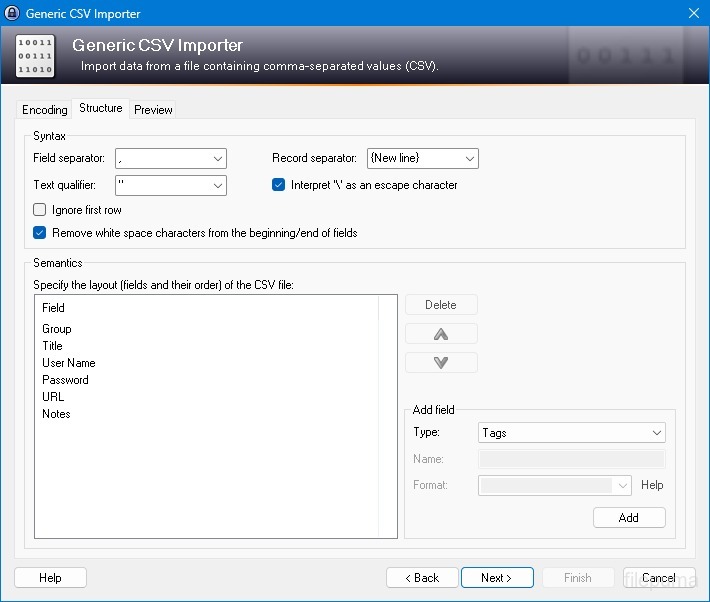
- Import & Export: Łatwe importowanie/eksportowanie haseł.
- Synchronizacja bazy danych: Zsynchronizuj bazę danych między urządzeniami w bezpieczny sposób.
Co nowego?
New Features:
- New KDBX 4 file format, which supports various new features (listed below; e.g. Argon2)
- Added Argon2 key derivation function (it can be activated in the database settings dialog)
- Improved header and data authentication in KDBX 4 files (using HMAC-SHA-256, Encrypt-then-MAC scheme)
- Added ChaCha20 (RFC 7539) encryption algorithm (it can be activated as KDBX file encryption algorithm in the database settings dialog; furthermore, it supersedes Salsa20 as default for generating the inner random stream of KDBX 4 files)
- Added support for opening entry URLs with Firefox or Opera in private mode via the context menu -> 'URL(s)' -> 'Open with ... (Private)'
- Added URL override suggestions for Firefox and Opera in private mode in the URL override suggestions drop-down list in the entry dialog
- Added optional built-in global URL overrides for opening HTTP/HTTPS URLs with Firefox or Opera in private mode
- Added {PICKFIELD} placeholder, which shows a dialog to pick a field whose value will be inserted
- Added option 'Hide "Close Database" toolbar button when at most one database is opened' (turned on by default)
- Added option 'Show additional auto-type menu commands', which can be turned on to show menu commands for performing entry auto-type with some specific sequences
- Added menu command 'Selected Entry's Group' (with keyboard shortcut Ctrl+G) in 'Edit' -> 'Show Entries' (and a context menu equivalent 'Show Parent Group' in 'Selected Entries'), which opens the parent group of the currently selected entry and selects the entry again
- Added menu commands in 'Edit' -> 'Show Entries' to show entries that expire in a specific number of days (1, 2, 3) or weeks (1, 2, 4, 8) or in the future
- Added configuration option that specifies the number of days within which entries are considered to expire 'soon' (the default is 7)
- Added option for changing the alternate item background color
- When the option 'Remember key sources' is enabled, KeePass now also remembers whether a master password has been used
- Added option 'Force changing the master key the next time (once)' (in 'File' -> 'Database Settings' -> tab 'Advanced')
- Added parameters 'Window style' and 'Verb' for the 'Execute command line / URL' trigger action
- Added support for importing mSecure 3.5.5 CSV files
- Added support for importing Password Saver 4.1.2 XML files
- Added support for importing Enpass 5.3.0.1 TXT files
- Enhanced SplashID CSV import (added support for the old version 3.4, added mappings for types of the latest version, groups are now created only for categories, and types are imported as tags)
- LastPass import: added support for CSV files exported by the LastPass Chrome extension, which encodes some special characters as XML entities
- Added 'KeePass KDBX (2.34, Old Format)' export module
- Export using XSL transformation: added support for the 'xsl:output' element in XSL files
- If the global auto-type hot key is Ctrl+Alt+A and the current input locale is Polish, KeePass now shows a warning dialog (telling the user that Ctrl+Alt+A is in conflict with a system key combination producing a character)
- Added Alt+X Unicode character conversion support in rich text boxes on Unix-like systems
- For development snapshots, the 'About' dialog now shows the snapshot version (in the form 'YYMMDD')
- Plugins can provide other key derivation functions now
- The header of KDBX 4 files is extensible by plugins
- Enhanced support for developing encryption algorithm plugins
- Plugins can now store custom data in groups and entries
- Plugin data stored in the database, a group or an entry can now be inspected (and deleted) in the database maintenance dialog, the group dialog and the entry dialog, respectively
- For plugins: file closing events now contain information about whether KeePass is exiting, locking or performing a trigger action
- Added workaround for .NET handle cast overflow bug in InputLanguage.Culture
- Added workaround for Mono ignoring the Ctrl+I shortcut
- Added workaround for Mono clipboard bug
- Added workaround for Mono not focusing the default control in the entry editing dialog
- Added workaround for a Mono timer bug that caused high CPU load while showing a file save confirmation dialog
- Added Mono workaround: when running on Mac OS X, KeePass now does not try to instantiate a tray icon anymore
- Added workaround for XDoTool sending diacritic characters in incorrect case
- TrlUtil now recommends to clear the 'Unused Text' tab
Improvements:
- Improved behavior when searching entries with exclusions (terms prefixed with '-')
- Improved support for auto-typing into target windows using different keyboard layouts
- Auto-Type: improved support for keyboard layouts with keys where Shift, Caps Lock and no modifier result in 3 different characters
- Auto-Type: improved support for spacing modifier letters (U+02B0 to U+02FF)
- Global auto-type now works with target windows having empty titles
- When copying entries to the clipboard, the data package now includes custom icons used by the entries
- Unified behavior when drag&dropping a field containing a placeholder
- Improved entry edit confirmation dialog
- If the screen height is insufficient to display a dialog, the dialog's banner (if the dialog has one) is now removed to save some space.
- Some tooltips are now displayed for a longer time
- A new entry created using a template now does not include the history of the template anymore
- For empty RTF attachments, the internal data editor now by default uses the font that is specified for TXT files
- Internal data editor: added support for changing the format of mixed-format selections
- Internal data viewer and editor: null characters ('', not '0') in texts are now automatically replaced by spaces (like Notepad on Windows 10)
- Improved encoding signature handling for conversions during text attachment imports (via the 'Text Encoding' dialog)
- File transactions are not used anymore for files that have a reparse point (e.g. symbolic links)
- Improved XSL stylesheets for KDBX XML files
- The internal window manager is now thread-safe
- Improved date/time handling
- Improved button image disposal
- When synchronizing two databases, custom data (by plugins) is now merged
- When opening a database file, corrupted icon indices are now automatically replaced by default values
- Added some more entropy sources for the seed of the cryptographically secure pseudo-random number generator (environment variables, command line, full operating system version, current culture)
- ChaCha20 is now used during password generation (instead of Salsa20)
- ChaCha20 is now used as fallback process memory encryption algorithm (instead of Salsa20)
- When the encryption algorithm for a database file is unknown, the error message now shows the UUID of the algorithm
- In KDBX 4, header field lengths are now 4 bytes wide
- In KDBX 4, entry attachments are now stored in an inner, binary header (encrypted, possibly compressed), before the XML part; this reduces the database file size and improves the loading/saving performance
- In KDBX 4, the inner random stream cipher ID and key (to support process memory protection) are now stored in the inner header instead of in the outer header
- KPScript: the 'ChangeMasterKey' command now also updates the master key change date
- TrlUtil: improved validation warning dialogs
- The MSI file now requires any .NET Framework version, not a specific one
- The MSI file is now built using Visual Studio 2015
- Various code optimizations
- Minor other improvements
Bugfixes:
- When executing a {HMACOTP} placeholder, the last modification time of the corresponding entry is now updated
- Key files containing exactly 64 alphanumeric characters are now loaded as intended
Program dostępny w innych językach.
- Download Keepass
- Télécharger Keepass
- Herunterladen Keepass
- Scaricare Keepass
- ダウンロード Keepass
- Descargar Keepass
- Baixar Keepass
Opinie użytkowników
Ocena użytkownika
 26
26
Licencja:
Darmowy
Wymagania:
Windows All
Języki:
Multi-languages
Rozmiar:
2.96MB
Wydawca:
Zaktualizowane:
Jan 9, 2017
Czysty
Zgłoś oprogramowanie
Najowsza wersja
Stare wersje
Oprogramowanie dewelopera
 Keepass 2.61.1
 RoboForm 10.0.0
 Dashlane 6.2632.0
 1Password 8.12.36
Poziomy bezpieczeństwa
Aby uniknąć potencjalnych szkód dla Twojego urządzenia i zapewnić bezpieczeństwo Twoich danych oraz prywatności, nasz zespół sprawdza za każdym razem, gdy nowy plik instalacyjny jest przesyłany na nasze serwery lub łączony z zdalnym serwerem, a także okresowo przegląda ten plik, aby potwierdzić lub zaktualizować jego status. Na podstawie tych kontroli ustalamy następujące poziomy bezpieczeństwa dla wszelkich plików do pobrania.
 Czysty
Bardzo prawdopodobne jest, że ten program software'owy jest czysty.
Skanowaliśmy pliki i adresy URL związane z tym programem w ponad 60 wiodących na świecie usługach antywirusowych; nie znaleziono żadnych możliwych zagrożeń. Nie ma także oprogramowania firm trzecich dołączonego do instalacji.
 Ostrzeżenie
Ten program jest wspierany przez reklamy i może oferować zainstalowanie programów stron trzecich, które nie są wymagane. Mogą one obejmować pasek narzędzi, zmianę strony startowej, domyślnej wyszukiwarki lub instalację innych programów stron trzecich. Mogą to być fałszywe pozytywy, a naszym użytkownikom zaleca się ostrożność przy instalacji i korzystaniu z tego oprogramowania.
 Niepełnosprawny
Ten program nie jest już dostępny do pobrania. Jest bardzo prawdopodobne, że ten program jest złośliwy lub ma problemy z bezpieczeństwem lub inne przyczyny.
Złóż raport
Dziękuję!
Twój raport został wysłany.
Dokonamy przeglądu twojej prośby i podejmiemy odpowiednie kroki.
Proszę zauważyć, że nie otrzymasz powiadomienia o żadnych działaniach podjętych w związku z tym raportem. Przepraszamy za wszelkie niedogodności, jakie może to spowodować.
Doceniamy Twoją pomoc w utrzymaniu naszej strony internetowej czystej i bezpiecznej.