

VirtualBox4.3.8
 Darmowe pobieranie
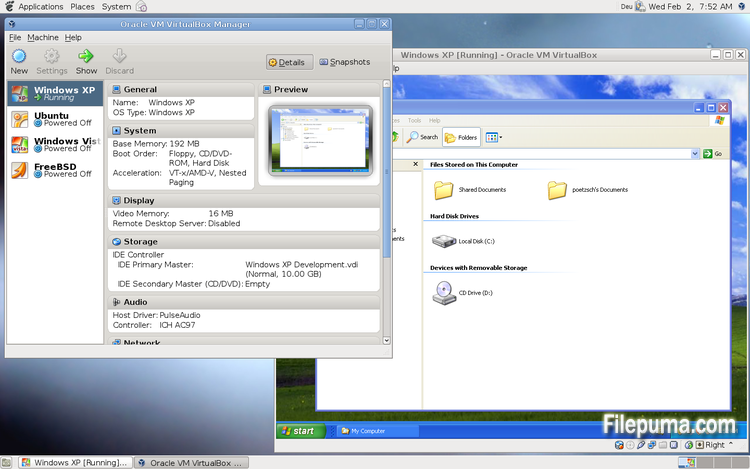
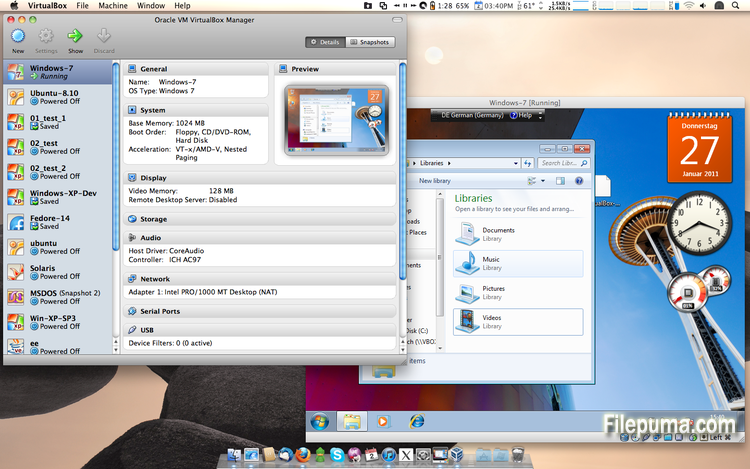
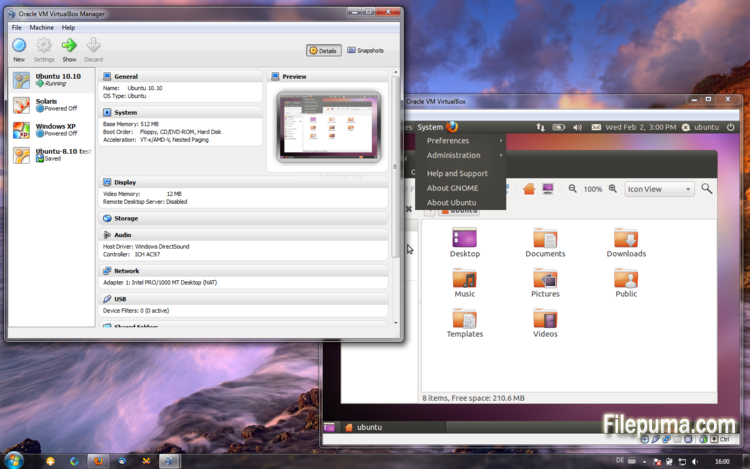


VirtualBoxjest darmowym i otwartoźródłowym oprogramowaniem do wirtualizacji, które pozwala użytkownikom tworzyć i uruchamiać maszyny wirtualne na ich komputerach. Dzięki VirtualBox użytkownicy mogą instalować i uruchamiać wiele systemów operacyjnych jednocześnie na swoim komputerze, bez konieczności tworzenia oddzielnych partycji lub kupowania dodatkowego sprzętu.
Jedną z głównych zalet VirtualBox jest jego łatwość obsługi. Jest prosty w instalacji i konfiguracji, nawet dla osób z niewielkim doświadczeniem lub bez doświadczenia w technologii wirtualizacji. VirtualBox oferuje również szeroki zakres opcji dostosowywania, w tym możliwość regulacji ilości pamięci RAM, rdzeni CPU oraz przestrzeni na dysku twardym przypisanych do każdej maszyny wirtualnej.
Kolejną świetną cechą VirtualBox jest jego kompatybilność z szeroką gamą systemów operacyjnych. Użytkownicy mogą instalować i uruchamiać Windows, Linux, macOS oraz wiele innych systemów operacyjnych na swoich maszynach wirtualnych. To czyni go doskonałym narzędziem dla deweloperów, testerów oprogramowania i każdego, kto potrzebuje uruchamiać wiele systemów operacyjnych na jednym komputerze.
VirtualBox oferuje również szereg zaawansowanych funkcji, takich jak obsługa urządzeń USB, foldery udostępnione i adaptery sieciowe. Te funkcje umożliwiają uruchamianie oprogramowania, które wymaga zasobów sprzętowych lub sieciowych, takich jak wirtualne routery, zapory ogniowe i serwery.
VirtualBox to doskonały wybór dla każdego, kto potrzebuje uruchamiać wiele systemów operacyjnych na jednym komputerze. Jego łatwość obsługi, szeroki zakres opcji dostosowywania i kompatybilność z wieloma różnymi systemami operacyjnymi czynią go wszechstronnym i potężnym narzędziem dla deweloperów, specjalistów IT oraz użytkowników domowych.
Kluczowa cecha:
- Kompatybilność międzyplatformowa.
- Intuicyjny graficzny interfejs użytkownika.
- Wsparcie dla różnych systemów operacyjnych.
- Bezproblemowa integracja z hostującym systemem operacyjnym.
- Migawki i klony.
- Możliwości sieciowe.
- Obsługa wirtualnych urządzeń.
- Pakiety rozszerzeń dla dodatkowej funkcjonalności.
Co nowego?
- VMM: more work on improving the emulation of certain MSR registers
- VMM: fixed a VERR_INVALID_RPL Guru Meditation when booting certain guests
- VMM: experimental support for SSE 4.1 / SSE 4.2 passthrough, see the manual for more information how to enable it
- VMM: fix for recent Linux kernels with software virtualization
- GUI: experimental HID LEDs synchronization for Windows hosts, see the manual for more information
- GUI: warn the user if the Oracle Extension Pack is not installed and the user tries to activate the remote display feature
- GUI: make sure that a minimized guest (using mini toolbar in fullscreen/seamless mode) keeps the minimized state
- GUI: popup banner's "do not show this message again" check-box replaced with corresponding button
- GUI: network adapter cables can now be connected/disconnected directly through the running virtual machine Devices / Network menu a Network status-bar indicator
- GUI: the new VM wizard now proposes 64-bit guests on 64-bit hosts by default; better distinction between 32-bit OS types 64-bit OS types
- GUI: better error message if appliance import fails
- GUI: allow to set host-combination to 'None' using the Global settings / Input page
- GUI: don't switch the guest to a black screen during online snapshot merge
- VBoxManage: when exporting an appliance, support the suppression of MAC addresses, which means they will be always recreated on import, avoiding duplicate MAC addresses for VMs which are imported several times
- AHCI: fixed a VM hang during suspend under certain circumstances
- AHCI: fixed a VM hang during online snapshot merge under certain circumstances
- AHCI: fixed a bug which resulted in Windows XP guest hangs if a SATA CDROM is attached
- AHCI: fixed a Guru Meditation under certain conditions
- AHCI: ejecting a CD/DVD medium failed under certain conditions
- AHCI: disk hotplugging fixes
- NAT: transparent handling of host sleep/resume and network configuration changes if the dnsproxy is enabled or if the hostresolver is used
- NAT: fixed crash and misbehaviour under some circumstances with ICMP packets having TTL=1
- NAT Network: fixed IPv6 reassembly
- NAT Network: ping proxy implemented
- OVF: fixed reading of the OVF 0.9 section element
- OVF: several fixes
- 3D: several fixes, multiscreen fixes
- 3D: include 3D content in captured videos
- 3D: include 3D content in captured screenshot
- VGA: proper handling of legacy graphics modes if the Guest Additions are active
- USB: fixed crash during isochronous transfer under rare circumstances
- BIOS: better disk geometry handling of SCSI drives
- API: fix crashes in Java API clients using the XPCOM binding, happened with output parameters only
- VBoxSVC: documented the handling of host power management events (see the manual for more information) and added an extradata item for configuring the handling of the battery-low event
- VBoxSVC: fixed a bug which could trigger a crash if a VM snapshot was restored the second time and the VM has associated bandwidth groups
- VBoxSVC: properly detect ifconfig if located in /bin
- Shared Folders: fixed a failure to restore transient shared folders when starting a VM from a saved state
- Mac OS X hosts: fixed issue when the application icon was frozen in the dock if the bridging interface was not connected to a network
- Linux hosts: also consider the physical package ID when determining the number of physical CPU cores
- Linux hosts / guests: don't warn in kernel log if memory allocation fails
- Solaris hosts: fixed the autostart SMF script
- Windows hosts: fixes for non-ANSI code page user names and similar environment contents
- Windows hosts / guests: fixed setting and using a guest user's process environment variables (relevant for Guest Control)
- Windows Additions: fixed handle leaks in VBoxTray
- Windows Additions: fixed a crash while detecting active guest users
- Windows Additions: fixed restoring backed up D3D files on XPDM -> WDDM upgrade
- Guest Control: fixed setting and using a guest user's process environment variables
- Linux Additions: support Enterprise Linux 6.5 kernels
- Linux Additions: fixed CPU hot-remove on newer Linux kernels
- Linux / Solaris Additions: don't automount a shared folder which is already mounted
- X11 Additions: support X.Org Server 1.15
Program dostępny w innych językach.
- Download VirtualBox
- Télécharger VirtualBox
- Herunterladen VirtualBox
- Scaricare VirtualBox
- ダウンロード VirtualBox
- Descargar VirtualBox
- Baixar VirtualBox
Opinie użytkowników
Ocena użytkownika
 101
101
Licencja:
Darmowy
Wymagania:
Windows All
Języki:
Multi-languages
Rozmiar:
102MB
Wydawca:
Zaktualizowane:
Feb 26, 2014
Czysty
Zgłoś oprogramowanie
Najowsza wersja
Stare wersje
Oprogramowanie dewelopera
 VirtualBox 7.2.18
 Adobe Air 51.3.3.1
 Java Runtime Environment (32bit) 8 Update 501
 Java Runtime Environment (64bit) 8 Update 501
 Java Development Kit (64bit) 8 Update 501
 Python (64bit) 3.14.7
Poziomy bezpieczeństwa
Aby uniknąć potencjalnych szkód dla Twojego urządzenia i zapewnić bezpieczeństwo Twoich danych oraz prywatności, nasz zespół sprawdza za każdym razem, gdy nowy plik instalacyjny jest przesyłany na nasze serwery lub łączony z zdalnym serwerem, a także okresowo przegląda ten plik, aby potwierdzić lub zaktualizować jego status. Na podstawie tych kontroli ustalamy następujące poziomy bezpieczeństwa dla wszelkich plików do pobrania.
 Czysty
Bardzo prawdopodobne jest, że ten program software'owy jest czysty.
Skanowaliśmy pliki i adresy URL związane z tym programem w ponad 60 wiodących na świecie usługach antywirusowych; nie znaleziono żadnych możliwych zagrożeń. Nie ma także oprogramowania firm trzecich dołączonego do instalacji.
 Ostrzeżenie
Ten program jest wspierany przez reklamy i może oferować zainstalowanie programów stron trzecich, które nie są wymagane. Mogą one obejmować pasek narzędzi, zmianę strony startowej, domyślnej wyszukiwarki lub instalację innych programów stron trzecich. Mogą to być fałszywe pozytywy, a naszym użytkownikom zaleca się ostrożność przy instalacji i korzystaniu z tego oprogramowania.
 Niepełnosprawny
Ten program nie jest już dostępny do pobrania. Jest bardzo prawdopodobne, że ten program jest złośliwy lub ma problemy z bezpieczeństwem lub inne przyczyny.
Złóż raport
Dziękuję!
Twój raport został wysłany.
Dokonamy przeglądu twojej prośby i podejmiemy odpowiednie kroki.
Proszę zauważyć, że nie otrzymasz powiadomienia o żadnych działaniach podjętych w związku z tym raportem. Przepraszamy za wszelkie niedogodności, jakie może to spowodować.
Doceniamy Twoją pomoc w utrzymaniu naszej strony internetowej czystej i bezpiecznej.