

VirtualBox5.0.0-101573
 Свободная загрузка
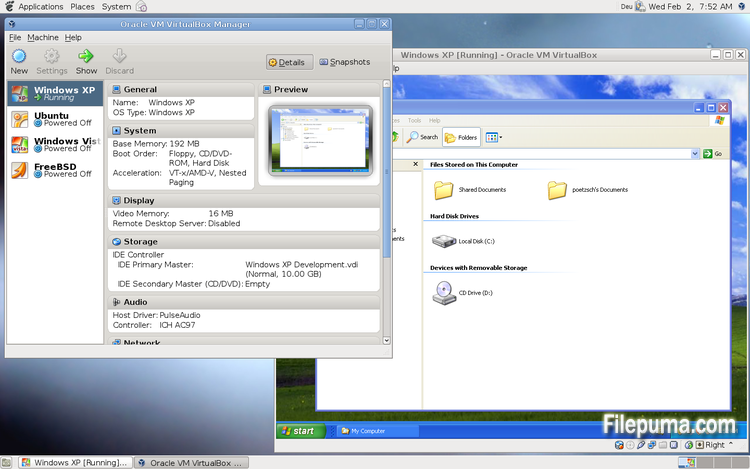
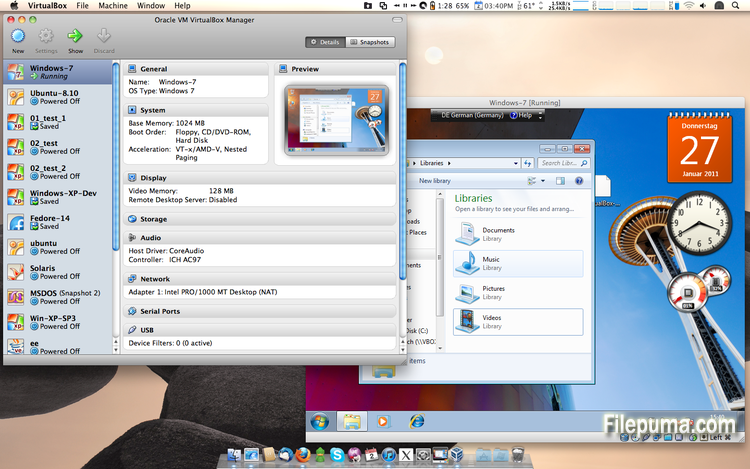
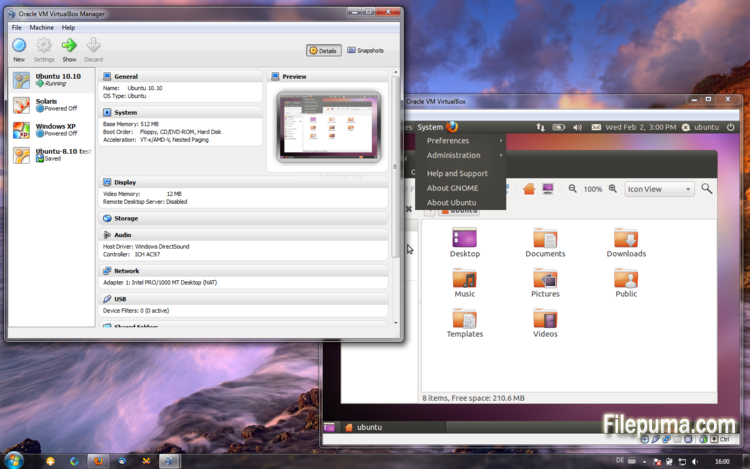


VirtualBoxявляется бесплатным и открытым программным обеспечением виртуализации, которое позволяет пользователям создавать и запускать виртуальные машины на своих компьютерах. С VirtualBox пользователи могут устанавливать и запускать несколько операционных систем одновременно на своем компьютере, не создавая отдельные разделы или покупая дополнительное оборудование.
Одним из основных преимуществ VirtualBox является его простота использования. Он прост в установке и настройке, даже для тех, кто имеет небольшой или совсем не имеет опыта работы с технологиями виртуализации. VirtualBox также предлагает широкий набор параметров настройки, включая возможность регулировки объема оперативной памяти, количества процессорных ядер и объема места на жестком диске, выделенных для каждой виртуальной машины.
Еще одной отличной особенностью VirtualBox является его совместимость с широким спектром операционных систем. Пользователи могут установить и запускать Windows, Linux, macOS и многие другие операционные системы на своих виртуальных машинах. Это делает его отличным инструментом для разработчиков, тестировщиков программного обеспечения и всех, кому нужно запускать несколько операционных систем на одном компьютере.
VirtualBox также предлагает ряд расширенных функций, таких как поддержка USB-устройств, общих папок и сетевых адаптеров. Эти функции позволяют запускать программное обеспечение, которое требует аппаратных или сетевых ресурсов, таких как виртуальные маршрутизаторы, брандмауэры и серверы.
VirtualBox — это отличный выбор для любого, кому нужно запускать несколько операционных систем на одном компьютере. Его простота в использовании, широкий спектр вариантов настройки и совместимость с множеством различных операционных систем делают его универсальным и мощным инструментом для разработчиков, IT-специалистов и домашних пользователей.
Ключевая особенность:
- Кроссплатформенная совместимость.
- Интуитивно понятный графический интерфейс.
- Поддержка различных операционных систем.
- Бесшовная интеграция с основной операционной системой.
- Снимки и клоны.
- Сетевые возможности.
- Поддержка виртуальных устройств.
- Пакеты расширений для дополнительной функциональности.
Что нового?
- Paravirtualization support for Windows and Linux guests to improve time-keeping accuracy and performance (see the manual for more information)
- Make more instruction set extensions available to the guest when running with hardware-assisted virtualization and nested paging. Among others this includes: SSE 4.1, SSE4.2, AVX, AVX-2, AES-NI, POPCNT, RDRAND and RDSEED
- xHCI Controller to support USB 3 devices (see the manual for more information)
- Drag and drop support (bidirectional) for Windows, Linux and Solaris guests
- Disk image encryption (see the manual for more information)
- VMs can now be started in separate mode. The VM process is started headless while the frontend runs as a separate process which can be terminated without stopping the VM.
- GUI: VM guest-content scaling support (including 3D acceleration)
- GUI: New User Interface settings page for customizing status-bar, menu-bar and guest-content scaling
- GUI: New Encryption settings tab for customizing encryption options for disk images
- GUI: HiDPI support including application icons and optional unscaled HiDPI output on Mac OS X (including 3D acceleration)
- GUI: Hotplugging support for SATA disks
- New, modular audio architecture for providing a better abstraction of the host audio backends
- Support for the NDIS6 networking framework on Windows (default on Vista and later)
In addition, the following items were fixed and/or added:
- VMM: improved timing on Solaris hosts with older VT-x hosts without preemption timers
- VMM: further improvements for TSC frequency measurements and guest timekeeping
- VMM: debug facility now includes the guest CPU's FPU/SSE/extended state in the core dump
- VMM: fixed a hang under rare conditions on 32-bit hosts
- VMM: several fixes
- GUI: improved HID LEDs synchronization for Mac and Windows hosts. The physical LEDs state now restored together with the VM state.
- GUI: take the guest screen aspect ratio into account for the preview window
- GUI: provide direct access to storage media in the VM selector
- GUI: allow to save the VM state from the selector even if the VM is already paused
- VBoxManage: when exporting an appliance, support the suppression of MAC addresses, which means they will be always recreated on import, avoiding duplicate MAC addresses for VMs which are imported several times
- VBoxManage: now supports renaming storage controllers and USB controllers
- Guest Control: major overhaul, for example fixing wrong parameter quoting (bug #13157)
- USB: added USB traffic capturing (see the manual for more information)
- Made resizing X11 guests work more reliably
- API: block the removal of the current snapshot if it has child snapshots (only relevant for VMs without snapshottable hard disks, their presence always prevented removal), which resulted in VM config corruption
- API: mark VM configs with snapshots but without current snapshot as inaccessible, as this combination is nonsense
- API: fix information for some automatically generated events (only with XPCOM, Windows host was not affected), which caused errors when getting some of the attributes over the webservice (bug #12379)
- API: fix crashes in Java API clients using the XPCOM binding, happened with output parameters only (bug #11232)
- API: a number of settings (e.g. network settings) can now also be changed when the VM is in saved state
- API: fixed incorrect resuming of VMs on host-resume unless they were previously paused due to a host-suspend
- API: don't lose the saved state and "current state changed" flag during cloning of a VM
- API: OS type description consistency fix (bug #14162)
- VBoxSVC: don't keep the support driver permanently open
- Main/Properties: properly drop transient guest properties when the VM is powered off
- VRDP: fixed a couple of races which may cause a crash during VM poweroff
- ExtPack: don't fail if the TMP directory contains non-latin1 characters (bug #14159)
- 3D: fix potential race in which might cause a crash on VM termination
- 3D: fixed a possible memory leak in the host service
- Serial: new TCP/IP backend (see the manual for more information)
- Storage: added USB mass storage device class (see the manual for more information)
- Storage: added vbox-img standalone tool for direct manipulation of virtual hard disk images without VBoxManage
- Storage: fixed crash as a result of I/O errors in certain conditions (bug #13105)
- NAT: fixed several potential crashes
- NAT: don't forcibly reset/drop all connections when the link goes down
- Netsniffer: properly handle changing of the trace file name at VM runtime
- Audio: fixed audio output and input when changing the default audio device more than once on OS X
- Audio: fixed audio input on OS X under certain circumstances
- ICH9: fixed the interrupt disable logic for MSI interrupts; should fix old Linux guests with AHCI
- USB: improve playback with USB sound devices attached to the emulated OHCI controller
- Audio: provide Linux guests a different AC97 audio codec type so Linux ALSA does not mis-detect the link speed (default for new VMs)
- BIOS: fix for booting from SCSI CD/DVD media
- BIOS: fix for reads partially beyond end of disk (bug #14021)
- VRDP: fixed listening for IPv6 on some systems (bug #14038)
- rdesktop-vrdp: upgraded to version 1.8.3
- Linux hosts: fixed a bug which made the netfilter driver ignore certain events (bug #12264)
- Mac OS X hosts: El Capitan fixes
- Mac OS X hosts: fixed a bug which might trigger a host kernel panic if a VM is started and another hypervisor is active
- Solaris hosts: installer fix for very recent versions of Solaris
- Guest Additions: added a heartbeat service (see the manual for more information)
- Linux hosts / guests: support for Linux distributions using systemd without sysv emulation (e.g. ArchLinux)
- Windows Additions/WDDM: improved video memory utilization and allow more/bigger guest screens with large resolutions (including HiDPI)
- Linux Additions: added -s parameter to mount.vboxsf to be sloppy with invalid parameters
- X11 Additions: fixed wrong DPI value (bug #14151)
- Mac OS X guests: limit the CPU family for legacy guests
- Solaris Additions: added quiesce support to co-operate with Solaris' fast-reboot feature
Программа доступна на других языках.
- Download VirtualBox
- Télécharger VirtualBox
- Herunterladen VirtualBox
- Scaricare VirtualBox
- ダウンロード VirtualBox
- Descargar VirtualBox
- Baixar VirtualBox
Отзывы пользователей
Оценка пользователя
 101
101
Лицензия:
Свободный
Требования:
Windows All
Языки:
Multi-languages
Размер:
111MB
Издатель:
Обновлено:
Jul 9, 2015
Чистый
Отчетное программное обеспечение
Последняя версия
Старые версии
Программное обеспечение разработчика
 VirtualBox 7.2.18
 Adobe Air 51.3.3.1
 Java Runtime Environment (32bit) 8 Update 501
 Java Runtime Environment (64bit) 8 Update 501
 Java Development Kit (64bit) 8 Update 501
 Python (64bit) 3.14.7
Уровни безопасности
Чтобы избежать возможного ущерба для вашего устройства и обеспечить безопасность ваших данных и конфиденциальность, наша команда проверяет каждый раз, когда новый файл установки загружается на наши серверы или связывается с удаленным сервером, и периодически пересматривает файл, чтобы подтвердить или обновить его статус. На основе этой проверки мы устанавливаем следующие уровни безопасности для любых загружаемых файлов.
 Чистый
Это весьма вероятно, что эта программа чистая.
Мы просканировали файлы и URL-адреса, связанные с этой программой, более чем в 60 ведущих антивирусных службах мира; угроз не найдено. И стороннее программное обеспечение не bundled.
 Предупреждение
Эта программа поддерживается рекламой и может предложить установить сторонние программы, которые не являются обязательными. Это могут включать панель инструментов, изменение вашей домашней страницы, поисковой системы по умолчанию или установку других сторонних программ. Это могут быть ложные срабатывания, и нашим пользователям рекомендуется быть осторожными при установке и использовании этого ПО.
 Инвалид
Это программное обеспечение больше недоступно для скачивания. С высокой вероятностью, эта программа вредоносна или имеет проблемы с безопасностью или другие причины.
Представить отчет
Спасибо!
Ваш отчет был отправлен.
Мы рассмотрим вашу просьбу и примем соответствующие меры.
Обратите внимание, что вы не получите уведомление о любых действиях, предпринятых по этому отчету. Приносим извинения за любые неудобства, которые это может причинить.
Мы благодарим вас за помощь в поддержании нашего сайта чистым и безопасным.