

Keepass2.31
 ดาวน์โหลดฟรี
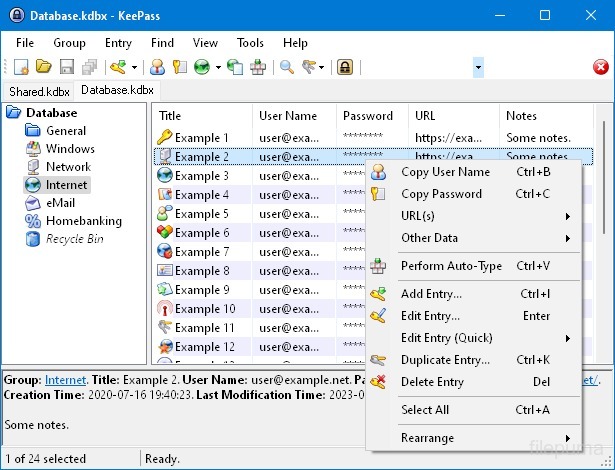
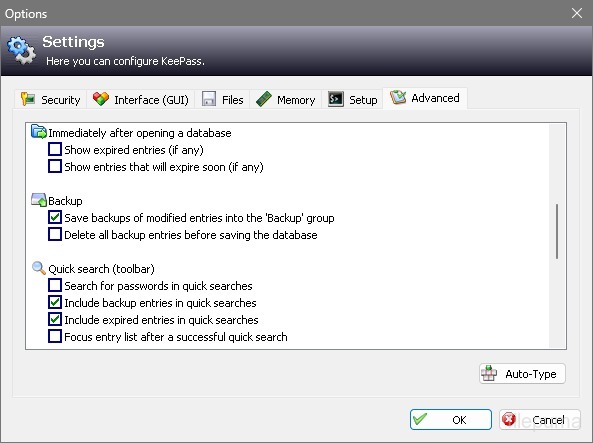


KeePassเป็นโปรแกรมจัดการรหัสผ่านที่เปิดเผยรหัสต้นฉบับที่ปลอดภัยและเป็นที่นิยมใช้ในการจัดเก็บและจัดการรหัสผ่าน ชื่อผู้ใช้ และข้อมูลที่ละเอียดอ่อนอื่น ๆ อย่างปลอดภัย พัฒนาโดย Dominik Reichl และมีให้ใช้งานในหลายแพลตฟอร์ม รวมถึง Windows, macOS, Linux และอุปกรณ์เคลื่อนที่
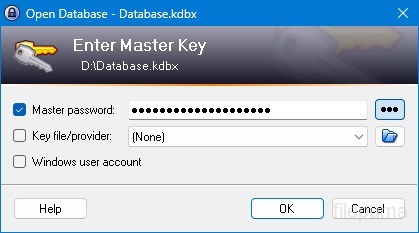
หนึ่งในคุณสมบัติหลักของ KeePass คือการรักษาความปลอดภัยที่แข็งแกร่ง มันใช้การเข้ารหัสที่แข็งแกร่ง (เช่น AES, Twofish) เพื่อป้องกันข้อมูลที่เก็บไว้ ทำให้มั่นใจได้ว่าเฉพาะผู้ใช้ที่ได้รับอนุญาตที่มีรหัสผ่านหลักเท่านั้นที่สามารถเข้าถึงรหัสผ่านของพวกเขาได้ รหัสผ่านหลักทำหน้าที่เป็นกุญแจหลักเพื่อปลดล็อกฐานข้อมูลที่เข้ารหัส
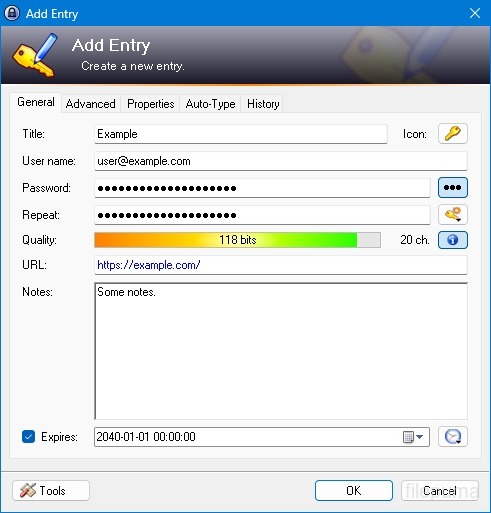
KeePass มอบอินเทอร์เฟซที่ใช้งานง่าย ให้ผู้ใช้จัดระเบียบรหัสผ่านในลักษณะที่จัดโครงสร้างด้วยโฟลเดอร์และหมวดหมู่ นอกจากนี้ยังมีเครื่องมือสร้างรหัสผ่าน ช่วยให้ผู้ใช้สร้างรหัสผ่านที่ซับซ้อนและไม่ซ้ำเพื่อเพิ่มความปลอดภัย
ซอฟต์แวร์นี้ช่วยให้ผู้ใช้สามารถค้นหารหัสผ่านเฉพาะได้อย่างรวดเร็วและนำเสนอฟีเจอร์ต่างๆ เช่น auto-type ที่ช่วยในการกรอกฟอร์มเข้าสู่ระบบสำหรับเว็บไซต์และแอปพลิเคชัน KeePass ยังรองรับปลั๊กอินซึ่งสามารถเพิ่มความสามารถและทำให้สามารถปรับแต่งได้เพื่อตอบสนองความต้องการของแต่ละบุคคล
นอกจากนี้ KeePass ยังเน้นความสามารถในการพกพาและการเข้าถึงโดยให้ผู้ใช้เก็บฐานข้อมูลรหัสผ่านที่เข้ารหัสไว้ในสื่อจัดเก็บข้อมูลหลากหลายประเภท เช่น ไดรฟ์ท้องถิ่น ไดรฟ์ USB หรือพื้นที่จัดเก็บบนคลาวด์ ซึ่งช่วยให้ผู้ใช้สามารถเข้าถึงรหัสผ่านของตนจากอุปกรณ์ต่าง ๆ ได้ในขณะที่ยังคงรักษาความปลอดภัยและความเป็นส่วนตัว
โดยรวมแล้ว KeePass เป็นโซลูชันการจัดการรหัสผ่านที่เชื่อถือได้และปลอดภัยที่ช่วยให้ผู้ใช้จัดระเบียบและปกป้องข้อมูลที่ละเอียดอ่อนของพวกเขา
คุณสมบัติหลัก:
- การเก็บรักษารหัสผ่านอย่างปลอดภัย: เก็บรักษาและจัดการรหัสผ่านอย่างปลอดภัย
- การเข้ารหัสที่แข็งแกร่ง: ใช้การเข้ารหัสขั้นสูงเพื่อความปลอดภัยของข้อมูล
- Master Password & Keyfile: เข้าถึงฐานข้อมูลด้วยรหัสผ่านหลักที่แข็งแกร่งและไฟล์กุญแจเสริม
- การยืนยันตัวตนสองชั้น (2FA): ให้การรักษาความปลอดภัยอีกชั้นหนึ่ง
- ฟังก์ชัน Auto-Type: ทำให้การกรอกชื่อผู้ใช้และรหัสผ่านเป็นอัตโนมัติ
- เครื่องสร้างรหัสผ่าน: สร้างรหัสผ่านที่แข็งแกร่งและสุ่ม
- จัดการรหัสผ่าน: จัดกลุ่มรหัสผ่านเป็นกลุ่มและกลุ่มย่อย.
- การค้นหาและการกรองค้นหารายการเฉพาะอย่างรวดเร็ว
- ฟิลด์แบบกำหนดเอง: เพิ่มข้อมูลเพิ่มเติมในรายการ
- ไฟล์แนบ: แนบไฟล์กับรายการรหัสผ่านอย่างปลอดภัย
- คุณสมบัติความปลอดภัย: มีตัวเลือกความปลอดภัยเพิ่มเติม
- ข้ามแพลตฟอร์ม: เข้าถึงได้บนระบบปฏิบัติการต่างๆ
- ปลั๊กอินและส่วนเสริม: ขยายฟังก์ชันด้วยคุณสมบัติเพิ่มเติม
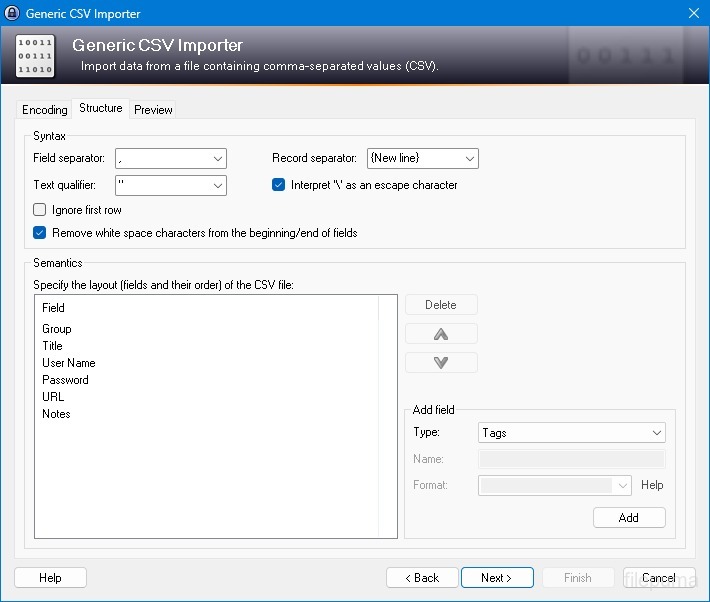
- นำเข้าและส่งออก: นำเข้า/ส่งออกพาสเวิร์ดได้อย่างง่ายดาย
- การซิงโครไนซ์ฐานข้อมูลซิงค์ฐานข้อมูลข้ามอุปกรณ์อย่างปลอดภัย
มีอะไรใหม่บ้าง
New Features:
- Added menu/toolbar styles, freely selectable in 'Tools' -> 'Options' -> tab 'Interface'; available styles are 'Windows 10', 'Windows 8.1', 'KeePass - Gradient', '.NET/Office - Professional' and 'System - Classic'; by default KeePass uses the style most similar to the one of the current operating system.
- Refined application icons (thanks to Victor Andreyenkov).
- Auto-Type: new target window classification method, which improves compatibility with target windows hosted within other windows (e.g. a PuTTY window within SuperPuTTY/MTPuTTY).
- Auto-Type: added workaround for the default Ctrl+Alt behavior of KiTTY variants (which differs from Windows' behavior).
- Before clearing the clipboard, KeePass now first copies a non-sensitive text into it; this ensures that no sensitive information remains in the clipboard even when clearing is prevented by the environment (e.g. when running in a virtual machine, when using a clipboard extension utility, ...).
- Added support for opening entry URLs with Internet Explorer or Google Chrome in private mode via the context menu -> 'URL(s)' -> 'Open with ... (Private)'.
- Added URL override suggestions for Internet Explorer and Google Chrome in private mode in the URL override suggestions drop-down list in the entry dialog.
- Added optional built-in global URL overrides for opening HTTP/HTTPS URLs with Internet Explorer or Google Chrome in private mode.
- Added Ctrl+K shortcut for the 'Duplicate Entry' command.
- Mozilla Bookmarks HTML import: added support for importing tags.
- Added support for exporting to Mozilla Bookmarks HTML files.
- Windows/IE favorites export: entry fields are Spr-compiled now, and entries with cmd:// URLs are now exported as LNK files.
- HTML export/printing: added support for UUIDs, added horizontal lines between entries in details mode, added background color for group headings, long field names are hyphenated now, and long field data now breaks and wraps onto the next line.
- Plugins: added possibility to configure file transactions for each URI scheme.
- Plugins: added possibility to provide custom 'Save As' dialogs more easily.
- Converted some PNG images as a workaround for a problem in Cairo/LibPNG on Unix-like systems.
- As a workaround for a weakness in Mono's FileDialog, before showing such a dialog on Unix-like systems KeePass now tries to load the file '~/.recently-used' and deletes it, if it is not a valid XML file.
- KPScript: added support for specifying the master password in encrypted form using the '-pw-enc:' command line parameter (exactly like in KeePass, compatible with the {PASSWORD_ENC} placeholder).
- KPScript: the 'Export' command now supports the optional '-GroupPath:' parameter (to export a specific group instead of the whole database).
- KPScript: the 'GetEntryString' command now supports the '-FailIfNoEntry' option.
- KPScript: added '-refx-Expires' and '-refx-Expired' entry identification parameters.
- KPScript: the 'Import' command now prints more specific error messages.
- All KeePass program binaries are now dual signed using SHA-1 and SHA-256.
Improvements / Changes:
- Auto-Type: improved keyboard layout handling when the target window changes during an auto-type process.
- Auto-Type: improved compatibility with Remote Desktop Connection client and VirtualBox.
- Improved icon recoloring.
- Improved printing of dates/times and tags.
- The password generator based on a character set now ensures that the generated password is Spr-invariant.
- Password generator based on a pattern or a custom algorithm: when a Spr-variant password is generated, a confirmation dialog for accepting this password is displayed.
- If the 'Save Database' policy prevents saving, the auto-save option is now ignored.
- Improved .NET Framework version detection.
- PLGX debugging: when the command line option '-debug' is passed and a PLGX plugin fails to compile, the output of all tried compilers is saved to a temporary file.
- Improved file transaction creation time handling on Unix-like systems.
- Improved compatibility with Mono on BSD systems.
- Enhanced PrepMonoDev.sh script for compatibility with Mono 4.x.
- Removed KeePassLibSD sub-project (a KeePass library for Pocket PC / Windows Mobile) from the main solution.
- Upgraded installer.
- Various code optimizations.
- Minor other improvements.
Bugfixes:
- When running under Mono (Linux, Mac OS X, ...), two options related to window minimization are disabled now (because they do not work properly due to a Mono bug).
โปรแกรมมีให้บริการในหลายภาษา
- Download Keepass
- Télécharger Keepass
- Herunterladen Keepass
- Scaricare Keepass
- ダウンロード Keepass
- Descargar Keepass
- Baixar Keepass
รีวิวจากผู้ใช้
การให้คะแนนจากผู้ใช้
 26
26
ใบอนุญาต:
ฟรี
ข้อกำหนด:
Windows All
ภาษา:
Multi-languages
ขนาด:
2.9MB
ผู้จัดพิมพ์:
อัปเดตแล้ว:
Jan 10, 2016
สะอาด
ซอฟต์แวร์รายงาน
เวอร์ชันล่าสุด
เวอร์ชันเก่า
ซอฟต์แวร์สำหรับนักพัฒนา
 Keepass 2.61.1
 RoboForm 10.0.0
 Dashlane 6.2632.0
 1Password 8.12.36
ระดับความปลอดภัย
เพื่อลดความเสี่ยงต่ออุปกรณ์ของคุณและรับประกันความปลอดภัยของข้อมูลและความเป็นส่วนตัว ทีมงานของเราจะตรวจสอบทุกครั้งที่มีการอัปโหลดไฟล์ติดตั้งใหม่ไปยังเซิร์ฟเวอร์ของเรา หรือเชื่อมโยงกับเซิร์ฟเวอร์ระยะไกล และจะตรวจสอบไฟล์เป็นระยะเพื่อยืนยันหรือปรับปรุงสถานะของไฟล์นั้น ตามการตรวจสอบนี้ เราจึงกำหนดระดับความปลอดภัยดังต่อไปนี้สำหรับไฟล์ที่สามารถดาวน์โหลดได้
 สะอาด
สะอาด
มีความเป็นไปได้สูงที่โปรแกรมซอฟต์แวร์นี้จะไม่มีมัลแวร์
เราได้สแกนไฟล์และลิงก์ที่เกี่ยวข้องกับโปรแกรมซอฟต์แวร์นี้ในบริการป้องกันไวรัสชั้นนำมากกว่า 60 แห่งทั่วโลก และไม่พบภัยคุกคามที่เป็นไปได้ และไม่มีซอฟต์แวร์จากบุคคลที่สามรวมอยู่ด้วย
 คำเตือน
โปรแกรมนี้ได้รับการสนับสนุนจากโฆษณาและอาจเสนอให้ติดตั้งโปรแกรมของบุคคลที่สามที่ไม่จำเป็น โปรแกรมเหล่านี้อาจรวมถึงแถบเครื่องมือ การเปลี่ยนหน้าแรกของคุณ เครื่องมือค้นหาที่ตั้งค่าเริ่มต้น หรือการติดตั้งโปรแกรมของบุคคลอื่น ซึ่งอาจเป็นการแจ้งเตือนที่ผิดพลาด และเราแนะนำให้ผู้ใช้ระมัดระวังเมื่อทำการติดตั้งและใช้งานซอฟต์แวร์นี้
 พิการ
พิการ
ซอฟต์แวร์นี้ไม่สามารถดาวน์โหลดได้อีกต่อไป มีความเป็นไปได้สูงที่โปรแกรมซอฟต์แวร์นี้อาจมีลักษณะเป็นอันตรายหรือมีปัญหาด้านความปลอดภัยหรือเหตุผลอื่น ๆ
ส่งรายงาน
ขอบคุณ!
รายงานของคุณได้ถูกส่งแล้ว。
เราจะตรวจสอบคำขอของคุณและดำเนินการอย่างเหมาะสม。
โปรดทราบว่าคุณจะไม่ได้รับการแจ้งเตือนเกี่ยวกับการดำเนินการใด ๆ ที่เกิดจากรายงานนี้ เราขออภัยในความไม่สะดวกที่อาจเกิดขึ้น
เราขอขอบคุณสำหรับความช่วยเหลือของคุณในการทำให้เว็บไซต์ของเราสะอาดและปลอดภัย