
Looking for a free Mac cleaner? Try diCleaner

TeamViewer (32bit)10.0.36244
 ดาวน์โหลดฟรี
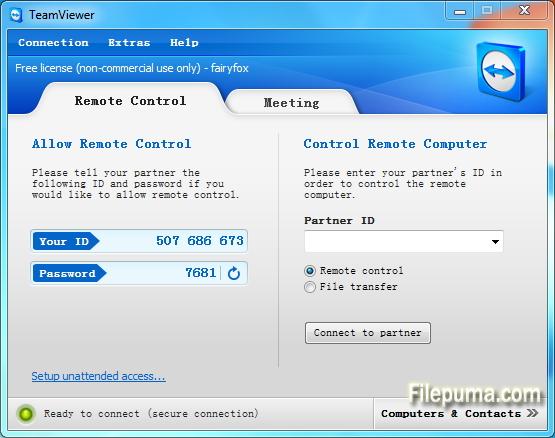
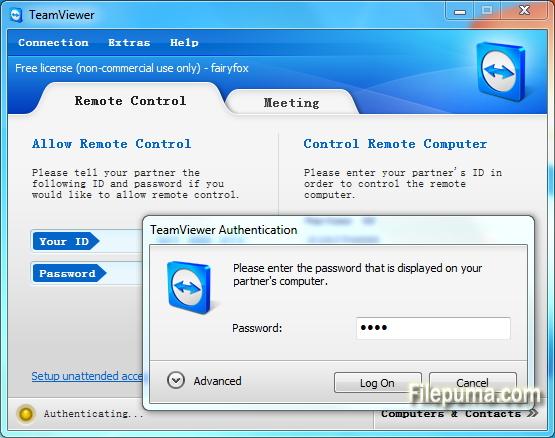
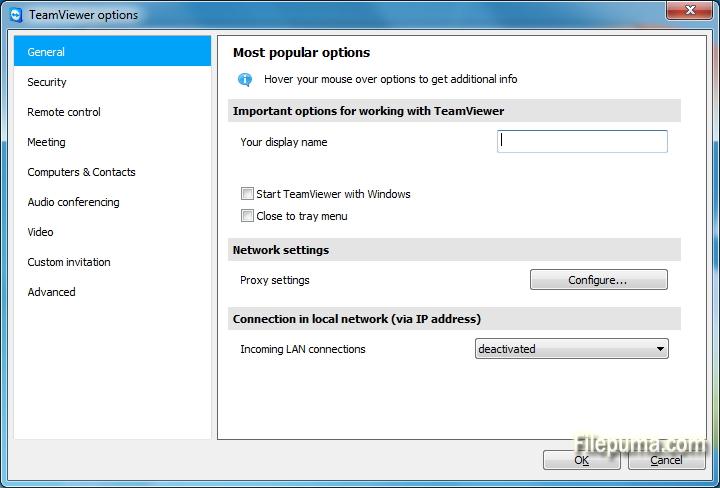
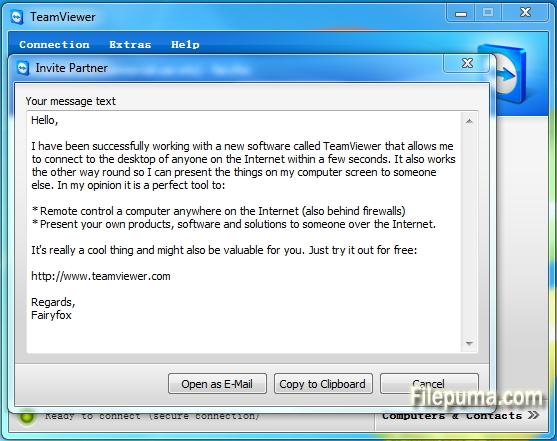


TeamViewerเป็นเครื่องมือการเข้าถึงระยะไกลและการทำงานร่วมกันที่ล้ำสมัยซึ่งช่วยให้การเชื่อมต่อระหว่างอุปกรณ์ทั่วโลกเป็นไปอย่างราบรื่น ด้วยอินเทอร์เฟซที่ใช้งานง่ายและฟีเจอร์ที่ทรงพลัง TeamViewer ได้กลายเป็นทางเลือกแรกสำหรับทั้งบุคคลและธุรกิจ
ที่แก่นแท้ของมัน TeamViewer ช่วยให้ผู้ใช้สามารถเข้าถึงและควบคุมอุปกรณ์ระยะไกลได้อย่างง่ายดาย ไม่ว่าคุณจะต้องการให้การสนับสนุนด้านเทคนิคแก่เพื่อนร่วมงาน เข้าถึงคอมพิวเตอร์ทำงานจากที่บ้าน หรือร่วมมือในโครงการกับสมาชิกในทีมที่กระจัดกระจายทั่วโลก TeamViewer ช่วยให้การเชื่อมต่อที่ปลอดภัยและมีประสิทธิภาพ
หนึ่งในคุณสมบัติที่โดดเด่นของ TeamViewer คือการทำงานร่วมกันข้ามแพลตฟอร์ม รองรับ Windows, macOS, Linux, และระบบปฏิบัติการมือถือหลากหลายชนิด ความหลากหลายนี้ทำให้มันเป็นโซลูชันอเนกประสงค์สำหรับผู้ใช้ที่มีความชื่นชอบอุปกรณ์ที่หลากหลาย
ความปลอดภัยเป็นสิ่งสำคัญอันดับต้น ๆ สำหรับ TeamViewer ดังที่เห็นได้จากการเข้ารหัสแบบ end-to-end และตัวเลือกการยืนยันตัวตนแบบหลายปัจจัย ผู้ใช้สามารถมั่นใจได้ว่าข้อมูลและการเชื่อมต่อของพวกเขาได้รับการปกป้อง ทำให้เป็นตัวเลือกที่เหมาะสมทั้งสำหรับการใช้งานส่วนตัวและมืออาชีพ
คุณสมบัติเพิ่มเติมของ TeamViewer รวมถึงการถ่ายโอนไฟล์ การพิมพ์ระยะไกล และฟังก์ชันแชท ช่วยให้การสื่อสารและการทำงานร่วมกันเป็นไปอย่างราบรื่น ด้วยความน่าเชื่อถือ ใช้งานง่าย และความสามารถที่ทรงพลัง TeamViewer จึงกลายเป็นเครื่องมือที่ขาดไม่ได้สำหรับใครก็ตามที่มองหาวิธีการเข้าถึงระยะไกลและการทำงานร่วมกันที่มีประสิทธิภาพ
คุณสมบัติหลัก:
- การเข้าถึงระยะไกล: ควบคุมอุปกรณ์จากระยะไกล
- ความเข้ากันได้ข้ามแพลตฟอร์ม: เชื่อมต่อข้ามระบบปฏิบัติการต่าง ๆ
- ไฟล์ทรานส์เฟอร์: แบ่งปันไฟล์ได้ง่ายระหว่างเซสชัน
- การเข้าถึงข้ามเบราว์เซอร์: เข้าถึงผ่านเว็บเบราว์เซอร์ต่าง ๆ
- การประชุมและการนำเสนอ: จัดการประชุมและการนำเสนอออนไลน์
- การถ่ายโอนข้อมูลอย่างปลอดภัย: เข้ารหัสข้อมูลเพื่อการถ่ายโอนอย่างปลอดภัย
- การพิมพ์ระยะไกล: พิมพ์ระยะไกลไปที่เครื่องพิมพ์ท้องถิ่น
- เสียงและวิดีโอคุณภาพสูง: รองรับเสียงและวิดีโอคุณภาพ
- การทำงานร่วมกันหลายผู้ใช้: ทำงานร่วมกับผู้ใช้หลายคน
- การเข้าถึงที่ไม่ต้องดูแล: ตั้งค่าการเข้าถึงระยะไกลโดยไม่ต้องได้รับอนุญาต
- Wake-on-LAN: ปลุกคอมพิวเตอร์ระยะไกล
- การสร้างแบรนด์แบบกำหนดเอง: กำหนดตราสินค้าสำหรับอินเทอร์เฟซ TeamViewer.
- การผสาน: ผสานกับแอปพลิเคชันอื่น ๆ
- การเข้าถึงผ่านมือถือ: ใช้แอปมือถือสำหรับการเข้าถึงจากระยะไกล
- การบันทึกเซสชัน: บันทึกเซสชันระยะไกล
มีอะไรใหม่บ้าง
Central setting policies
Master whitelist
Chat history and persistent chat groups
One-click video calls
Add your profile picture
Automatically find nearby contacts
Ultra High Definition - 4K display - support
Greater emphasis on your corporate identity
Real-time session notes
TeamViewer 10 redesign
Computers & Contacts API
Idle session timeout
Service cases in TeamViewer Host
Integration with Dropbox, Google Drive, and more
Whiteboard for remote control
BlackBerry App (Preview)
- Control computers remotely as if you were sitting right in front of them.
- Transfer files in both directions.
- Enjoy the highest security standards: 256 Bit AES Session Encryption, 2048 Bit RSA Key Exchange.
- TeamViewer 10 users can establish remote control connections to TeamViewer version 3 or higher.
- For technical and licensing reasons, a remote control connection in the other direction, i.e. from TeamViewer 9, 8, or older to TeamViewer 10, is not possible. Meetings with version 10 are also accessible for participants with version 7 or higher; however, vice versa is not possible due to the reasons mentioned.
โปรแกรมมีให้บริการในหลายภาษา
- Download TeamViewer (32bit)
- Télécharger TeamViewer (32bit)
- Herunterladen TeamViewer (32bit)
- Scaricare TeamViewer (32bit)
- ダウンロード TeamViewer (32bit)
- Descargar TeamViewer (32bit)
- Baixar TeamViewer (32bit)
รีวิวจากผู้ใช้
การให้คะแนนจากผู้ใช้
 221
221
ใบอนุญาต:
ฟรี
ข้อกำหนด:
Windows All
ภาษา:
Multi-languages
ขนาด:
7.3MB
ผู้จัดพิมพ์:
อัปเดตแล้ว:
Dec 2, 2014
สะอาด
ซอฟต์แวร์รายงาน
เวอร์ชันล่าสุด
เวอร์ชันเก่า
ซอฟต์แวร์สำหรับนักพัฒนา
 TeamViewer (32bit) 15.81.6
 TeamViewer Portable 15.70.5
 TeamViewer (64bit) 15.81.6
 UltraVNC (64bit) 1.8.3.0
 UltraVNC (32bit) 1.8.2.9
ระดับความปลอดภัย
เพื่อลดความเสี่ยงต่ออุปกรณ์ของคุณและรับประกันความปลอดภัยของข้อมูลและความเป็นส่วนตัว ทีมงานของเราจะตรวจสอบทุกครั้งที่มีการอัปโหลดไฟล์ติดตั้งใหม่ไปยังเซิร์ฟเวอร์ของเรา หรือเชื่อมโยงกับเซิร์ฟเวอร์ระยะไกล และจะตรวจสอบไฟล์เป็นระยะเพื่อยืนยันหรือปรับปรุงสถานะของไฟล์นั้น ตามการตรวจสอบนี้ เราจึงกำหนดระดับความปลอดภัยดังต่อไปนี้สำหรับไฟล์ที่สามารถดาวน์โหลดได้
 สะอาด
สะอาด
มีความเป็นไปได้สูงที่โปรแกรมซอฟต์แวร์นี้จะไม่มีมัลแวร์
เราได้สแกนไฟล์และลิงก์ที่เกี่ยวข้องกับโปรแกรมซอฟต์แวร์นี้ในบริการป้องกันไวรัสชั้นนำมากกว่า 60 แห่งทั่วโลก และไม่พบภัยคุกคามที่เป็นไปได้ และไม่มีซอฟต์แวร์จากบุคคลที่สามรวมอยู่ด้วย
 คำเตือน
โปรแกรมนี้ได้รับการสนับสนุนจากโฆษณาและอาจเสนอให้ติดตั้งโปรแกรมของบุคคลที่สามที่ไม่จำเป็น โปรแกรมเหล่านี้อาจรวมถึงแถบเครื่องมือ การเปลี่ยนหน้าแรกของคุณ เครื่องมือค้นหาที่ตั้งค่าเริ่มต้น หรือการติดตั้งโปรแกรมของบุคคลอื่น ซึ่งอาจเป็นการแจ้งเตือนที่ผิดพลาด และเราแนะนำให้ผู้ใช้ระมัดระวังเมื่อทำการติดตั้งและใช้งานซอฟต์แวร์นี้
 พิการ
พิการ
ซอฟต์แวร์นี้ไม่สามารถดาวน์โหลดได้อีกต่อไป มีความเป็นไปได้สูงที่โปรแกรมซอฟต์แวร์นี้อาจมีลักษณะเป็นอันตรายหรือมีปัญหาด้านความปลอดภัยหรือเหตุผลอื่น ๆ
ส่งรายงาน
ขอบคุณ!
รายงานของคุณได้ถูกส่งแล้ว。
เราจะตรวจสอบคำขอของคุณและดำเนินการอย่างเหมาะสม。
โปรดทราบว่าคุณจะไม่ได้รับการแจ้งเตือนเกี่ยวกับการดำเนินการใด ๆ ที่เกิดจากรายงานนี้ เราขออภัยในความไม่สะดวกที่อาจเกิดขึ้น
เราขอขอบคุณสำหรับความช่วยเหลือของคุณในการทำให้เว็บไซต์ของเราสะอาดและปลอดภัย