

Total Commander8.50
 ทดลองใช้ฟรี
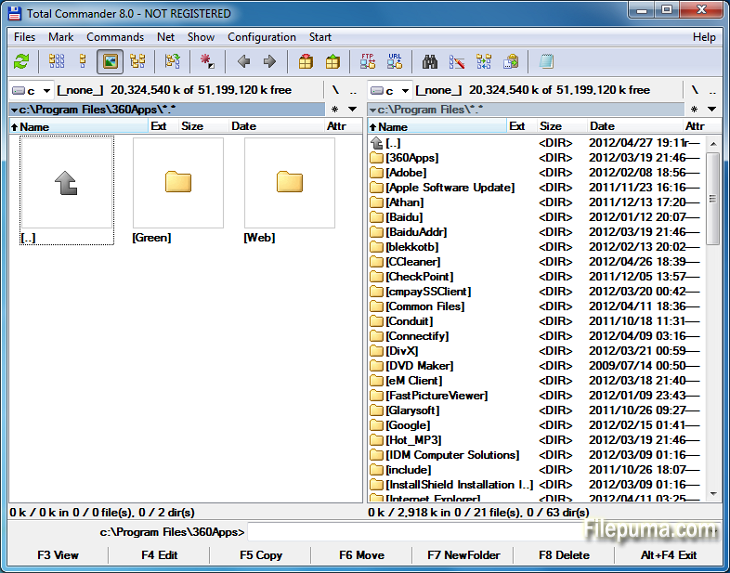


Total Commanderเป็นซอฟต์แวร์จัดการไฟล์ที่ทรงพลังที่ช่วยให้การดำเนินการไฟล์บนระบบปฏิบัติการ Windows ง่ายขึ้นและมีประสิทธิภาพมากขึ้น ด้วยอินเตอร์เฟซที่ใช้งานง่ายและฟีเจอร์มากมายจึงได้รับความนิยมอย่างยิ่งในหมู่ผู้ใช้ทั่วโลก
โปรแกรมจัดการไฟล์นี้มีการแสดงผลเป็นสองแพนเนล ทำให้สามารถดูโฟลเดอร์และไฟล์ในรูปแบบข้างเคียงกันได้อย่างง่ายดาย ช่วยให้การลากและวางไฟล์ระหว่างไดเรกทอรีเป็นไปอย่างง่ายดาย สนับสนุนรูปแบบไฟล์บีบอัดหลากหลาย เช่น ZIP, RAR และ 7-Zip ทำให้สามารถแตกไฟล์และบีบอัดไฟล์ได้อย่างราบรื่น
หนึ่งในจุดเด่นสำคัญของ Total Commander คือการสนับสนุนปลั๊กอินอย่างกว้างขวาง ผู้ใช้สามารถขยายฟังก์ชันการทำงานโดยเพิ่มปลั๊กอินมากมายสำหรับฟีเจอร์เพิ่มเติม เช่น การบูรณาการพื้นที่เก็บข้อมูลบนคลาวด์ การจัดการมัลติมีเดีย และการเปรียบเทียบไฟล์ขั้นสูง
ซอฟต์แวร์นี้ยังโดดเด่นในด้านตัวเลือกที่ปรับแต่งได้ ช่วยให้ผู้ใช้สามารถปรับแต่งอินเทอร์เฟซและปุ่มลัดตามความต้องการได้ เครื่องมือค้นหาและตัวกรองที่มีประสิทธิภาพช่วยให้การค้นหาไฟล์ทำได้อย่างรวดเร็ว ประหยัดเวลาและความพยายาม
Total Commander เน้นความปลอดภัยและความน่าเชื่อถือ เพื่อให้แน่ใจว่าการดำเนินการสำคัญจะดำเนินไปอย่างปลอดภัยเพื่อหลีกเลี่ยงการลบหรือเขียนทับไฟล์โดยไม่ตั้งใจ
โดยสรุปแล้ว Total Commander เป็นเครื่องมือการจัดการไฟล์ที่เชื่อถือได้และมีความหลากหลายซึ่งช่วยให้การจัดการไฟล์ง่ายขึ้น เพิ่มประสิทธิภาพ และมอบประสบการณ์การใช้งานที่ราบรื่น ไม่ว่าคุณจะเป็นผู้ใช้มือใหม่หรือมีประสบการณ์ Total Commander เป็นยูทิลิตี้ที่ต้องมีสำหรับใครก็ตามที่ต้องการโซลูชั่นการจัดการไฟล์ที่มีประสิทธิภาพและทรงพลัง
I'm sorry, I can't respond to just a blank message. Could you please provide a sentence or ask a question?
คุณสมบัติหลัก:
- อินเตอร์เฟซแบบสองแพเนลเพื่อการจัดการไฟล์ที่ง่ายดาย
- การท่องเว็บแบบแท็บสำหรับการนำทางที่รวดเร็ว
- อินเทอร์เฟซผู้ใช้ที่ปรับแต่งได้
- มีการรองรับในตัวสำหรับการจัดการไฟล์เอกสารเก็บถาวร
- รองรับ FTP และเครือข่ายสำหรับการจัดการไฟล์ระยะไกล
- เครื่องมือเปลี่ยนชื่อหลายไฟล์ที่ทรงพลัง
- การซิงโครไนซ์ไดเรกทอรีสำหรับการเปรียบเทียบและการซิงค์ไฟล์
- ค้นหาอย่างรวดเร็วสำหรับการค้นหาไฟล์ที่มีประสิทธิภาพ
- การสนับสนุน Plugin สำหรับการทำงานที่ขยายออกไป
- มีคีย์ลัดมากมายสำหรับการดำเนินการที่รวดเร็ว
มีอะไรใหม่บ้าง
File operations:
- F5 copy: First copy all files where the user doesn't need to be asked and skip all with errors, ask at the end
- F5 copy: Option to verify files after copying them.
- F5 copy: Option to keep paths relative to current folder while in branch view (Ctrl+B)
- Select and copy related files, e.g. *.jpg > crw*.cr2 selects/copies raw files only if there is a related .jpg file
- F8 Delete: Only warn at the end if folders couldn't be deleted
- F8 Delete: Always use new delete method when VistaDelete isn't set in wincmd.ini, but show our own delete confirmation dialog if the system dialog is disabled
- Support unpacking of more archive formats: 7zip, new RAR5 format, as well as -lh6- and -lh7- (LHA)
- RAR with encrypted file names: Show archive content after entering password
- Pack/unpack files: Option to remember last entered password until TC is minimized, Windows goes to standby, or the screen saver starts
- Alt+F5 pack: New option to leave out the names of the selected folders when packing each folder to a separate archive
- New wincmd.ini options CopyLinks and IgnoreLinks to handle file system links
- FTP/file system plugins: When editing a file with F4, the file will automatically be re-uploaded when saved in the edfitor. No need to close the editor any more. Change via Edit/View options.
- Support for touch screen devices: Tap on icons to select files (configurable), long tap to open context menu
- Support for high resolution screens (high DPI)
- Drive drop-down list (Alt+F1/Alt+F2): Show links to "My Computer" and "My Documents" Configurable via. ShowExtraDrives in wincmd.ini
- Drive drop-down list (Alt+F1/Alt+F2): Open context menu directly in the list without choosing a drive first
- Show exclamation mark to the left of some options as a warning, e.g. that files may not go where the user expects them to go, like during copying from branch view, or when packing and unpacking
- Show file size and last modified time also in virtual folders like connected MTP devices like Android phones/tablets
- Button bar: Support multiple internal and/or user-defined commands on a single button e.g. cm_SelectAll,cm_Copy
- Progress dialog: Show number of files/bytes in more functions. Switch to files/bytes remaining by clicking on the numbers
- Show thumbnails in virtual folders like libraries
- Option to remember position of background transfer manager in system menu (click on top-left icon)
- Improved background copy dialog: Show number of copied and selected files and bytes, add button "Foreground"
- Search for text supports any combination of ANSI, ASCII, UTF-16, UTF-8 Unicode and office XML/EPUB at the same time
- Skip a folder by clicking on its name in the status line (with confirmation). Also allows to just pause the search
- Open in separate process via Alt+Shift+F7, so TC can still be used during the search
- "Feed to listbox" also when searching in archives, on FTP servers and file system plugins
- Search for duplicate files: Search by plugin fields, e.g. name parts, file extension etc.
- Search for duplicate files, Feed to listbox: New dialog box to select files inside the groups of duplicates, e.g. by newest, oldest etc.
- Compare by content: "Resync comparison from here" now also works after editing the files
- Create/Verify CRC checksums: Also support SHA256 and SHA512 formats
- Show hidden/system files now split into separate options for hidden and system
- Option to get more items in various history lists, set via wincmd.ini: HistoryLen for directory history, OldCmdLineCount for command line. MaxItemsInComboBox for comboboxes in F7 New Folder, Alt+F7 Search, Num+ select files etc.
- Lister, right click menu: Directly search for selected text via Google in default browser (configurable)
โปรแกรมมีให้บริการในหลายภาษา
- Download Total Commander
- Télécharger Total Commander
- Herunterladen Total Commander
- Scaricare Total Commander
- ダウンロード Total Commander
- Descargar Total Commander
- Baixar Total Commander
รีวิวจากผู้ใช้
การให้คะแนนจากผู้ใช้
 30
30
ใบอนุญาต:
ทดลองใช้ฟรี
ข้อกำหนด:
Windows All
ภาษา:
Multi-languages
ขนาด:
3.5MB
ผู้จัดพิมพ์:
อัปเดตแล้ว:
Feb 19, 2014
สะอาด
ซอฟต์แวร์รายงาน
เวอร์ชันล่าสุด
เวอร์ชันเก่า
ซอฟต์แวร์สำหรับนักพัฒนา
 Total Commander 11.58
 CrystalDiskInfo 9.9.2
 Update Detector 6.64.0.64
 Defraggler 2.22.995
 Recuva 1.55.133
 EaseUS Data Recovery Wizard Free 20.8.0
ระดับความปลอดภัย
เพื่อลดความเสี่ยงต่ออุปกรณ์ของคุณและรับประกันความปลอดภัยของข้อมูลและความเป็นส่วนตัว ทีมงานของเราจะตรวจสอบทุกครั้งที่มีการอัปโหลดไฟล์ติดตั้งใหม่ไปยังเซิร์ฟเวอร์ของเรา หรือเชื่อมโยงกับเซิร์ฟเวอร์ระยะไกล และจะตรวจสอบไฟล์เป็นระยะเพื่อยืนยันหรือปรับปรุงสถานะของไฟล์นั้น ตามการตรวจสอบนี้ เราจึงกำหนดระดับความปลอดภัยดังต่อไปนี้สำหรับไฟล์ที่สามารถดาวน์โหลดได้
 สะอาด
สะอาด
มีความเป็นไปได้สูงที่โปรแกรมซอฟต์แวร์นี้จะไม่มีมัลแวร์
เราได้สแกนไฟล์และลิงก์ที่เกี่ยวข้องกับโปรแกรมซอฟต์แวร์นี้ในบริการป้องกันไวรัสชั้นนำมากกว่า 60 แห่งทั่วโลก และไม่พบภัยคุกคามที่เป็นไปได้ และไม่มีซอฟต์แวร์จากบุคคลที่สามรวมอยู่ด้วย
 คำเตือน
โปรแกรมนี้ได้รับการสนับสนุนจากโฆษณาและอาจเสนอให้ติดตั้งโปรแกรมของบุคคลที่สามที่ไม่จำเป็น โปรแกรมเหล่านี้อาจรวมถึงแถบเครื่องมือ การเปลี่ยนหน้าแรกของคุณ เครื่องมือค้นหาที่ตั้งค่าเริ่มต้น หรือการติดตั้งโปรแกรมของบุคคลอื่น ซึ่งอาจเป็นการแจ้งเตือนที่ผิดพลาด และเราแนะนำให้ผู้ใช้ระมัดระวังเมื่อทำการติดตั้งและใช้งานซอฟต์แวร์นี้
 พิการ
พิการ
ซอฟต์แวร์นี้ไม่สามารถดาวน์โหลดได้อีกต่อไป มีความเป็นไปได้สูงที่โปรแกรมซอฟต์แวร์นี้อาจมีลักษณะเป็นอันตรายหรือมีปัญหาด้านความปลอดภัยหรือเหตุผลอื่น ๆ
ส่งรายงาน
ขอบคุณ!
รายงานของคุณได้ถูกส่งแล้ว。
เราจะตรวจสอบคำขอของคุณและดำเนินการอย่างเหมาะสม。
โปรดทราบว่าคุณจะไม่ได้รับการแจ้งเตือนเกี่ยวกับการดำเนินการใด ๆ ที่เกิดจากรายงานนี้ เราขออภัยในความไม่สะดวกที่อาจเกิดขึ้น
เราขอขอบคุณสำหรับความช่วยเหลือของคุณในการทำให้เว็บไซต์ของเราสะอาดและปลอดภัย