

VirtualBox4.3.4
 ดาวน์โหลดฟรี
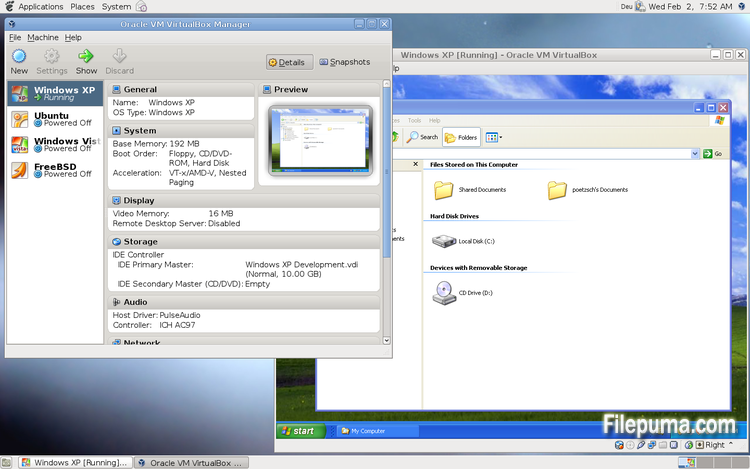
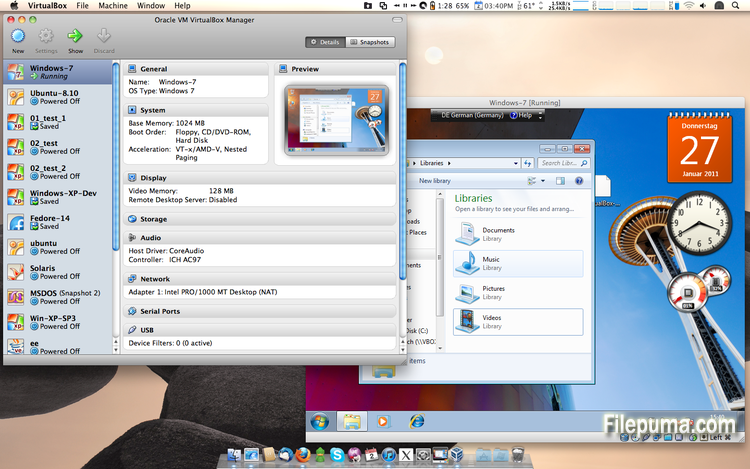
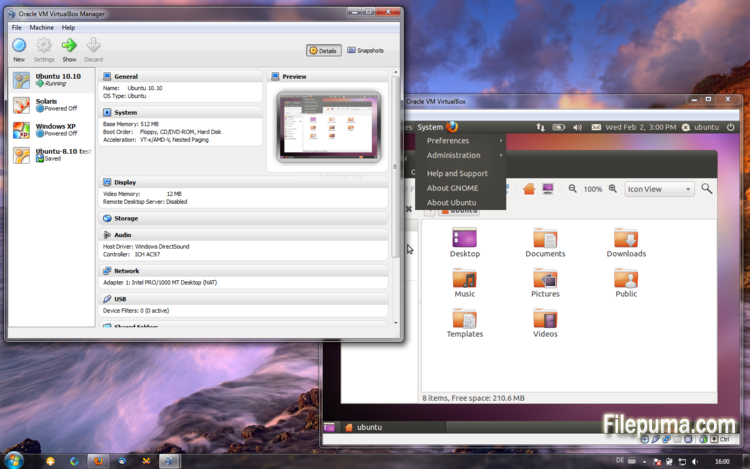


VirtualBoxเป็นซอฟต์แวร์จำลองระบบฟรีและโอเพ่นซอร์สที่อนุญาตให้ผู้ใช้สร้างและรันเครื่องเสมือนบนคอมพิวเตอร์ของพวกเขา ด้วย VirtualBox ผู้ใช้สามารถติดตั้งและรันระบบปฏิบัติการหลายระบบในเวลาเดียวกันบนคอมพิวเตอร์ของพวกเขาโดยไม่ต้องสร้างพาร์ติชันแยกหรือซื้อตัวฮาร์ดแวร์เพิ่มเติม
หนึ่งในข้อดีหลักของ VirtualBox คือใช้งานง่าย ติดตั้งและตั้งค่าได้ง่าย แม้สำหรับผู้ที่มีประสบการณ์เพียงเล็กน้อยหรือไม่มีเลยกับเทคโนโลยีการจำลองเสมือน VirtualBox ยังมีทางเลือกในการปรับแต่งที่หลากหลาย เช่น การปรับจำนวน RAM, CPU cores, และพื้นที่ฮาร์ดดิสก์ที่จัดสรรให้กับแต่ละเครื่องเสมือน
อีกหนึ่งคุณสมบัติที่ยอดเยี่ยมของ VirtualBox คือความเข้ากันได้กับระบบปฏิบัติการหลากหลาย ผู้ใช้สามารถติดตั้งและใช้งาน Windows, Linux, macOS และระบบปฏิบัติการอื่น ๆ อีกมากมายบนเครื่องเสมือนของตน ทำให้เป็นเครื่องมือที่ยอดเยี่ยมสำหรับนักพัฒนา ผู้ทดสอบซอฟต์แวร์ และบุคคลที่ต้องการใช้งานระบบปฏิบัติการหลายระบบบนคอมพิวเตอร์เครื่องเดียว
VirtualBox ยังมีคุณสมบัติขั้นสูงหลายอย่าง เช่น การรองรับอุปกรณ์ USB, โฟลเดอร์ที่แชร์ได้, และอะแดปเตอร์เครือข่าย คุณสมบัติเหล่านี้ทำให้สามารถรันซอฟต์แวร์ที่ต้องการฮาร์ดแวร์หรือทรัพยากรเครือข่าย เช่น เราท์เตอร์เสมือน, ไฟร์วอลล์, และเซิร์ฟเวอร์
VirtualBox เป็นทางเลือกที่ยอดเยี่ยมสำหรับใครก็ตามที่ต้องการใช้งานระบบปฏิบัติการหลายระบบบนคอมพิวเตอร์เครื่องเดียว ความง่ายในการใช้งาน ตัวเลือกการปรับแต่งที่หลากหลาย และความเข้ากันได้กับระบบปฏิบัติการหลากหลาย ทำให้มันเป็นเครื่องมือที่มีความหลากหลายและทรงพลังสำหรับนักพัฒนา ผู้เชี่ยวชาญด้านไอที และผู้ใช้ตามบ้าน
คุณสมบัติเด่น:
- ความเข้ากันได้ข้ามแพลตฟอร์ม
- ส่วนติดต่อผู้ใช้เชิงกราฟิกที่ใช้งานง่าย
- รองรับระบบปฏิบัติการต่าง ๆ
- การผสานรวมอย่างไร้รอยต่อกับระบบปฏิบัติการหลัก
- สแนปชอตและโคลน
- ความสามารถด้านเครือข่าย
- การรองรับอุปกรณ์เสมือน
- ชุดขยายสำหรับฟังก์ชันเพิ่มเติม
มีอะไรใหม่บ้าง
- VMM: fix for a bug in the Local APIC emulation causing a BSOD when booting certain guests (4.3.0 regression; bug #12240)
- VMM: fixed loading of saved states if VT-x/AMD-V was disabled (4.3.2 regression; bug #12291)
- VMM: fixed single-stepping inside the guest for certain instructions (VT-x only; bug #10947)
- VMM: fixed a performance issue involving APIC accesses after rebooting a VM (4.3.0 regression; VT-x only; bug #12296)
- VMM: fixed TPR patching to be enabled for 32-bit guests even when the chosen guest type is 64-bit (4.3.0 regression; AMD-V only)
- VMM: fixed occasional VINF_EM_TRIPLE_FAULT errors on hosts without the unrestricted guest execution feature (bug #12198)
- GUI: don't bother the user with the BPP warning if no Guest Additions are installed
- GUI: fixed machine-window paint artifacts on VM reboot / guest-screen resize
- GUI: make sure the assigned license and description are attached to the exported appliance
- GUI: fixed bugs in close VM action restrictions handling (bug #12333)
- GUI: fixed incorrect wizards text colors for some unusual look and feel styles (bug #11743)
- GUI: should restore seamless mode as soon as possible after VM reboot or shutdown
- GUI: fixes for medium enumeration
- GUI: the OS X hot corners were not accessible while a VirtualBox VM is running (Mac OS X hosts only; bug #4139)
- GUI: fixed an old bug which bared the host from cleanly shutdown / reboot if the VM selector window is open (Mac OS X hosts only; bug #8254)
- Host-only Networking: fixed creating of host-only network interfaces (4.3.0 regression; bug #12182)
- NAT: don't run into an infinite loop in case the host cannot access any DNS server (4.3.0 regression; bug #12300)
- NAT: don't re-connect the cable if the DNS information changes and the cable was disconnected before (4.3.0 regression; bug #12225)
- NAT: fixed several issues with automatically starting / terminating of NAT networks on VM start / stop and configuration changes
- VBoxNetDHCP: don't block prevent VBoxSVC from terminating (bug #12264)
- 2D Video acceleration: fix crashes on presentation mode switches (bug #9194)
- BusLogic: allow to run VMs with more than one BusLogic SCSI controller enabled
- Keyboard: fixed a VM crash if a VM was resumed from a saved state where at least one key was pressed (bug #11289)
- VBoxSVC: fixed a heap corruption under certain conditions (4.3.0 regression)
- VBoxSVC: fixed a race leading to a hang during initialization (bug #12349)
- OVF: fixed import logic for OVF appliances containing multiple VMs
- OVF: improved logic for finding an appropriate image format during OVF import
- API: block the removal of the current snapshot if it has child snapshots (only relevant for VMs without snapshottable hard disks, their presence always prevented removal), which resulted in VM configuration corruption
- API: mark VM configurations with snapshots but without current snapshot as inaccessible, as this combination is nonsense
- API: fixed information for some automatically generated events (only with XPCOM, Windows host was not affected), which caused errors when getting some of the attributes over the webservice (bug #12379)
- SDK: extended the functionality coverage for the C bindings
- Guest Control: various bug fixes and improved VBoxManage help (bugs #8072, #11044, #12336, #12338, #12346, #12371)
- Windows hosts: another attempt to fix the massive DPC latency (bug #6242)
- Windows host installer: make registering file extensions optional, contributed by Tal Aloni (bug #8009)
- Mac OS X hosts: properly sign the kernel extensions for Mavericks hosts (bug #12256)
- Mac OS X hosts: fixed a bug where the VirtualBox dock icon was not properly removed from the dock after a VM terminated preventing Mavericks hosts from shutting down (bug #12241)
- Mac OS X hosts: fixed minor installer issue (bug #12275)
- Linux hosts / guests: Linux 3.13 compile fixes (bug #12358)
- Linux guests: build the vboxvideo kernel module correctly on OL/RHEL 6.1 guests (bug #11996)
- Linux guests: make 3D work on Slackware 14.1 (bug #12320 comments 3 and 4)
- Guest Additions/3D: fixed an occasional dead-lock (bug #12319)
- Windows Additions/3D: fixed possible memory leaking (bug #12228)
- Windows Additions/XPDM: use separate tables containing valid video modes for each virtual monitor
- Windows Additions: fixed automatic logins for Vista and newer Windows guests (bug #12332)
โปรแกรมมีให้บริการในหลายภาษา
- Download VirtualBox
- Télécharger VirtualBox
- Herunterladen VirtualBox
- Scaricare VirtualBox
- ダウンロード VirtualBox
- Descargar VirtualBox
- Baixar VirtualBox
รีวิวจากผู้ใช้
การให้คะแนนจากผู้ใช้
 101
101
ใบอนุญาต:
ฟรี
ข้อกำหนด:
Windows All
ภาษา:
Multi-languages
ขนาด:
101MB
ผู้จัดพิมพ์:
อัปเดตแล้ว:
Dec 2, 2013
สะอาด
ซอฟต์แวร์รายงาน
เวอร์ชันล่าสุด
เวอร์ชันเก่า
ซอฟต์แวร์สำหรับนักพัฒนา
 VirtualBox 7.2.18
 Adobe Air 51.3.3.1
 Java Runtime Environment (32bit) 8 Update 501
 Java Runtime Environment (64bit) 8 Update 501
 Java Development Kit (64bit) 8 Update 501
 Python (64bit) 3.14.7
ระดับความปลอดภัย
เพื่อลดความเสี่ยงต่ออุปกรณ์ของคุณและรับประกันความปลอดภัยของข้อมูลและความเป็นส่วนตัว ทีมงานของเราจะตรวจสอบทุกครั้งที่มีการอัปโหลดไฟล์ติดตั้งใหม่ไปยังเซิร์ฟเวอร์ของเรา หรือเชื่อมโยงกับเซิร์ฟเวอร์ระยะไกล และจะตรวจสอบไฟล์เป็นระยะเพื่อยืนยันหรือปรับปรุงสถานะของไฟล์นั้น ตามการตรวจสอบนี้ เราจึงกำหนดระดับความปลอดภัยดังต่อไปนี้สำหรับไฟล์ที่สามารถดาวน์โหลดได้
 สะอาด
สะอาด
มีความเป็นไปได้สูงที่โปรแกรมซอฟต์แวร์นี้จะไม่มีมัลแวร์
เราได้สแกนไฟล์และลิงก์ที่เกี่ยวข้องกับโปรแกรมซอฟต์แวร์นี้ในบริการป้องกันไวรัสชั้นนำมากกว่า 60 แห่งทั่วโลก และไม่พบภัยคุกคามที่เป็นไปได้ และไม่มีซอฟต์แวร์จากบุคคลที่สามรวมอยู่ด้วย
 คำเตือน
โปรแกรมนี้ได้รับการสนับสนุนจากโฆษณาและอาจเสนอให้ติดตั้งโปรแกรมของบุคคลที่สามที่ไม่จำเป็น โปรแกรมเหล่านี้อาจรวมถึงแถบเครื่องมือ การเปลี่ยนหน้าแรกของคุณ เครื่องมือค้นหาที่ตั้งค่าเริ่มต้น หรือการติดตั้งโปรแกรมของบุคคลอื่น ซึ่งอาจเป็นการแจ้งเตือนที่ผิดพลาด และเราแนะนำให้ผู้ใช้ระมัดระวังเมื่อทำการติดตั้งและใช้งานซอฟต์แวร์นี้
 พิการ
พิการ
ซอฟต์แวร์นี้ไม่สามารถดาวน์โหลดได้อีกต่อไป มีความเป็นไปได้สูงที่โปรแกรมซอฟต์แวร์นี้อาจมีลักษณะเป็นอันตรายหรือมีปัญหาด้านความปลอดภัยหรือเหตุผลอื่น ๆ
ส่งรายงาน
ขอบคุณ!
รายงานของคุณได้ถูกส่งแล้ว。
เราจะตรวจสอบคำขอของคุณและดำเนินการอย่างเหมาะสม。
โปรดทราบว่าคุณจะไม่ได้รับการแจ้งเตือนเกี่ยวกับการดำเนินการใด ๆ ที่เกิดจากรายงานนี้ เราขออภัยในความไม่สะดวกที่อาจเกิดขึ้น
เราขอขอบคุณสำหรับความช่วยเหลือของคุณในการทำให้เว็บไซต์ของเราสะอาดและปลอดภัย