

Keepass2.35
 Ücretsiz İndirme
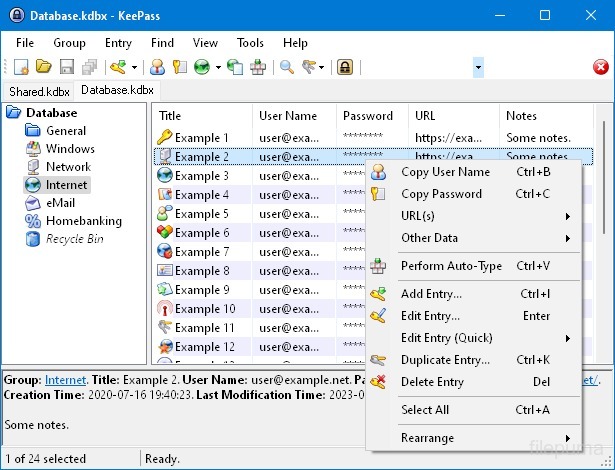


KeePassKişisel bilgileri güvenli bir şekilde depolamak ve yönetmek için kullanılan, yüksek düzeyde güvenliğe sahip ve popüler bir açık kaynak parola yöneticisidir. Dominik Reichl tarafından geliştirilmiştir ve Windows, macOS, Linux ve mobil cihazlar dahil olmak üzere çeşitli platformlarda mevcuttur.
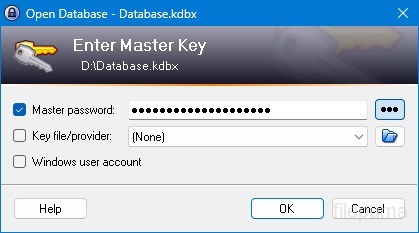
KeePass'in en önemli özelliklerinden biri sağlam güvenliğidir. Depolanan verileri korumak için güçlü şifreleme algoritmaları (örn. AES, Twofish) kullanır ve yalnızca ana parola ile yetkilendirilmiş kullanıcıların parolalarına erişebilmesini sağlar. Ana parola, şifrelenmiş veritabanını açmak için birincil anahtar olarak hizmet eder.
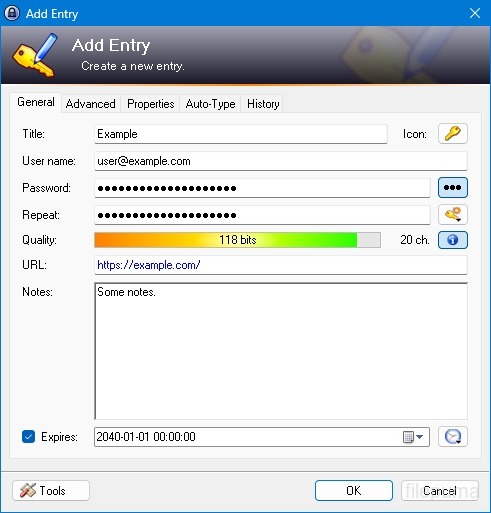
KeePass, kullanıcıların şifrelerini klasörler ve kategoriler kullanarak yapılandırılmış bir şekilde düzenlemelerine olanak tanıyan kullanıcı dostu bir arayüz sunar. Ayrıca, kullanıcıların güvenliği artırmak için karmaşık ve benzersiz şifreler oluşturmalarına yardımcı olan şifre oluşturma araçları da sunar.
Yazılım, kullanıcıların belirli şifreleri hızlı bir şekilde aramasını sağlar ve otomatik doldurma gibi özellikler sunar, bu da web siteleri ve uygulamalar için giriş formlarının otomatik doldurulmasına olanak tanır. KeePass ayrıca eklentileri destekler, işlevselliğini genişletir ve bireysel ihtiyaçları karşılamak için özelleştirilebilir hale getirir.
Ayrıca, KeePass, kullanıcıların şifrelenmiş parola veritabanlarını yerel sürücüler, USB sürücüler veya bulut depolama gibi çeşitli depolama ortamlarında saklamalarına olanak tanıyarak taşınabilirlik ve erişilebilirliği vurgular. Bu, kullanıcıların farklı cihazlardan parolalarına erişirken güvenlik ve gizliliği korumalarını sağlar.
Genel olarak, KeePass, kullanıcıların hassas bilgilerini düzenli ve korunaklı bir şekilde saklamalarına yardımcı olan güvenilir ve güvenli bir şifre yönetim çözümüdür.
Ana Özellikler:
- Güvenli Şifre Depolama: Şifreleri güvenli bir şekilde saklayın ve yönetin.
- Güçlü Şifreleme: Veri güvenliği için gelişmiş şifreleme kullanır.
- Ana Parola & Anahtar Dosyası: Güçlü bir ana şifre ve isteğe bağlı anahtar dosyası ile Access veritabanına erişin.
- İki Aşamalı Kimlik Doğrulama (2FA)Ekstra bir güvenlik katmanı sağlar.
- Otomatik Yazma İşleviKullanıcı adları ve şifrelerin girilmesini otomatikleştirir.
- Şifre Üretici: Güçlü, rastgele parolalar oluşturur.
- Şifreleri Düzenle: Parolaları gruplara ve alt gruplara ayır.
- Ara ve FiltreleBelirli girişleri hızlıca bulun.
- Özel Alanlar: Girişlere ek bilgi ekle.
- Ekler: Dosya girişlerine güvenli bir şekilde dosyalar ekleyin.
- Güvenlik Özellikleri: Ek güvenlik seçenekleri sunar.
- Çapraz Platform: Çeşitli işletim sistemlerinde erişilebilir.
- Eklentiler ve Uzantılar: İşlevselliği ek özelliklerle genişletin.
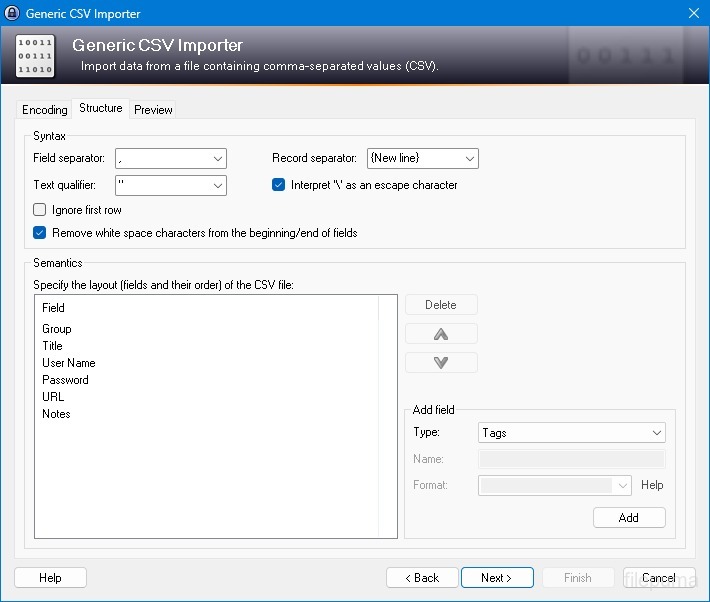
- İthalat & İhracat: Parolaları kolayca içe/dışa aktarın.
- Veritabanı Senkronizasyonu: Veritabanını cihazlar arasında güvenli bir şekilde senkronize edin.
Yeni Olan Nedir?
New Features:
- New KDBX 4 file format, which supports various new features (listed below; e.g. Argon2)
- Added Argon2 key derivation function (it can be activated in the database settings dialog)
- Improved header and data authentication in KDBX 4 files (using HMAC-SHA-256, Encrypt-then-MAC scheme)
- Added ChaCha20 (RFC 7539) encryption algorithm (it can be activated as KDBX file encryption algorithm in the database settings dialog; furthermore, it supersedes Salsa20 as default for generating the inner random stream of KDBX 4 files)
- Added support for opening entry URLs with Firefox or Opera in private mode via the context menu -> 'URL(s)' -> 'Open with ... (Private)'
- Added URL override suggestions for Firefox and Opera in private mode in the URL override suggestions drop-down list in the entry dialog
- Added optional built-in global URL overrides for opening HTTP/HTTPS URLs with Firefox or Opera in private mode
- Added {PICKFIELD} placeholder, which shows a dialog to pick a field whose value will be inserted
- Added option 'Hide "Close Database" toolbar button when at most one database is opened' (turned on by default)
- Added option 'Show additional auto-type menu commands', which can be turned on to show menu commands for performing entry auto-type with some specific sequences
- Added menu command 'Selected Entry's Group' (with keyboard shortcut Ctrl+G) in 'Edit' -> 'Show Entries' (and a context menu equivalent 'Show Parent Group' in 'Selected Entries'), which opens the parent group of the currently selected entry and selects the entry again
- Added menu commands in 'Edit' -> 'Show Entries' to show entries that expire in a specific number of days (1, 2, 3) or weeks (1, 2, 4, 8) or in the future
- Added configuration option that specifies the number of days within which entries are considered to expire 'soon' (the default is 7)
- Added option for changing the alternate item background color
- When the option 'Remember key sources' is enabled, KeePass now also remembers whether a master password has been used
- Added option 'Force changing the master key the next time (once)' (in 'File' -> 'Database Settings' -> tab 'Advanced')
- Added parameters 'Window style' and 'Verb' for the 'Execute command line / URL' trigger action
- Added support for importing mSecure 3.5.5 CSV files
- Added support for importing Password Saver 4.1.2 XML files
- Added support for importing Enpass 5.3.0.1 TXT files
- Enhanced SplashID CSV import (added support for the old version 3.4, added mappings for types of the latest version, groups are now created only for categories, and types are imported as tags)
- LastPass import: added support for CSV files exported by the LastPass Chrome extension, which encodes some special characters as XML entities
- Added 'KeePass KDBX (2.34, Old Format)' export module
- Export using XSL transformation: added support for the 'xsl:output' element in XSL files
- If the global auto-type hot key is Ctrl+Alt+A and the current input locale is Polish, KeePass now shows a warning dialog (telling the user that Ctrl+Alt+A is in conflict with a system key combination producing a character)
- Added Alt+X Unicode character conversion support in rich text boxes on Unix-like systems
- For development snapshots, the 'About' dialog now shows the snapshot version (in the form 'YYMMDD')
- Plugins can provide other key derivation functions now
- The header of KDBX 4 files is extensible by plugins
- Enhanced support for developing encryption algorithm plugins
- Plugins can now store custom data in groups and entries
- Plugin data stored in the database, a group or an entry can now be inspected (and deleted) in the database maintenance dialog, the group dialog and the entry dialog, respectively
- For plugins: file closing events now contain information about whether KeePass is exiting, locking or performing a trigger action
- Added workaround for .NET handle cast overflow bug in InputLanguage.Culture
- Added workaround for Mono ignoring the Ctrl+I shortcut
- Added workaround for Mono clipboard bug
- Added workaround for Mono not focusing the default control in the entry editing dialog
- Added workaround for a Mono timer bug that caused high CPU load while showing a file save confirmation dialog
- Added Mono workaround: when running on Mac OS X, KeePass now does not try to instantiate a tray icon anymore
- Added workaround for XDoTool sending diacritic characters in incorrect case
- TrlUtil now recommends to clear the 'Unused Text' tab
Improvements:
- Improved behavior when searching entries with exclusions (terms prefixed with '-')
- Improved support for auto-typing into target windows using different keyboard layouts
- Auto-Type: improved support for keyboard layouts with keys where Shift, Caps Lock and no modifier result in 3 different characters
- Auto-Type: improved support for spacing modifier letters (U+02B0 to U+02FF)
- Global auto-type now works with target windows having empty titles
- When copying entries to the clipboard, the data package now includes custom icons used by the entries
- Unified behavior when drag&dropping a field containing a placeholder
- Improved entry edit confirmation dialog
- If the screen height is insufficient to display a dialog, the dialog's banner (if the dialog has one) is now removed to save some space.
- Some tooltips are now displayed for a longer time
- A new entry created using a template now does not include the history of the template anymore
- For empty RTF attachments, the internal data editor now by default uses the font that is specified for TXT files
- Internal data editor: added support for changing the format of mixed-format selections
- Internal data viewer and editor: null characters ('', not '0') in texts are now automatically replaced by spaces (like Notepad on Windows 10)
- Improved encoding signature handling for conversions during text attachment imports (via the 'Text Encoding' dialog)
- File transactions are not used anymore for files that have a reparse point (e.g. symbolic links)
- Improved XSL stylesheets for KDBX XML files
- The internal window manager is now thread-safe
- Improved date/time handling
- Improved button image disposal
- When synchronizing two databases, custom data (by plugins) is now merged
- When opening a database file, corrupted icon indices are now automatically replaced by default values
- Added some more entropy sources for the seed of the cryptographically secure pseudo-random number generator (environment variables, command line, full operating system version, current culture)
- ChaCha20 is now used during password generation (instead of Salsa20)
- ChaCha20 is now used as fallback process memory encryption algorithm (instead of Salsa20)
- When the encryption algorithm for a database file is unknown, the error message now shows the UUID of the algorithm
- In KDBX 4, header field lengths are now 4 bytes wide
- In KDBX 4, entry attachments are now stored in an inner, binary header (encrypted, possibly compressed), before the XML part; this reduces the database file size and improves the loading/saving performance
- In KDBX 4, the inner random stream cipher ID and key (to support process memory protection) are now stored in the inner header instead of in the outer header
- KPScript: the 'ChangeMasterKey' command now also updates the master key change date
- TrlUtil: improved validation warning dialogs
- The MSI file now requires any .NET Framework version, not a specific one
- The MSI file is now built using Visual Studio 2015
- Various code optimizations
- Minor other improvements
Bugfixes:
- When executing a {HMACOTP} placeholder, the last modification time of the corresponding entry is now updated
- Key files containing exactly 64 alphanumeric characters are now loaded as intended
Program diğer dillerde mevcuttur.
- Download Keepass
- Télécharger Keepass
- Herunterladen Keepass
- Scaricare Keepass
- ダウンロード Keepass
- Descargar Keepass
- Baixar Keepass
Kullanıcı Yorumları
Kullanıcı Puanı
 26
26
Lisans:
Ücretsiz
Gereksinimler:
Windows All
Diller:
Multi-languages
Size:
2.96MB
Yayıncı:
Güncellendi:
Jan 9, 2017
Temiz
Yazılım Raporu
Son Sürüm
Eski Sürümler
Geliştirici Yazılımı
 Keepass 2.61.1
 RoboForm 10.0.0
 Dashlane 6.2632.0
 1Password 8.12.36
Güvenlik Seviyeleri
Cihazınıza olası zararları önlemek ve verilerinizin ve gizliliğinizin güvenliğini sağlamak amacıyla, ekibimiz her yeni kurulum dosyası sunucularımıza yüklendiğinde veya bir uzak sunucuya bağlandığında kontrol yapar ve dosyanın durumunu onaylamak veya güncellemek için periyodik olarak gözden geçirir. Bu kontrol temelinde, indirilebilir dosyalar için aşağıdaki güvenlik seviyelerini belirliyoruz.
 Temiz
Temiz
Bu yazılım programının temiz olması yüksek ihtimal.
Bu yazılım programıyla ilişkili dosyaları ve URL'leri dünyanın önde gelen 60'tan fazla antivirüs hizmetinde taradık; olası tehditler bulunamadı. Ayrıca, üçüncü taraf yazılımlar bir arada gelmemiştir.
 Uyarı
Uyarı
Bu program reklam desteklidir ve gerekli olmayan üçüncü taraf programların kurulmasını teklif edebilir. Bu, bir araç çubuğu, ana sayfanızı değiştirmek, varsayılan arama motorunuzu ayarlamak veya diğer parti programlarını yüklemek gibi şeyleri içerebilir. Bunlar yanlış pozitif olabilir ve kullanıcılarımızın bu yazılımı kurarken ve kullanırken dikkatli olmaları tavsiye edilir.
 Engelli
Bu yazılım artık indirilebilir durumda değil. Bu yazılım programının kötü niyetli olma veya güvenlik sorunları ya da başka nedenlerden dolayı olması oldukça olasıdır.
Bir Rapor Gönderin
Teşekkür ederim!
Raporunuz gönderildi.
Talebinizi gözden geçireceğiz ve uygun adımları atacağız.
Lütfen bu raporla ilgili alınan herhangi bir eylem hakkında bildirim almayacağınızı unutmayın. Verdiğimiz rahatsızlıktan dolayı özür dileriz.
Web sitemizi temiz ve güvenli tutma konusundaki yardımınızı takdir ediyoruz.