

Audacity (32bit)2.1.0
 免費下載
免費下載
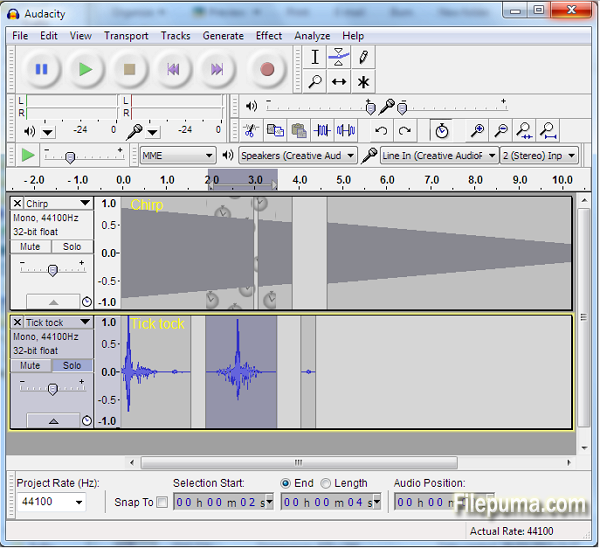
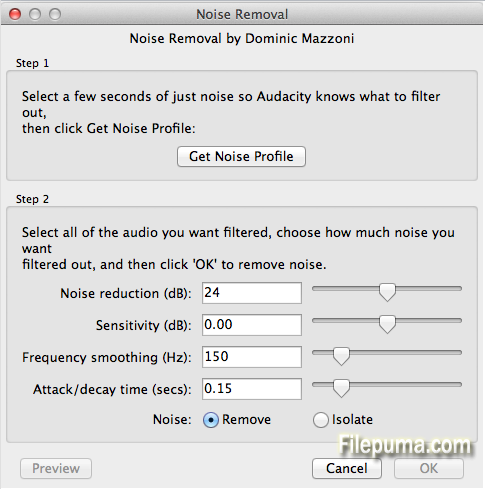
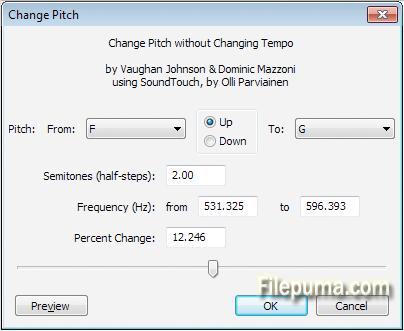
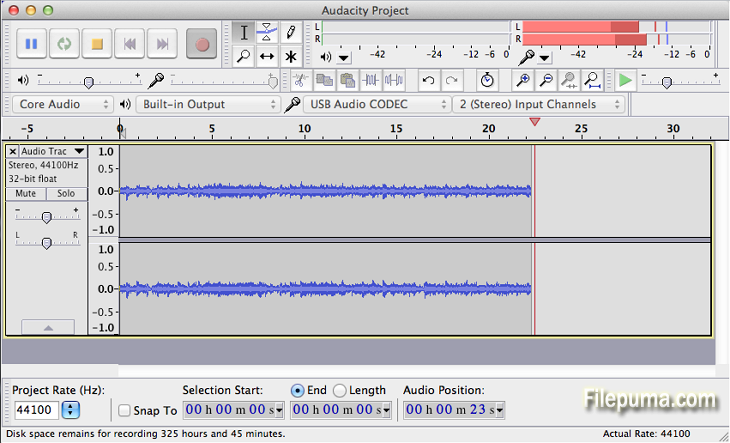


Audacity是一個受歡迎的開源音頻編輯軟體,提供多種強大功能來錄製、編輯和處理音頻文件。憑藉其用戶友好的界面和廣泛的工具,Audacity 已成為音頻愛好者、音樂家和播客的首選。
Audacity 的一個關鍵功能是其可以從多個來源錄製音頻,例如麥克風、線性輸入,甚至是計算機回放。這使得它非常適合錄製配音、訪談和音樂表演。用戶還可以導入和匯出各種音頻文件格式,包括 WAV、MP3 和 FLAC,這使得它對不同的音頻需求非常靈活。
Audacity 提供大量的編輯工具,包括剪切、複製和粘貼音頻片段,以及調整音調、速度和音量。用戶還可以應用各種音效,如均衡、混響和降噪,以提升音頻質量。此外,Audacity 支持多軌編輯,允許用戶同時處理多個音軌,以便進行更複雜的音頻項目。
此外,Audacity 提供了一套強大的分析工具,包括聲譜圖視圖、波形顯示和音頻計量,這些工具有助於精確的音頻編輯和母帶處理。它還支持插件和擴展,可以用來進一步擴展其功能。
Audacity 是一款功能強大且多用途的音頻編輯軟體,提供廣泛的功能,用於錄製、編輯和分析音頻文件。其使用者友好的介面、豐富的工具和開源性質使其成為音頻愛好者和專業人士的熱門選擇。
主要功能:
- 多軌錄音
- 編輯工具(剪下、複製、貼上、裁剪、刪除)
- 效果和濾鏡(均衡、降噪等)
- 頻譜圖視圖用於可視化頻率內容
- 音效的即時預覽
- 支援外掛以擴充功能
- 批量處理以對多個文件應用效果
- 無障礙功能(鍵盤快捷鍵、螢幕閱讀器支援)
- 介面和設定的自定義功能。
最新消息
- LADSPA, VST and Audio Unit (OS X) effects now support real-time preview, save/load of user presets and saving effect settings across sessions. Note: Real-time preview does not yet support latency compensation.
- VST effects now support import/export of FXB preset banks.
- Shell VST effects that host multiple plugins are now supported.
- All Effect Menu items (built-in or plugin) can now be used in a Chain.
- Items in the Effect, Generate or Analyze Menus can be sorted or grouped by name, publisher or class of effect.
- Noise Removal is improved and renamed to "Noise Reduction".
- Change Speed has new time controls for current and new length. You can now enter the speed change as a multiplier e.g. "2" is twice as fast.
- New "Crossfade Tracks" effect can be used for crossfading two tracks. This replaces Cross Fade In and Cross Fade Out.
- Nyquist Prompt and most shipped Nyquist effects now have Preview button.
Interface:
- Redesigned Meter Toolbars: The default shows separate Record and Playback Meters, half-height so they can be wider while docked, in gradient style.
- A frequency selection can now be made (and spectral edit effects applied to those frequencies) when in a spectrogram view. You can also create or adjust frequency selections in a new "Spectral Selection Toolbar" (available at View > Toolbars).
- Transcription Toolbar (Play-at-speed) can now loop play and cut-preview.
- Timer Record now saves recordings automatically into an existing project.
- New Armenian translation.
Operating system and sound device support:
- (Windows) Audacity 2.1.0 requires Windows XP SP3 (32-bit) or XP SP2 (64-bit), Vista, Windows 7, Windows 8 or 8.1.
- (Windows) Audacity is now compiled using Visual Studio 2013.
- (Windows) Recording with WASAPI host now includes experimental support for physical inputs (up to 24-bit depth) as well as loopback recording.
- (OS X) 10.10 (Yosemite) is now supported including Apple Audio Units.
- Typing "j" or "k" in a label track activated the "move cursor" shortcut.
- Spectrogram log (f) view displayed incorrectly until vertically zoomed.
- Fixed crash after zooming out on vertical scale beyond +/-1.0.
- Selections made with Selection Toolbar were not restored after Undo.
- Undo could fail silently if a selection included/touched a clip boundary.
Imports and Exports:
- If there were invalid FFmpeg libs in system PATH this prevented Audacity recognising the installed FFmpeg or the FFmpeg specified in audacity.cfg.
該程序提供其他語言版本
- Download Audacity (32bit)
- Télécharger Audacity (32bit)
- Herunterladen Audacity (32bit)
- Scaricare Audacity (32bit)
- ダウンロード Audacity (32bit)
- Descargar Audacity (32bit)
- Baixar Audacity (32bit)
使用者評價
用戶評分
 208
208
許可證:
免費
需求:
Windows 2000/ XP/ Vista/ Windows 7/ Windows 8
語言:
Multi-languages
尺寸:
23.1MB
出版社:
更新了:
Mar 30, 2015
清潔
報告軟體
最新版本
舊版本
 Audacity (32bit) 3.7.9
 Audacity (64bit) 3.7.9
 Audacity (64bit) 4.0.0
 HandBrake 1.11.2
 HD Video Converter Factory Pro 28.9
 Free HD Video Converter 15.0
安全級別
為了避免對您的設備造成潛在損害,並確保您的數據和隱私安全,我們的團隊在每次新的安裝檔案上傳到我們的伺服器或連結到遠端伺服器時進行檢查,並定期審查該檔案以確認或更新其狀態。根據這種檢查,我們為任何可下載檔案設定以下安全級別。
 清潔
清潔
這個軟體程序極有可能是乾淨的。
我們在全球60多個主要殺毒服務中掃描了與此軟件程序相關的文件和網址;未發現任何潛在威脅。並且沒有捆綁第三方軟件。
 警告
警告
本程序是由廣告支持的,可能會提供安裝不必要的第三方程序。這些可能包括工具欄、更改您的首頁、預設搜尋引擎或安裝其他第三方程序。這些可能是誤報,我們建議用戶在安裝和使用此軟體時要小心。
 殘疾的
殘疾的
這款軟體不再提供下載。這款軟體程式很可能是惡意的,或存在安全問題或其他原因。
提交報告
謝謝你!
您的報告已經發送。
我們將審查您的請求並採取適當的行動。
請注意,您將不會收到有關此報告所採取行動的通知。我們對可能造成的任何不便表示歉意。
我們感謝您在保持我們網站清潔和安全方面的幫助。