
Looking for a free Mac cleaner? Try diCleaner

Mp3tag (32bit)2.83
 免費下載
免費下載
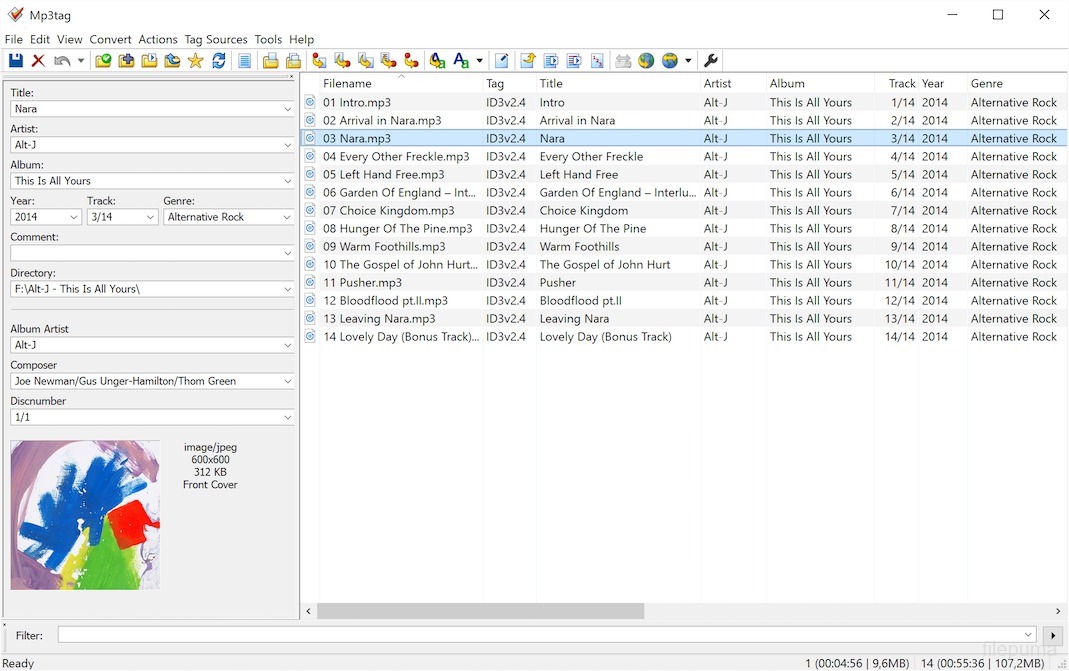


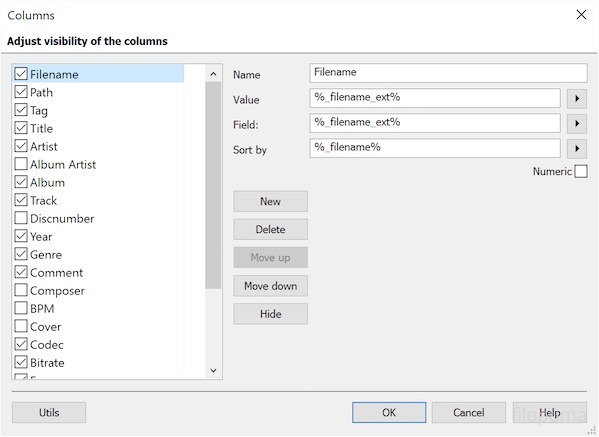


Mp3tag是一款用於編輯音訊檔案中中繼資料的熱門應用程式。它允許使用者修改如藝術家、專輯、標題、類型和封面等資訊。透過保持音樂資料庫的整齊,它讓尋找歌曲更容易,並提升聆聽體驗。
Mp3tag支援多種音訊格式,包括 MP3、FLAC、AAC 等。使用者可以單獨或批次編輯標籤,這在處理大型收藏時能節省時間。Mp3tag 也能讀取線上資料庫,自動填入遺漏的資訊。
Mp3tag提供自訂動作和批次處理。例如,使用者可以根據標籤資訊重新命名檔案,或將標籤詳細資料匯出為文字檔。這些選項讓使用者能控制音樂檔案的排列與顯示方式。
許多音樂愛好者欣賞Mp3tag由於其簡潔的設計。介面簡單,即使是初學者也能輕鬆上手。定期更新可確保其與新的音訊格式相容,讓使用者能長期高效地管理音樂。
主要功能:
- 批次編輯-同時編輯多個音訊檔案的標籤。
- 支援多種格式-可處理 MP3、FLAC、AAC、M4A、WMA、OGG 等等。
- ID3 標籤編輯 – 可編輯 ID3v1、ID3v2、APEv2 及其他標籤。
- 從線上資料庫匯入標籤——從 Discogs、MusicBrainz 和 Amazon 等來源擷取中繼資料。
- 匯出中繼資料 ─ 以 CSV、HTML 或 TXT 等格式建立報告或匯出標籤資訊。
- 根據標籤重新命名檔案-使用標籤資訊自動重新命名檔案。
- 播放清單支援-建立並管理如 M3U 的播放清單。
- 封面藝術管理-新增、更改或移除專輯封面圖片。
- 腳本與動作——使用動作腳本自動化重複性任務。
最新消息
New:
- added MP4 column to tag-field mappings overview table in documentation
- added Discogs Release ID tag source to directly search by Discogs Release ID
- added support for ISRC field in cue sheets
- added option to restrict action-based cover export to certain cover type
- added support for stripping Nero-style chapter information from MP4 files via context-menu in the file list
- added support for detecting Nero-style MP4 tags and reporting via %_tag% if present
- removed Amazon tag sources after Amazon.com invalidated Mp3tag's web services account
- Discogs tag source name is now correctly capitalized
- main performer from cue sheet is now mapped to ALBUMARTIST (instead of ALBUM ARTIST)
- special characters in main performer from cue sheet were not correctly converted when writing
- cue sheets that started with a different track number than 1 were not read
- checkboxes at dialog for cover export were not labeled correctly (since 2.82b)
- tags saved to wrong file when auto-save was enabled and column-click in file list changed the file order
- Discogs Web Source had problems with certain artists which resulted in obsolete comma after artist name
- sort arrow was incorrectly shown for next column after adding or removing a column left from the sort column
- added detection of non-iTunes custom tags which are now kept unmodified during rewrites
- encoding of cover art for Opus did not always include Base64 padding (which was problematic for some players)
- runtime error at Export if loop limit exceeded actual export result set size
- possible index overflow at $substr() scripting function
該程序提供其他語言版本
- Download Mp3tag (32bit)
- Télécharger Mp3tag (32bit)
- Herunterladen Mp3tag (32bit)
- Scaricare Mp3tag (32bit)
- ダウンロード Mp3tag (32bit)
- Descargar Mp3tag (32bit)
- Baixar Mp3tag (32bit)
使用者評價
用戶評分
 28
28
許可證:
免費
需求:
Windows XP/ 2003/ Vista/ 2008/ Windows 7/ Windows 8/ Windows 10
語言:
Multi-languages
尺寸:
3.13MB
出版社:
更新了:
Jun 25, 2017
清潔
報告軟體
最新版本
舊版本
開發者的軟體
 Mp3tag (32bit) 3.36.1
 VLC Media Player (64bit) 3.0.23
 VLC Media Player (32bit) 3.0.23
 iTunes (64bit) 12.13.11.1
 Spotify 1.2.99.317
 AIMP 5.40.2727
安全級別
為了避免對您的設備造成潛在損害,並確保您的數據和隱私安全,我們的團隊在每次新的安裝檔案上傳到我們的伺服器或連結到遠端伺服器時進行檢查,並定期審查該檔案以確認或更新其狀態。根據這種檢查,我們為任何可下載檔案設定以下安全級別。
 清潔
清潔
這個軟體程序極有可能是乾淨的。
我們在全球60多個主要殺毒服務中掃描了與此軟件程序相關的文件和網址;未發現任何潛在威脅。並且沒有捆綁第三方軟件。
 警告
警告
本程序是由廣告支持的,可能會提供安裝不必要的第三方程序。這些可能包括工具欄、更改您的首頁、預設搜尋引擎或安裝其他第三方程序。這些可能是誤報,我們建議用戶在安裝和使用此軟體時要小心。
 殘疾的
殘疾的
這款軟體不再提供下載。這款軟體程式很可能是惡意的,或存在安全問題或其他原因。
提交報告
謝謝你!
您的報告已經發送。
我們將審查您的請求並採取適當的行動。
請注意,您將不會收到有關此報告所採取行動的通知。我們對可能造成的任何不便表示歉意。
我們感謝您在保持我們網站清潔和安全方面的幫助。