

Keepass2.35
 مفت ڈاؤن لوڈ
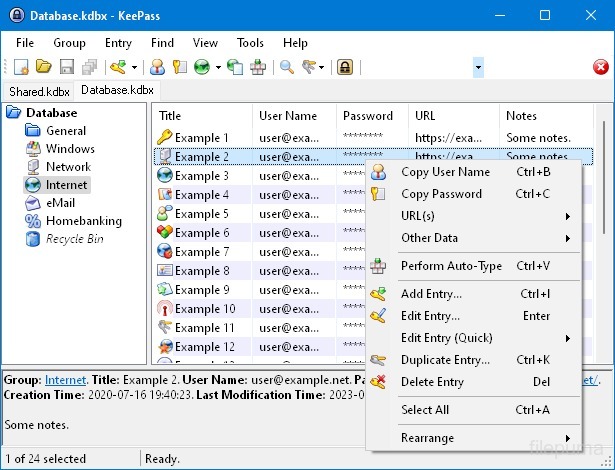


KeePassایک انتہائی محفوظ اور مقبول اوپن سورس پاس ورڈ مینیجر ہے جو پاس ورڈز، یوزرنیمز، اور دیگر حساس معلومات کو محفوظ انداز میں ذخیرہ اور منظم کرنے کے لیے استعمال ہوتا ہے۔ یہ Dominik Reichl نے تیار کیا تھا اور مختلف پلیٹ فارمز بشمول Windows، macOS، Linux، اور موبائل ڈیوائسز کے لیے دستیاب ہے۔
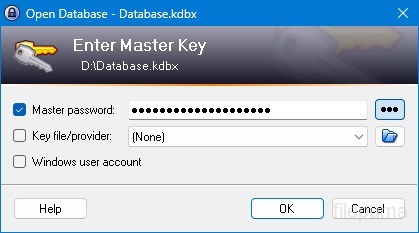
KeePass کی اہم خصوصیات میں سے ایک اس کی مضبوط سیکیورٹی ہے۔ یہ ذخیرہ شدہ ڈیٹا کی حفاظت کے لیے مضبوط انکرپشن الگورithms استعمال کرتا ہے (مثال کے طور پر، AES, Twofish)، جس سے اس بات کی ضمانت دی جاتی ہے کہ صرف مجاز صارفین ہی ماسٹر پاس ورڈ کے ساتھ اپنے پاس ورڈز تک رسائی حاصل کر سکتے ہیں۔ ماسٹر پاس ورڈ مرموز شدہ ڈیٹا بیس کو انلاک کرنے کے لیے بنیادی کلید کے طور پر کام کرتا ہے۔
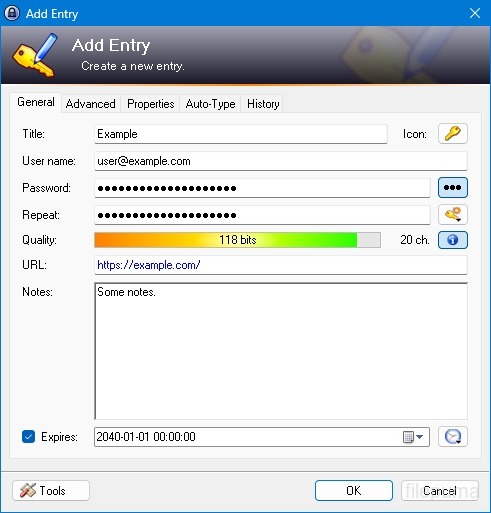
KeePass ایک صارف دوست انٹرفیس فراہم کرتا ہے، جو صارفین کو اپنی پاس ورڈز کو منظم انداز میں ترتیب دینے کی اجازت دیتا ہے، فولڈرز اور زمروں کا استعمال کرتے ہوئے۔ اس کے علاوہ، یہ پاس ورڈ جنریشن کے اوزار پیش کرتا ہے، جو صارفین کو سیکیورٹی کو بہتر بنانے کے لئے پیچیدہ اور منفرد پاس ورڈ بنانے میں مدد دیتے ہیں۔
یہ سافٹ ویئر صارفین کو مخصوص پاس ورڈز کی تیزی سے تلاش کرنے کی صلاحیت فراہم کرتا ہے اور خصوصیات جیسے آٹو-ٹائپ پیش کرتا ہے، جو ویب سائٹس اور ایپلیکیشنز کے لیے لاگ ان فارم کو خودکار طریقے سے پُر کرنے کی اجازت دیتی ہیں۔ KeePass پلگ انز کی بھی حمایت کرتا ہے، جو اس کی فعالیت کو بڑھانے اور اسے انفرادی ضروریات کے مطابق کرنے کے قابل بناتا ہے۔
مزید برآں، KeePass پورٹیبلٹی اور رسائی پر زور دیتا ہے کیونکہ یہ صارفین کو ان کے مرموز پاس ورڈ ڈیٹا بیس کو مختلف ذخیرہ کے ذرائع، جیسے مقامی ڈرائیوز، یو ایس بی ڈرائیوز یا کلاؤڈ اسٹوریج پر محفوظ کرنے کی اجازت دیتا ہے۔ اس سے صارفین کو مختلف ڈیوائسز سے اپنے پاس ورڈز تک رسائی حاصل کرنے کی اجازت ملتی ہے جبکہ سیکیورٹی اور نجی معلومات کی حفاظت برقرار رہتی ہے۔
مجموعی طور پر، KeePass ایک قابل اعتماد اور محفوظ پاس ورڈ مینجمنٹ حل ہے جو صارفین کو ان کی حساس معلومات کو منظم اور محفوظ رکھنے میں مدد کرتا ہے۔
اہم خصوصیات:
- محفوظ پاس ورڈ ذخیرہ: پاس ورڈز کو محفوظ طریقے سے محفوظ کریں اور منظم کریں۔
- مضبوط انکرپشن: ڈیٹا کی سیکیورٹی کے لیے جدید انکرپشن استعمال کرتا ہے۔
- ماسٹر پاس ورڈ اور کی فائل: مضبوط ماسٹر پاس ورڈ اور اختیاری کلید فائل کے ساتھ Access database تک رسائی حاصل کریں۔
- دو عناصری تصدیق (2FA): اضافی حفاظتی پرت فراہم کرتا ہے۔
- آٹو-ٹائپ فعالیت: یوزر نیمز اور پاس ورڈز کا داخلہ خودکار بناتا ہے۔
- پاس ورڈ جنریٹر: مضبوط، بےترتیب پاس ورڈز بناتا ہے۔
- پاس ورڈز کو منظم کریں: پاس ورڈز کو گروپس اور ذیلی گروپس میں تقسیم کریں۔
- تلاش اور فلٹر: مخصوص اندراجات کو جلدی سے تلاش کریں۔
- کسٹم فیلڈز: اندراجات میں اضافی معلومات شامل کریں۔
- منسلکات: فائلوں کو پاس ورڈ اندراجات کے ساتھ محفوظ طریقے سے منسلک کریں۔
- سیکیورٹی خصوصیات: اضافی سیکیورٹی اختیارات پیش کرتا ہے۔
- کراس پلیٹ فارم: مختلف آپریٹنگ سسٹمز پر دستیاب ہے۔
- پلاگ انز اور ایکسٹینشنز: اضافی خصوصیات کے ساتھ فعالیت کو بڑھائیں۔
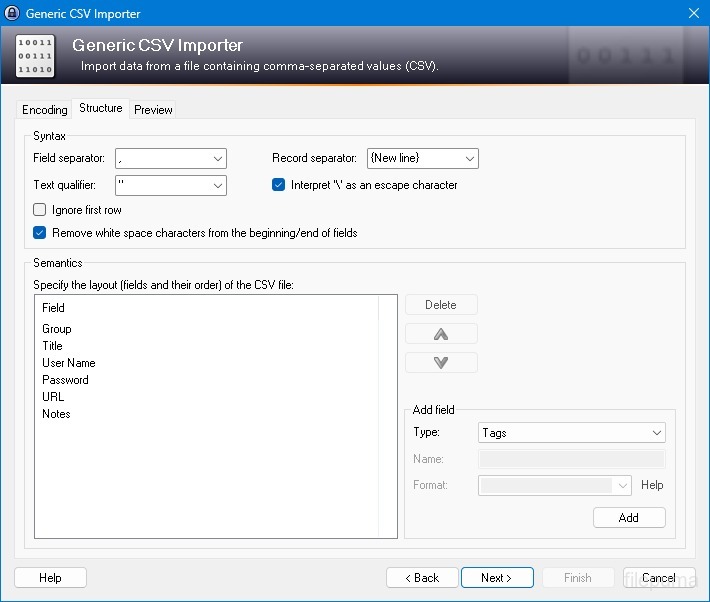
- درآمد و برآمد: پاس ورڈز کو آسانی سے درآمد/برآمد کریں۔
- ڈیٹابیس ہم آہنگی: ڈیٹا بیس کو آلات کے درمیان محفوظ طریقے سے ہم وقت سازی کریں۔
کیا نیا ہے؟
New Features:
- New KDBX 4 file format, which supports various new features (listed below; e.g. Argon2)
- Added Argon2 key derivation function (it can be activated in the database settings dialog)
- Improved header and data authentication in KDBX 4 files (using HMAC-SHA-256, Encrypt-then-MAC scheme)
- Added ChaCha20 (RFC 7539) encryption algorithm (it can be activated as KDBX file encryption algorithm in the database settings dialog; furthermore, it supersedes Salsa20 as default for generating the inner random stream of KDBX 4 files)
- Added support for opening entry URLs with Firefox or Opera in private mode via the context menu -> 'URL(s)' -> 'Open with ... (Private)'
- Added URL override suggestions for Firefox and Opera in private mode in the URL override suggestions drop-down list in the entry dialog
- Added optional built-in global URL overrides for opening HTTP/HTTPS URLs with Firefox or Opera in private mode
- Added {PICKFIELD} placeholder, which shows a dialog to pick a field whose value will be inserted
- Added option 'Hide "Close Database" toolbar button when at most one database is opened' (turned on by default)
- Added option 'Show additional auto-type menu commands', which can be turned on to show menu commands for performing entry auto-type with some specific sequences
- Added menu command 'Selected Entry's Group' (with keyboard shortcut Ctrl+G) in 'Edit' -> 'Show Entries' (and a context menu equivalent 'Show Parent Group' in 'Selected Entries'), which opens the parent group of the currently selected entry and selects the entry again
- Added menu commands in 'Edit' -> 'Show Entries' to show entries that expire in a specific number of days (1, 2, 3) or weeks (1, 2, 4, 8) or in the future
- Added configuration option that specifies the number of days within which entries are considered to expire 'soon' (the default is 7)
- Added option for changing the alternate item background color
- When the option 'Remember key sources' is enabled, KeePass now also remembers whether a master password has been used
- Added option 'Force changing the master key the next time (once)' (in 'File' -> 'Database Settings' -> tab 'Advanced')
- Added parameters 'Window style' and 'Verb' for the 'Execute command line / URL' trigger action
- Added support for importing mSecure 3.5.5 CSV files
- Added support for importing Password Saver 4.1.2 XML files
- Added support for importing Enpass 5.3.0.1 TXT files
- Enhanced SplashID CSV import (added support for the old version 3.4, added mappings for types of the latest version, groups are now created only for categories, and types are imported as tags)
- LastPass import: added support for CSV files exported by the LastPass Chrome extension, which encodes some special characters as XML entities
- Added 'KeePass KDBX (2.34, Old Format)' export module
- Export using XSL transformation: added support for the 'xsl:output' element in XSL files
- If the global auto-type hot key is Ctrl+Alt+A and the current input locale is Polish, KeePass now shows a warning dialog (telling the user that Ctrl+Alt+A is in conflict with a system key combination producing a character)
- Added Alt+X Unicode character conversion support in rich text boxes on Unix-like systems
- For development snapshots, the 'About' dialog now shows the snapshot version (in the form 'YYMMDD')
- Plugins can provide other key derivation functions now
- The header of KDBX 4 files is extensible by plugins
- Enhanced support for developing encryption algorithm plugins
- Plugins can now store custom data in groups and entries
- Plugin data stored in the database, a group or an entry can now be inspected (and deleted) in the database maintenance dialog, the group dialog and the entry dialog, respectively
- For plugins: file closing events now contain information about whether KeePass is exiting, locking or performing a trigger action
- Added workaround for .NET handle cast overflow bug in InputLanguage.Culture
- Added workaround for Mono ignoring the Ctrl+I shortcut
- Added workaround for Mono clipboard bug
- Added workaround for Mono not focusing the default control in the entry editing dialog
- Added workaround for a Mono timer bug that caused high CPU load while showing a file save confirmation dialog
- Added Mono workaround: when running on Mac OS X, KeePass now does not try to instantiate a tray icon anymore
- Added workaround for XDoTool sending diacritic characters in incorrect case
- TrlUtil now recommends to clear the 'Unused Text' tab
Improvements:
- Improved behavior when searching entries with exclusions (terms prefixed with '-')
- Improved support for auto-typing into target windows using different keyboard layouts
- Auto-Type: improved support for keyboard layouts with keys where Shift, Caps Lock and no modifier result in 3 different characters
- Auto-Type: improved support for spacing modifier letters (U+02B0 to U+02FF)
- Global auto-type now works with target windows having empty titles
- When copying entries to the clipboard, the data package now includes custom icons used by the entries
- Unified behavior when drag&dropping a field containing a placeholder
- Improved entry edit confirmation dialog
- If the screen height is insufficient to display a dialog, the dialog's banner (if the dialog has one) is now removed to save some space.
- Some tooltips are now displayed for a longer time
- A new entry created using a template now does not include the history of the template anymore
- For empty RTF attachments, the internal data editor now by default uses the font that is specified for TXT files
- Internal data editor: added support for changing the format of mixed-format selections
- Internal data viewer and editor: null characters ('', not '0') in texts are now automatically replaced by spaces (like Notepad on Windows 10)
- Improved encoding signature handling for conversions during text attachment imports (via the 'Text Encoding' dialog)
- File transactions are not used anymore for files that have a reparse point (e.g. symbolic links)
- Improved XSL stylesheets for KDBX XML files
- The internal window manager is now thread-safe
- Improved date/time handling
- Improved button image disposal
- When synchronizing two databases, custom data (by plugins) is now merged
- When opening a database file, corrupted icon indices are now automatically replaced by default values
- Added some more entropy sources for the seed of the cryptographically secure pseudo-random number generator (environment variables, command line, full operating system version, current culture)
- ChaCha20 is now used during password generation (instead of Salsa20)
- ChaCha20 is now used as fallback process memory encryption algorithm (instead of Salsa20)
- When the encryption algorithm for a database file is unknown, the error message now shows the UUID of the algorithm
- In KDBX 4, header field lengths are now 4 bytes wide
- In KDBX 4, entry attachments are now stored in an inner, binary header (encrypted, possibly compressed), before the XML part; this reduces the database file size and improves the loading/saving performance
- In KDBX 4, the inner random stream cipher ID and key (to support process memory protection) are now stored in the inner header instead of in the outer header
- KPScript: the 'ChangeMasterKey' command now also updates the master key change date
- TrlUtil: improved validation warning dialogs
- The MSI file now requires any .NET Framework version, not a specific one
- The MSI file is now built using Visual Studio 2015
- Various code optimizations
- Minor other improvements
Bugfixes:
- When executing a {HMACOTP} placeholder, the last modification time of the corresponding entry is now updated
- Key files containing exactly 64 alphanumeric characters are now loaded as intended
پروگرام دوسرے زبانوں میں دستیاب ہے۔
- Download Keepass
- Télécharger Keepass
- Herunterladen Keepass
- Scaricare Keepass
- ダウンロード Keepass
- Descargar Keepass
- Baixar Keepass
صارف کے جائزے
صارف کی درجہ بندی
 26
26
لائسنس:
آزاد
ضروریات:
Windows All
زبانیں:
Multi-languages
سائز:
2.96MB
ناشر:
اپ ڈیٹ کیا گیا:
Jan 9, 2017
صاف
رپورٹ سافٹ ویئر
حالیہ ورژن
پرانی ورژنز
ڈویلپر کا سافٹ ویئر
 Keepass 2.61.1
 RoboForm 10.0.0
 Dashlane 6.2632.0
 1Password 8.12.36
سیکیورٹی کی سطحیں
اپنے ڈیوائس کو کسی ممکنہ نقصان سے بچانے اور اپنے ڈیٹا اور رازداری کی سیکیورٹی کو یقینی بنانے کے لیے، ہماری ٹیم ہر بار جب ایک نیا انسٹالیشن فائل ہمارے سرورز پر اپلوڈ کیا جاتا ہے یا کسی دور دراز کے سرور کے ساتھ منسلک ہوتا ہے، اسے چیک کرتی ہے اور فائل کی حیثیت کی تصدیق یا تازہ ترین کرنے کے لیے اسے وقتاً فوقتاً جائزہ لیتی ہے۔ اس چیکنگ کی بنیاد پر، ہم کسی بھی ڈاؤن لوڈ کے قابل فائلوں کے لیے مندرجہ ذیل سیکیورٹی سطحیں متعین کرتے ہیں۔
 صاف
صاف
یہ بہت ممکن ہے کہ یہ سافٹ ویئر پروگرام محفوظ ہو۔
ہم نے دنیا کے 60 سے زائد معروف اینٹی وائرس سروسز میں اس سافٹ ویئر پروگرام سے منسلک فائلوں اور یو آر ایل کو اسکین کیا؛ کوئی ممکنہ خطرات نہیں ملے۔ اور کوئی تیسری پارٹی کا سافٹ ویئر شامل نہیں ہے۔
 خبردار
یہ پروگرام اشتہاری حمایت یافتہ ہے اور یہ تیسری پارٹی کے پروگرامز کو انسٹال کرنے کی پیشکش کر سکتا ہے جو ضرورت نہیں ہیں۔ ان میں ایک ٹول بار، آپ کے ہوم پیج میں تبدیلی، ڈیفالٹ سرچ انجن، یا دوسرے پارٹی پروگرامز کا انسٹال کرنا شامل ہو سکتا ہے۔ یہ جھوٹے مثبت ہو سکتے ہیں، اور ہمارے صارفین کو اس سافٹ ویئر کو انسٹال اور استعمال کرتے وقت محتاط رہنے کی نصیحت کی جاتی ہے۔
 معذور
معذور
یہ سافٹ ویئر اب ڈاؤن لوڈ کے لیے دستیاب نہیں ہے۔ اس بات کا زیادہ امکان ہے کہ یہ سافٹ ویئر پروگرام خطرناک ہے یا اس میں سیکیورٹی کے مسائل ہیں یا دیگر وجوہات ہیں۔
ایک رپورٹ جمع کریں
شکریہ!
آپ کی رپورٹ بھیج دی گئی ہے۔
ہم آپ کی درخواست کا جائزہ لیں گے اور مناسب کارروائی کریں گے۔
براہ کرم نوٹ کریں کہ اس رپورٹ کی وجہ سے کیے گئے کسی بھی عمل کے بارے میں آپ کو کوئی اطلاع نہیں ملے گی۔ ہم اس کی وجہ سے ہونے والی کسی بھی تکلیف کے لیے معذرت خواہ ہیں۔
ہم آپ کی مدد کی قدر کرتے ہیں تاکہ ہماری ویب سائٹ کو صاف اور محفوظ رکھا جا سکے۔