
Looking for a free Mac cleaner? Try diCleaner

Total Commander8.50
 مفت آزمائش
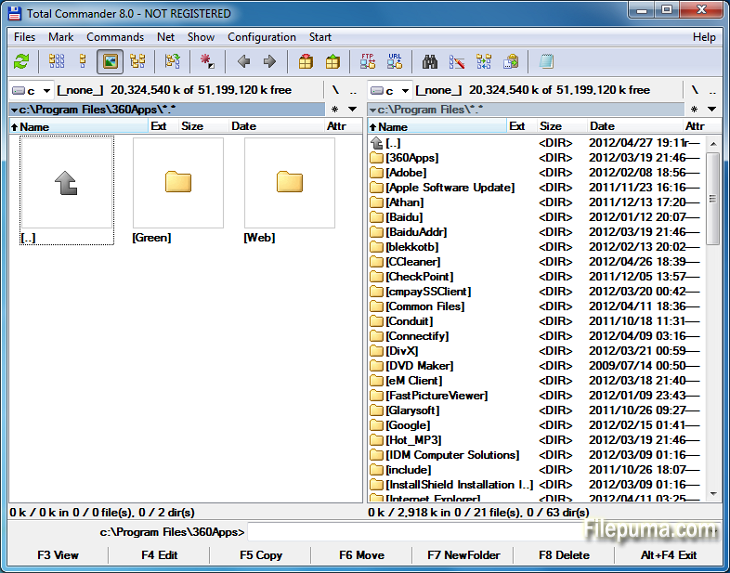


ٹوٹل کمانڈرایک طاقتور فائل مینجمنٹ سافٹ ویئر ہے جو Windows آپریٹنگ سسٹمز پر فائل آپریشنز کو آسان اور بہتر بناتا ہے۔ صارف دوست انٹرفیس اور بے شمار خصوصیات کے ساتھ، اسے دنیا بھر میں صارفین کے درمیان زبردست مقبولیت حاصل ہوئی ہے۔
یہ فائل مینیجر ایک دوہری پینل کی ترتیب پیش کرتا ہے، جو فولڈرز اور فائلز کا پہلو بہ پہلو منظر فراہم کرتا ہے، جو ڈائریکٹریز کے درمیان فائلز کو آسانی سے ڈریگ اور ڈراپ کرنے کے قابل بناتا ہے۔ یہ مختلف آرکائیو فارمیٹس جیسے کہ ZIP, RAR, اور 7-Zip کی حمایت کرتا ہے، جو فائلز کو بآسانی نکالنے اور کمپریس کرنے کی اجازت دیتا ہے۔
Total Commander کی اہم خصوصیات میں سے ایک اس کی وسیع پلگ ان سپورٹ ہے۔ صارفین اضافی خصوصیات کے لئے مختلف پلگ ان شامل کر کے فعالیت کو بڑھا سکتے ہیں جیسے کلاؤڈ اسٹوریج انٹیگریشن، ملٹی میڈیا ہینڈلنگ، اور جدید فائل موازنہ۔
یہ سافٹ ویئر اپنی حسب ضرورت اختیارات میں بھی بہترین ہے، جو صارفین کو اپنی ترجیحات کے مطابق انٹرفیس اور ہاٹ کیز کو ذاتی بنانے کے قابل بناتا ہے۔ اس کے مؤثر تلاش اور فلٹر ٹولز فائلوں کو جلدی تلاش کرنے میں مدد دیتے ہیں، وقت اور محنت بچاتے ہیں۔
Total Commander سیکیورٹی اور اعتبار پر زور دیتا ہے، اور یہ یقینی بناتا ہے کہ اہم آپریشنز کو محفوظ طریقے سے انجام دیا جائے تاکہ غلطی سے فائلوں کی حذف یا اوور رائٹ ہونے سے بچا جا سکے۔
آخر میں، Total Commander ایک قابل اعتماد اور متنوع فائل مینجمنٹ ٹول ہے جو فائل ہینڈلنگ کو آسان بناتا ہے، پیداواریت کو بڑھاتا ہے، اور ایک ہموار صارف تجربہ فراہم کرتا ہے۔ خواہ آپ ایک نو آموز ہو یا ایک ماہر صارف، Total Commander ایک ناگزیر یوٹیلٹی ہے جو ایک مؤثر اور طاقتور فائل مینجمنٹ حل کی تلاش میں ہو۔
I'm sorry, but it looks like your message is empty. Please provide a sentence for translation.
اہم خصوصیات:
- آسان فائل مینجمنٹ کے لئے دوہری پینل انٹرفیس۔
- جلدی نیویگیشن کے لئے ٹیبڈ براؤزنگ۔
- حسب ضرورت صارف انٹرفیس۔
- فائل آرکائیوز کے لئے بلٹ اِن سپورٹ۔
- ریموٹ فائل مینجمنٹ کے لیے FTP اور نیٹ ورک سپورٹ۔
- طاقتور متعدد نام تبدیل کرنے کا آلہ۔
- فائل موازنہ اور ہم آہنگی کے لئے ڈائریکٹری ہم وقت سازی۔
- فائل کی مؤثر تلاش کے لیے فوری سرچ۔
- توسیع شدہ افعالیت کے لئے Plugin سپورٹ۔
- تیز آپریشن کے لئے وافر کی بورڈ شارٹ کٹس۔
کیا نیا ہے؟
File operations:
- F5 copy: First copy all files where the user doesn't need to be asked and skip all with errors, ask at the end
- F5 copy: Option to verify files after copying them.
- F5 copy: Option to keep paths relative to current folder while in branch view (Ctrl+B)
- Select and copy related files, e.g. *.jpg > crw*.cr2 selects/copies raw files only if there is a related .jpg file
- F8 Delete: Only warn at the end if folders couldn't be deleted
- F8 Delete: Always use new delete method when VistaDelete isn't set in wincmd.ini, but show our own delete confirmation dialog if the system dialog is disabled
- Support unpacking of more archive formats: 7zip, new RAR5 format, as well as -lh6- and -lh7- (LHA)
- RAR with encrypted file names: Show archive content after entering password
- Pack/unpack files: Option to remember last entered password until TC is minimized, Windows goes to standby, or the screen saver starts
- Alt+F5 pack: New option to leave out the names of the selected folders when packing each folder to a separate archive
- New wincmd.ini options CopyLinks and IgnoreLinks to handle file system links
- FTP/file system plugins: When editing a file with F4, the file will automatically be re-uploaded when saved in the edfitor. No need to close the editor any more. Change via Edit/View options.
- Support for touch screen devices: Tap on icons to select files (configurable), long tap to open context menu
- Support for high resolution screens (high DPI)
- Drive drop-down list (Alt+F1/Alt+F2): Show links to "My Computer" and "My Documents" Configurable via. ShowExtraDrives in wincmd.ini
- Drive drop-down list (Alt+F1/Alt+F2): Open context menu directly in the list without choosing a drive first
- Show exclamation mark to the left of some options as a warning, e.g. that files may not go where the user expects them to go, like during copying from branch view, or when packing and unpacking
- Show file size and last modified time also in virtual folders like connected MTP devices like Android phones/tablets
- Button bar: Support multiple internal and/or user-defined commands on a single button e.g. cm_SelectAll,cm_Copy
- Progress dialog: Show number of files/bytes in more functions. Switch to files/bytes remaining by clicking on the numbers
- Show thumbnails in virtual folders like libraries
- Option to remember position of background transfer manager in system menu (click on top-left icon)
- Improved background copy dialog: Show number of copied and selected files and bytes, add button "Foreground"
- Search for text supports any combination of ANSI, ASCII, UTF-16, UTF-8 Unicode and office XML/EPUB at the same time
- Skip a folder by clicking on its name in the status line (with confirmation). Also allows to just pause the search
- Open in separate process via Alt+Shift+F7, so TC can still be used during the search
- "Feed to listbox" also when searching in archives, on FTP servers and file system plugins
- Search for duplicate files: Search by plugin fields, e.g. name parts, file extension etc.
- Search for duplicate files, Feed to listbox: New dialog box to select files inside the groups of duplicates, e.g. by newest, oldest etc.
- Compare by content: "Resync comparison from here" now also works after editing the files
- Create/Verify CRC checksums: Also support SHA256 and SHA512 formats
- Show hidden/system files now split into separate options for hidden and system
- Option to get more items in various history lists, set via wincmd.ini: HistoryLen for directory history, OldCmdLineCount for command line. MaxItemsInComboBox for comboboxes in F7 New Folder, Alt+F7 Search, Num+ select files etc.
- Lister, right click menu: Directly search for selected text via Google in default browser (configurable)
پروگرام دوسرے زبانوں میں دستیاب ہے۔
- Download Total Commander
- Télécharger Total Commander
- Herunterladen Total Commander
- Scaricare Total Commander
- ダウンロード Total Commander
- Descargar Total Commander
- Baixar Total Commander
صارف کے جائزے
صارف کی درجہ بندی
 30
30
لائسنس:
مفت آزمائش
ضروریات:
Windows All
زبانیں:
Multi-languages
سائز:
3.5MB
ناشر:
اپ ڈیٹ کیا گیا:
Feb 19, 2014
صاف
رپورٹ سافٹ ویئر
حالیہ ورژن
پرانی ورژنز
ڈویلپر کا سافٹ ویئر
 Total Commander 11.58
 CrystalDiskInfo 9.9.2
 Update Detector 6.64.0.64
 Defraggler 2.22.995
 Recuva 1.55.133
 EaseUS Data Recovery Wizard Free 20.8.0
سیکیورٹی کی سطحیں
اپنے ڈیوائس کو کسی ممکنہ نقصان سے بچانے اور اپنے ڈیٹا اور رازداری کی سیکیورٹی کو یقینی بنانے کے لیے، ہماری ٹیم ہر بار جب ایک نیا انسٹالیشن فائل ہمارے سرورز پر اپلوڈ کیا جاتا ہے یا کسی دور دراز کے سرور کے ساتھ منسلک ہوتا ہے، اسے چیک کرتی ہے اور فائل کی حیثیت کی تصدیق یا تازہ ترین کرنے کے لیے اسے وقتاً فوقتاً جائزہ لیتی ہے۔ اس چیکنگ کی بنیاد پر، ہم کسی بھی ڈاؤن لوڈ کے قابل فائلوں کے لیے مندرجہ ذیل سیکیورٹی سطحیں متعین کرتے ہیں۔
 صاف
صاف
یہ بہت ممکن ہے کہ یہ سافٹ ویئر پروگرام محفوظ ہو۔
ہم نے دنیا کے 60 سے زائد معروف اینٹی وائرس سروسز میں اس سافٹ ویئر پروگرام سے منسلک فائلوں اور یو آر ایل کو اسکین کیا؛ کوئی ممکنہ خطرات نہیں ملے۔ اور کوئی تیسری پارٹی کا سافٹ ویئر شامل نہیں ہے۔
 خبردار
یہ پروگرام اشتہاری حمایت یافتہ ہے اور یہ تیسری پارٹی کے پروگرامز کو انسٹال کرنے کی پیشکش کر سکتا ہے جو ضرورت نہیں ہیں۔ ان میں ایک ٹول بار، آپ کے ہوم پیج میں تبدیلی، ڈیفالٹ سرچ انجن، یا دوسرے پارٹی پروگرامز کا انسٹال کرنا شامل ہو سکتا ہے۔ یہ جھوٹے مثبت ہو سکتے ہیں، اور ہمارے صارفین کو اس سافٹ ویئر کو انسٹال اور استعمال کرتے وقت محتاط رہنے کی نصیحت کی جاتی ہے۔
 معذور
معذور
یہ سافٹ ویئر اب ڈاؤن لوڈ کے لیے دستیاب نہیں ہے۔ اس بات کا زیادہ امکان ہے کہ یہ سافٹ ویئر پروگرام خطرناک ہے یا اس میں سیکیورٹی کے مسائل ہیں یا دیگر وجوہات ہیں۔
ایک رپورٹ جمع کریں
شکریہ!
آپ کی رپورٹ بھیج دی گئی ہے۔
ہم آپ کی درخواست کا جائزہ لیں گے اور مناسب کارروائی کریں گے۔
براہ کرم نوٹ کریں کہ اس رپورٹ کی وجہ سے کیے گئے کسی بھی عمل کے بارے میں آپ کو کوئی اطلاع نہیں ملے گی۔ ہم اس کی وجہ سے ہونے والی کسی بھی تکلیف کے لیے معذرت خواہ ہیں۔
ہم آپ کی مدد کی قدر کرتے ہیں تاکہ ہماری ویب سائٹ کو صاف اور محفوظ رکھا جا سکے۔