

VirtualBox5.0.0-101573
 مفت ڈاؤن لوڈ
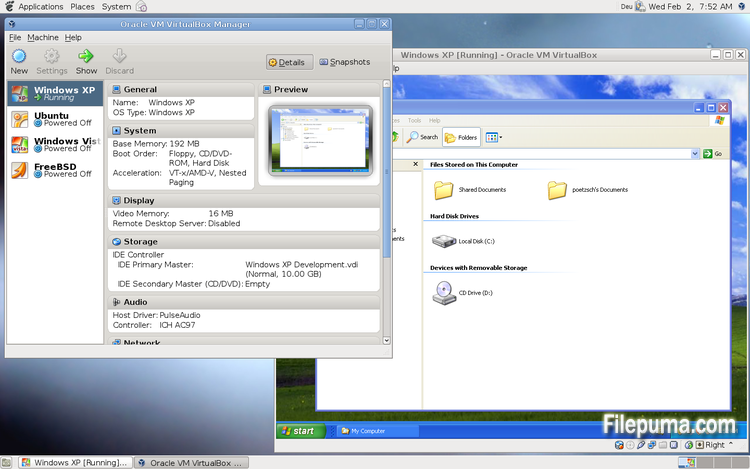
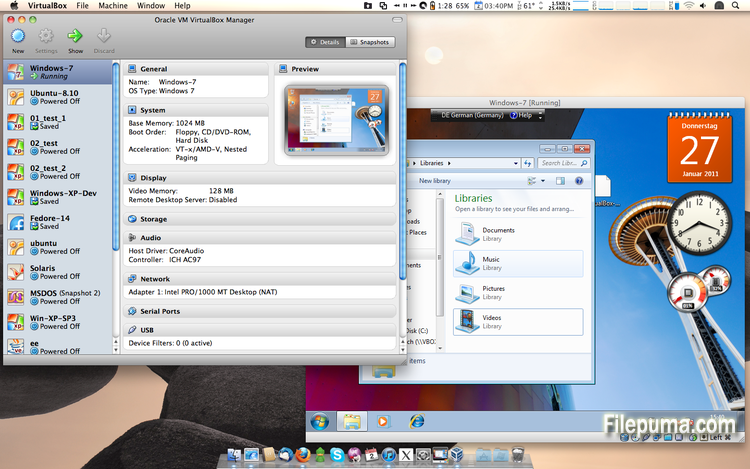
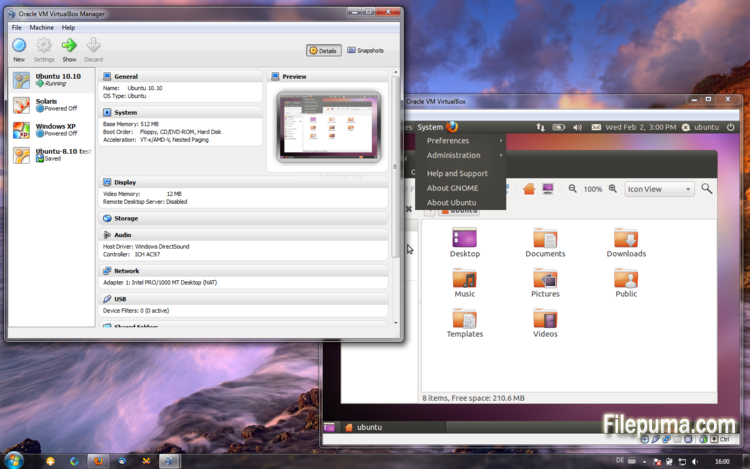


ورچوئل باکسمفت اور اوپن سورس ورچوئلائزیشن سافٹ ویئر ہے جو صارفین کو اپنی کمپیوٹرز پر ورچوئل مشینز بنانے اور چلانے کی اجازت دیتا ہے۔ VirtualBox کے ساتھ، صارفین اپنے کمپیوٹر پر بیک وقت متعدد آپریٹنگ سسٹمز انسٹال اور چلا سکتے ہیں بغیر الگ پارٹیشنز بنائے یا اضافی ہارڈویئر خریدے۔
VirtualBox کی ایک اہم خصوصیت یہ ہے کہ اس کا استعمال آسان ہے۔ اسے انسٹال کرنا اور سیٹ اپ کرنا سادہ ہے، چاہے ان لوگوں کے لیے بھی جو ورچوئلائزیشن ٹیکنالوجی کے تجربے میں کم یا بالکل معلومات نہیں رکھتے۔ VirtualBox کئی قسم کے تخصیص کے اختیارات بھی پیش کرتا ہے، بشمول ہر ورچوئل مشین کے لیے مختص کردہ RAM، CPU کورز، اور ہارڈ ڈسک اسپیس کی مقدار کو ایڈجسٹ کرنے کی صلاحیت۔
VirtualBox کی ایک اور شاندار خوبی اس کی وسیع رینج کے آپریٹنگ سسٹمز کے ساتھ مطابقت ہے۔ صارفین اپنے ورچوئل مشینوں پر Windows, Linux, macOS، اور دیگر بہت سے آپریٹنگ سسٹمز انسٹال اور چلا سکتے ہیں۔ یہ اسے ڈیولپرز، سافٹ ویئر ٹیسٹرز، اور کسی بھی شخص کے لئے ایک بہترین ٹول بناتا ہے جسے ایک کمپیوٹر پر متعدد آپریٹنگ سسٹمز چلانے کی ضرورت ہوتی ہے۔
VirtualBox متعدد اعلی خصوصیات بھی پیش کرتا ہے، جیسے USB devices، مشترکہ فولڈرز، اور نیٹ ورک اڈاپٹرز کی حمایت۔ یہ خصوصیات ان سافٹ ویئر کو چلانا ممکن بناتی ہیں جو ہارڈویئر یا نیٹ ورک وسائل کی ضرورت ہوتی ہے، جیسے مجازی routers، firewalls، اور servers۔
VirtualBox ان لوگوں کے لئے ایک بہترین انتخاب ہے جو ایک ہی کمپیوٹر پر متعدد آپریٹنگ سسٹمز چلانے کی ضرورت رکھتے ہیں۔ اس کا استعمال میں آسانی، تخصیص کی وسیع تعداد میں اختیارات، اور کئی مختلف آپریٹنگ سسٹمز کے ساتھ مطابقت اسے ڈویلپرز، آئی ٹی پیشہ ور افراد، اور گھریلو صارفین کے لئے ایک ہمہ گیر اور طاقتور ٹول بناتی ہے۔
اہم خصوصیت:
- کراس-پلیٹ فارم مطابقت۔
- بصری صارف مواجہ
- مختلف آپریٹنگ سسٹمز کے لئے سپورٹ۔
- میزبان آپریٹنگ سسٹم کے ساتھ بلا رکاوٹ انضمام۔
- اسنیپ شاٹس اور کلونز۔
- نیٹ ورکنگ صلاحیتیں۔
- ورچوئل ڈیوائس سپورٹ۔
- اضافی فعالیت کے لیے توسیعی پیک۔
کیا نیا ہے؟
- Paravirtualization support for Windows and Linux guests to improve time-keeping accuracy and performance (see the manual for more information)
- Make more instruction set extensions available to the guest when running with hardware-assisted virtualization and nested paging. Among others this includes: SSE 4.1, SSE4.2, AVX, AVX-2, AES-NI, POPCNT, RDRAND and RDSEED
- xHCI Controller to support USB 3 devices (see the manual for more information)
- Drag and drop support (bidirectional) for Windows, Linux and Solaris guests
- Disk image encryption (see the manual for more information)
- VMs can now be started in separate mode. The VM process is started headless while the frontend runs as a separate process which can be terminated without stopping the VM.
- GUI: VM guest-content scaling support (including 3D acceleration)
- GUI: New User Interface settings page for customizing status-bar, menu-bar and guest-content scaling
- GUI: New Encryption settings tab for customizing encryption options for disk images
- GUI: HiDPI support including application icons and optional unscaled HiDPI output on Mac OS X (including 3D acceleration)
- GUI: Hotplugging support for SATA disks
- New, modular audio architecture for providing a better abstraction of the host audio backends
- Support for the NDIS6 networking framework on Windows (default on Vista and later)
In addition, the following items were fixed and/or added:
- VMM: improved timing on Solaris hosts with older VT-x hosts without preemption timers
- VMM: further improvements for TSC frequency measurements and guest timekeeping
- VMM: debug facility now includes the guest CPU's FPU/SSE/extended state in the core dump
- VMM: fixed a hang under rare conditions on 32-bit hosts
- VMM: several fixes
- GUI: improved HID LEDs synchronization for Mac and Windows hosts. The physical LEDs state now restored together with the VM state.
- GUI: take the guest screen aspect ratio into account for the preview window
- GUI: provide direct access to storage media in the VM selector
- GUI: allow to save the VM state from the selector even if the VM is already paused
- VBoxManage: when exporting an appliance, support the suppression of MAC addresses, which means they will be always recreated on import, avoiding duplicate MAC addresses for VMs which are imported several times
- VBoxManage: now supports renaming storage controllers and USB controllers
- Guest Control: major overhaul, for example fixing wrong parameter quoting (bug #13157)
- USB: added USB traffic capturing (see the manual for more information)
- Made resizing X11 guests work more reliably
- API: block the removal of the current snapshot if it has child snapshots (only relevant for VMs without snapshottable hard disks, their presence always prevented removal), which resulted in VM config corruption
- API: mark VM configs with snapshots but without current snapshot as inaccessible, as this combination is nonsense
- API: fix information for some automatically generated events (only with XPCOM, Windows host was not affected), which caused errors when getting some of the attributes over the webservice (bug #12379)
- API: fix crashes in Java API clients using the XPCOM binding, happened with output parameters only (bug #11232)
- API: a number of settings (e.g. network settings) can now also be changed when the VM is in saved state
- API: fixed incorrect resuming of VMs on host-resume unless they were previously paused due to a host-suspend
- API: don't lose the saved state and "current state changed" flag during cloning of a VM
- API: OS type description consistency fix (bug #14162)
- VBoxSVC: don't keep the support driver permanently open
- Main/Properties: properly drop transient guest properties when the VM is powered off
- VRDP: fixed a couple of races which may cause a crash during VM poweroff
- ExtPack: don't fail if the TMP directory contains non-latin1 characters (bug #14159)
- 3D: fix potential race in which might cause a crash on VM termination
- 3D: fixed a possible memory leak in the host service
- Serial: new TCP/IP backend (see the manual for more information)
- Storage: added USB mass storage device class (see the manual for more information)
- Storage: added vbox-img standalone tool for direct manipulation of virtual hard disk images without VBoxManage
- Storage: fixed crash as a result of I/O errors in certain conditions (bug #13105)
- NAT: fixed several potential crashes
- NAT: don't forcibly reset/drop all connections when the link goes down
- Netsniffer: properly handle changing of the trace file name at VM runtime
- Audio: fixed audio output and input when changing the default audio device more than once on OS X
- Audio: fixed audio input on OS X under certain circumstances
- ICH9: fixed the interrupt disable logic for MSI interrupts; should fix old Linux guests with AHCI
- USB: improve playback with USB sound devices attached to the emulated OHCI controller
- Audio: provide Linux guests a different AC97 audio codec type so Linux ALSA does not mis-detect the link speed (default for new VMs)
- BIOS: fix for booting from SCSI CD/DVD media
- BIOS: fix for reads partially beyond end of disk (bug #14021)
- VRDP: fixed listening for IPv6 on some systems (bug #14038)
- rdesktop-vrdp: upgraded to version 1.8.3
- Linux hosts: fixed a bug which made the netfilter driver ignore certain events (bug #12264)
- Mac OS X hosts: El Capitan fixes
- Mac OS X hosts: fixed a bug which might trigger a host kernel panic if a VM is started and another hypervisor is active
- Solaris hosts: installer fix for very recent versions of Solaris
- Guest Additions: added a heartbeat service (see the manual for more information)
- Linux hosts / guests: support for Linux distributions using systemd without sysv emulation (e.g. ArchLinux)
- Windows Additions/WDDM: improved video memory utilization and allow more/bigger guest screens with large resolutions (including HiDPI)
- Linux Additions: added -s parameter to mount.vboxsf to be sloppy with invalid parameters
- X11 Additions: fixed wrong DPI value (bug #14151)
- Mac OS X guests: limit the CPU family for legacy guests
- Solaris Additions: added quiesce support to co-operate with Solaris' fast-reboot feature
پروگرام دوسرے زبانوں میں دستیاب ہے۔
- Download VirtualBox
- Télécharger VirtualBox
- Herunterladen VirtualBox
- Scaricare VirtualBox
- ダウンロード VirtualBox
- Descargar VirtualBox
- Baixar VirtualBox
صارف کے جائزے
صارف کی درجہ بندی
 101
101
لائسنس:
آزاد
ضروریات:
Windows All
زبانیں:
Multi-languages
سائز:
111MB
ناشر:
اپ ڈیٹ کیا گیا:
Jul 9, 2015
صاف
رپورٹ سافٹ ویئر
حالیہ ورژن
پرانی ورژنز
ڈویلپر کا سافٹ ویئر
 VirtualBox 7.2.18
 Adobe Air 51.3.3.1
 Java Runtime Environment (32bit) 8 Update 501
 Java Runtime Environment (64bit) 8 Update 501
 Java Development Kit (64bit) 8 Update 501
 Python (64bit) 3.14.7
سیکیورٹی کی سطحیں
اپنے ڈیوائس کو کسی ممکنہ نقصان سے بچانے اور اپنے ڈیٹا اور رازداری کی سیکیورٹی کو یقینی بنانے کے لیے، ہماری ٹیم ہر بار جب ایک نیا انسٹالیشن فائل ہمارے سرورز پر اپلوڈ کیا جاتا ہے یا کسی دور دراز کے سرور کے ساتھ منسلک ہوتا ہے، اسے چیک کرتی ہے اور فائل کی حیثیت کی تصدیق یا تازہ ترین کرنے کے لیے اسے وقتاً فوقتاً جائزہ لیتی ہے۔ اس چیکنگ کی بنیاد پر، ہم کسی بھی ڈاؤن لوڈ کے قابل فائلوں کے لیے مندرجہ ذیل سیکیورٹی سطحیں متعین کرتے ہیں۔
 صاف
صاف
یہ بہت ممکن ہے کہ یہ سافٹ ویئر پروگرام محفوظ ہو۔
ہم نے دنیا کے 60 سے زائد معروف اینٹی وائرس سروسز میں اس سافٹ ویئر پروگرام سے منسلک فائلوں اور یو آر ایل کو اسکین کیا؛ کوئی ممکنہ خطرات نہیں ملے۔ اور کوئی تیسری پارٹی کا سافٹ ویئر شامل نہیں ہے۔
 خبردار
یہ پروگرام اشتہاری حمایت یافتہ ہے اور یہ تیسری پارٹی کے پروگرامز کو انسٹال کرنے کی پیشکش کر سکتا ہے جو ضرورت نہیں ہیں۔ ان میں ایک ٹول بار، آپ کے ہوم پیج میں تبدیلی، ڈیفالٹ سرچ انجن، یا دوسرے پارٹی پروگرامز کا انسٹال کرنا شامل ہو سکتا ہے۔ یہ جھوٹے مثبت ہو سکتے ہیں، اور ہمارے صارفین کو اس سافٹ ویئر کو انسٹال اور استعمال کرتے وقت محتاط رہنے کی نصیحت کی جاتی ہے۔
 معذور
معذور
یہ سافٹ ویئر اب ڈاؤن لوڈ کے لیے دستیاب نہیں ہے۔ اس بات کا زیادہ امکان ہے کہ یہ سافٹ ویئر پروگرام خطرناک ہے یا اس میں سیکیورٹی کے مسائل ہیں یا دیگر وجوہات ہیں۔
ایک رپورٹ جمع کریں
شکریہ!
آپ کی رپورٹ بھیج دی گئی ہے۔
ہم آپ کی درخواست کا جائزہ لیں گے اور مناسب کارروائی کریں گے۔
براہ کرم نوٹ کریں کہ اس رپورٹ کی وجہ سے کیے گئے کسی بھی عمل کے بارے میں آپ کو کوئی اطلاع نہیں ملے گی۔ ہم اس کی وجہ سے ہونے والی کسی بھی تکلیف کے لیے معذرت خواہ ہیں۔
ہم آپ کی مدد کی قدر کرتے ہیں تاکہ ہماری ویب سائٹ کو صاف اور محفوظ رکھا جا سکے۔