
Looking for a free Mac cleaner? Try diCleaner

Keepass2.35
 Tải về miễn phí
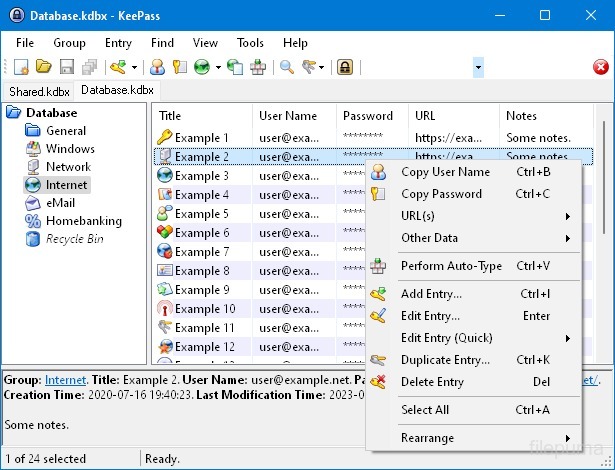
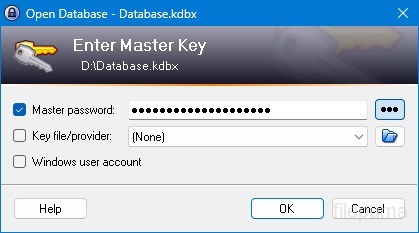
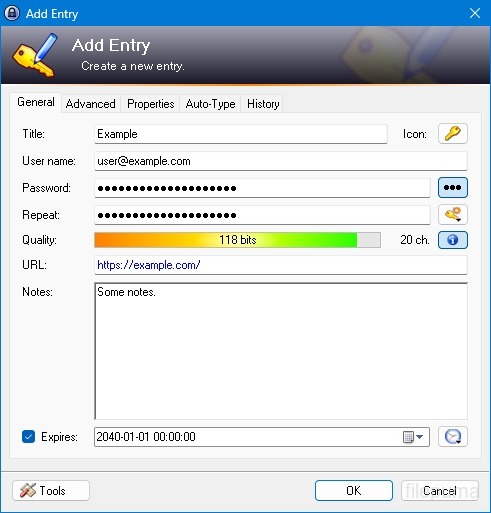
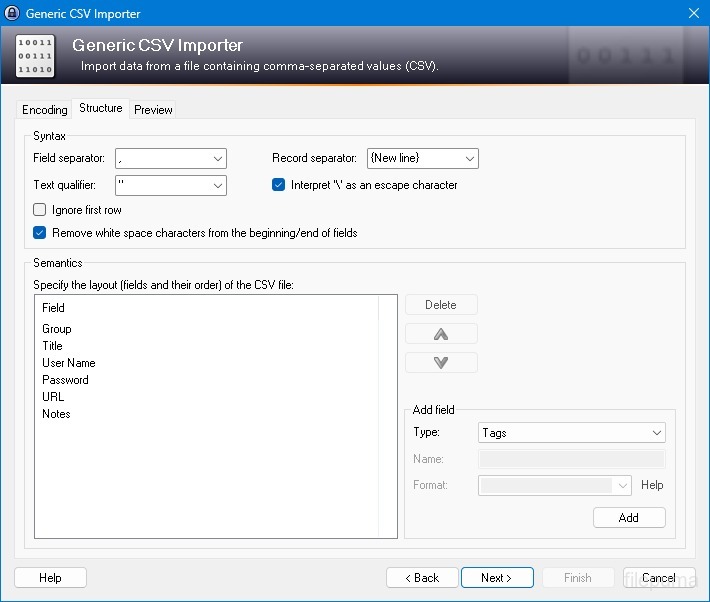
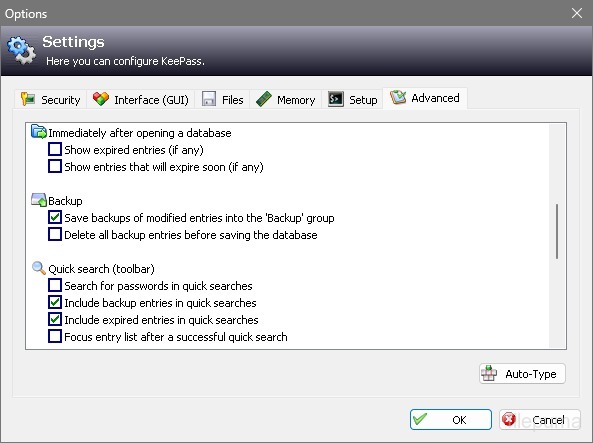


KeePasslà một trình quản lý mật khẩu mã nguồn mở, rất bảo mật và phổ biến, được sử dụng để lưu trữ và quản lý mật khẩu, tên người dùng và thông tin nhạy cảm khác một cách an toàn. Nó được phát triển bởi Dominik Reichl và có sẵn cho nhiều nền tảng, bao gồm Windows, macOS, Linux và các thiết bị di động.
Một trong những tính năng chính của KeePass là khả năng bảo mật mạnh mẽ. Nó sử dụng các thuật toán mã hóa mạnh (ví dụ, AES, Twofish) để bảo vệ dữ liệu đã lưu trữ, đảm bảo rằng chỉ những người dùng được ủy quyền với mật khẩu chính mới có thể truy cập vào mật khẩu của họ. Mật khẩu chính đóng vai trò như chìa khóa chính để mở khóa cơ sở dữ liệu đã mã hóa.
KeePass cung cấp giao diện thân thiện với người dùng, cho phép người dùng tổ chức mật khẩu của họ một cách có cấu trúc bằng cách sử dụng thư mục và danh mục. Ngoài ra, nó còn cung cấp công cụ tạo mật khẩu, giúp người dùng tạo mật khẩu phức tạp và độc nhất để tăng cường bảo mật.
Phần mềm này cho phép người dùng nhanh chóng tìm kiếm mật khẩu cụ thể và cung cấp các tính năng như tự động gõ, cho phép điền tự động các biểu mẫu đăng nhập cho các trang web và ứng dụng. KeePass cũng hỗ trợ các plugin, mở rộng chức năng của nó và khiến nó có thể tùy chỉnh để đáp ứng nhu cầu cá nhân.
Hơn nữa, KeePass nhấn mạnh tính di động và khả năng truy cập bằng cách cho phép người dùng lưu trữ cơ sở dữ liệu mật khẩu được mã hóa của họ trên các phương tiện lưu trữ khác nhau, chẳng hạn như ổ đĩa cục bộ, ổ USB hoặc lưu trữ đám mây. Điều này cho phép người dùng truy cập mật khẩu của họ từ các thiết bị khác nhau trong khi vẫn duy trì an ninh và quyền riêng tư.
Nhìn chung, KeePass là một giải pháp quản lý mật khẩu đáng tin cậy và an toàn giúp người dùng tổ chức và bảo vệ thông tin nhạy cảm của họ.
Các Tính Năng Chính:
- Lưu trữ mật khẩu an toàn: Lưu trữ và quản lý mật khẩu an toàn.
- Mã hóa mạnh mẽ: Sử dụng mã hóa tiên tiến để bảo mật dữ liệu.
- Mật khẩu chính & Keyfile: Truy cập cơ sở dữ liệu với mật khẩu chính mạnh và tệp khóa tùy chọn.
- Xác thực hai yếu tố (2FA): Cung cấp một lớp bảo mật bổ sung.
- Chức năng Auto-Type: Tự động nhập tên người dùng và mật khẩu.
- Password Generator: Tạo mật khẩu mạnh, ngẫu nhiên.
- Sắp xếp mật khẩu: Phân loại mật khẩu thành các nhóm và nhóm con.
- Tìm kiếm & Lọc: Nhanh chóng tìm các mục cụ thể.
- Trường tùy chỉnh: Thêm thông tin bổ sung vào các mục.
- Tệp đính kèm: Đính kèm tệp một cách an toàn vào các mục nhập mật khẩu.
- Tính năng bảo mật: Cung cấp các tùy chọn bảo mật bổ sung.
- Đa nền tảng: Khả dụng trên các hệ điều hành khác nhau.
- Plugin & Tiện ích mở rộngMở rộng tính năng với các đặc điểm bổ sung.
- Nhập khẩu & Xuất khẩu: Nhập/xuất mật khẩu một cách dễ dàng.
- Đồng bộ hóa Cơ sở dữ liệu: Đồng bộ hóa cơ sở dữ liệu trên các thiết bị một cách an toàn.
Có gì mới?
New Features:
- New KDBX 4 file format, which supports various new features (listed below; e.g. Argon2)
- Added Argon2 key derivation function (it can be activated in the database settings dialog)
- Improved header and data authentication in KDBX 4 files (using HMAC-SHA-256, Encrypt-then-MAC scheme)
- Added ChaCha20 (RFC 7539) encryption algorithm (it can be activated as KDBX file encryption algorithm in the database settings dialog; furthermore, it supersedes Salsa20 as default for generating the inner random stream of KDBX 4 files)
- Added support for opening entry URLs with Firefox or Opera in private mode via the context menu -> 'URL(s)' -> 'Open with ... (Private)'
- Added URL override suggestions for Firefox and Opera in private mode in the URL override suggestions drop-down list in the entry dialog
- Added optional built-in global URL overrides for opening HTTP/HTTPS URLs with Firefox or Opera in private mode
- Added {PICKFIELD} placeholder, which shows a dialog to pick a field whose value will be inserted
- Added option 'Hide "Close Database" toolbar button when at most one database is opened' (turned on by default)
- Added option 'Show additional auto-type menu commands', which can be turned on to show menu commands for performing entry auto-type with some specific sequences
- Added menu command 'Selected Entry's Group' (with keyboard shortcut Ctrl+G) in 'Edit' -> 'Show Entries' (and a context menu equivalent 'Show Parent Group' in 'Selected Entries'), which opens the parent group of the currently selected entry and selects the entry again
- Added menu commands in 'Edit' -> 'Show Entries' to show entries that expire in a specific number of days (1, 2, 3) or weeks (1, 2, 4, 8) or in the future
- Added configuration option that specifies the number of days within which entries are considered to expire 'soon' (the default is 7)
- Added option for changing the alternate item background color
- When the option 'Remember key sources' is enabled, KeePass now also remembers whether a master password has been used
- Added option 'Force changing the master key the next time (once)' (in 'File' -> 'Database Settings' -> tab 'Advanced')
- Added parameters 'Window style' and 'Verb' for the 'Execute command line / URL' trigger action
- Added support for importing mSecure 3.5.5 CSV files
- Added support for importing Password Saver 4.1.2 XML files
- Added support for importing Enpass 5.3.0.1 TXT files
- Enhanced SplashID CSV import (added support for the old version 3.4, added mappings for types of the latest version, groups are now created only for categories, and types are imported as tags)
- LastPass import: added support for CSV files exported by the LastPass Chrome extension, which encodes some special characters as XML entities
- Added 'KeePass KDBX (2.34, Old Format)' export module
- Export using XSL transformation: added support for the 'xsl:output' element in XSL files
- If the global auto-type hot key is Ctrl+Alt+A and the current input locale is Polish, KeePass now shows a warning dialog (telling the user that Ctrl+Alt+A is in conflict with a system key combination producing a character)
- Added Alt+X Unicode character conversion support in rich text boxes on Unix-like systems
- For development snapshots, the 'About' dialog now shows the snapshot version (in the form 'YYMMDD')
- Plugins can provide other key derivation functions now
- The header of KDBX 4 files is extensible by plugins
- Enhanced support for developing encryption algorithm plugins
- Plugins can now store custom data in groups and entries
- Plugin data stored in the database, a group or an entry can now be inspected (and deleted) in the database maintenance dialog, the group dialog and the entry dialog, respectively
- For plugins: file closing events now contain information about whether KeePass is exiting, locking or performing a trigger action
- Added workaround for .NET handle cast overflow bug in InputLanguage.Culture
- Added workaround for Mono ignoring the Ctrl+I shortcut
- Added workaround for Mono clipboard bug
- Added workaround for Mono not focusing the default control in the entry editing dialog
- Added workaround for a Mono timer bug that caused high CPU load while showing a file save confirmation dialog
- Added Mono workaround: when running on Mac OS X, KeePass now does not try to instantiate a tray icon anymore
- Added workaround for XDoTool sending diacritic characters in incorrect case
- TrlUtil now recommends to clear the 'Unused Text' tab
Improvements:
- Improved behavior when searching entries with exclusions (terms prefixed with '-')
- Improved support for auto-typing into target windows using different keyboard layouts
- Auto-Type: improved support for keyboard layouts with keys where Shift, Caps Lock and no modifier result in 3 different characters
- Auto-Type: improved support for spacing modifier letters (U+02B0 to U+02FF)
- Global auto-type now works with target windows having empty titles
- When copying entries to the clipboard, the data package now includes custom icons used by the entries
- Unified behavior when drag&dropping a field containing a placeholder
- Improved entry edit confirmation dialog
- If the screen height is insufficient to display a dialog, the dialog's banner (if the dialog has one) is now removed to save some space.
- Some tooltips are now displayed for a longer time
- A new entry created using a template now does not include the history of the template anymore
- For empty RTF attachments, the internal data editor now by default uses the font that is specified for TXT files
- Internal data editor: added support for changing the format of mixed-format selections
- Internal data viewer and editor: null characters ('', not '0') in texts are now automatically replaced by spaces (like Notepad on Windows 10)
- Improved encoding signature handling for conversions during text attachment imports (via the 'Text Encoding' dialog)
- File transactions are not used anymore for files that have a reparse point (e.g. symbolic links)
- Improved XSL stylesheets for KDBX XML files
- The internal window manager is now thread-safe
- Improved date/time handling
- Improved button image disposal
- When synchronizing two databases, custom data (by plugins) is now merged
- When opening a database file, corrupted icon indices are now automatically replaced by default values
- Added some more entropy sources for the seed of the cryptographically secure pseudo-random number generator (environment variables, command line, full operating system version, current culture)
- ChaCha20 is now used during password generation (instead of Salsa20)
- ChaCha20 is now used as fallback process memory encryption algorithm (instead of Salsa20)
- When the encryption algorithm for a database file is unknown, the error message now shows the UUID of the algorithm
- In KDBX 4, header field lengths are now 4 bytes wide
- In KDBX 4, entry attachments are now stored in an inner, binary header (encrypted, possibly compressed), before the XML part; this reduces the database file size and improves the loading/saving performance
- In KDBX 4, the inner random stream cipher ID and key (to support process memory protection) are now stored in the inner header instead of in the outer header
- KPScript: the 'ChangeMasterKey' command now also updates the master key change date
- TrlUtil: improved validation warning dialogs
- The MSI file now requires any .NET Framework version, not a specific one
- The MSI file is now built using Visual Studio 2015
- Various code optimizations
- Minor other improvements
Bugfixes:
- When executing a {HMACOTP} placeholder, the last modification time of the corresponding entry is now updated
- Key files containing exactly 64 alphanumeric characters are now loaded as intended
Chương trình có sẵn bằng các ngôn ngữ khác.
- Download Keepass
- Télécharger Keepass
- Herunterladen Keepass
- Scaricare Keepass
- ダウンロード Keepass
- Descargar Keepass
- Baixar Keepass
Đánh giá của người dùng
Đánh giá của người dùng
 26
26
Giấy phép:
Miễn phí
Yêu cầu:
Windows All
Ngôn ngữ:
Multi-languages
Kích thước:
2.96MB
Nhà xuất bản:
Cập nhật:
Jan 9, 2017
Sạch sẻ
Phần mềm báo cáo
Phiên bản mới nhất
Phiên bản cũ
Phần mềm của lập trình viên
 Keepass 2.61.1
 RoboForm 10.0.0
 Dashlane 6.2632.0
 1Password 8.12.36
Mức độ bảo mật
Để tránh bất kỳ thiệt hại tiềm ẩn nào cho thiết bị của bạn và đảm bảo an toàn cho dữ liệu và quyền riêng tư của bạn, đội ngũ của chúng tôi kiểm tra mỗi khi một tệp cài đặt mới được tải lên máy chủ của chúng tôi hoặc được liên kết với một máy chủ từ xa và định kỳ xem xét lại tệp để xác nhận hoặc cập nhật trạng thái của nó. Dựa trên việc kiểm tra này, chúng tôi thiết lập các mức độ an ninh sau cho bất kỳ tệp nào có thể tải xuống.
 Sạch sẻ
Rất có khả năng phần mềm này là sạch.
Chúng tôi đã quét các tệp và URL liên quan đến chương trình phần mềm này trong hơn 60 dịch vụ diệt virus hàng đầu thế giới; không phát hiện mối đe dọa nào có thể xảy ra. Và không có phần mềm bên thứ ba nào được đóng gói.
 Cảnh báo
Chương trình này được hỗ trợ bởi quảng cáo và có thể đề nghị cài đặt các chương trình của bên thứ ba không cần thiết. Chúng có thể bao gồm một thanh công cụ, thay đổi trang chủ của bạn, công cụ tìm kiếm mặc định hoặc cài đặt các chương trình khác. Đây có thể là những phát hiện sai, và người dùng của chúng tôi được khuyên nên cẩn thận khi cài đặt và sử dụng phần mềm này.
 Khuyết tật
Phần mềm này không còn khả dụng để tải xuống. Rất có thể chương trình phần mềm này có chứa mã độc hoặc có vấn đề về bảo mật hoặc lý do khác.
Gửi báo cáo
Cảm ơn bạn!
Báo cáo của bạn đã được gửi.
Chúng tôi sẽ xem xét yêu cầu của bạn và thực hiện hành động thích hợp.
Xin lưu ý rằng bạn sẽ không nhận được thông báo về bất kỳ hành động nào được thực hiện do báo cáo này. Chúng tôi xin lỗi vì bất kỳ sự bất tiện nào mà điều này có thể gây ra.
Chúng tôi cảm ơn sự giúp đỡ của bạn trong việc giữ cho trang web của chúng tôi sạch sẽ và an toàn.