
Looking for a free Mac cleaner? Try diCleaner

The Bat! (64bit)7.4
 Tải về miễn phí
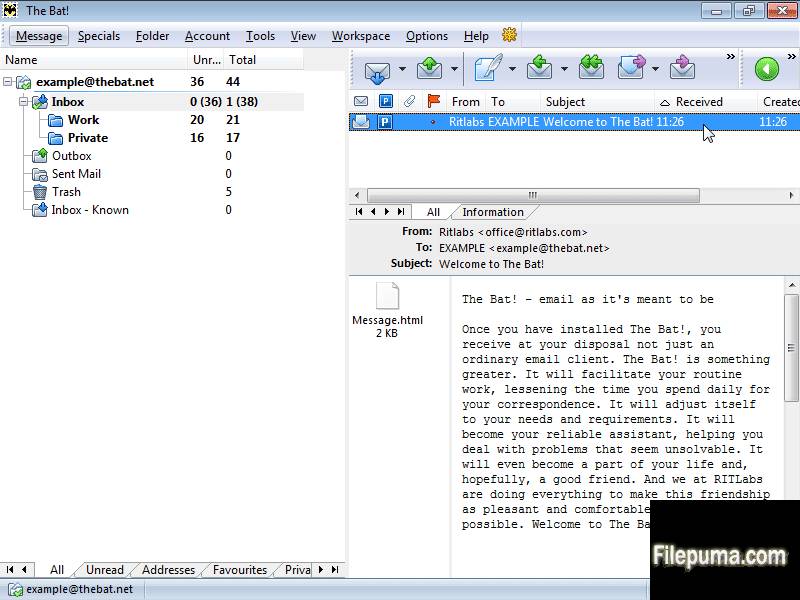
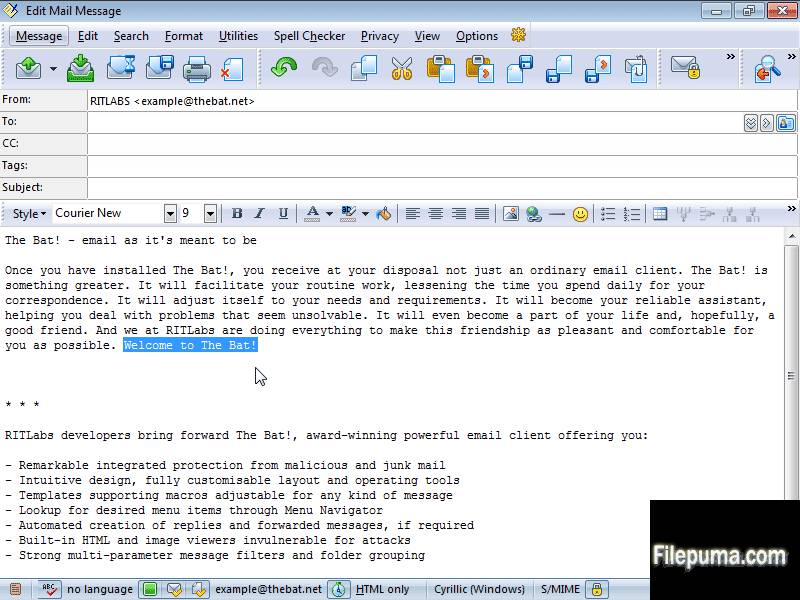
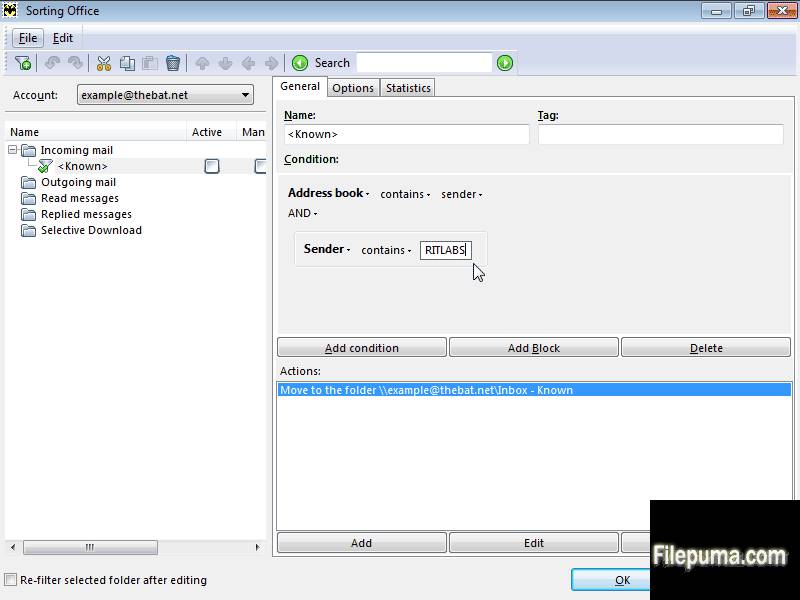
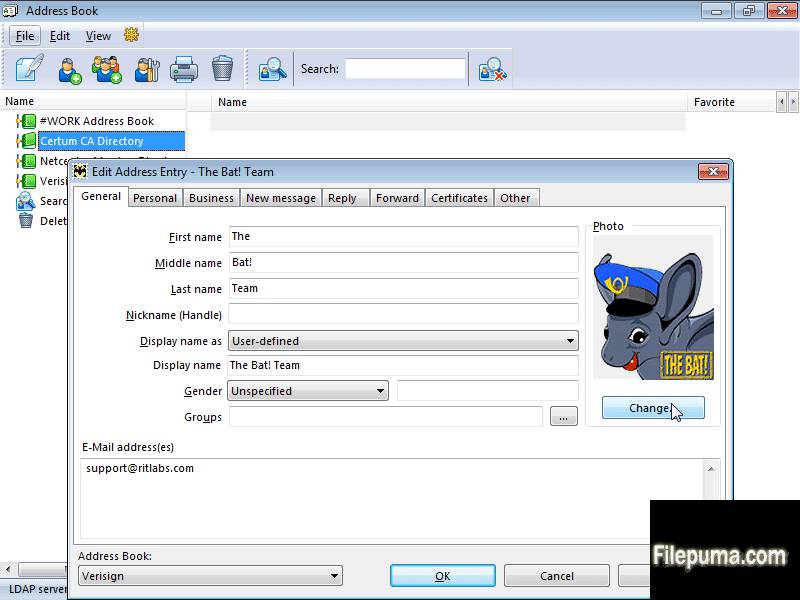


- Hỗ trợ PGP, GnuPG và S/MIME
- Trình xem HTML nội bộ
- Xử lý an toàn các tệp đính kèm
- Tải xuống có chọn lọc
- Hệ thống lọc mạnh mẽ
- Sổ Địa Chỉ của The Bat!
- Mẫu tiện dụng
- Đăng ký RSS Feed
Có gì mới?
New features
- Improved speed, reduced CPU use and decreased GUI latency on receiving messages via POP3 and sending via SMTP
- /BENCHMARK_STARTUP_TIME displays time passed to start The Bat!, in milliseconds
Improvements
- Improved speed of folder checking on MAPI
- Improved speed of checking for new message via MAPI in large folders
- Splash screen now uses default UI font
- Changed CSS length values for "ex" (was 1/1.3 of "em", now 1/2 of "em") and for cm&mm (was 1/2.52 of inch, now 1/2.54 of inch) - in accordance with https://www.w3.org/TR/CSS21/syndata.html#length-units
- If a tbuser.def file is larger than 500K, it is not loaded but renamed to .bak instead
- Plugins are now loaded at startup from a separate thread. In The Bat! version 5.0, has performed time-consuming startup routines (like loading of plug-ins, parsing of interface definition files) in parallel threads. The performance boost was noticeable even on old single-core CPUs, because disk and processor operations were running simultaneously; while on multi-core CPUs and multiprocessor systems the boost was even higher because computations could run in parallel, without one affecting another. In version 6.0, plugins weren’t loaded from a separate thread, but from the main thread. This is now fixed and plugin loading is now the same as it was in 5.0.
- Optimized IMAP work with multiple connections. When there are several idle connections, and there were need to work with another folder, The Bat! could use a connection that had INBOX selected; now connection with INBOX will only be used if no other connections are available
- dlNSpellLanguages is displayed when the user have selected too many languages for spell checking, in this case, the status bar didn't manage to display all the languages and there were a bug that other status bar items were hidden
Fixes
- (#0001080) "Message filtered counter" window element partially hidden in Filter Mail
- (#0000985) Wrong wrapping in the message boxes
- For HTML/plain text and HTML only editor modes after paste a link an unexpected space is added
- For Plain Text (Windows) editor mode after paste a link a selection remains
- MAPI tasks could give access violations on errors or if the user cancels them
- (#0000981) Photo area is too small in address book contact's properties
- Fixed "Thread Error: The handle is invalid" on HTML spell checkers
- Fixed a bug in spellchecker introduced in version 6.8.0.5 (05-May-2015)
- Selected color for even rows was incorrect
- Buttons' height in HTML didn't scale
- (#0000998) Incorrectly underlined text in the internal HTML viewer
- Improved speed of folder checking on MAPI
- (#0000963) Truncated line in "Options\Preferences\Message List"
- Fixed a vertical scroll bar in Preferences | Message List
- Items in User Preferences and Address Entry Editor dialog were misaligned
- CJKV (Chinese, Japanese, Korean, Vietnamese) characters were too big and didn't fit the interface sometimes, didn't look good
- Fixed the "Address Book photo width/height is mis-sized" error while adding new image for address book on high-resolution monitor
- Controls in the Account Properties form were misaligned
- Photos in the address book didn't scale properly
- The Bat! didn't delete TMP files older than 1 months (since version 5)
- (#0000776) If there were more than 2GB of total mail on the server during POP3 retrieval, total received size was displayed incorrect (negative) in the connection center; the word "bytes" was used twice there.
- Some dialog elements in the Account Properties, Folder Properties, Address Entry weren't properly aligned or sized with high-DPI settings in various dialogs (on high-definition displays)
- The pie chart didn't paint correctly in the connection center
- (#0001009) In URLs, the ampersand parameter delimiter gets percent-encoded as %26, rather than encoded as an HTML entity
- (#0001011) URLs with ampersands are incorrectly opened in the HTML editor after you reopen it
- (#0001014) Message list column width and attachments' icon too small (on high-definition displays)
- (#0000959) Small check boxes and overlapping buttons in text search (on high-definition displays)
- (#0000989) Splitters are not scaled (on high-definition displays)
- (#0000960) Not enough room for headers fields on the header pane (on high-definition displays)
- (#0001016) Message list nodes are too small (on high-definition displays)
- (#0001025) Address book icons truncated on 4K monitors (on high-definition displays)
- (#0000555) Toolbar buttons do not scale according to higher DPI setting (on high-definition displays)
- (#0001015) The status bar gripper is too small (on high-definition displays)
- (#0000967) Account/folder nodes and the respective lines are barely seen (on high-definition displays)
- (#0000965) Truncated font size drop-down menu in the HTML editor (on high-definition displays)
- (#0000952) Tiny icons in the message editor window (on high-definition displays)
- (#0000974) Scheduler Event via Sorting Office action doesn't look good (on high-definition displays)
- (#0000979) Narrow default column width in the Maintenance Center (on high-definition displays)
- (#0000989) Splitters are not scaled (on high-definition displays)
- (#0000951) Tiny font in the account information tab (on high-definition displays)
- (#0001028) Attachment panel is too narrow on high-resolution monitors, the icons don't fit, a scroll bar appears
- (#0001026) Editor/Viewer header layout uses an old font by default when you run fresh install of The Bat! under modern OS. For example, if you run The Bat! first time under Windows 10, it will set Tahoma 8, but should have set Segoe UI 9 or similar
- (#0000982) Issues with QR-Code Generator (on high-definition displays)
- Disappearing buttons in dialog Edit Event | Categories on high-definition display (on high-definition displays)
- (#00001032) The color of the even row of the quoted text is not purple as it used to be in The Bat! version 1 (purple)
- The font didn't get updated in the address headers in the message preview and the open message editor, after the user have changed the font in the Preferences dialog.
- (#0001015) The status bar gripper is too small (on high-definition displays)
- (#0001033) Changes in look and feel of the nodes and lines in the message list and folder tree
- The text in the splash screen was truncated under 300% DPI or more (on high-definition displays)
- High-contrast themes with large dpi (300% or more) didn't draw enlarged tree node glyph (plus/minus sign in a square), it was very small and not scaled (on high-definition displays)
- (#0000979) Narrow default column width in the Maintenance Center (on high-definition displays)
- Splitters didn't use system-defined colors, used a fixed color instead that ignored color schemes
- For certain widths of the header columns, in the message list, the ellipses became visible (mostly on high-definition monitors)
- (#0000958) Tiny and overlapping "next" and "last" buttons below the message body (on high-definition displays)
- (#0000955) Tiny "first/last" and "next/previous" buttons for the message list tabs (on high-definition displays)
- (#0000954) Account/folder tree tabs are tiny and overlap (on high-definition displays)
- (#0000892) Mouse cursor shows the "forbidden" sign if the user opens contact properties using double-click
- The Bat! could not complete the "Exit" command (the main window became inoperable after you close it) after you have created an account and tested connectivity to SMTP in the new account wizard
- (#0001005) Images are printed with the template
- (#0000997) SmartBat: Printed Text uses print templates for mails when printing via Print Preview
- (#0001046) If Quick Reply is enabled in the Message Finder, the Results tab becomes empty
- (#0000968) Tiny progress bar in Message Finder (F7) (on high-definition displays)
- (#0000974) Scheduler Event via Sorting Office action was displayed incorrectly (on high-definition displays)
- (#0000961) Tiny close buttons in the message list tabs incorrectly (on high-definition displays)
- (#00000962) Quick Reply pane is small (on high-definition displays)
- Grayed out items (like IMAP messages that weren't loaded) in the message list didn't scale
- Buttons didn't scale in the address grid of the message editor (on high-definition displays)
- (#0000948) Tiny contents of the OAUTH window (on high-definition displays)
- Internal HTML viewer didn’t scale logical pixels properly to physical pixels (on high-definition displays)
- (#0001055) The letter "g" does not fit on the search pane in the separate message viewer and in message finder (F7)
- (#0000919) Attachments' size turns 0 bytes after editing an email for the second time
- The mail ticker didn't scale (on high-definition displays)
- (#0000812) When resolution and display scaling is increased, the text gets unreadable in the address book (on high-definition displays)
- (#0001061) Selection color becomes invalid in the message list and in the Connection Center
- The widths of the status bar elements in the Message Finder and in the Connection Center didn't scale on high-definition monitors
- (#0001036) Sorting Office columns too narrow (on high-definition displays)
- (#0001037) Tiny conditions' drop-down arrows in Sorting Office (on high-definition displays)
- (#0001042) Filter text in Sorting Office always black
- (#0000884) AV errors on exit if an image was opened in an IMAP account
- (#0001063) Sorting office - filters that set colour groups always use blue text
- (#0000999) Spell-checker-specific underline (red) are not scaled for high resolution
- Check boxes were truncated at the bottom when UI font 9pt was used in the Message List Tabs editor dialog
- The radio buttons did overlap in the print preview window
- (#0000890) Access Violation error after compacting address books
- The Bat! could only allow compressing an address book when there were at least 1% of free space; the user could not compress the address book when there were less free space, e.g. only one entry deleted, which is not good from the security or privacy point of view
- (#0000659) Errors on compressing address books while On-The-Fly encryption was on
- Memory corruption on compacting address books with photos or certificates
- (#0001060) Message header names were top-aligned in the Message Editor
- (#0000988) Numbered list - Description is missing
- (#0000703) Removed import/export address entries from Google and Synchronize popup item from Google address books created earlier
- (#0000996) Print Preview: Two groups of option boxes did exclude each other
- (#0000639) URLs are not displayed as hyperlinks in Windows Editor
- Access Violation while starting The Bat (related to quick reply)
- (#0001049) "List index out of bounds" error message in the HTML-editor
- (#0000987) Clicking anywhere in the message body opens mail.ru sign-in page
- Access violation when working with 64-bit plugins, for example when clicking learn spam/learn ham plugin on the toolbar
- (#0000559) The main menu command Folder|Check for viruses was removed in 6.3.0.5 - now put back
- Cleanup for possible multiple "List index out of bounds" error messages while editing/moving/undo/redo and tracking mouse in editor
- Fixed an Access Violation when running The Bat! for the first time and creating an account with empty account password
- An IMAP connection went to Inbox between other commands, when it was not needed. A connection should only go to Inbox when there are no pending tasks at all, so all the connections are idle. There were a bug in determining whether a connection is idle, so it went to INBOX over and over again between executing other commands. You could observe it in the IMAP protocol log
- The Bat! didn't exit properly if the user had tags configured
- The Bat! didn't support "Priority: non-urgent" (see RFC-4021 section 2.1.54)
- Connection center labels were occasionally deleted in The Bat! 5.0.18.12 (23-Jul-2011) - now restored
Chương trình có sẵn bằng các ngôn ngữ khác.
- Download The Bat! (64bit)
- Télécharger The Bat! (64bit)
- Herunterladen The Bat! (64bit)
- Scaricare The Bat! (64bit)
- ダウンロード The Bat! (64bit)
- Descargar The Bat! (64bit)
- Baixar The Bat! (64bit)
Đánh giá của người dùng
Đánh giá của người dùng
 7
7
Giấy phép:
Miễn phí
Yêu cầu:
Windows All
Ngôn ngữ:
English
Kích thước:
35.8MB
Nhà xuất bản:
Cập nhật:
Dec 13, 2016
Sạch sẻ
Phần mềm báo cáo
Phiên bản mới nhất
Phiên bản cũ
 The Bat! (32bit) 12.3.1
 The Bat! (64bit) 12.3.1
 Mozilla Thunderbird (32bit) 156.0
 Mozilla Thunderbird (64bit) 156.0
 eM Client 10.4.5674.0
Mức độ bảo mật
Để tránh bất kỳ thiệt hại tiềm ẩn nào cho thiết bị của bạn và đảm bảo an toàn cho dữ liệu và quyền riêng tư của bạn, đội ngũ của chúng tôi kiểm tra mỗi khi một tệp cài đặt mới được tải lên máy chủ của chúng tôi hoặc được liên kết với một máy chủ từ xa và định kỳ xem xét lại tệp để xác nhận hoặc cập nhật trạng thái của nó. Dựa trên việc kiểm tra này, chúng tôi thiết lập các mức độ an ninh sau cho bất kỳ tệp nào có thể tải xuống.
 Sạch sẻ
Rất có khả năng phần mềm này là sạch.
Chúng tôi đã quét các tệp và URL liên quan đến chương trình phần mềm này trong hơn 60 dịch vụ diệt virus hàng đầu thế giới; không phát hiện mối đe dọa nào có thể xảy ra. Và không có phần mềm bên thứ ba nào được đóng gói.
 Cảnh báo
Chương trình này được hỗ trợ bởi quảng cáo và có thể đề nghị cài đặt các chương trình của bên thứ ba không cần thiết. Chúng có thể bao gồm một thanh công cụ, thay đổi trang chủ của bạn, công cụ tìm kiếm mặc định hoặc cài đặt các chương trình khác. Đây có thể là những phát hiện sai, và người dùng của chúng tôi được khuyên nên cẩn thận khi cài đặt và sử dụng phần mềm này.
 Khuyết tật
Phần mềm này không còn khả dụng để tải xuống. Rất có thể chương trình phần mềm này có chứa mã độc hoặc có vấn đề về bảo mật hoặc lý do khác.
Gửi báo cáo
Cảm ơn bạn!
Báo cáo của bạn đã được gửi.
Chúng tôi sẽ xem xét yêu cầu của bạn và thực hiện hành động thích hợp.
Xin lưu ý rằng bạn sẽ không nhận được thông báo về bất kỳ hành động nào được thực hiện do báo cáo này. Chúng tôi xin lỗi vì bất kỳ sự bất tiện nào mà điều này có thể gây ra.
Chúng tôi cảm ơn sự giúp đỡ của bạn trong việc giữ cho trang web của chúng tôi sạch sẽ và an toàn.