

VirtualBox4.3.0
 Tải về miễn phí
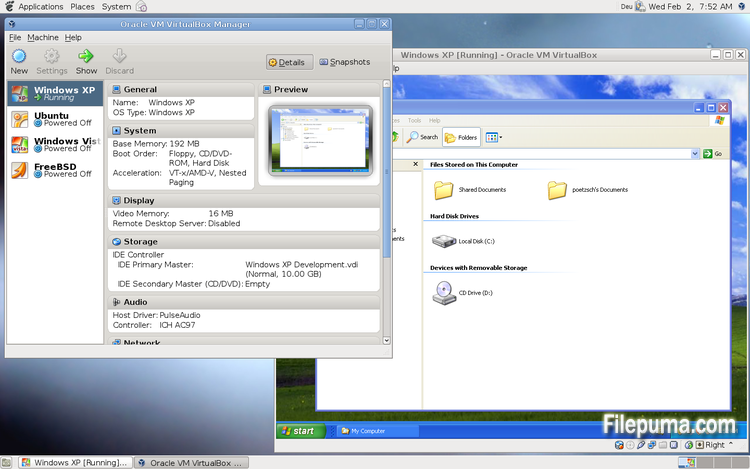
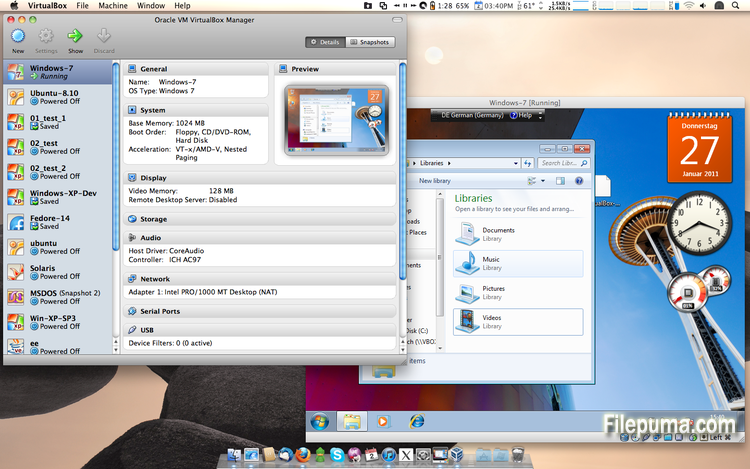
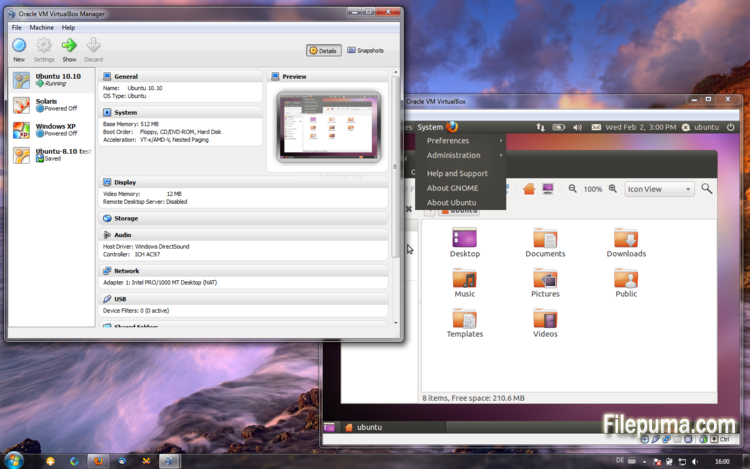


VirtualBoxlà một phần mềm ảo hóa mã nguồn mở và miễn phí cho phép người dùng tạo và chạy máy ảo trên máy tính của họ. Với VirtualBox, người dùng có thể cài đặt và chạy nhiều hệ điều hành cùng lúc trên máy tính của họ mà không cần phải tạo các phân vùng riêng biệt hoặc mua thêm phần cứng.
Một trong những lợi thế chính của VirtualBox là sự dễ sử dụng của nó. Nó đơn giản để cài đặt và thiết lập, ngay cả đối với những người có ít hoặc không có kinh nghiệm với công nghệ ảo hóa. VirtualBox cũng cung cấp nhiều tùy chọn tùy chỉnh, bao gồm khả năng điều chỉnh lượng RAM, lõi CPU và không gian đĩa cứng phân bổ cho mỗi máy ảo.
Một tính năng tuyệt vời khác của VirtualBox là khả năng tương thích với nhiều hệ điều hành khác nhau. Người dùng có thể cài đặt và chạy Windows, Linux, macOS, và nhiều hệ điều hành khác trên máy ảo của họ. Điều này làm cho nó trở thành một công cụ xuất sắc cho các nhà phát triển, người kiểm tra phần mềm, và bất kỳ ai cần chạy nhiều hệ điều hành trên một máy tính duy nhất.
VirtualBox cũng cung cấp một loạt các tính năng nâng cao, chẳng hạn như hỗ trợ thiết bị USB, thư mục chia sẻ và bộ điều hợp mạng. Những tính năng này giúp chạy phần mềm yêu cầu tài nguyên phần cứng hoặc mạng, chẳng hạn như định tuyến ảo, tường lửa và máy chủ.
VirtualBox là một lựa chọn tuyệt vời cho bất kỳ ai cần chạy nhiều hệ điều hành trên một máy tính duy nhất. Sự dễ sử dụng, phạm vi tùy chỉnh rộng rãi và khả năng tương thích với nhiều hệ điều hành khác nhau khiến nó trở thành một công cụ linh hoạt và mạnh mẽ cho các nhà phát triển, chuyên viên CNTT và người dùng gia đình.
Tính Năng Chính:
- Khả năng tương thích đa nền tảng.
- Giao diện người dùng đồ họa trực quan.
- Hỗ trợ cho các hệ điều hành khác nhau.
- Tích hợp liền mạch với hệ điều hành chủ.
- Snapshots và clones.
- Khả năng kết nối mạng.
- Hỗ trợ thiết bị ảo.
- Các gói mở rộng cho chức năng bổ sung.
Có gì mới?
This version is a major update. The following major new features were added:
- VMM: major rewrite of the VT-x code and the AMD-V code including many bug fixes and performance improvements (for example bug #9659)
- VMM: introduced a lightweight instruction interpreter for situations not handled by hardware virtualization
- GUI: extended messaging mechanism (new non-modal popup overlays used to show non-critical warnings and provide user with additional information)
- GUI: keyboard shortcuts management (input page of global preferences extended with possibility to edit general keyboard shortcuts for VirtualBox Manager and Virtual Machine)
- GUI: video capturing support (bug #4766)
- Added USB touch device emulation
- Added experimental support for webcam passthrough complementing USB passthrough (see the manual for more information)
- Added SCSI CD-ROM emulation, including boot support
- VRDP: support for IPv6
- Guest Control: guest sessions now are running in dedicated, impersonated session processes (needs at least Guest Additions 4.3 installed)
- Guest Control: implemented IGuestFile support
- NAT: experimental virtual router mode: several VMs are attached to the same internal network and share one NAT service (see the manual for more information)
In addition, the following items were fixed and/or added:
- VMM: significantly improved performance of NetWare 5.x/6.x guests on host systems without nested paging support
- VMM: fixed losing host NMIs while in VT-x guest-context
- VMM: changed order of actions in emulated task switch (bug #10532)
- VMM: allow to activate VT-x while in SMX mode and provide more information if that is not possible
- GUI: update check uses https
- GUI: numerous minor internal cleanups and bug fixes
- GUI: HID LEDs synchronization when switching between guest window(s) and host (Mac OS X hosts only)
- GUI, VBoxManage: when unregistering a VM, also unregister the hard disk images which are used exclusively (bug #10311)
- GUI: use the number of physical presented processor cores instead of the number of logical processor cores to check if the users assigned too many virtual CPUs to the guest
- Snapshots: made live snapshots work again (bug #9255)
- Teleportation: made it work again (bug #9455)
- Storage: implemented AHA-154x compatibility mode in the emulated BusLogic SCSI HBA
- Storage: significantly improved performance of large ATAPI PIO transfers (BeOS, Minix 3 guests affected)
- Storage: added floppy formatting emulation (NB: cannot be used to change existing media geometry)
- Settings: global and per-VM default frontend configuration, useful to select the use of alternative VM frontends
- Settings: limit depth of snapshot tree to 250 levels, as more will lead to decreased performance and may trigger crashes
- Settings: the per-VM hwvirtextexcl setting has been replaced by a global hwvirtexclusive property
- Main: new event queue implementation which does not use the host's native event queue for processing VirtualBox events anymore
- Main: eliminate the use of SysV semaphores on all host OSes other than Windows, namely Linux, Solaris and Mac OS X, with the consequence that no system reconfiguration is needed to run more than approximately 100 VMs
- Main: use the XDG standard configuration folder instead of .VirtualBox on systems where it is appropriate (bug #5099)
- Main: extension pack framework can now support loading HGCM modules, contributed by Jeff Westphal
- VBoxManage: list more information about hard disk/DVD/floppy media, and support the --long option to show really all available details
- VBoxManage: added support for optional command line parameters for the automatic Guest Additions update
- VBoxManage: added support for listing active guest sessions, guest processes and/or guest files via guestcontrol list
- VBoxManage: added support for closing active guest sessions via guestcontrol session close --session-id
| --session-name | --all - VBoxManage: added support for terminating active guest processes via guestcontrol
process kill|close|terminate --session-id
| --session-name or guestcontrol [p[s]]kill --session-id... | --session-name ... - VBoxManage: added support for watching guest sessions via guestcontrol watch
- VBoxManage: added modifyvm --triplefaultreset to make the VM reset on triple fault instead of triggering a Guru Meditation (see the manual for more information)
- 3D support: several fixes
- 3D support: several fixes for Mac OS X hosts
- OVF: several fixes
- Extpack Installer: make it work if the file is located in a folder with special characters
- Keyboard: fix for reporting key sequences like Ctrl+Alt+Del for the USB keyboard emulation
- Shared Clipboard/X11: support for BMP-format images, contributed by François Revol
- Mac OS X hosts: limited support for Mac OS X 10.9 (Mavericks)
- Mac OS X hosts: use a launchd script instead of the deprecated StartupItem mechanism (bug #8940)
- Windows hosts: don't cause massive DPC latency (only on certain hosts; still needs improving; bug #6242)
- Windows hosts: consider symlinks when retrieving volume information (bug #11962)
- Windows hosts: fixed an issue with USB2 devices being inaccessible when plugged into USB 3.0 ports
- Windows Additions: fixed misbehavior with guest display power management (WDDM driver only; bug #11170)
- Windows Additions: fixed memory leak caused by WTSQuerySessionInformation() on Windows 2000 guests (bug #12072)
- Windows Additions: ability to track guest user idle times through the newly introduced event IGuestUserStateChangedEvent
- Linux Additions: fixed udev detection in the init script with Linux 3.x kernels
Chương trình có sẵn bằng các ngôn ngữ khác.
- Download VirtualBox
- Télécharger VirtualBox
- Herunterladen VirtualBox
- Scaricare VirtualBox
- ダウンロード VirtualBox
- Descargar VirtualBox
- Baixar VirtualBox
Đánh giá của người dùng
Đánh giá của người dùng
 101
101
Giấy phép:
Miễn phí
Yêu cầu:
Windows All
Ngôn ngữ:
Multi-languages
Kích thước:
102MB
Nhà xuất bản:
Cập nhật:
Oct 15, 2013
Sạch sẻ
Phần mềm báo cáo
Phiên bản mới nhất
Phiên bản cũ
Phần mềm của lập trình viên
 VirtualBox 7.2.18
 Adobe Air 51.3.3.1
 Java Runtime Environment (32bit) 8 Update 501
 Java Runtime Environment (64bit) 8 Update 501
 Java Development Kit (64bit) 8 Update 501
 Python (64bit) 3.14.7
Mức độ bảo mật
Để tránh bất kỳ thiệt hại tiềm ẩn nào cho thiết bị của bạn và đảm bảo an toàn cho dữ liệu và quyền riêng tư của bạn, đội ngũ của chúng tôi kiểm tra mỗi khi một tệp cài đặt mới được tải lên máy chủ của chúng tôi hoặc được liên kết với một máy chủ từ xa và định kỳ xem xét lại tệp để xác nhận hoặc cập nhật trạng thái của nó. Dựa trên việc kiểm tra này, chúng tôi thiết lập các mức độ an ninh sau cho bất kỳ tệp nào có thể tải xuống.
 Sạch sẻ
Rất có khả năng phần mềm này là sạch.
Chúng tôi đã quét các tệp và URL liên quan đến chương trình phần mềm này trong hơn 60 dịch vụ diệt virus hàng đầu thế giới; không phát hiện mối đe dọa nào có thể xảy ra. Và không có phần mềm bên thứ ba nào được đóng gói.
 Cảnh báo
Chương trình này được hỗ trợ bởi quảng cáo và có thể đề nghị cài đặt các chương trình của bên thứ ba không cần thiết. Chúng có thể bao gồm một thanh công cụ, thay đổi trang chủ của bạn, công cụ tìm kiếm mặc định hoặc cài đặt các chương trình khác. Đây có thể là những phát hiện sai, và người dùng của chúng tôi được khuyên nên cẩn thận khi cài đặt và sử dụng phần mềm này.
 Khuyết tật
Phần mềm này không còn khả dụng để tải xuống. Rất có thể chương trình phần mềm này có chứa mã độc hoặc có vấn đề về bảo mật hoặc lý do khác.
Gửi báo cáo
Cảm ơn bạn!
Báo cáo của bạn đã được gửi.
Chúng tôi sẽ xem xét yêu cầu của bạn và thực hiện hành động thích hợp.
Xin lưu ý rằng bạn sẽ không nhận được thông báo về bất kỳ hành động nào được thực hiện do báo cáo này. Chúng tôi xin lỗi vì bất kỳ sự bất tiện nào mà điều này có thể gây ra.
Chúng tôi cảm ơn sự giúp đỡ của bạn trong việc giữ cho trang web của chúng tôi sạch sẽ và an toàn.