
Looking for a free Mac cleaner? Try diCleaner

VirtualBox5.0.0-101573
 Tải về miễn phí
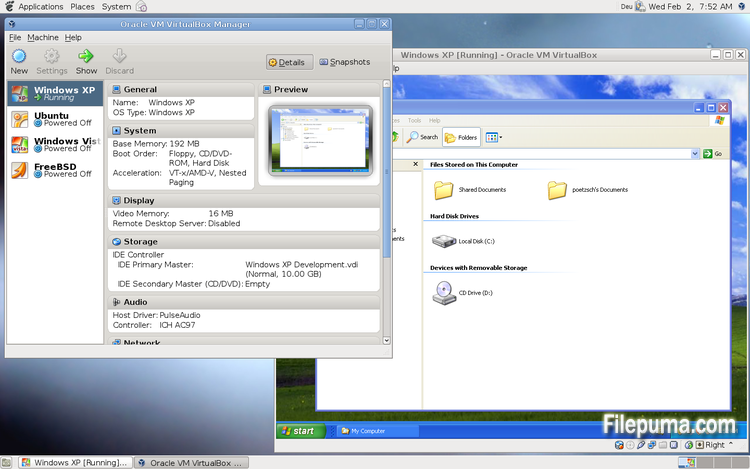
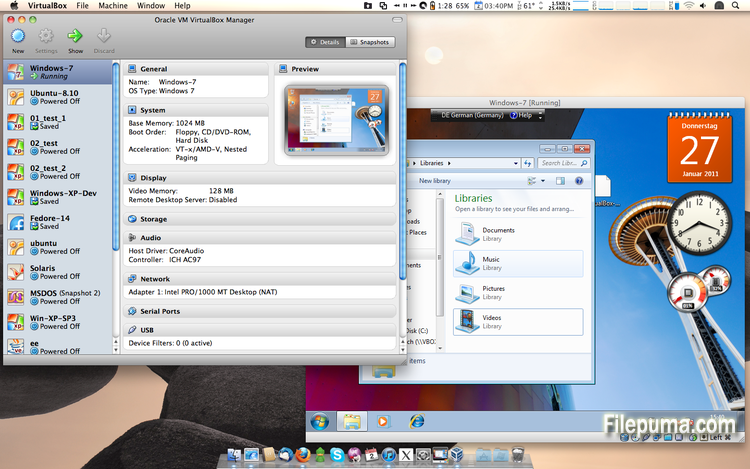
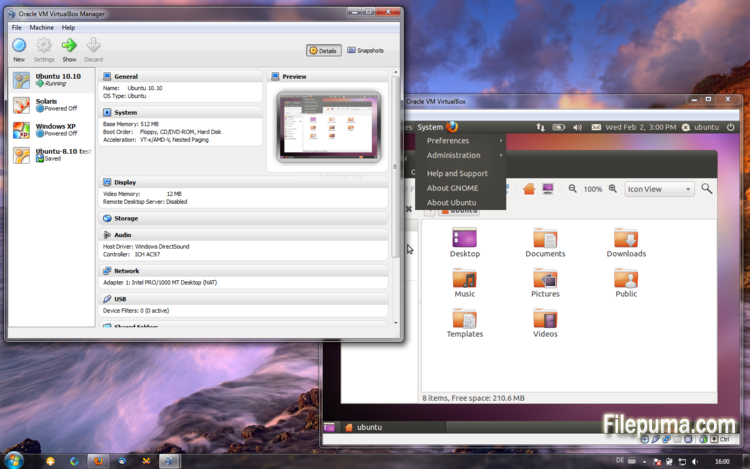


VirtualBoxlà một phần mềm ảo hóa mã nguồn mở và miễn phí cho phép người dùng tạo và chạy máy ảo trên máy tính của họ. Với VirtualBox, người dùng có thể cài đặt và chạy nhiều hệ điều hành cùng lúc trên máy tính của họ mà không cần phải tạo các phân vùng riêng biệt hoặc mua thêm phần cứng.
Một trong những lợi thế chính của VirtualBox là sự dễ sử dụng của nó. Nó đơn giản để cài đặt và thiết lập, ngay cả đối với những người có ít hoặc không có kinh nghiệm với công nghệ ảo hóa. VirtualBox cũng cung cấp nhiều tùy chọn tùy chỉnh, bao gồm khả năng điều chỉnh lượng RAM, lõi CPU và không gian đĩa cứng phân bổ cho mỗi máy ảo.
Một tính năng tuyệt vời khác của VirtualBox là khả năng tương thích với nhiều hệ điều hành khác nhau. Người dùng có thể cài đặt và chạy Windows, Linux, macOS, và nhiều hệ điều hành khác trên máy ảo của họ. Điều này làm cho nó trở thành một công cụ xuất sắc cho các nhà phát triển, người kiểm tra phần mềm, và bất kỳ ai cần chạy nhiều hệ điều hành trên một máy tính duy nhất.
VirtualBox cũng cung cấp một loạt các tính năng nâng cao, chẳng hạn như hỗ trợ thiết bị USB, thư mục chia sẻ và bộ điều hợp mạng. Những tính năng này giúp chạy phần mềm yêu cầu tài nguyên phần cứng hoặc mạng, chẳng hạn như định tuyến ảo, tường lửa và máy chủ.
VirtualBox là một lựa chọn tuyệt vời cho bất kỳ ai cần chạy nhiều hệ điều hành trên một máy tính duy nhất. Sự dễ sử dụng, phạm vi tùy chỉnh rộng rãi và khả năng tương thích với nhiều hệ điều hành khác nhau khiến nó trở thành một công cụ linh hoạt và mạnh mẽ cho các nhà phát triển, chuyên viên CNTT và người dùng gia đình.
Tính Năng Chính:
- Khả năng tương thích đa nền tảng.
- Giao diện người dùng đồ họa trực quan.
- Hỗ trợ cho các hệ điều hành khác nhau.
- Tích hợp liền mạch với hệ điều hành chủ.
- Snapshots và clones.
- Khả năng kết nối mạng.
- Hỗ trợ thiết bị ảo.
- Các gói mở rộng cho chức năng bổ sung.
Có gì mới?
- Paravirtualization support for Windows and Linux guests to improve time-keeping accuracy and performance (see the manual for more information)
- Make more instruction set extensions available to the guest when running with hardware-assisted virtualization and nested paging. Among others this includes: SSE 4.1, SSE4.2, AVX, AVX-2, AES-NI, POPCNT, RDRAND and RDSEED
- xHCI Controller to support USB 3 devices (see the manual for more information)
- Drag and drop support (bidirectional) for Windows, Linux and Solaris guests
- Disk image encryption (see the manual for more information)
- VMs can now be started in separate mode. The VM process is started headless while the frontend runs as a separate process which can be terminated without stopping the VM.
- GUI: VM guest-content scaling support (including 3D acceleration)
- GUI: New User Interface settings page for customizing status-bar, menu-bar and guest-content scaling
- GUI: New Encryption settings tab for customizing encryption options for disk images
- GUI: HiDPI support including application icons and optional unscaled HiDPI output on Mac OS X (including 3D acceleration)
- GUI: Hotplugging support for SATA disks
- New, modular audio architecture for providing a better abstraction of the host audio backends
- Support for the NDIS6 networking framework on Windows (default on Vista and later)
In addition, the following items were fixed and/or added:
- VMM: improved timing on Solaris hosts with older VT-x hosts without preemption timers
- VMM: further improvements for TSC frequency measurements and guest timekeeping
- VMM: debug facility now includes the guest CPU's FPU/SSE/extended state in the core dump
- VMM: fixed a hang under rare conditions on 32-bit hosts
- VMM: several fixes
- GUI: improved HID LEDs synchronization for Mac and Windows hosts. The physical LEDs state now restored together with the VM state.
- GUI: take the guest screen aspect ratio into account for the preview window
- GUI: provide direct access to storage media in the VM selector
- GUI: allow to save the VM state from the selector even if the VM is already paused
- VBoxManage: when exporting an appliance, support the suppression of MAC addresses, which means they will be always recreated on import, avoiding duplicate MAC addresses for VMs which are imported several times
- VBoxManage: now supports renaming storage controllers and USB controllers
- Guest Control: major overhaul, for example fixing wrong parameter quoting (bug #13157)
- USB: added USB traffic capturing (see the manual for more information)
- Made resizing X11 guests work more reliably
- API: block the removal of the current snapshot if it has child snapshots (only relevant for VMs without snapshottable hard disks, their presence always prevented removal), which resulted in VM config corruption
- API: mark VM configs with snapshots but without current snapshot as inaccessible, as this combination is nonsense
- API: fix information for some automatically generated events (only with XPCOM, Windows host was not affected), which caused errors when getting some of the attributes over the webservice (bug #12379)
- API: fix crashes in Java API clients using the XPCOM binding, happened with output parameters only (bug #11232)
- API: a number of settings (e.g. network settings) can now also be changed when the VM is in saved state
- API: fixed incorrect resuming of VMs on host-resume unless they were previously paused due to a host-suspend
- API: don't lose the saved state and "current state changed" flag during cloning of a VM
- API: OS type description consistency fix (bug #14162)
- VBoxSVC: don't keep the support driver permanently open
- Main/Properties: properly drop transient guest properties when the VM is powered off
- VRDP: fixed a couple of races which may cause a crash during VM poweroff
- ExtPack: don't fail if the TMP directory contains non-latin1 characters (bug #14159)
- 3D: fix potential race in which might cause a crash on VM termination
- 3D: fixed a possible memory leak in the host service
- Serial: new TCP/IP backend (see the manual for more information)
- Storage: added USB mass storage device class (see the manual for more information)
- Storage: added vbox-img standalone tool for direct manipulation of virtual hard disk images without VBoxManage
- Storage: fixed crash as a result of I/O errors in certain conditions (bug #13105)
- NAT: fixed several potential crashes
- NAT: don't forcibly reset/drop all connections when the link goes down
- Netsniffer: properly handle changing of the trace file name at VM runtime
- Audio: fixed audio output and input when changing the default audio device more than once on OS X
- Audio: fixed audio input on OS X under certain circumstances
- ICH9: fixed the interrupt disable logic for MSI interrupts; should fix old Linux guests with AHCI
- USB: improve playback with USB sound devices attached to the emulated OHCI controller
- Audio: provide Linux guests a different AC97 audio codec type so Linux ALSA does not mis-detect the link speed (default for new VMs)
- BIOS: fix for booting from SCSI CD/DVD media
- BIOS: fix for reads partially beyond end of disk (bug #14021)
- VRDP: fixed listening for IPv6 on some systems (bug #14038)
- rdesktop-vrdp: upgraded to version 1.8.3
- Linux hosts: fixed a bug which made the netfilter driver ignore certain events (bug #12264)
- Mac OS X hosts: El Capitan fixes
- Mac OS X hosts: fixed a bug which might trigger a host kernel panic if a VM is started and another hypervisor is active
- Solaris hosts: installer fix for very recent versions of Solaris
- Guest Additions: added a heartbeat service (see the manual for more information)
- Linux hosts / guests: support for Linux distributions using systemd without sysv emulation (e.g. ArchLinux)
- Windows Additions/WDDM: improved video memory utilization and allow more/bigger guest screens with large resolutions (including HiDPI)
- Linux Additions: added -s parameter to mount.vboxsf to be sloppy with invalid parameters
- X11 Additions: fixed wrong DPI value (bug #14151)
- Mac OS X guests: limit the CPU family for legacy guests
- Solaris Additions: added quiesce support to co-operate with Solaris' fast-reboot feature
Chương trình có sẵn bằng các ngôn ngữ khác.
- Download VirtualBox
- Télécharger VirtualBox
- Herunterladen VirtualBox
- Scaricare VirtualBox
- ダウンロード VirtualBox
- Descargar VirtualBox
- Baixar VirtualBox
Đánh giá của người dùng
Đánh giá của người dùng
 101
101
Giấy phép:
Miễn phí
Yêu cầu:
Windows All
Ngôn ngữ:
Multi-languages
Kích thước:
111MB
Nhà xuất bản:
Cập nhật:
Jul 9, 2015
Sạch sẻ
Phần mềm báo cáo
Phiên bản mới nhất
Phiên bản cũ
Phần mềm của lập trình viên
 VirtualBox 7.2.18
 Adobe Air 51.3.3.1
 Java Runtime Environment (32bit) 8 Update 501
 Java Runtime Environment (64bit) 8 Update 501
 Java Development Kit (64bit) 8 Update 501
 Python (64bit) 3.14.7
Mức độ bảo mật
Để tránh bất kỳ thiệt hại tiềm ẩn nào cho thiết bị của bạn và đảm bảo an toàn cho dữ liệu và quyền riêng tư của bạn, đội ngũ của chúng tôi kiểm tra mỗi khi một tệp cài đặt mới được tải lên máy chủ của chúng tôi hoặc được liên kết với một máy chủ từ xa và định kỳ xem xét lại tệp để xác nhận hoặc cập nhật trạng thái của nó. Dựa trên việc kiểm tra này, chúng tôi thiết lập các mức độ an ninh sau cho bất kỳ tệp nào có thể tải xuống.
 Sạch sẻ
Rất có khả năng phần mềm này là sạch.
Chúng tôi đã quét các tệp và URL liên quan đến chương trình phần mềm này trong hơn 60 dịch vụ diệt virus hàng đầu thế giới; không phát hiện mối đe dọa nào có thể xảy ra. Và không có phần mềm bên thứ ba nào được đóng gói.
 Cảnh báo
Chương trình này được hỗ trợ bởi quảng cáo và có thể đề nghị cài đặt các chương trình của bên thứ ba không cần thiết. Chúng có thể bao gồm một thanh công cụ, thay đổi trang chủ của bạn, công cụ tìm kiếm mặc định hoặc cài đặt các chương trình khác. Đây có thể là những phát hiện sai, và người dùng của chúng tôi được khuyên nên cẩn thận khi cài đặt và sử dụng phần mềm này.
 Khuyết tật
Phần mềm này không còn khả dụng để tải xuống. Rất có thể chương trình phần mềm này có chứa mã độc hoặc có vấn đề về bảo mật hoặc lý do khác.
Gửi báo cáo
Cảm ơn bạn!
Báo cáo của bạn đã được gửi.
Chúng tôi sẽ xem xét yêu cầu của bạn và thực hiện hành động thích hợp.
Xin lưu ý rằng bạn sẽ không nhận được thông báo về bất kỳ hành động nào được thực hiện do báo cáo này. Chúng tôi xin lỗi vì bất kỳ sự bất tiện nào mà điều này có thể gây ra.
Chúng tôi cảm ơn sự giúp đỡ của bạn trong việc giữ cho trang web của chúng tôi sạch sẽ và an toàn.