

TOWeb5.15
 تحميل مجاني
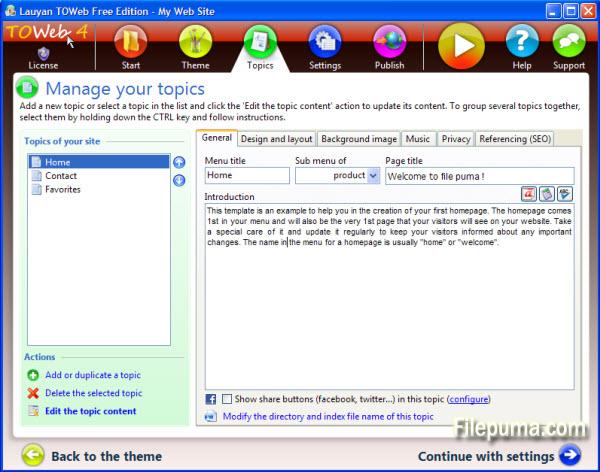
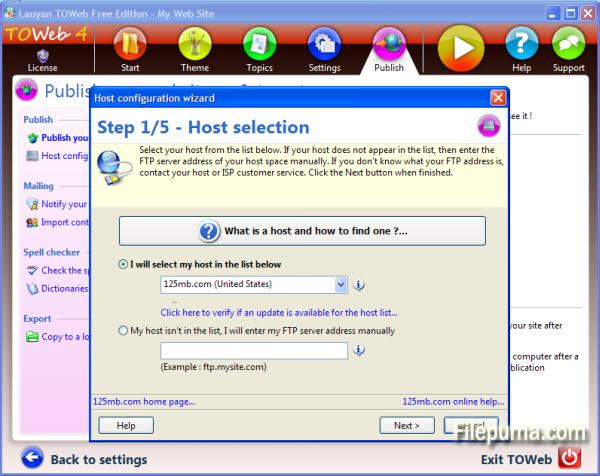
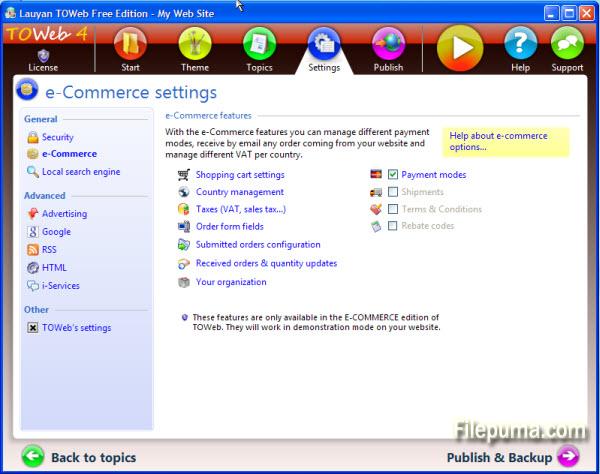
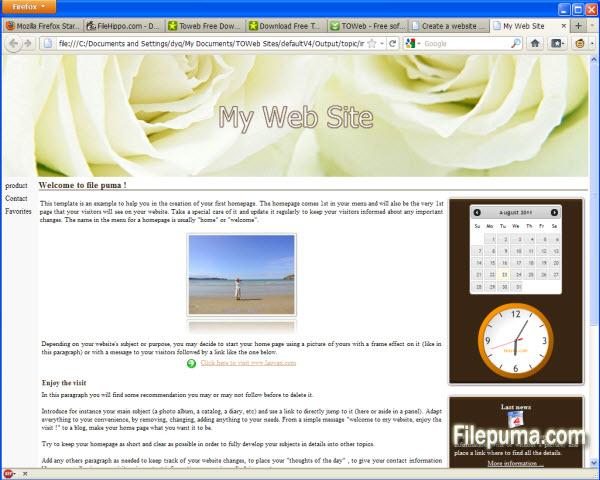


باستخدام برنامج TOWeb، يمكنك إنشاء وصيانة موقع إلكتروني في غضون دقائق سواء كنت خبيرًا أو مبتدئًا.
مع TOWeb، فقط 5 خطوات: أنشئ موقعك الإلكتروني من المواضيع، امنحه هوية بصرية فريدة، اختر بعض الخيارات وانشر موقعك على أي خدمة استضافة. خاصةً، يحتوي TOWeb على محرر صور متكامل يتيح لك اقتصاص الصور، تطبيق تأثيرات الحدود، النصوص أو التشويه على صورك، ويوفر لك كل النصائح والأدوات اللازمة لتمكينك من تحسين فهرسة موقعك في محركات البحث.
جميع الميزات المتقدمة على بعد ضغطة واحدة، فقط اتبع توجيهات الإرشاد الواضح، سيكتمل موقعك بنجاح.
ما الجديد؟
Version 5.15
- In design mode under the Topics' step, a toolbar is now displayed when hovering over some editable or customizable elements (such as paragraphs, site's menu or shopcart button) to easily access their options. The double-click remains operational as before to directly modify any editable element such as titles and texts. These toolbars are all displayed by default at the end of the hovered elements but can be displayed at the beginning of these elements by using the option located in the "Options > TOWeb" screen
- The drop-down list of topics now starts with a “Add a new topic” entry to facilitate the creation of a new topic in your site
- New checkbox “Flat buttons” located in the theme under the element "Site > General > Buttons > Default button" to remove the default gradient/3D effects of all buttons of your site. This allows to make flat buttons used a lot in webdesign these days
- New option located in “Options > e-Commerce > Shopping cart” to quickly remove the shopping cart of your site and deactivate all e-Commerce features
- The different states of Brazil are now available. Not activated by default you can use them from TOWeb step “Options > e-Commerce > Selling Countries” by selecting 'Brazil” and checking the option called “Use states/departments for Brazil”
- In the “Options> Advertising” screen, the input area containing the custom advert script was expanded to occupy the maximum screen size for a better readability of your script. Furthermore in the generated web pages, the script is now purged of all newline characters in order to avoid any error due to misplaced returns but also to reduce the size of the generated pages
- Product information may have been initially displayed with wrong default values when using subproducts categories with different values (like different prices for instance)
- The zoom and “Street View” functions were not working properly in Google Maps and the markers were not been displayed correctly when using several maps into the same topic
البرنامج متوفر بلغات أخرى
- Download TOWeb
- Télécharger TOWeb
- Herunterladen TOWeb
- Scaricare TOWeb
- ダウンロード TOWeb
- Descargar TOWeb
- Baixar TOWeb
مراجعات المستخدمين
تقييم المستخدم

رخصة:
مجاني
متطلبات:
Windows XP/ Vista/ Windows 7/ Windows 8
اللغات:
English
حجم:
24.8MB
ناشر:
محدث:
Mar 6, 2014
نظيف
برنامج التقارير
أحدث إصدار
إصدارات قديمة
برنامج المطور
 TOWeb 6.18
 Web Page Maker 3.22
 Sitoo Web 2010
 TopStyle 5.0.0.108
مستويات الأمان
لتجنب أي ضرر محتمل لجهازك وضمان أمان بياناتك وخصوصيتك، تقوم فريقنا بالتحقق في كل مرة يتم فيها رفع ملف تثبيت جديد على خوادمنا أو ربطه بخادم بعيد، كما يتم مراجعة الملف بشكل دوري لتأكيد حالته أو تحديثها. استنادًا إلى هذه العملية، نحدد مستويات الأمان التالية لأي ملفات قابلة للتنزيل.
 نظيف
نظيف
من المرجح جدًا أن يكون هذا البرنامج خاليًا من الفيروسات.
لقد قمنا بفحص الملفات وعناوين URL المرتبطة بهذا البرنامج في أكثر من 60 من خدمات مكافحة الفيروسات الرائدة في العالم؛ ولم يتم العثور على أي تهديدات محتملة. ولا يوجد أي برنامج طرف ثالث مُدمج.
 تحذير
تحذير
هذا البرنامج مدعوم بإعلانات وقد يقدم عرضًا لتثبيت برامج طرف ثالث غير مطلوبة. قد تشمل هذه برامج شريط الأدوات، أو تغيير الصفحة الرئيسية، أو محرك البحث الافتراضي، أو تثبيت برامج أخرى. قد تكون هذه نتائج إيجابية زائفة، وينصح مستخدمونا بأن يكونوا حذرين عند تثبيت واستخدام هذا البرنامج.
 معاق
معاق
هذا البرنامج لم يعد متاحًا للتنزيل. من المحتمل جدًا أن يكون هذا البرنامج ضارًا أو يحتوي على مشكلات أمان أو أسباب أخرى.
قدّم تقريراً
شكراً لك!
تم إرسال تقريرك.
سوف نراجع طلبك ونتخذ الإجراء المناسب.
يرجى ملاحظة أنك لن تتلقى إشعارًا بشأن أي إجراء يُتخذ نتيجةً لهذا التقرير. نعتذر عن أي إزعاج قد يسببه ذلك.
نُقدّر مساعدتك في الحفاظ على موقعنا الإلكتروني نظيفًا وآمنًا.